Этот обзор пока недоступен на языке «Русский», поэтому вы читаете оригинал на языке «English».
Photo to Anime Review: Same Scene, Redrawn as Anime for $0.05
Pick Photo to Anime for avatars, couples and pets redrawn as anime with the pose and outfit intact; expect the background to stay partly photographic.
Spicy Index
Вне индекса
Freedom Score
Пока не проверяли
- Цена
- 0,05 $ за изображение
- Медианное время
- Собираем данные
- Доля успешных
- Собираем данные
Photo to Anime does one job: send image_url, get back the same picture redrawn as anime. The people and pets become anime characters in the same pose, outfit and colours, and the setting follows the photo. It runs Alibaba's open Qwen-Image-Edit-2509 with the Photo-to-Anime LoRA by AutoWeeb (MIT licence), behind a built-in instruction, so there is nothing to write. You pay $0.05 per image whatever the aspect ratio or file format.
- SpicyAPI Engineering
- Проверено 26 окт. 2026 г.
- Методика v3.3 →
- Мы продаём эти модели; цена на оценку не влияет →
Что Photo to Anime выдала в наших тестах
Прямо из наших тестовых прогонов. Скопируйте промпт или откройте его в песочнице, чтобы попробовать самим.
Редактирование изображений
Редактирование изображений
Редактирование изображений
Сделайте своё с помощью Photo to Anime
The verdict
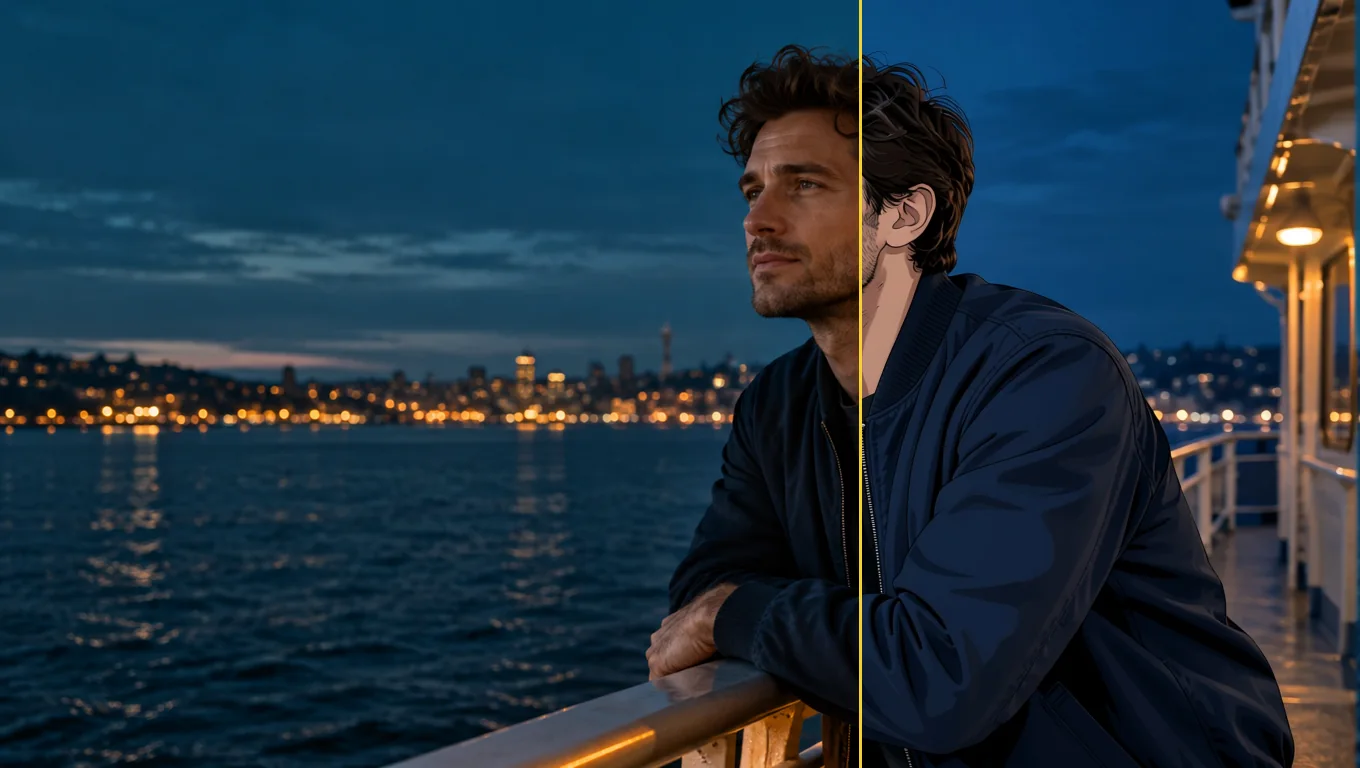
We tested it on 26 October 2026 with five generated, fully clothed photo sets: a woman at a café window, a man on a rooftop, a couple in an autumn park, a golden retriever indoors and a man on a ferry deck. All five were converted to anime. The characters were redrawn with line art and cel shading while the outfits, poses and rooms stayed in place. The limits are just as consistent. The background often keeps much of its photographic look, and fine details such as freckles do not survive.
Use it for profile pictures, gifts, cards and pet portraits where you want the scene you already have, drawn differently. Look elsewhere if you want a fully painted background, a chosen anime art style, or a character invented from words.
Key facts
- Price: $0.05 per image. Aspect ratio and output format do not change it, and failed requests are not charged. The model page shows the live price.
- Input: one photo, JPEG, PNG or WebP, up to 10 MB. Sharp, high-resolution photos with large faces give the most convincing results.
- Output: about one megapixel. Leave
aspect_ratioempty and the result keeps the shape of the photo (832 x 1248 for a 2:3 portrait, 1248 x 832 for a 3:2 landscape, 1024 x 1024 for a square), or pick one of nine ratios from 1:1 to 21:9 and 9:21. - Other fields: an optional
promptof up to 1,000 characters, aseedfor comparing runs, andoutput_format(JPEG by default, PNG or WebP). - Speed: about 7 to 13 seconds per image in our integration runs and 17 to 26 seconds in later runs on the live platform.
- Content testing: we have not run content-level tests on this tool, so there is no Freedom reading to quote.
Что понравилось и что мешало
Что понравилось
- The scene stays the scene. A knit sweater and a mug in a café, an olive work jacket on a rooftop and a retriever on a wooden floor all kept their pose, colours and place in the frame.
- No prompt needed. The built-in instruction does the work; leave
promptempty for a first attempt. - It keeps colouring better than the plain model. With the same seed and instruction, the base edit model drew more of the café as anime but turned the woman's brown eyes blue and darkened her hair. With the LoRA her eye and hair colour stayed.
- It works on pets and groups. The dog came back as an anime dog in the same spot with the same coat colour, and a couple in a park were both redrawn.
- Flat, predictable price. One image, one price, in any of nine ratios.
- Fast enough to iterate. Seconds per image, and a fixed
seedkeeps comparisons fair.
Что мешало
- The background often stays photographic. Skylines, autumn trees and café windows kept much of their photo look. Adding "also redraw the background as a painted anime scene" barely helped: the rooftop man's background did not change and the dog's moved only slightly.
- Faces become characters, not likenesses. Large, sharp faces keep the most recognisable features. Small faces in wide shots come out simplified, and the LoRA author recommends high-resolution photos.
- Details are lost. Asking to keep a woman's freckles had no effect; they disappeared in every anime version.
- The prompt does not choose a style. In a matched test on the same seed, asking for a 90s cel-shaded TV look produced an almost identical result. Use
promptto protect a detail, not to select a drawing style. - Short instructions can fail on the underlying model. In our trials the author's three-word prompt, "transform into anime", often returned the photo unchanged, and sometimes drew a dog as a lion. The tool's built-in instruction adds an explicit redraw line to avoid this, and five of five final test photos converted. We cannot promise it for every photo.
What the images look like
The gallery holds three published examples from the Photo to Anime model page, all fictional adults or a pet, fully clothed and safe for work. Each was sent with no prompt.
A café window. A woman with auburn curls in an oatmeal knit sweater holding a mug. Her face and hair become anime with the same brown eyes; the sweater, the mug and the autumn street outside stay close to the photo.
A rooftop at sunset. A bearded man in an olive work jacket comes back in clean line art and cel shading, in the same pose, with the city skyline behind him still photographic.
A golden retriever. A dog lying on a sunny wooden floor next to a houseplant, redrawn as an anime character in the same pose and coat colour; the room stays light and airy.
Prompts that worked
The built-in instruction starts with the LoRA author's "transform into anime" and adds a line asking for the whole photo to be redrawn as an anime illustration with the same subjects, pose, clothing, colours and background. Anything in prompt is appended after it as a new sentence.
- Start with the prompt empty. The main examples were all run that way.
- Name a detail to protect. "Keep his beard and the olive jacket" is the kind of line the field is for. Check whether the detail survived before you rewrite the instruction.
- Do not expect a style menu. Period or studio wording did not change the drawing in our matched test.
- Make the face large and clear. Close portraits gave the most convincing anime look. A tighter crop or a simpler background is the practical next try, though we have not tested whether cropping alone redraws a busy background.
- Compare with a seed. A fixed
seedlets you run the same photo with and without a prompt.
Alternatives
- Want to invent an anime character from words instead of redrawing a photo? Anima Turbo is the text-to-image route; see our Anima Turbo review.
- Want to go the other way, from anime to a photographic look? Anime to Real converts an anime image back into a photo-style picture. We have not reviewed it yet.
Из чего складывается Spicy Index модели Photo to Anime
Каждое измерение ниже ведёт к полному расчёту: из какой строки таблицы взят каждый балл и почему баллы потеряны.
- Публичные рейтинги 45 % качества
- Пока не проверяли
- Слепой тест результатов 35 % качества
- Пока не проверяли
- Качество на арене 20 % качества
- Пока не проверяли
- Возможности Вес 10,5 %
- Пока не проверяли
- Freedom Score Вес 30 %
- Пока не проверяли
В отслеживаемых публичных рейтингах пока нет точного совпадения. Как это работает
Модель пока не проходила наш слепой тест результатов. Как это работает
Учитывается, когда у модели будет больше 100 слепых голосов и 95%-й интервал уже 200 Эло. Как это работает
Пока не оценено. Как это работает
Свобода не проверена или данных недостаточно. Index сохраняет исходный балл качества и возможностей, помечается как предварительный и продолжает участвовать в рейтинге. Отсутствие данных не равно нулю. Как это работает
Что Photo to Anime умеет на SpicyAPI
Взято напрямую из актуальной спецификации модели на SpicyAPI. Некоторые разработчики дают больше в своих приложениях; здесь — то, что можно вызвать через наш API уже сегодня.
| Функция | Редактирование изображений |
|---|---|
| Соотношения сторон | 1:1 · 16:9 · 9:16 · 4:3 · 3:4 · 3:2 · 2:3 · 21:9 · 9:21 |
| Форматы вывода | jpeg · png · webp |
| Управление seed | Да |
| Негативный промпт | Нет |
Сколько это занимает на самом деле
Измерено на реальных задачах за последние 30 дней — от запроса до готового результата. Время включает и наши собственные тестовые запуски.
- Медианное время
- Собираем данные
- 90-й процентиль
- Собираем данные
- Доля успешных
- Собираем данные
Время появляется, когда набирается не менее 10 завершённых задач. Доля успешных считается только по задачам клиентов и скрыта для всех моделей, пока не наберётся 30 полных дней трафика.
Модели, которые стоит рассмотреть вместо Photo to Anime
CircleStone Labs
Anima Turbo
Want to invent an anime character from words instead of redrawing a photo?
- Spicy Index
- 62,6
- Freedom Score
- 97,5
- Цена
- 0,012 $−76 %/ изображение
SpicyAPI
Anime to Real
Want to go the other way, from anime to a photographic look?
- Spicy Index
- —
- Freedom Score
- Пока недостаточно данных
- Цена
- 0,03 $−40 %/ изображение
Что вы думаете?
Был ли этот обзор полезен?
Войдите, чтобы проголосовать.
Комментарии
Комментарии проверяются автоматически и нашей командой. Мы удаляем спам, неуместный контент, личные нападки и всё, где без согласия называют реального человека. Пожалуйтесь на комментарий — мы рассмотрим жалобу в течение одного рабочего дня.
Пробовали эту модель? Поделитесь тем, что сработало. Чтобы комментировать, нужен бесплатный аккаунт — так мы защищаемся от спама.
Вопросы о Photo to Anime
Попробуйте Photo to Anime сами
Настройте каждый параметр в Playground и узнайте точную цену до запуска.
0,05 $ за изображение
Другие обзоры
Смотреть рейтинги →
Background Remover
Берите Background Remover для вырезок продуктов, аватаров и композитов за долю цента; давайте ему фото, где объект уже отделяется от фона.
Проверено 27 сент. 2026 г.
Читать обзор
Object Eraser
Берите Object Eraser, чтобы убрать мелкий и средний беспорядок с фото, назвав или замаскировав его; крупные удаления потребуют повторной проверки.
Проверено 27 сент. 2026 г.
Читать обзор
Image Expander
Берите Image Expander, чтобы вписать фото в новое соотношение сторон без обрезки; закладывайте апскейл результата, если нужно крупнее 1536 пикселей.
- Spicy Index
- 82,4
- Freedom Score
- —
Проверено 27 сент. 2026 г.
Читать обзор