Questa recensione non è ancora disponibile in Italiano, quindi stai leggendo l’originale in English.
Photo to Anime Review: Same Scene, Redrawn as Anime for $0.05
Pick Photo to Anime for avatars, couples and pets redrawn as anime with the pose and outfit intact; expect the background to stay partly photographic.
Spicy Index
Fuori indice
Freedom Score
Non ancora testato
- Prezzo
- 0,05 USD per immagine
- Tempo mediano
- Raccolta dati in corso
- Tasso di successo
- Raccolta dati in corso
Photo to Anime does one job: send image_url, get back the same picture redrawn as anime. The people and pets become anime characters in the same pose, outfit and colours, and the setting follows the photo. It runs Alibaba's open Qwen-Image-Edit-2509 with the Photo-to-Anime LoRA by AutoWeeb (MIT licence), behind a built-in instruction, so there is nothing to write. You pay $0.05 per image whatever the aspect ratio or file format.
- SpicyAPI Engineering
- Testato il 26 ott 2026
- Metodologia v3.3 →
- Vendiamo questi modelli; il prezzo non entra nei punteggi →
Cosa ha prodotto Photo to Anime nelle nostre prove
Direttamente dalle nostre esecuzioni di prova. Copia un prompt o aprilo nel Playground per provarlo tu stesso.
Editing di immagini
Editing di immagini
Editing di immagini
Crea il tuo con Photo to Anime
The verdict
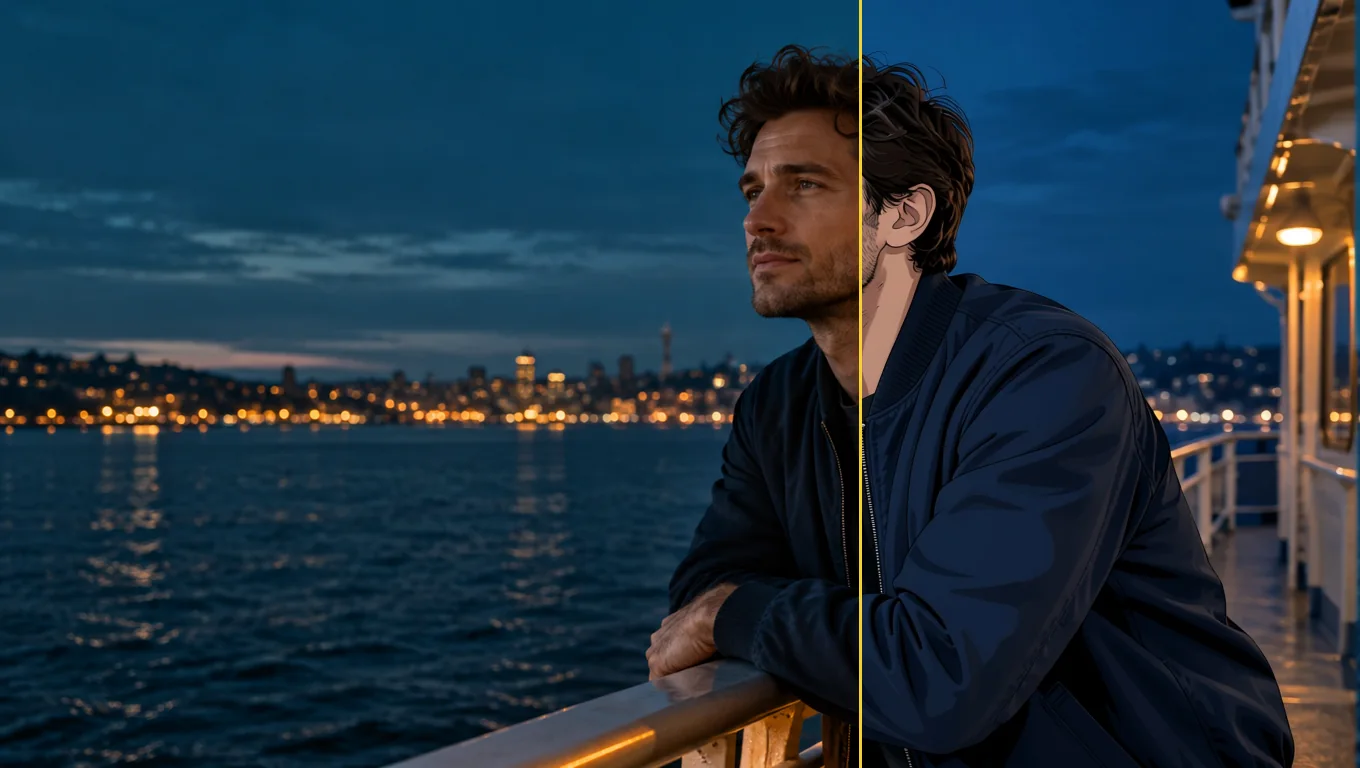
We tested it on 26 October 2026 with five generated, fully clothed photo sets: a woman at a café window, a man on a rooftop, a couple in an autumn park, a golden retriever indoors and a man on a ferry deck. All five were converted to anime. The characters were redrawn with line art and cel shading while the outfits, poses and rooms stayed in place. The limits are just as consistent. The background often keeps much of its photographic look, and fine details such as freckles do not survive.
Use it for profile pictures, gifts, cards and pet portraits where you want the scene you already have, drawn differently. Look elsewhere if you want a fully painted background, a chosen anime art style, or a character invented from words.
Key facts
- Price: $0.05 per image. Aspect ratio and output format do not change it, and failed requests are not charged. The model page shows the live price.
- Input: one photo, JPEG, PNG or WebP, up to 10 MB. Sharp, high-resolution photos with large faces give the most convincing results.
- Output: about one megapixel. Leave
aspect_ratioempty and the result keeps the shape of the photo (832 x 1248 for a 2:3 portrait, 1248 x 832 for a 3:2 landscape, 1024 x 1024 for a square), or pick one of nine ratios from 1:1 to 21:9 and 9:21. - Other fields: an optional
promptof up to 1,000 characters, aseedfor comparing runs, andoutput_format(JPEG by default, PNG or WebP). - Speed: about 7 to 13 seconds per image in our integration runs and 17 to 26 seconds in later runs on the live platform.
- Content testing: we have not run content-level tests on this tool, so there is no Freedom reading to quote.
Cosa ci è piaciuto e cosa l’ha frenato
Cosa ci è piaciuto
- The scene stays the scene. A knit sweater and a mug in a café, an olive work jacket on a rooftop and a retriever on a wooden floor all kept their pose, colours and place in the frame.
- No prompt needed. The built-in instruction does the work; leave
promptempty for a first attempt. - It keeps colouring better than the plain model. With the same seed and instruction, the base edit model drew more of the café as anime but turned the woman's brown eyes blue and darkened her hair. With the LoRA her eye and hair colour stayed.
- It works on pets and groups. The dog came back as an anime dog in the same spot with the same coat colour, and a couple in a park were both redrawn.
- Flat, predictable price. One image, one price, in any of nine ratios.
- Fast enough to iterate. Seconds per image, and a fixed
seedkeeps comparisons fair.
Cosa l’ha frenato
- The background often stays photographic. Skylines, autumn trees and café windows kept much of their photo look. Adding "also redraw the background as a painted anime scene" barely helped: the rooftop man's background did not change and the dog's moved only slightly.
- Faces become characters, not likenesses. Large, sharp faces keep the most recognisable features. Small faces in wide shots come out simplified, and the LoRA author recommends high-resolution photos.
- Details are lost. Asking to keep a woman's freckles had no effect; they disappeared in every anime version.
- The prompt does not choose a style. In a matched test on the same seed, asking for a 90s cel-shaded TV look produced an almost identical result. Use
promptto protect a detail, not to select a drawing style. - Short instructions can fail on the underlying model. In our trials the author's three-word prompt, "transform into anime", often returned the photo unchanged, and sometimes drew a dog as a lion. The tool's built-in instruction adds an explicit redraw line to avoid this, and five of five final test photos converted. We cannot promise it for every photo.
What the images look like
The gallery holds three published examples from the Photo to Anime model page, all fictional adults or a pet, fully clothed and safe for work. Each was sent with no prompt.
A café window. A woman with auburn curls in an oatmeal knit sweater holding a mug. Her face and hair become anime with the same brown eyes; the sweater, the mug and the autumn street outside stay close to the photo.
A rooftop at sunset. A bearded man in an olive work jacket comes back in clean line art and cel shading, in the same pose, with the city skyline behind him still photographic.
A golden retriever. A dog lying on a sunny wooden floor next to a houseplant, redrawn as an anime character in the same pose and coat colour; the room stays light and airy.
Prompts that worked
The built-in instruction starts with the LoRA author's "transform into anime" and adds a line asking for the whole photo to be redrawn as an anime illustration with the same subjects, pose, clothing, colours and background. Anything in prompt is appended after it as a new sentence.
- Start with the prompt empty. The main examples were all run that way.
- Name a detail to protect. "Keep his beard and the olive jacket" is the kind of line the field is for. Check whether the detail survived before you rewrite the instruction.
- Do not expect a style menu. Period or studio wording did not change the drawing in our matched test.
- Make the face large and clear. Close portraits gave the most convincing anime look. A tighter crop or a simpler background is the practical next try, though we have not tested whether cropping alone redraws a busy background.
- Compare with a seed. A fixed
seedlets you run the same photo with and without a prompt.
Alternatives
- Want to invent an anime character from words instead of redrawing a photo? Anima Turbo is the text-to-image route; see our Anima Turbo review.
- Want to go the other way, from anime to a photographic look? Anime to Real converts an anime image back into a photo-style picture. We have not reviewed it yet.
Come Photo to Anime si guadagna il suo Spicy Index
Ogni dimensione qui sotto porta al calcolo completo: la riga della tabella da cui viene ogni punto e perché i punti sono stati persi.
- Classifiche pubbliche 45% della qualità
- Non ancora testato
- Test alla cieca dei risultati 35% della qualità
- Non ancora testato
- Qualità in arena 20% della qualità
- Non ancora testato
- Capacità Peso 10,5%
- Non ancora testato
- Freedom Score Peso 30%
- Non ancora testato
Ancora nessuna corrispondenza esatta nelle classifiche pubbliche che seguiamo. Come funziona
Non ancora passato dal nostro test alla cieca dei risultati. Come funziona
Conta quando il modello avrà più di 100 voti alla cieca e un intervallo al 95% sotto i 200 Elo. Come funziona
Non ancora valutato. Come funziona
La libertà non è stata testata o le prove sono insufficienti. L'Index mantiene il punteggio originale di qualità e capacità, è segnato come preliminare e continua a ricevere una posizione. Una prova mancante non vale zero. Come funziona
Cosa sa fare Photo to Anime su SpicyAPI
Preso direttamente dalla specifica attiva del modello su SpicyAPI. Alcuni sviluppatori offrono di più nelle proprie app; questo è ciò che puoi chiamare oggi tramite la nostra API.
| Funzione | Editing di immagini |
|---|---|
| Proporzioni | 1:1 · 16:9 · 9:16 · 4:3 · 3:4 · 3:2 · 2:3 · 21:9 · 9:21 |
| Formati di output | jpeg · png · webp |
| Controllo del seed | Sì |
| Prompt negativo | No |
Quanto ci mette davvero
Misurato su lavori reali degli ultimi 30 giorni, dalla richiesta al risultato finale. I tempi includono anche i nostri test.
- Tempo mediano
- Raccolta dati in corso
- 90° percentile
- Raccolta dati in corso
- Tasso di successo
- Raccolta dati in corso
Un tempo compare quando ci sono almeno 10 lavori completati. I tassi di successo contano solo i lavori dei clienti e restano nascosti per tutti i modelli fino a 30 giorni completi di traffico.
Modelli da considerare al posto di Photo to Anime
CircleStone Labs
Anima Turbo
Want to invent an anime character from words instead of redrawing a photo?
- Spicy Index
- 62,6
- Freedom Score
- 97,5
- Prezzo
- 0,012 USD−76%/ immagine
SpicyAPI
Anime to Real
Want to go the other way, from anime to a photographic look?
- Spicy Index
- —
- Freedom Score
- Evidenze ancora insufficienti
- Prezzo
- 0,03 USD−40%/ immagine
Cosa ne pensi?
Questa recensione ti è stata utile?
Accedi per votare.
Commenti
I commenti vengono controllati automaticamente e dal nostro team. Rimuoviamo spam, contenuti inappropriati, attacchi personali e tutto ciò che nomina una persona reale senza il suo consenso. Segnala un commento e lo esamineremo entro un giorno lavorativo.
Hai provato questo modello? Racconta cosa ha funzionato. Per commentare serve un account gratuito, così teniamo lontano lo spam.
Domande frequenti su Photo to Anime
Prova Photo to Anime di persona
Imposta ogni parametro nel Playground e vedi il prezzo esatto prima di avviare.
0,05 USD per immagine
Altre recensioni
Vai alle classifiche →
Background Remover
Scegli Background Remover per ritagli di prodotti, avatar e composizioni a una frazione di centesimo; dagli una foto in cui il soggetto già si distingue.
Testato il 27 set 2026
Leggi la recensione
Object Eraser
Scegli Object Eraser per ripulire disordine piccolo e medio da una foto nominandolo o mascherandolo; le rimozioni grandi richiedono un secondo controllo
Testato il 27 set 2026
Leggi la recensione
Image Expander
Scegli Image Expander per riformattare una foto in un nuovo rapporto d'aspetto senza ritagliarla; ingrandisci poi il risultato se ti serve oltre 1536 pixel
- Spicy Index
- 82,4
- Freedom Score
- —
Testato il 27 set 2026
Leggi la recensione