Esta reseña aún no está disponible en Español, así que estás leyendo el original en English.
Photo to Anime Review: Same Scene, Redrawn as Anime for $0.05
Pick Photo to Anime for avatars, couples and pets redrawn as anime with the pose and outfit intact; expect the background to stay partly photographic.
Spicy Index
Fuera del índice
Freedom Score
Aún sin probar
- Precio
- 0,05 US$ por imagen
- Tiempo mediano
- Recopilando datos
- Tasa de éxito
- Recopilando datos
Photo to Anime does one job: send image_url, get back the same picture redrawn as anime. The people and pets become anime characters in the same pose, outfit and colours, and the setting follows the photo. It runs Alibaba's open Qwen-Image-Edit-2509 with the Photo-to-Anime LoRA by AutoWeeb (MIT licence), behind a built-in instruction, so there is nothing to write. You pay $0.05 per image whatever the aspect ratio or file format.
- SpicyAPI Engineering
- Probado el 26 oct 2026
- Metodología v3.3 →
- Vendemos estos modelos; el precio no cuenta en la puntuación →
Lo que Photo to Anime generó en nuestras pruebas
Directo de nuestras ejecuciones de prueba. Copia un prompt o ábrelo en el Playground para probarlo tú mismo.
Edición de imagen
Edición de imagen
Edición de imagen
Crea lo tuyo con Photo to Anime
The verdict
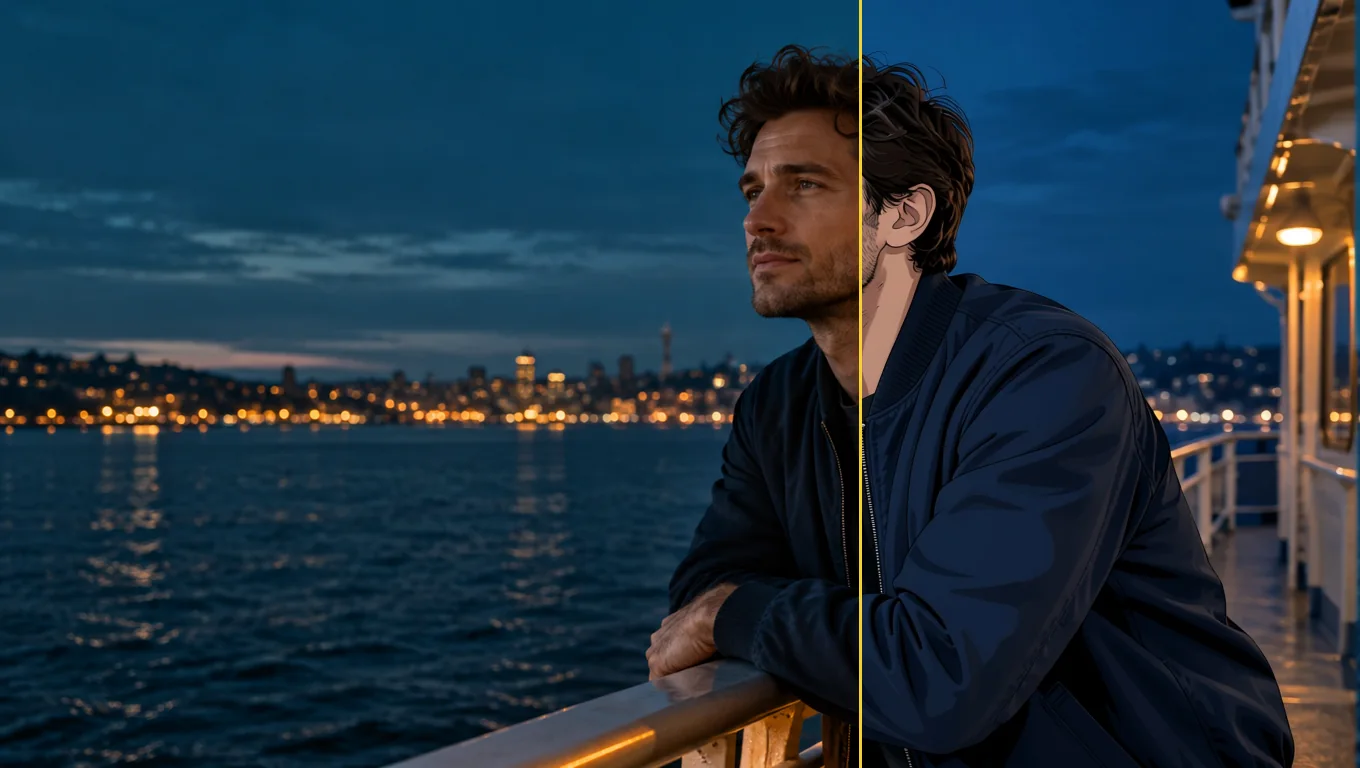
We tested it on 26 October 2026 with five generated, fully clothed photo sets: a woman at a café window, a man on a rooftop, a couple in an autumn park, a golden retriever indoors and a man on a ferry deck. All five were converted to anime. The characters were redrawn with line art and cel shading while the outfits, poses and rooms stayed in place. The limits are just as consistent. The background often keeps much of its photographic look, and fine details such as freckles do not survive.
Use it for profile pictures, gifts, cards and pet portraits where you want the scene you already have, drawn differently. Look elsewhere if you want a fully painted background, a chosen anime art style, or a character invented from words.
Key facts
- Price: $0.05 per image. Aspect ratio and output format do not change it, and failed requests are not charged. The model page shows the live price.
- Input: one photo, JPEG, PNG or WebP, up to 10 MB. Sharp, high-resolution photos with large faces give the most convincing results.
- Output: about one megapixel. Leave
aspect_ratioempty and the result keeps the shape of the photo (832 x 1248 for a 2:3 portrait, 1248 x 832 for a 3:2 landscape, 1024 x 1024 for a square), or pick one of nine ratios from 1:1 to 21:9 and 9:21. - Other fields: an optional
promptof up to 1,000 characters, aseedfor comparing runs, andoutput_format(JPEG by default, PNG or WebP). - Speed: about 7 to 13 seconds per image in our integration runs and 17 to 26 seconds in later runs on the live platform.
- Content testing: we have not run content-level tests on this tool, so there is no Freedom reading to quote.
Lo que nos gustó y lo que lo frenó
Lo que nos gustó
- The scene stays the scene. A knit sweater and a mug in a café, an olive work jacket on a rooftop and a retriever on a wooden floor all kept their pose, colours and place in the frame.
- No prompt needed. The built-in instruction does the work; leave
promptempty for a first attempt. - It keeps colouring better than the plain model. With the same seed and instruction, the base edit model drew more of the café as anime but turned the woman's brown eyes blue and darkened her hair. With the LoRA her eye and hair colour stayed.
- It works on pets and groups. The dog came back as an anime dog in the same spot with the same coat colour, and a couple in a park were both redrawn.
- Flat, predictable price. One image, one price, in any of nine ratios.
- Fast enough to iterate. Seconds per image, and a fixed
seedkeeps comparisons fair.
Lo que lo frenó
- The background often stays photographic. Skylines, autumn trees and café windows kept much of their photo look. Adding "also redraw the background as a painted anime scene" barely helped: the rooftop man's background did not change and the dog's moved only slightly.
- Faces become characters, not likenesses. Large, sharp faces keep the most recognisable features. Small faces in wide shots come out simplified, and the LoRA author recommends high-resolution photos.
- Details are lost. Asking to keep a woman's freckles had no effect; they disappeared in every anime version.
- The prompt does not choose a style. In a matched test on the same seed, asking for a 90s cel-shaded TV look produced an almost identical result. Use
promptto protect a detail, not to select a drawing style. - Short instructions can fail on the underlying model. In our trials the author's three-word prompt, "transform into anime", often returned the photo unchanged, and sometimes drew a dog as a lion. The tool's built-in instruction adds an explicit redraw line to avoid this, and five of five final test photos converted. We cannot promise it for every photo.
What the images look like
The gallery holds three published examples from the Photo to Anime model page, all fictional adults or a pet, fully clothed and safe for work. Each was sent with no prompt.
A café window. A woman with auburn curls in an oatmeal knit sweater holding a mug. Her face and hair become anime with the same brown eyes; the sweater, the mug and the autumn street outside stay close to the photo.
A rooftop at sunset. A bearded man in an olive work jacket comes back in clean line art and cel shading, in the same pose, with the city skyline behind him still photographic.
A golden retriever. A dog lying on a sunny wooden floor next to a houseplant, redrawn as an anime character in the same pose and coat colour; the room stays light and airy.
Prompts that worked
The built-in instruction starts with the LoRA author's "transform into anime" and adds a line asking for the whole photo to be redrawn as an anime illustration with the same subjects, pose, clothing, colours and background. Anything in prompt is appended after it as a new sentence.
- Start with the prompt empty. The main examples were all run that way.
- Name a detail to protect. "Keep his beard and the olive jacket" is the kind of line the field is for. Check whether the detail survived before you rewrite the instruction.
- Do not expect a style menu. Period or studio wording did not change the drawing in our matched test.
- Make the face large and clear. Close portraits gave the most convincing anime look. A tighter crop or a simpler background is the practical next try, though we have not tested whether cropping alone redraws a busy background.
- Compare with a seed. A fixed
seedlets you run the same photo with and without a prompt.
Alternatives
- Want to invent an anime character from words instead of redrawing a photo? Anima Turbo is the text-to-image route; see our Anima Turbo review.
- Want to go the other way, from anime to a photographic look? Anime to Real converts an anime image back into a photo-style picture. We have not reviewed it yet.
Cómo gana Photo to Anime su Spicy Index
Cada dimensión enlaza con su cálculo completo: la fila de la tabla de la que sale cada punto y por qué se perdieron puntos.
- Clasificaciones públicas 45 % de la calidad
- Aún sin probar
- Prueba a ciegas de resultados 35 % de la calidad
- Aún sin probar
- Calidad en la arena 20 % de la calidad
- Aún sin probar
- Capacidad Peso del 10,5 %
- Aún sin probar
- Freedom Score Peso del 30 %
- Aún sin probar
Aún no hay una coincidencia exacta en las clasificaciones públicas que seguimos. Cómo funciona
Aún no se ha incluido en nuestra prueba a ciegas de resultados. Cómo funciona
Contará cuando el modelo tenga al menos 100 votos a ciegas y un intervalo del 95 % menor de 200 Elo. Cómo funciona
Aún sin puntuar. Cómo funciona
La libertad no se ha probado o las pruebas son insuficientes. El Index conserva la puntuación original de calidad y capacidades, se marca como provisional y sigue recibiendo posición. La falta de pruebas no equivale a cero. Cómo funciona
Lo que Photo to Anime puede hacer en SpicyAPI
Tomado directamente de la especificación en vivo del modelo en SpicyAPI. Algunos creadores ofrecen más en sus propias apps; esto es lo que puedes llamar hoy desde nuestra API.
| Función | Edición de imagen |
|---|---|
| Relaciones de aspecto | 1:1 · 16:9 · 9:16 · 4:3 · 3:4 · 3:2 · 2:3 · 21:9 · 9:21 |
| Formatos de salida | jpeg · png · webp |
| Control de semilla | Sí |
| Prompt negativo | No |
Cuánto tarda de verdad
Medido con trabajos reales de los últimos 30 días, desde la solicitud hasta el resultado final. Los tiempos incluyen nuestras propias pruebas.
- Tiempo mediano
- Recopilando datos
- Percentil 90
- Recopilando datos
- Tasa de éxito
- Recopilando datos
Un tiempo aparece cuando hay al menos 10 trabajos completados. Las tasas de éxito solo cuentan trabajos de clientes y siguen ocultas para todos los modelos hasta completar 30 días de tráfico.
Modelos que puedes considerar en lugar de Photo to Anime
CircleStone Labs
Anima Turbo
Want to invent an anime character from words instead of redrawing a photo?
- Spicy Index
- 62,6
- Freedom Score
- 97,5
- Precio
- 0,012 US$−76 %/ imagen
SpicyAPI
Anime to Real
Want to go the other way, from anime to a photographic look?
- Spicy Index
- —
- Freedom Score
- Aún no hay evidencia suficiente
- Precio
- 0,03 US$−40 %/ imagen
¿Qué opinas?
¿Te resultó útil esta reseña?
Inicia sesión para votar.
Comentarios
Los comentarios se revisan de forma automática y por nuestro equipo. Eliminamos el spam, el contenido inapropiado, los ataques personales y cualquier cosa que nombre a una persona real sin su consentimiento. Si reportas un comentario, lo revisamos en un día hábil.
¿Probaste este modelo? Comparte lo que te funcionó. Necesitas una cuenta gratuita para comentar, así mantenemos fuera el spam.
Preguntas frecuentes sobre Photo to Anime
Prueba Photo to Anime por tu cuenta
Ajusta cada parámetro en el Playground y mira el precio exacto antes de lanzarlo.
0,05 US$ por imagen
Más reseñas
Ver las clasificaciones →
Background Remover
Elige Background Remover para recortes de producto, avatar o composición por una fracción de centavo; dale una foto donde el sujeto ya se distinga del fondo.
Probado el 27 sept 2026
Leer la reseña
Object Eraser
Elige Object Eraser para limpiar desorden pequeño y mediano nombrándolo o enmascarándolo; las eliminaciones grandes necesitan una segunda revisión.
Probado el 27 sept 2026
Leer la reseña
Image Expander
Elige Image Expander para reencuadrar una foto a una nueva proporción sin recortarla; planea escalar el resultado si lo necesitas más grande de 1536 píxeles.
- Spicy Index
- 82,4
- Freedom Score
- —
Probado el 27 sept 2026
Leer la reseña