Esta análise ainda não está disponível em Português (Brasil), então você está lendo o original em English.
Photo to Anime Review: Same Scene, Redrawn as Anime for $0.05
Pick Photo to Anime for avatars, couples and pets redrawn as anime with the pose and outfit intact; expect the background to stay partly photographic.
Spicy Index
Fora do índice
Freedom Score
Ainda não testado
- Preço
- US$ 0,05 por imagem
- Tempo mediano
- Coletando dados
- Taxa de sucesso
- Coletando dados
Photo to Anime does one job: send image_url, get back the same picture redrawn as anime. The people and pets become anime characters in the same pose, outfit and colours, and the setting follows the photo. It runs Alibaba's open Qwen-Image-Edit-2509 with the Photo-to-Anime LoRA by AutoWeeb (MIT licence), behind a built-in instruction, so there is nothing to write. You pay $0.05 per image whatever the aspect ratio or file format.
- SpicyAPI Engineering
- Testado em 26 de out. de 2026
- Metodologia v3.3 →
- Vendemos estes modelos; o preço não entra na nota →
O que Photo to Anime gerou nos nossos testes
Direto das nossas execuções de teste. Copie um prompt ou abra no Playground para testar você mesmo.
Edição de imagem
Edição de imagem
Edição de imagem
Crie o seu com Photo to Anime
The verdict
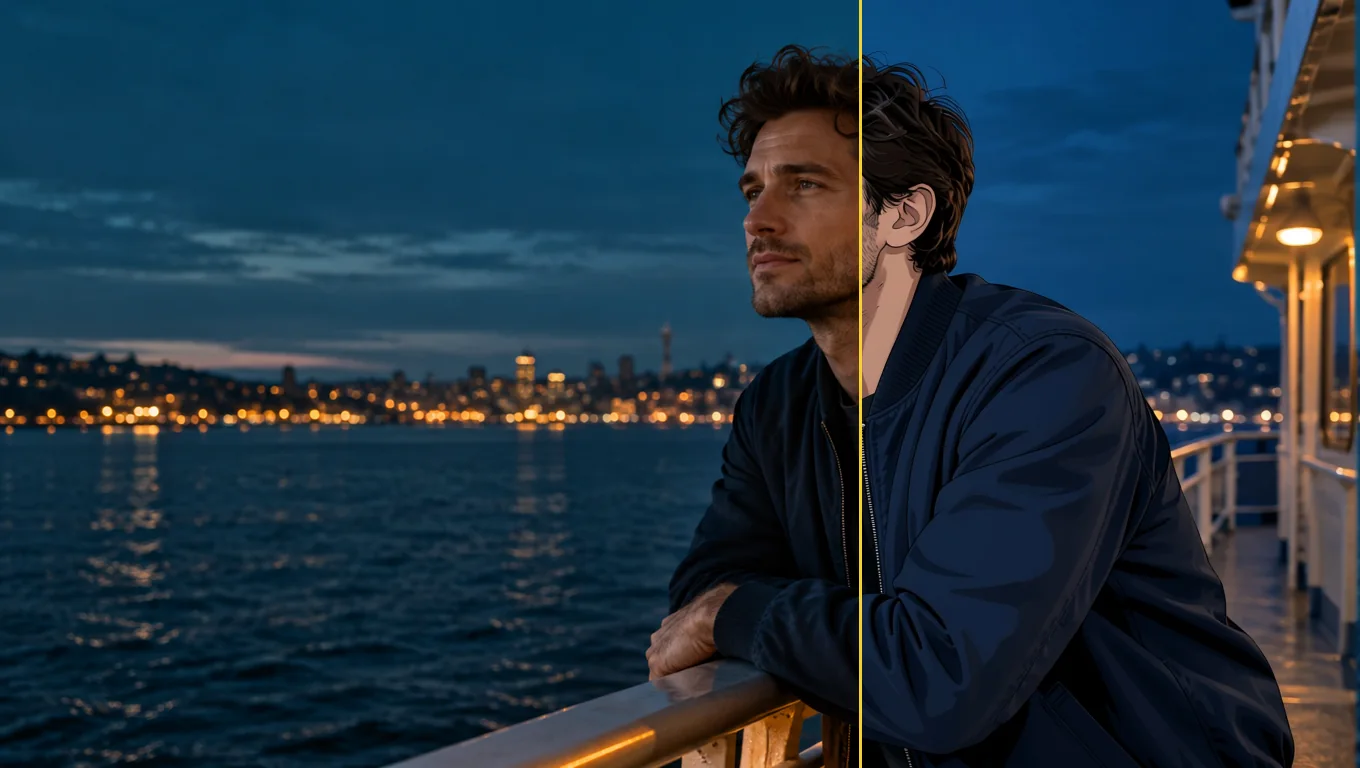
We tested it on 26 October 2026 with five generated, fully clothed photo sets: a woman at a café window, a man on a rooftop, a couple in an autumn park, a golden retriever indoors and a man on a ferry deck. All five were converted to anime. The characters were redrawn with line art and cel shading while the outfits, poses and rooms stayed in place. The limits are just as consistent. The background often keeps much of its photographic look, and fine details such as freckles do not survive.
Use it for profile pictures, gifts, cards and pet portraits where you want the scene you already have, drawn differently. Look elsewhere if you want a fully painted background, a chosen anime art style, or a character invented from words.
Key facts
- Price: $0.05 per image. Aspect ratio and output format do not change it, and failed requests are not charged. The model page shows the live price.
- Input: one photo, JPEG, PNG or WebP, up to 10 MB. Sharp, high-resolution photos with large faces give the most convincing results.
- Output: about one megapixel. Leave
aspect_ratioempty and the result keeps the shape of the photo (832 x 1248 for a 2:3 portrait, 1248 x 832 for a 3:2 landscape, 1024 x 1024 for a square), or pick one of nine ratios from 1:1 to 21:9 and 9:21. - Other fields: an optional
promptof up to 1,000 characters, aseedfor comparing runs, andoutput_format(JPEG by default, PNG or WebP). - Speed: about 7 to 13 seconds per image in our integration runs and 17 to 26 seconds in later runs on the live platform.
- Content testing: we have not run content-level tests on this tool, so there is no Freedom reading to quote.
O que gostamos e o que atrapalhou
O que gostamos
- The scene stays the scene. A knit sweater and a mug in a café, an olive work jacket on a rooftop and a retriever on a wooden floor all kept their pose, colours and place in the frame.
- No prompt needed. The built-in instruction does the work; leave
promptempty for a first attempt. - It keeps colouring better than the plain model. With the same seed and instruction, the base edit model drew more of the café as anime but turned the woman's brown eyes blue and darkened her hair. With the LoRA her eye and hair colour stayed.
- It works on pets and groups. The dog came back as an anime dog in the same spot with the same coat colour, and a couple in a park were both redrawn.
- Flat, predictable price. One image, one price, in any of nine ratios.
- Fast enough to iterate. Seconds per image, and a fixed
seedkeeps comparisons fair.
O que atrapalhou
- The background often stays photographic. Skylines, autumn trees and café windows kept much of their photo look. Adding "also redraw the background as a painted anime scene" barely helped: the rooftop man's background did not change and the dog's moved only slightly.
- Faces become characters, not likenesses. Large, sharp faces keep the most recognisable features. Small faces in wide shots come out simplified, and the LoRA author recommends high-resolution photos.
- Details are lost. Asking to keep a woman's freckles had no effect; they disappeared in every anime version.
- The prompt does not choose a style. In a matched test on the same seed, asking for a 90s cel-shaded TV look produced an almost identical result. Use
promptto protect a detail, not to select a drawing style. - Short instructions can fail on the underlying model. In our trials the author's three-word prompt, "transform into anime", often returned the photo unchanged, and sometimes drew a dog as a lion. The tool's built-in instruction adds an explicit redraw line to avoid this, and five of five final test photos converted. We cannot promise it for every photo.
What the images look like
The gallery holds three published examples from the Photo to Anime model page, all fictional adults or a pet, fully clothed and safe for work. Each was sent with no prompt.
A café window. A woman with auburn curls in an oatmeal knit sweater holding a mug. Her face and hair become anime with the same brown eyes; the sweater, the mug and the autumn street outside stay close to the photo.
A rooftop at sunset. A bearded man in an olive work jacket comes back in clean line art and cel shading, in the same pose, with the city skyline behind him still photographic.
A golden retriever. A dog lying on a sunny wooden floor next to a houseplant, redrawn as an anime character in the same pose and coat colour; the room stays light and airy.
Prompts that worked
The built-in instruction starts with the LoRA author's "transform into anime" and adds a line asking for the whole photo to be redrawn as an anime illustration with the same subjects, pose, clothing, colours and background. Anything in prompt is appended after it as a new sentence.
- Start with the prompt empty. The main examples were all run that way.
- Name a detail to protect. "Keep his beard and the olive jacket" is the kind of line the field is for. Check whether the detail survived before you rewrite the instruction.
- Do not expect a style menu. Period or studio wording did not change the drawing in our matched test.
- Make the face large and clear. Close portraits gave the most convincing anime look. A tighter crop or a simpler background is the practical next try, though we have not tested whether cropping alone redraws a busy background.
- Compare with a seed. A fixed
seedlets you run the same photo with and without a prompt.
Alternatives
- Want to invent an anime character from words instead of redrawing a photo? Anima Turbo is the text-to-image route; see our Anima Turbo review.
- Want to go the other way, from anime to a photographic look? Anime to Real converts an anime image back into a photo-style picture. We have not reviewed it yet.
Como Photo to Anime conquista seu Spicy Index
Cada dimensão abaixo leva ao cálculo completo: a linha da tabela de onde veio cada ponto e por que pontos foram perdidos.
- Rankings públicos 45% da qualidade
- Ainda não testado
- Teste às cegas de resultados 35% da qualidade
- Ainda não testado
- Qualidade na arena 20% da qualidade
- Ainda não testado
- Capacidade Peso de 10,5%
- Ainda não testado
- Freedom Score Peso de 30%
- Ainda não testado
Ainda sem correspondência exata nos rankings públicos que acompanhamos. Como funciona
Ainda não passou pelo nosso teste às cegas de resultados. Como funciona
Passa a contar quando o modelo tiver pelo menos 100 votos às cegas e um intervalo de 95% com largura inferior a 200 Elo. Como funciona
Ainda não pontuado. Como funciona
A liberdade não foi testada ou as evidências são insuficientes. O Index mantém a pontuação original de qualidade e capacidades, recebe a marca preliminar e continua no ranking. Evidência ausente não equivale a zero. Como funciona
O que Photo to Anime faz na SpicyAPI
Direto da especificação atual do modelo na SpicyAPI. Alguns criadores oferecem mais nos próprios apps; estas são as funções que você pode usar pela nossa API hoje.
| Recurso | Edição de imagem |
|---|---|
| Proporções de tela | 1:1 · 16:9 · 9:16 · 4:3 · 3:4 · 3:2 · 2:3 · 21:9 · 9:21 |
| Formatos de saída | jpeg · png · webp |
| Controle de seed | Sim |
| Prompt negativo | Não |
Quanto tempo leva de verdade
Medido em trabalhos reais dos últimos 30 dias, da solicitação ao resultado final. Os tempos incluem nossos próprios testes.
- Tempo mediano
- Coletando dados
- Percentil 90
- Coletando dados
- Taxa de sucesso
- Coletando dados
Um tempo aparece quando há pelo menos 10 trabalhos concluídos. As taxas de sucesso contam só trabalhos de clientes e ficam ocultas para todos os modelos até completarmos 30 dias de tráfego.
Modelos para considerar no lugar de Photo to Anime
CircleStone Labs
Anima Turbo
Want to invent an anime character from words instead of redrawing a photo?
- Spicy Index
- 62,6
- Freedom Score
- 97,5
- Preço
- US$ 0,012−76%/ imagem
SpicyAPI
Anime to Real
Want to go the other way, from anime to a photographic look?
- Spicy Index
- —
- Freedom Score
- Evidências ainda insuficientes
- Preço
- US$ 0,03−40%/ imagem
O que você acha?
Esta análise foi útil?
Entre na sua conta para votar.
Comentários
Os comentários passam por verificação automática e pela nossa equipe. Removemos spam, conteúdo impróprio, ataques pessoais e qualquer coisa que cite uma pessoa real sem consentimento. Denuncie um comentário e analisamos em até um dia útil.
Já testou este modelo? Conte o que funcionou. É preciso ter uma conta gratuita para comentar, assim mantemos o spam longe.
Perguntas frequentes sobre Photo to Anime
Teste Photo to Anime você mesmo
Ajuste cada parâmetro no Playground e veja o preço exato antes de rodar.
US$ 0,05 por imagem
Mais análises
Ver as classificações →
Background Remover
Use o Background Remover para recortes de produto, avatar e composição por uma fração de centavo; dê a ele uma foto em que o sujeito já se destaca.
Testado em 27 de set. de 2026
Ler a análise
Object Eraser
Use o Object Eraser para limpar bagunça pequena e média de uma foto nomeando ou mascarando; espere que remoções grandes precisem de uma segunda olhada.
Testado em 27 de set. de 2026
Ler a análise
Image Expander
Use o Image Expander para reenquadrar uma foto numa nova proporção sem cortá-la; planeje ampliar o resultado se precisar dele maior que 1536 pixels.
- Spicy Index
- 82,4
- Freedom Score
- —
Testado em 27 de set. de 2026
Ler a análise