
You found a bot you like on Janitor AI and want it to run on DeepSeek instead of Janitor's own model. Janitor has no DeepSeek switch. You connect DeepSeek through Janitor's Proxy provider, with a key from a service that hosts the model.
Short answer: in a Janitor chat, click the using janitor button at the top right, set Provider to Proxy and press + New. Paste https://api.spicyapi.ai/v1/chat/completions as the Proxy URL, your sk-spicy- key as the API key and deepseek/v4.1-flash/chat as the Model. Press Add, reload the page and send a message. Our first message in a fresh chat cost $0.00105.
We set this up on a new Janitor account on 19 October 2026 and checked the request in our own logs. Everything below matches what Janitor showed that day.
- Which DeepSeek: start with DeepSeek V4.1 Flash, the cheapest. All three DeepSeek V4 models use the same URL and key; only the Model field changes.
- The mistake that causes most errors: a Proxy URL without
/chat/completionsat the end. Janitor now has a button that adds it for you.
Step 1: Create an account and add funds
Sign up at SpicyAPI and add funds under Billing in the console. New accounts start at $0, so a message sent before you add funds comes back as an insufficient balance error and costs nothing. A few dollars lasts a long time at the prices below.
Step 2: Create a key just for Janitor
Open API keys in the console and create a key. Under Advanced, set a daily spend cap, for example $1.
Janitor stores the key and sends every message from its own servers, and its settings panel warns that a proxy can log your IP and chat. Use a key you use nowhere else. If a chat gets stuck regenerating or the key leaks, the cap stops the spending, and you can revoke that one key without touching the others.
Step 3: Add the proxy in Janitor
Open a chat with a bot. At the top right of the chat, click the button that says using janitor. A settings panel opens on the right. Set Provider to Proxy (the other choices are janitor, janitor+ Router, OpenAI and Claude), then press + New under Proxy configurations.
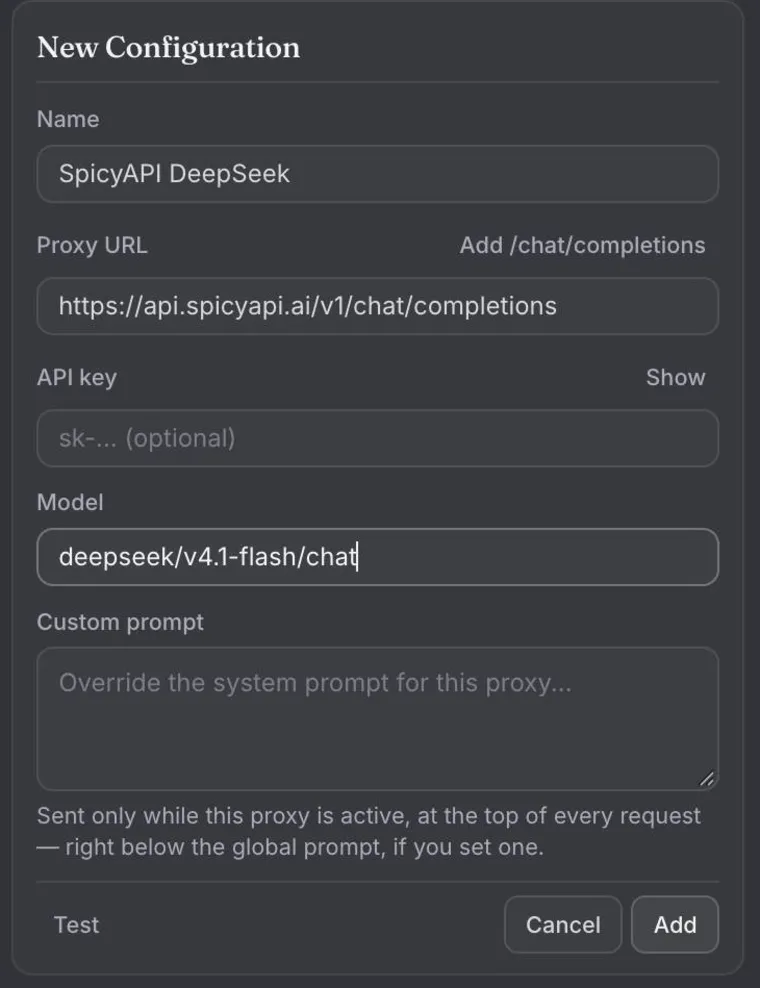
Fill in the form from top to bottom, with no spaces before or after any value:
| Janitor field | What to enter |
|---|---|
| Name | Any label, for example SpicyAPI DeepSeek |
| Proxy URL | https://api.spicyapi.ai/v1/chat/completions |
| API key | Your key, starting with sk-spicy-. Janitor marks this field optional; SpicyAPI needs it. |
| Model | deepseek/v4.1-flash/chat |
| Custom prompt | Leave it empty for now |
The Proxy URL needs the full path. Janitor sends your message to exactly the address you type, and the shorter https://api.spicyapi.ai/v1 returns a 404. If you pasted the short form, press Add /chat/completions at the top right of the Proxy URL field and Janitor appends it. Don't add a slash at the end.
The Model must also match exactly, including /chat at the end. The other two DeepSeek models are deepseek/v4-flash/chat and deepseek/v4-pro/chat.
Press Add. The configuration now appears in the list as SpicyAPI DeepSeek with the model and api.spicyapi.ai underneath, and the button at the top of the chat changes to using proxy. The form also has a Test button, but a real message, in the next step, is the check we relied on.
Step 4: Reload and send a message
The panel says it outright: after adding or changing a proxy URL, refresh the page. Reload, then send a short message.
On a new Janitor account, the first send opens a Complete your profile box asking for a persona name and appearance. Fill it in (a made-up name is fine) and press Save; the bot uses that name for you. If your message is still sitting in the box after you save, press send once more, but only once.
Our first reply arrived in about four seconds:

Notice the small thoughts line above the reply. DeepSeek V4 reasons before it answers, and Janitor folds that reasoning into a collapsed section instead of mixing it into the story. Click it to read the reasoning; leave it closed and you only see the reply. You pay for the reasoning tokens as output either way.
Then open Logs in the SpicyAPI console. The request is listed with its token counts and exact cost. If something failed, the error text tells you which fix you need (see the table further down).
The generation settings, and what to leave alone
Under the proxy list, the panel has a Generation settings block: Temperature, Max tokens, Context size, and under Advanced settings, Top K, Top P, Rep. penalty and Freq. penalty.
- Max tokens: most people never need to change it. We left it at the default of 0, which Janitor describes as "lets the model choose the length". The reply came back complete, reasoning included. If replies ever stop mid-sentence or arrive empty, set it to 2,000 or more, because the reasoning and the reply share the same budget.
- Context size: decides how much chat history Janitor sends with each message, and you pay for all of it, every time. It was set to 50,000 tokens on our account. Lower it if your bot doesn't need a long memory, or if replies fail to generate in a very long chat.
- Temperature and the Advanced settings: we left them at their defaults. When a model doesn't accept one of these sampling settings, SpicyAPI ignores it instead of rejecting the message, so they won't cause an error.
There is no field in Janitor for DeepSeek's reasoning level, so the model reasons at its default. If you want faster, cheaper replies with less thinking, the real lever is the model: V4.1 Flash is both the cheapest and the quickest of the three.
Which DeepSeek model to pick
All three are listed as unrestricted in our catalogue, meaning the model adds no refusal layer of its own. Prices per million tokens:
| Model | Model field | Input | Output | Pick it when |
|---|---|---|---|---|
| DeepSeek V4.1 Flash | deepseek/v4.1-flash/chat | $0.30 | $1.20 | You want the cheapest and fastest DeepSeek. Start here. |
| DeepSeek V4 Flash | deepseek/v4-flash/chat | $0.44 | $1.32 | You want a second Flash option to compare against V4.1 Flash. |
| DeepSeek V4 Pro | deepseek/v4-pro/chat | $1.32 | $3.96 | You want the larger model and accept about 3 to 4 times the price of V4.1 Flash. |
How the three compare with 20 other chat models in long roleplay is in our roleplay tests of 23 chat models.
To switch models, press Edit on your configuration, change the Model field, save, and reload.
What a message costs
Every message sends the bot's definition, your persona and the recent chat history, plus your new line, and you pay for those input tokens each time, plus the reply. Janitor's own panel says the same: the character's token count is not the full request total.
Our first message with DeepSeek V4.1 Flash, to a bot whose definition is about 1,100 tokens, used 1,242 input tokens and 564 output tokens (reasoning included) and cost $0.00105. As the chat grows, the input grows with it. Assuming replies of about 600 tokens:
| Chat | Input per message | Per message | Per 100 messages |
|---|---|---|---|
| A new chat (measured, 564 output tokens) | 1,242 tokens | $0.00105 | about $0.10 |
| A long chat | 20,000 tokens | about $0.0067 | about $0.67 |
| Context size reached at 50,000 tokens | 50,000 tokens | about $0.016 | about $1.57 |
The last two rows are calculated from the same prices and assume no cache hits. When part of the history is read from the model's cache, that part is billed at the cached input price ($0.006 per million tokens on V4.1 Flash), so a real bill can come out lower. A thousand tokens is roughly 750 English words.
What to put in Custom prompt
Janitor has two prompt slots. The Custom prompt inside your proxy configuration is sent only while that proxy is active, at the top of every request. The Global prompt, under Instructions in the same panel, applies to every provider, and when both are set Janitor sends both. Because they travel with every message, a long prompt adds to the cost of each one.
Start with both empty. If you add one, keep it to formatting and style. A neutral example:
Write in third person, past tense. Keep each reply under 250 words. Never write the user's lines or decide the user's actions.What you write is sent exactly as you wrote it.
Fixing the common errors
Janitor shows the reply from SpicyAPI after PROXY ERROR and the status code. The words after the code tell you what to change.
| You see | What to do |
|---|---|
PROXY ERROR 401, Credentials are invalid or expired, or Missing credentials | Copy the key again from the console and paste it with no spaces. If you revoked it, create a new one. |
PROXY ERROR 404, Resource not found | The Proxy URL is incomplete. Press Add /chat/completions or paste the full URL, save and reload. |
PROXY ERROR 404 that names the model | The Model field doesn't match. Copy it again, including /chat. |
PROXY ERROR 402 | The balance is empty or the key hit its daily cap. Add funds or raise the cap. |
PROXY ERROR 400 that names a field | Janitor sent a value or more history than the model accepts. Lower the context size and send again. |
PROXY ERROR 429 | Too many requests in a short time. Wait a few seconds and send again. |
| An empty reply, or only the thoughts section | Set Max tokens to 2,000 or more and send again. Reasoning and the reply share one budget. |
| "A network error occurred", and nothing in your console logs | The message never reached SpicyAPI. Check the Proxy URL for typos, save and reload. |
| The bot keeps using Janitor's model | The page wasn't reloaded after adding the proxy, or the bot's creator turned proxies off. Reload; if the button still says using janitor, pick another bot. |
The console logs are the fastest check: every request that reaches SpicyAPI is listed there with a request ID. If a request isn't there, the problem is on the way to us, not in the model.
Is DeepSeek free on Janitor AI?
Not through SpicyAPI. You pay per token from a prepaid balance, with no subscription; our measured first message cost about a tenth of a cent, and the only limit is the spend cap you set on your key. Janitor's own subscription, janitor+ at $14.99 a month, adds a Router provider with more models inside the site; the Proxy route in this guide works on a free Janitor account.
Next step
Create a key, fill in the four fields and send one message. Any chat model on SpicyAPI fits the same Model field; the uncensored AI models list shows the rest. If you'd rather run your chats on your own machine, the same key and models work in SillyTavern.
For live prices of every compatible model and the full error table, see the Janitor AI proxy page.