MiniMax H3 image-to-video starts from your opening frame, with an optional closing frame and a prompt that directs the motion between them. Clips run 4 to 15 seconds with generated audio at 768p or 2k.

From $0.037/s53% below the publisher's list price

Workbench

Input

Image to video
265/7000
Describe the change after the opening frame: action, camera, sound. Do not re-describe the frame. at least 1 characters · at most 7000 characters
1/1

Drop files or media links, paste, or browse · 1 file · Max 10 MB · JPG · PNG · WEBP · GIF

  • 1
1 / 1 files
The opening frame. It sets subject, wardrobe and composition - the model follows it closely. Keep each side between 256 and 5760 px, the aspect ratio between 2:5 and 5:2, and the file under 30 MB.
0/1

Drop files or media links, paste, or browse · 1 file · Max 10 MB · JPG · PNG · WEBP · GIF

0 / 1 files
Optional closing frame. Tightens the ending only; the middle of the clip is still free.
affects price
768p or 2k, both native. Draft at 768p, deliver at 2k. 2k needs at least 5 seconds.
Durationaffects price
Whole seconds, 4 to 15. Four seconds is only available at 768p. Longer clips drift further from a supplied closing frame. no lower than 4 · no higher than 15
Safety checkerOff

SpicyAPI does not run a safety checker on this model. Your prompt and media go to the model as written, and the model itself decides what comes back.

Checking your account before enabling submission and pricing.

Output

Ready for a new run
Example result

Missing the model you need?

Tell us what to add and where you would use it. Requests go to the people who decide what gets onboarded next.

UNCENSORED VIDEO WITH SOUND

MiniMax H3 API at a glance

Write the scene, start from your own frame, or cast it from photos - and it plays out as written.

Tested rungs passed
4/4
From Mild to the strongest level, each checked frame by frame.
Longest clip
15S
Long enough for a full beat, not just a loop.
Top resolution
2K
Draft at 768p, render the keeper in 2K.
Sound included
AUDIO
Ambience, footsteps, music and spoken lines arrive with the picture.
Reference photos
9
Hold a face, an outfit and a room steady across shots.
Vertical ready
9:16
Six frame shapes, from 21:9 widescreen to 9:16 for Reels and TikTok.

Results

What you can make with MiniMax H3

  • From text

    A finished shot from one paragraph

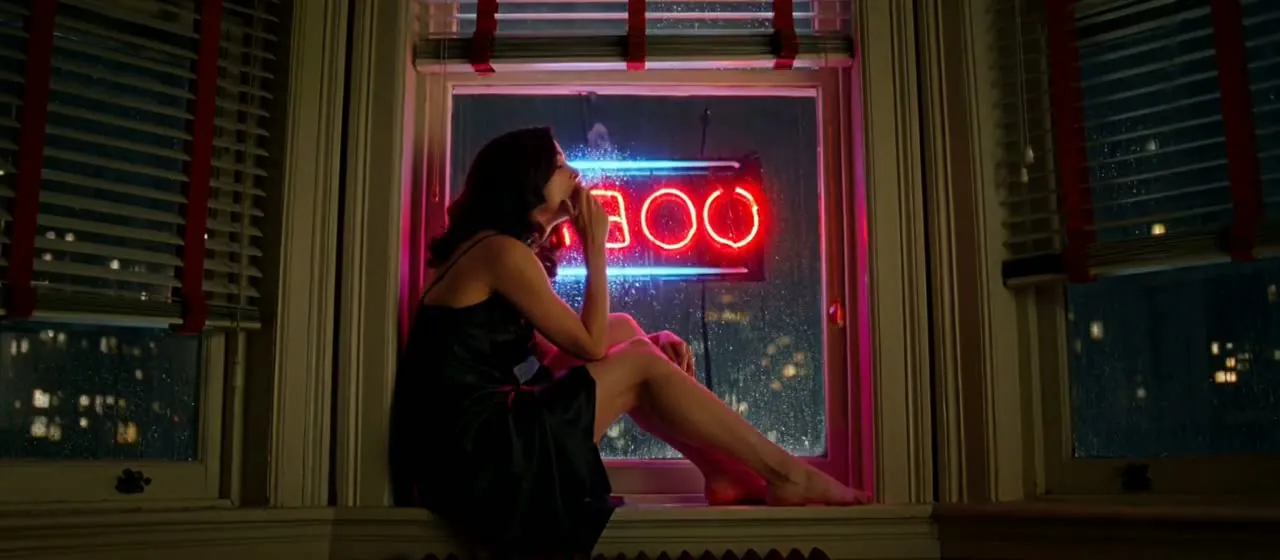
    Say who is in frame, what happens, where the camera goes and what you hear. H3 returns the lighting, the grain, the movement and a matching soundtrack in one clip. This noir window scene is four sentences and nothing else.

    Text-to-video, 5 seconds at 768p in 21:9. The blind shadows, the neon pulse and the slow head turn all come from one written brief.

  • From an image

    Your frame, set in motion

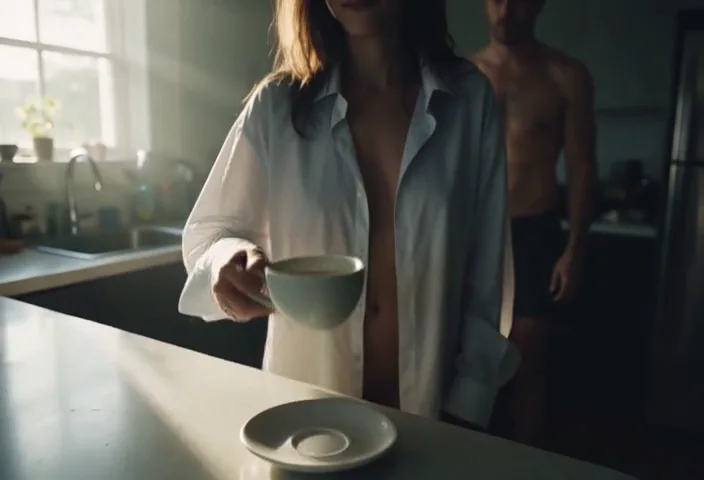
    Start from a still and describe only what happens next. Here the opening frame was a coffee cup on a counter; the hand, the tilt up to the shirt and the man waking up behind her all came from the prompt.

    Image-to-video, 6 seconds: the camera move and the second person come from the prompt, not the frame.

  • From references

    Same woman, same outfit, a new scene

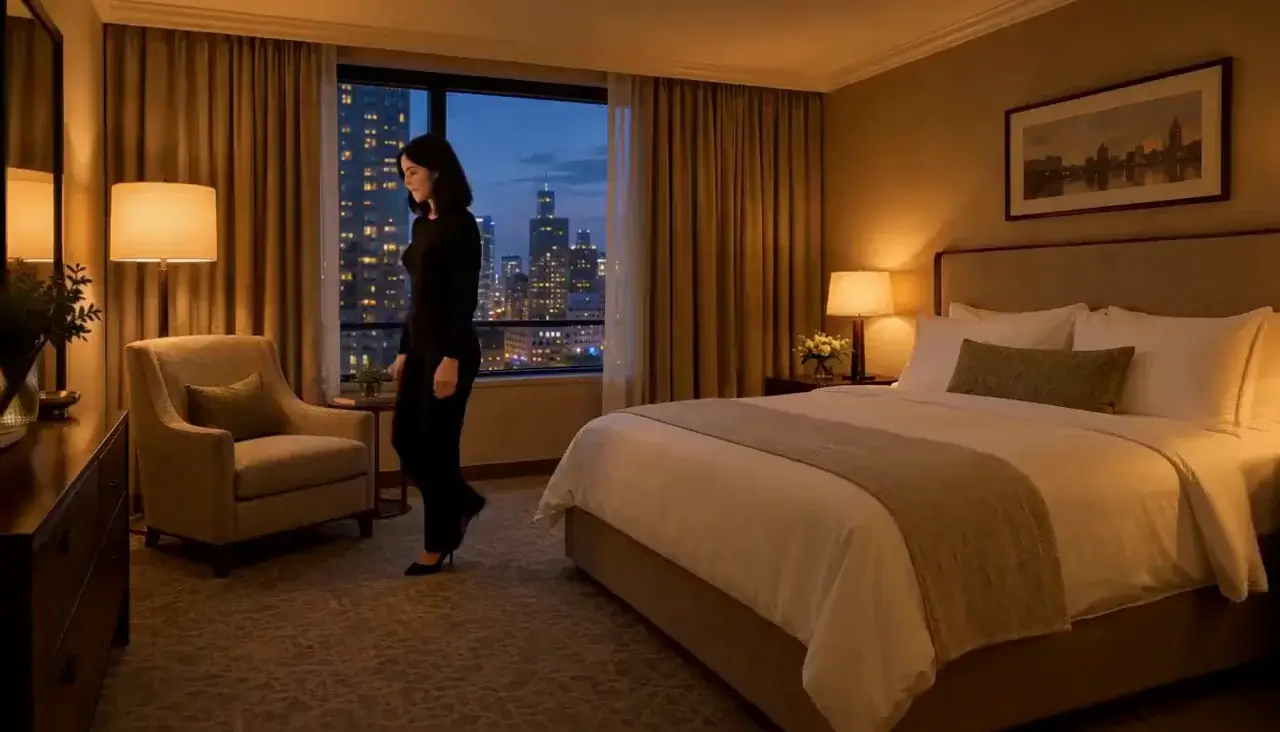
    Hand it a face, an outfit and a room as separate photos and it puts them together in a shot you never filmed. It is how a character keeps looking like herself from one clip to the next.

    Reference-to-video, 6 seconds at 768p: face, outfit and room each came from a separate reference photo.

  • With sound

    The soundtrack comes out with the picture

    Dialogue, room tone and music are generated in the same pass. The singer's line, the club reverb and the murmur from the crowd in this clip were all written into the prompt - no separate audio step.

    Reference-to-video with sound: the sung line, the club reverb and the crowd murmur were all written in the prompt.

More clips made with MiniMax H3

  • Text-to-video, 5 seconds at 768p: two views of one person in a single frame, held through a slow camera arc.
    5s
  • 5s
  • 5s
  • 5s
  • 5s

Content test

Is MiniMax H3 uncensored? What we tested

We ran each level on our live setup and checked every clip frame by frame. A pass means the content was actually on screen, not just that the request went through.

Content levels tested on MiniMax H3, by mode
LevelText to videoImage to videoReference to video
MildThe lightest prompts in the test
RendersTested Sep 22, 2026
Not tested yet
Not tested yet
ModerateWhere filtered models start to refuse
Not tested yet
Not tested yet
Not tested yet
StrongThe middle of the scale
RendersTested Sep 22, 2026
RendersTested Sep 14, 2026
Very strongWhere most models start to hold back
RendersTested Sep 22, 2026
Not tested yet
Not tested yet
MaximumThe top of the scale
RendersTested Sep 22, 2026
Not tested yet

Renders: on screen as written. Softened: generated, but milder than what was written. Refused: rejected. Not tested yet: we have not run that level on that mode.

How each mode behaves

Text to video
Every level we asked for came back on screen, the strongest included. What words alone cannot pin down is the person: face, body and wardrobe are decided fresh on every run. When you need the same character twice, make the first frame and switch to image-to-video.
Image to video
The opening frame is followed closely: the scene in the frame is kept as it is through the clip. Adding a closing frame pins the ending, but on 15-second clips the middle can wander - keep the two frames close in light and framing.
Reference to video
A reference carries through as sent: what our reference showed came back unchanged in the clip. Identity holds best with three or four clear photos, one job each. Load all nine with overlapping shots and it starts blending them into someone new.
All modes
Every image we have tested as a frame or reference was AI-generated. Photos of real people are the one input we have not run yet.

Use cases

What to build with the MiniMax H3 API

  • Uncensored scenes other video APIs refuse

    Scenes that other APIs block go through on the first try instead of bouncing off a prompt filter. Write the scene for text-to-video, or generate the exact person first and animate that frame when the look has to be precise.

  • Vertical clips with sound for social feeds

    9:16 clips that already have their audio: a ten-second teaser, a mood loop, a reaction beat. Draft at 768p until the timing works, then re-run the keeper in 2K.

  • A recurring character across a series

    Keep one face, one outfit and one room steady from episode to episode with reference photos, and write only what changes in each new shot.

  • Longer scenes, one shot at a time

    Chain 15-second clips into a full scene: the last frame of each approved clip becomes the first frame of the next, so wardrobe, set and light carry across the cut.

Prompts

MiniMax H3 prompt examples you can copy

Paste one into the playground as it is, then change one thing at a time.

  • Text to video

    Film-noir window, written as a shot list

    Result from this prompt

    Film noir. An adult woman in a black satin nightgown sits on a wide apartment windowsill at night, one knee drawn up, exhaling cigarette smoke against the rain-streaked glass as a neon sign pulses red across her face. She turns her head slowly toward camera. Venetian blind shadows, deep blacks, 1970s grain, rain and distant traffic.

    Why it works. It reads like a shot list - who, what happens, the light, then the sound - so nothing is left to guess, and the rain and traffic come back on the soundtrack.

    Try this prompt
  • Text to video

    Name the shot, not the mood

    A woman in a silk slip dress sits on the edge of a hotel bed at dusk, looking out of the window, warm backlight, soft haze, slow push-in, cinematic

    Instead of “woman in a hotel room”

    Why it works. Naming the dress, the dusk backlight and the camera move gives the model a shot to film; the short version leaves pose, light and camera to chance.

    Try this prompt
  • Image to video

    Let the frame set the scene, let the words move it

    Result from this prompt

    The cup is lifted out of frame by a hand, then the camera tilts up: she is wearing an oversized men's shirt, and further back in the dim room a man is just getting up. Slow tilt and rack focus. Cinematic, shallow depth of field, heavy film grain, morning grey-gold.

    Why it works. The prompt only describes what happens after the first frame - the hand, the tilt, the second person - and leaves the look to the image.

    This mode starts from your own image: add it in the playground before you run.

    Try this prompt
  • Reference to video

    Same woman, same outfit, new shot

    Result from this prompt

    Keep the woman from Picture 1 and the black lace slip from Picture 2, in the hotel room from Picture 3. She sits on the arm of the chair, crosses her legs and looks up at camera. Slow handheld drift, warm lamp, quiet room tone.

    Why it works. Each photo gets one job and is called by its number, so face, outfit and room carry over instead of blending together.

    Try this prompt

Compare

MiniMax H3 vs similar models: which one to pick

ModelModesFromContentPick it when
MiniMax H3This pageImage to video · Reference to video · Text to video · Video extension$0.037 / output secondUncensored — This model declares no content filter. SpicyAPI forwards the request without adding a platform content scan; legal and consent duties remain with the customer.You want one model for a sentence, a first frame or reference photos, with sound, from cheap drafts up to 2K.
MiniMax H3 SpicyImage to video · Video extension$0.038 / output secondUncensored — This model declares no content filter. SpicyAPI forwards the request without adding a platform content scan; legal and consent duties remain with the customer.You start from your own opening frame and want a LoRA-tuned uncensored edition.
MiniMax H3 MaxImage to video · Text to video · Video extension$0.05 / output secondSoftened — This model returns a result instead of an error, but requests beyond its own limits come back toned down. The call still succeeds and is still billed, so check the output rather than the status code. Image to video — Softened; Video extension — Softened; Text to video — Filtered.Your scenes stay at the Mild level and you want the fast Max variant, which tops out at 768p.
Seedance 2.5Image to video · Reference to video · Text to video · Video extension$0.074 / output secondUncensored — This model declares no content filter. SpicyAPI forwards the request without adding a platform content scan; legal and consent duties remain with the customer.You need a single clip longer than 15 seconds, or more than nine reference images in one shot.

Pricing

MiniMax H3 API pricing

A 5-second clip starts at $0.185 at 768p and $0.29 at 2K.

The playground shows the exact price for your settings before you run. Failed or timed-out tasks are usually not charged. Some models charge for content refusals as stated on their model page; check those billing terms before submitting.

See every price tier

Get started

How to use the MiniMax H3 API in three steps

  1. Step 1

    Try it in the playground

    Pick a mode above - a sentence, your own opening frame, or a few reference photos - paste one of the prompts from this page and run it. The exact price shows before anything is charged.

  2. Step 2

    Get an API key

    Sign up, top up by card or crypto, and create a key in the console. There is no subscription: you pay for the seconds of video you generate.

  3. Step 3

    Send the same request from your code

    Copy the request from the API tab - it is the same body the playground just ran. The finished clip comes back to your webhook, or you fetch it by task ID.

Parameter reference and code samples are in the API and Readme tabs at the top of this page.

Why SpicyAPI

Why run MiniMax H3 on SpicyAPI

  • No filter from us

    We add no content filter of our own. What the model renders is what you get back.

  • Tested, not guessed

    Content labels come from real generations we ran and checked, with the test date on the page.

  • Pay per result, in dollars

    No subscription and no credits. Failed or timed-out tasks are usually not charged. Some models charge for content refusals as stated on their model page; check those billing terms before submitting.

  • One key for every model

    One API key and balance cover image, video, audio and chat models, so you can explore more models from the same account.

FAQ

MiniMax H3 API FAQ

About MiniMax H3

MiniMax H3 is MiniMax's video model with sound, available on SpicyAPI in these modes: text-to-video, image-to-video, reference-to-video and video-extend. Clips run up to 15 seconds at 768p or 2K, in frame shapes from 21:9 widescreen to 9:16 vertical. In our 2026-09-22 tests every level of our content ladder came back as requested, with no softening. SpicyAPI adds no content filter of its own and bills per second of output in US dollars, with no subscription. You are responsible for having the rights and consent for anything you upload and for how you use what you generate.

Related models and next tasks