Introduction
MiniMax H3 Text to video generates a clip from a prompt alone, with no image or reference set involved. You choose a length of 5 to 15 whole seconds, a resolution of 768p or 2k, and one of six aspect ratios, and the clip comes back with sound generated in the same pass. The prompt field takes up to 7,000 characters, enough for a full shot description rather than a caption.
Choose a MiniMax H3 mode by starting material
| What you have at the start | Mode |
|---|---|
| a written scene or script | MiniMax H3 Text to video |
| an approved opening image | MiniMax H3 Image to video |
| one to nine reference images | MiniMax H3 Reference to video |
Key features & highlights
Six frame shapes, set per request
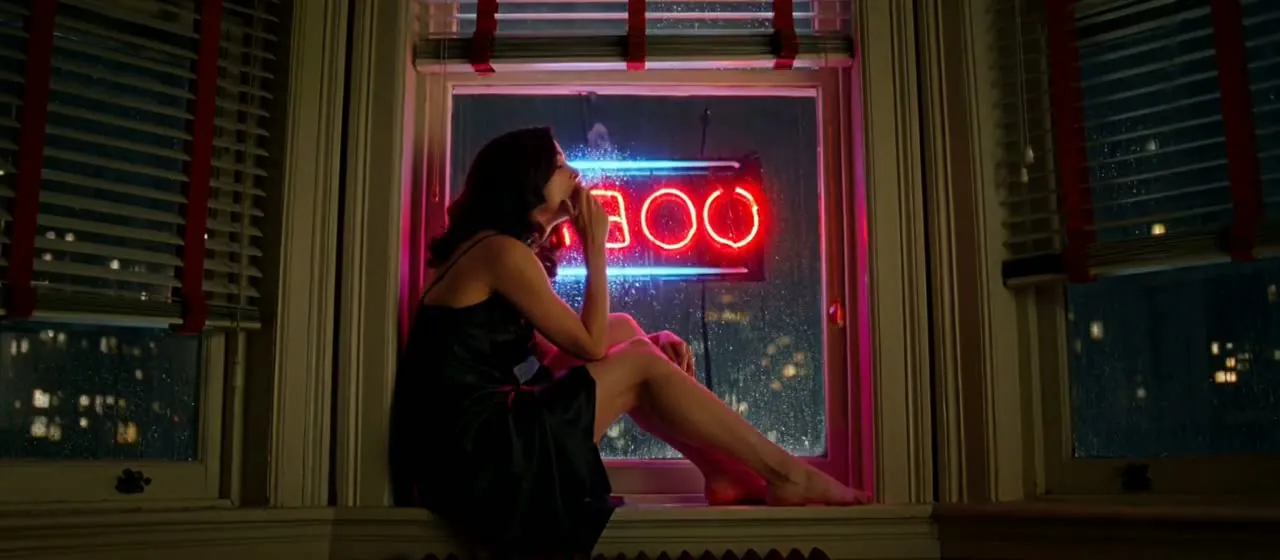
aspect_ratio accepts 16:9 (the default), 9:16, 1:1, 4:3, 3:4 and 21:9. The 21:9 value renders an anamorphic letterbox, which is how the published noir-window example was made: a red neon pulse, Venetian blind shadows and a slow head turn, all composed for the wide frame from one paragraph. Pick the shape before writing, so the brief places the subject for that frame.
Sound directed in the same brief
Audio is generated with the picture rather than dubbed on afterwards, so the prompt is also where the soundtrack is written: room tone, foley, music or a spoken line. In the thunder-wheat-field example the thunder arrives in the same file as the lightning, so it lands against the strikes instead of having to be cut to them in the edit.
768p and 2k, both native
Both resolutions are native outputs, and 480p and 720p are not options: the schema rejects them. Duration and resolution both drive the price, so the usual pattern is to draft at 768p until the action and framing work, then run the take you want at 2k. The endpoint takes no seed, so that final run is a new take of the same brief rather than a sharper copy of the draft.
Request parameters
| Parameter | Required | Description |
|---|---|---|
prompt | Yes | Write it as a shot: subject, action, camera move, light, sound. Uncensored wording is accepted. at least 1 characters · at most 7000 characters |
aspect_ratio | No | 16:9, 9:16, 1:1, 4:3, 3:4 or 21:9. 21:9 gives the anamorphic letterbox. |
resolution | No | 768p or 2k, both native. Draft at 768p, deliver at 2k. |
duration_seconds | No | Whole seconds, 5 to 15. Drives the price. |
Pricing
| Specification | Price |
|---|---|
| $0.037 / second |
| $0.058 / second |
Use cases
Start a shot from nothing but an idea
Text-to-video is the H3 endpoint that needs no image input. The curtain-silhouette example shows the kind of brief that holds up best across re-runs: a static camera, a gauzy curtain, one warm lamp behind it and a silhouette whose outline is all that reads. The fewer details a brief leaves open, the closer consecutive takes stay to each other.
Test a lighting or timing idea
Light that changes over time is written entirely in the prompt. The thunder-wheat-field brief asks for intermittent reveal, a soaked shirt printed white by each strike and dropped back into darkness, across six seconds at 768p in 16:9. Short drafts like this show whether an effect reads before you spend a 2k run on it.
Open a sequence that continues elsewhere
H3 has no edit endpoint, and one request tops out at 15 seconds. For a longer scene, generate the first shot here, then continue it with MiniMax H3 Video extend: it opens the next shot on the final frame of the approved clip and returns the two joined in one file. When the subject must look exactly as designed, switch to image-to-video instead, because prose leaves wardrobe, body and framing to the model and consecutive runs drift.
Prompt guide & pro tips
Write the shot in the order it happens
Structure the prompt as subject, action, camera, light and sound. The noir-window prompt is a workable template: who is on the windowsill and what she wears, what she does (exhales smoke, turns her head slowly toward camera), then the look (blind shadows, deep blacks, 1970s grain) and finally the sound (rain and distant traffic).
Give two subjects one camera move
When a frame has to hold two things at once, give the camera a single move that serves both. The mirror-two-views example keeps a woman's back and her reflection in an antique mirror readable together by asking for a slow arc to the right. The same prompt states plainly that the garments stay on and nothing is removed; when a shot depends on wardrobe staying in place, write that out instead of leaving it implied.
Change one variable between runs
Because there is no seed, two runs with identical settings return two different takes. Keep the wording fixed while comparing takes, and when a take misses, change one element, such as the camera instruction or the lighting line, rather than rewriting the whole brief. If subject and framing must stay identical across takes, pin them with an opening frame on image-to-video instead.
API quick start
# Generate the idempotency key once; reuse it when retrying after a lost response.
export SPICY_IDEMPOTENCY_KEY="${SPICY_IDEMPOTENCY_KEY:-$(uuidgen)}"
curl -X POST https://api.spicyapi.ai/api/v1/jobs/createTask \
  -H "Authorization: Bearer $SPICY_API_KEY" \
  -H "Content-Type: application/json" \
  -H "Idempotency-Key: $SPICY_IDEMPOTENCY_KEY" \
  -d '{
  "model": "minimax/h3/text-to-video",
  "input": {
    "prompt": "A slow aerial shot drifting over a misty pine forest at sunrise",
    "resolution": "768p",
    "aspect_ratio": "16:9",
    "duration_seconds": 5,
    "enable_prompt_expansion": false
  }
}'

# Copy data.taskId from the response into TASK_ID, then poll the status.
TASK_ID="TASK_ID_FROM_RESPONSE"
curl "https://api.spicyapi.ai/api/v1/jobs/recordInfo?taskId=$TASK_ID" \
  -H "Authorization: Bearer $SPICY_API_KEY"
See the API reference for authentication, the complete schema, polling, and error handling.