
ComfyUI has no content filter
The app runs whatever model you load. NSFW filtering only exists as optional custom nodes (NudeNet, safety checkers) that you add yourself. What you can make depends on the model, not on ComfyUI.
ComfyUI itself never filters what you make; the limits come from your graphics card and from the API nodes you plug in. The SpicyAPI node pack adds 199 uncensored models, 114 of them for video, as ordinary ComfyUI nodes that run on our servers and show their price before they run.
Three facts decide how NSFW work goes in ComfyUI. Most tutorials only cover the first one.
The app runs whatever model you load. NSFW filtering only exists as optional custom nodes (NudeNet, safety checkers) that you add yourself. What you can make depends on the model, not on ComfyUI.
A typical uncensored Wan 2.2 workflow needs four separate model files, and community guides recommend a 24 GB card such as an RTX 4090. Smaller cards work with quantized builds, at minutes of rendering per second of video.
The paid partner nodes built into ComfyUI forward your prompt to third-party providers with their own moderation, and the documentation asks you not to send NSFW content at all. The SpicyAPI nodes are the hosted route that allows it on unrestricted models.
“Please do not submit NSFW or other prohibited content to API nodes.”
All four end in the same kind of graph. They differ in what you have to own, download and accept.
| Four ways to run NSFW models from ComfyUI | SpicyAPI nodes | Your own GPU | Rented cloud GPU | ComfyUI partner nodes |
|---|---|---|---|---|
| Hardware | None; models run on our servers | 24 GB of VRAM is the comfortable floor for video | Whatever you rent, billed by the hour | None |
| Downloads | None; the pack itself is a few MB | Checkpoints, text encoders, VAEs and LoRAs, often tens of GB | The same, onto the rented machine | None |
| NSFW | Allowed on unrestricted models; every model's policy is listed | Allowed; you pick the model | Allowed on most hosts; read their terms | Not allowed by the documentation |
| Video | Up to 4K (Seedance 2.0, Wan 3.0 Pro, LTX 2.5), and up to 30 seconds on the longest models | Limited by VRAM; long or 1080p clips are slow | As fast as the GPU you pay for | Depends on the provider |
| Cost | Per run in US dollars, quoted before it starts | Your hardware and electricity | Per GPU hour, including setup and idle time | Comfy credits; monthly credits expire |
| Privacy | No content review on our side; results kept up to 14 days | Nothing leaves your machine | Files sit on the host's machine | Inputs go to third-party providers |
Mixing works too: the SpicyAPI nodes output ordinary IMAGE, VIDEO and AUDIO values, so they slot into a local graph next to your own checkpoints.
No model downloads and no Python packages. If you already run ComfyUI, these are the only steps.
Open Manager in ComfyUI, search for SpicyAPI, click Install and restart ComfyUI. No Manager? Clone the pack into custom_nodes with the command below. A SpicyAPI group appears in the node menu, sorted into Image, Video, Audio, Text and Utils.
cd ComfyUI/custom_nodes
git clone https://github.com/spicyapi-ai/comfyui-spicyapiOpen Settings, then SpicyAPI, and paste a key from your console. A notice confirms it and shows your balance. The key is stored in ComfyUI's user folder, never in a workflow or in the metadata of a saved image, so sharing either is safe. Restart once so the node list comes from your account.
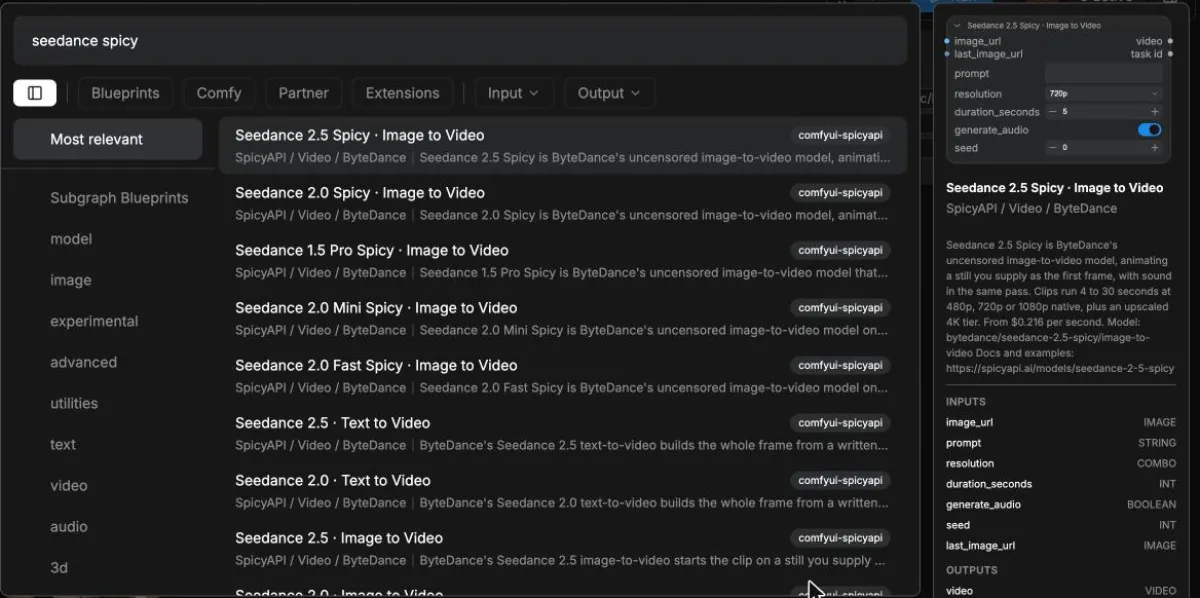
Double-click the canvas and type a model name. Nodes are named exactly like the models on our site, and the preview panel shows what each one does and what it costs. Spicy models are the uncensored tunes.
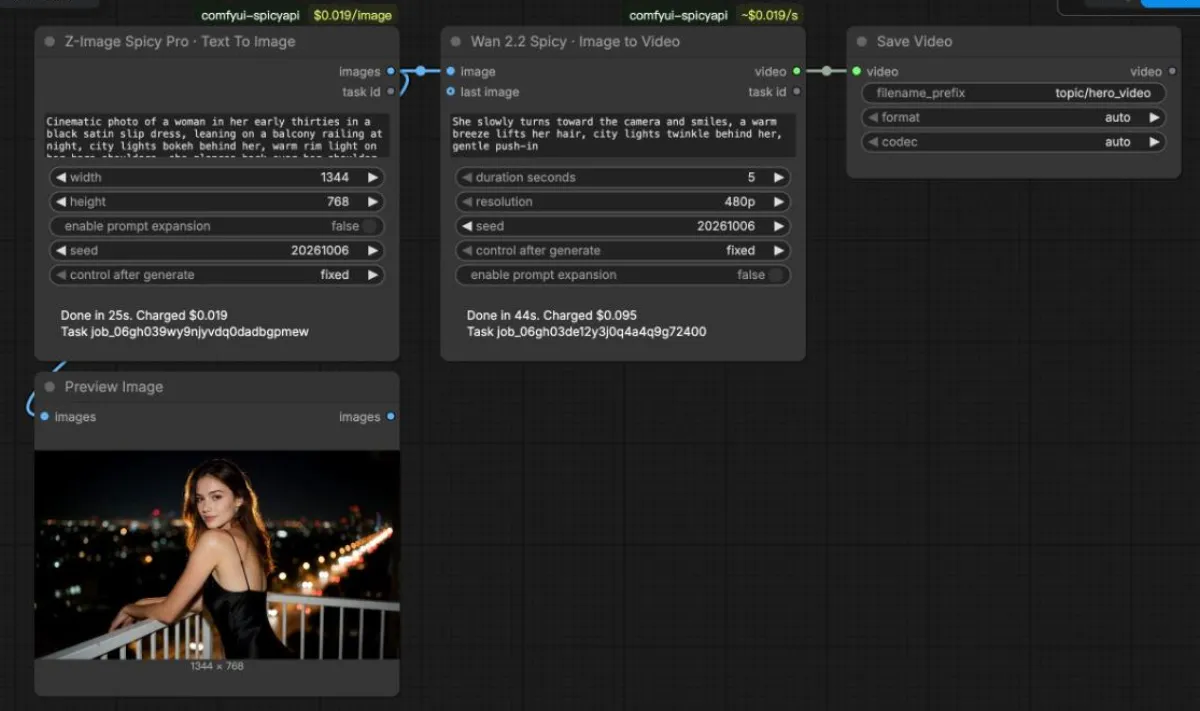
Connect a text-to-image node's images output to an image-to-video node's image input, then add a Save Video node. Every option on a node comes from the model itself, so a node never offers a setting the model would reject.
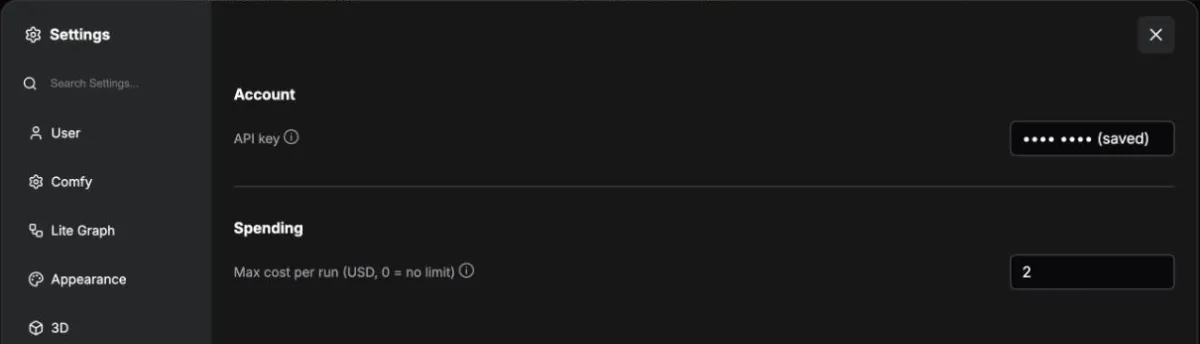
The badge on each node shows its rate for the options you picked. Every run is quoted first, and a Max cost per run in Settings stops anything above your limit before it is charged. When the node finishes it prints what it cost and the task ID. Seeds start on fixed, letting ComfyUI reuse unchanged node outputs while its execution cache is available. Running an uncached node starts a new billed task.
Prefer to start from a working graph? Open ComfyUI's template browser: under comfyui-spicyapi you get text to image, image to video, a chat model writing the prompt, text to speech, and a LoRA example that runs as is.
Each one was run for this page with the nodes you see. Prices and times are what the nodes reported.
Write the scene once, get a still, and animate it in the same graph. Change the motion prompt and rerun only the video node; the cached still is free.
Z-Image Spicy Pro + Wan 2.2 Spicy · 480p, 5 s · $0.114 in total
A SpicyAPI Chat node turns a one-line idea into a detailed photo prompt and wires it straight into an image node. Useful when you want variety without writing every prompt by hand.
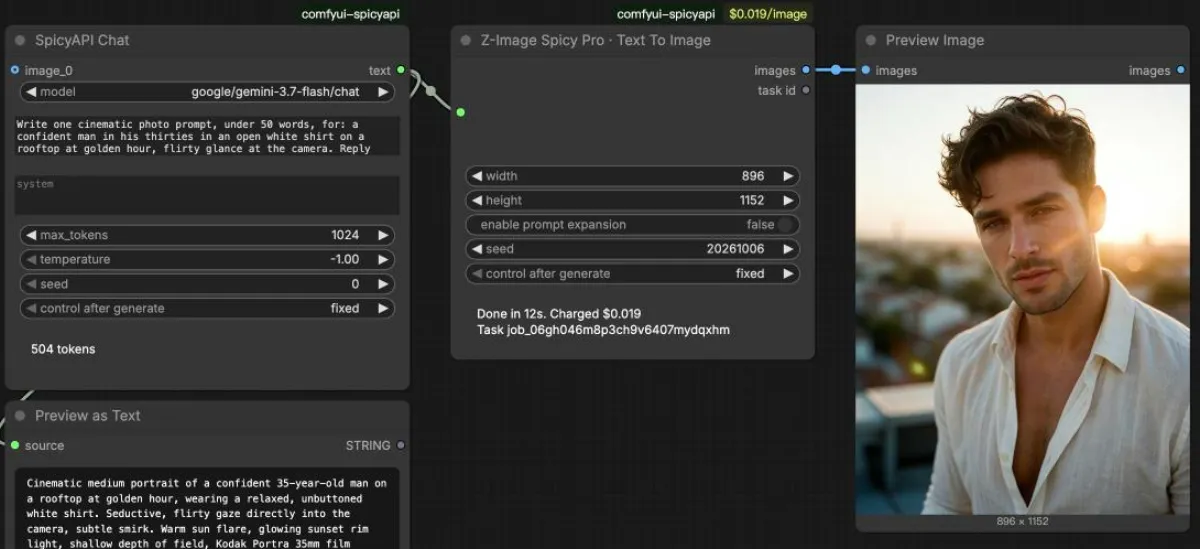

Gemini 3.7 Flash + Z-Image Spicy Pro · $0.019 plus a fraction of a cent · 12 s · Template: prompt-writer
Paste a direct link to a .safetensors file into a SpicyAPI LoRA node and connect it to a LoRA model with the matching base checkpoint. Chain several to stack styles or characters; no download, no models folder.
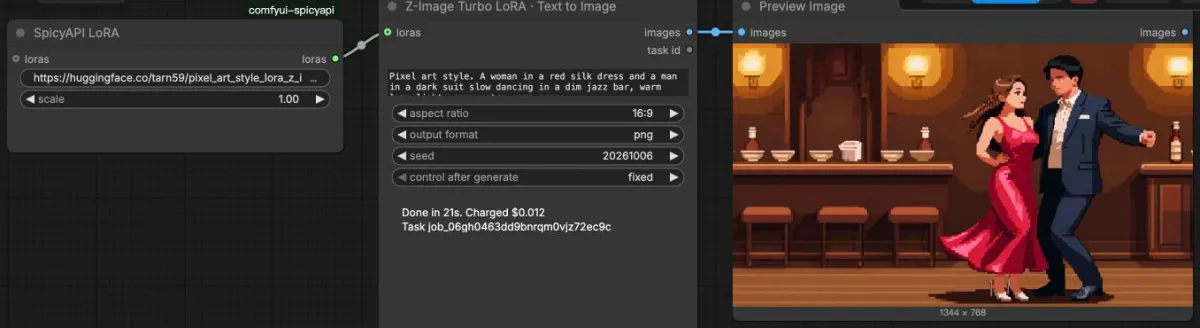

Z-Image Turbo LoRA + an Apache-2.0 pixel-art LoRA · $0.012 · 21 s · Template: lora
Keep your favourite local checkpoint for stills, then hand the best frame to a hosted video model through a Load Image node. Your GPU never has to hold a video model.
LTX 2.3 Spicy · 480p, 5 s · $0.095 · Template: image-to-video
Untouched outputs from the runs on this page, with the model and the scene under each one.


Every model whose own policy is unrestricted, live from our catalogue. Search the name in ComfyUI to add its node. The Freedom score is how far each model goes in our standard content tests.
 Uncensored — This model declares no content filter. SpicyAPI forwards the request without adding a platform content scan; legal and consent duties remain with the customer.Wan 3.0Text to video · Image to video · +2Alibaba official price: $0.05From $0.04510% below the publisher's list priceper output second
 Uncensored — This model declares no content filter. SpicyAPI forwards the request without adding a platform content scan; legal and consent duties remain with the customer.Seedance 2.5 SpicyImage to video · Video extensionFrom $0.216per output second
 Uncensored — This model declares no content filter. SpicyAPI forwards the request without adding a platform content scan; legal and consent duties remain with the customer.Seedance 2.5Text to video · Image to video · +2From $0.074per output second
 Uncensored — This model declares no content filter. SpicyAPI forwards the request without adding a platform content scan; legal and consent duties remain with the customer.Wan 3.0 SpicyImage to video · Video extensionSpicy list price: $0.06From $0.0575% below the Spicy list priceper output second
 Uncensored — This model declares no content filter. SpicyAPI forwards the request without adding a platform content scan; legal and consent duties remain with the customer.Wan 3.0 PrimeText to video · Image to video · +2Alibaba official price: $0.068From $0.06110% below the publisher's list priceper output second
 Uncensored — This model declares no content filter. SpicyAPI forwards the request without adding a platform content scan; legal and consent duties remain with the customer.Seedance 2.0 FastText to video · Image to video · +2From $0.023per output second
| Model | Type | Nodes | Freedom | From |
|---|---|---|---|---|
| Wan 3.0Wan 3.0 · Image to Video · Wan 3.0 · Reference to Video · Wan 3.0 · Text to Video · Wan 3.0 · Video Extend | Video | Text to video · Image to video · Reference to video · Video extension | 96 | $0.045/ output second |
| Seedance 2.5 SpicySeedance 2.5 Spicy · Image to Video · Seedance 2.5 Spicy · Video Extend | Video | Image to video · Video extension | 96.7 | $0.216/ output second |
| Seedance 2.5Seedance 2.5 · Image to Video · Seedance 2.5 · Reference to Video · Seedance 2.5 · Text to Video · Seedance 2.5 · Video Extend | Video | Text to video · Image to video · Reference to video · Video extension | 83.6 | $0.123/ output second |
| Wan 3.0 SpicyWan 3.0 Spicy · Image to Video · Wan 3.0 Spicy · Video Extend | Video | Image to video · Video extension | 84 | $0.057/ output second |
| Wan 3.0 PrimeWan 3.0 Prime · Image to Video · Wan 3.0 Prime · Reference to Video · Wan 3.0 Prime · Text to Video · Wan 3.0 Prime · Video Extend | Video | Text to video · Image to video · Reference to video · Video extension | 80.7 | $0.061/ output second |
| Seedance 2.0 FastSeedance 2.0 Fast · Image to Video · Seedance 2.0 Fast · Reference to Video · Seedance 2.0 Fast · Text to Video · Seedance 2.0 Fast · Video Extend | Video | Text to video · Image to video · Reference to video · Video extension | 72.2 | $0.045/ output second |
| MiniMax H3 SpicyMiniMax H3 Spicy · Image to Video · MiniMax H3 Spicy · Video Extend | Video | Image to video · Video extension | 97.5 | $0.038/ output second |
| MiniMax H3MiniMax H3 · Image to Video · MiniMax H3 · Reference to Video · MiniMax H3 · Text to Video · MiniMax H3 · Video Extend | Video | Text to video · Image to video · Reference to video · Video extension | 70.7 | $0.037/ output second |
| Wan 3.0 Prime SpicyWan 3.0 Prime Spicy · Image to Video · Wan 3.0 Prime Spicy · Video Extend | Video | Image to video · Video extension | 84 | $0.09/ output second |
| Vidu Q4 PreviewVidu Q4 Preview · Image to Video · Vidu Q4 Preview · Video Extend | Video | Image to video · Video extension | 61.7 | $0.045/ output second |
| MiniMax H3 360 OrbitMiniMax H3 360 Orbit · Image to Video | Video | Image to video | — | $0.05/ output second |
| P-Video 2 ProP-Video 2 Pro · Image to Video · P-Video 2 Pro · Reference to Video · P-Video 2 Pro · Text to Video | Video | Text to video · Image to video · Reference to video | — | $0.012/ output second |
| MiniMax H3 Singularity LoRAMiniMax H3 Singularity LoRA · Image to Video · MiniMax H3 Singularity LoRA · Reference to Video · MiniMax H3 Singularity LoRA · Video Extend | Video | Image to video · Reference to video · Video extension | 100 | $0.063/ output second |
| LTX 2.5LTX 2.5 · Image to Video · LTX 2.5 · Text to Video | Video | Text to video · Image to video | 82.3 | $0.09/ output second |
| Wan 3.0 Pro PrimeWan 3.0 Pro Prime · Image To Video · Wan 3.0 Pro Prime · Reference To Video · Wan 3.0 Pro Prime · Text To Video · Wan 3.0 Pro Prime · Video Extend | Video | Text to video · Image to video · Reference to video · Video extension | 84.7 | $0.234/ output second |
| Wan 3.0 ProWan 3.0 Pro · Image To Video · Wan 3.0 Pro · Reference To Video · Wan 3.0 Pro · Text To Video · Wan 3.0 Pro · Video Extend | Video | Text to video · Image to video · Reference to video · Video extension | 84.7 | $0.144/ output second |
| MiniMax H3 LoRAMiniMax H3 LoRA · Image to Video · MiniMax H3 LoRA · Reference to Video · MiniMax H3 LoRA · Text to Video · MiniMax H3 LoRA · Video Extend | Video | Text to video · Image to video · Reference to video · Video extension | 98.3 | $0.05/ output second |
| HappyHorse 1.1HappyHorse 1.1 · Image to Video · HappyHorse 1.1 · Reference to Video | Video | Image to video · Reference to video | 65.1 | $0.14/ output second |
| Seedance 2.0 Mini SpicySeedance 2.0 Mini Spicy · Image to Video · Seedance 2.0 Mini Spicy · Video Extend | Video | Image to video · Video extension | 93.3 | $0.039/ output second |
| Seedance 2.0 MiniSeedance 2.0 Mini · Image to Video · Seedance 2.0 Mini · Reference to Video · Seedance 2.0 Mini · Text to Video · Seedance 2.0 Mini · Video Extend | Video | Text to video · Image to video · Reference to video · Video extension | 67.6 | $0.025/ output second |
| Wan 2.7 SpicyWan 2.7 Spicy · Image to Video · Wan 2.7 Spicy · Video Extend | Video | Image to video · Video extension | 100 | $0.123/ output second |
| LTX 2.3 SpicyLTX 2.3 Spicy · Image to Video · LTX 2.3 Spicy · Video Extend | Video | Image to video · Video extension | 89.2 | $0.019/ output second |
| LTX 2.3 Spicy LoRALTX 2.3 Spicy LoRA · Image to Video · LTX 2.3 Spicy LoRA · Video Extend | Video | Image to video · Video extension | 83.8 | $0.029/ output second |
| LTX-2.3 LoRALTX-2.3 LoRA · Image to Video · LTX-2.3 LoRA · Text to Video | Video | Text to video · Image to video | 33 | $0.024/ output second |
| Seedance 2.0 SpicySeedance 2.0 Spicy · Image to Video · Seedance 2.0 Spicy · Video Extend | Video | Image to video · Video extension | 93.3 | $0.114/ output second |
| Seedance 2.0Seedance 2.0 · Image to Video · Seedance 2.0 · Reference to Video · Seedance 2.0 · Text to Video · Seedance 2.0 · Video Extend | Video | Text to video · Image to video · Reference to video · Video extension | 73.1 | $0.07/ output second |
| Seedance 2.0 Fast SpicySeedance 2.0 Fast Spicy · Image to Video · Seedance 2.0 Fast Spicy · Video Extend | Video | Image to video · Video extension | 90 | $0.081/ output second |
| Vidu Q3 TurboVidu Q3 Turbo · Image to Video · Vidu Q3 Turbo · Video Extend | Video | Image to video · Video extension | 93.3 | $0.042/ output second |
| Vidu Q3 SpicyVidu Q3 Spicy · Image to Video · Vidu Q3 Spicy · Video Extend | Video | Image to video · Video extension | 96.7 | $0.067/ output second |
| Vidu Q3Vidu Q3 · Image to Video | Video | Image to video | 93.3 | $0.07/ output second |
| Vidu Q3 ProVidu Q3 Pro · Image to Video | Video | Image to video | 93.3 | $0.054/ output second |
| LTX-2 19BLTX-2 19B · Image to Video · LTX-2 19B · Text to Video · LTX-2 19B · Video Extend | Video | Text to video · Image to video · Video extension | 76.1 | $0.014/ output second |
| LTX-2 19B LoRALTX-2 19B LoRA · Image to Video · LTX-2 19B LoRA · Text to Video | Video | Text to video · Image to video | 75.5 | $0.018/ output second |
| Seedance 1.5 Pro SpicySeedance 1.5 Pro Spicy · Image to Video · Seedance 1.5 Pro Spicy · Video Extend | Video | Image to video · Video extension | 96.7 | $0.012/ output second |
| Seedance 1.5 ProSeedance 1.5 Pro · Image to Video · Seedance 1.5 Pro · Text to Video · Seedance 1.5 Pro · Video Extend | Video | Text to video · Image to video · Video extension | 90 | $0.011/ output second |
| Wan 2.6 FlashWan 2.6 Flash · Image to Video · Wan 2.6 Flash · Reference to Video | Video | Image to video · Reference to video | 100 | $0.022/ output second |
| Wan 2.6 SpicyWan 2.6 Spicy · Image to Video | Video | Image to video | 96.7 | $0.095/ output second |
| Wan 2.6Wan 2.6 · Image to Video · Wan 2.6 · Text to Video | Video | Text to video · Image to video | 12.7 | $0.09/ output second |
| HunyuanVideo 1.5HunyuanVideo 1.5 · Image to Video · HunyuanVideo 1.5 · Text to Video | Video | Text to video · Image to video | 88.1 | $0.024/ output second |
| Wan 2.5Wan 2.5 · Image to Video · Wan 2.5 · Text to Video · Wan 2.5 · Video Extend | Video | Text to video · Image to video · Video extension | 99 | $0.045/ output second |
| Wan 2.2 AnimateWan 2.2 Animate · Character Animation | Video | Character animation | 95.4 | $0.053/ output second |
| Wan 2.2 SpicyWan 2.2 Spicy · Image to Video · Wan 2.2 Spicy · Video Extend | Video | Image to video · Video extension | 91.2 | $0.019/ output second |
| Wan 2.2 Spicy LoRAWan 2.2 Spicy LoRA · Image to Video · Wan 2.2 Spicy LoRA · Video Extend | Video | Image to video · Video extension | 74.8 | $0.024/ output second |
| Wan 2.2 LoRAWan 2.2 LoRA · Image To Video · Wan 2.2 LoRA · Text To Video · Wan 2.2 LoRA · Video Extend | Video | Text to video · Image to video · Video extension | 88.1 | $0.024/ output second |
| Wan 2.2 5B LoRAWan 2.2 5B LoRA · Image to Video · Wan 2.2 5B LoRA · Text to Video | Video | Text to video · Image to video | 33 | $0.12/ request |
| Wan 2.1 LoRAWan 2.1 LoRA · Image to Video · Wan 2.1 LoRA · Text to Video · Wan 2.1 LoRA · Video to Video | Video | Text to video · Image to video · Video editing | 36 | $0.24/ request |
| Seedream 5.0 ProSeedream 5.0 Pro · Image Editing · Seedream 5.0 Pro · Layer Decomposition · Seedream 5.0 Pro · Text to Image | Image | Text to image · Image editing · Layer decomposition | 76.9 | $0.036/ image |
| Qwen Image 2.1Qwen Image 2.1 · Image Editing · Qwen Image 2.1 · Text to Image | Image | Text to image · Image editing | 96.3 | $0.036/ image |
| Qwen Image Edit SpicyQwen Image Edit Spicy · Image Editing | Image | Image editing | 100 | $0.038/ image |
| Seedream 5.0 FlashSeedream 5.0 Flash · Image Editing · Seedream 5.0 Flash · Layer Decomposition · Seedream 5.0 Flash · Text to Image | Image | Text to image · Image editing · Layer decomposition | 62.2 | $0.029/ image |
| Z-Image Spicy ProZ-Image Spicy Pro · Text To Image | Image | Text to image | 100 | $0.019/ image |
| Qwen Image 3.0 ProQwen Image 3.0 Pro · Image Editing · Qwen Image 3.0 Pro · Text to Image | Image | Text to image · Image editing | 98 | $0.04/ image |
| Qwen Image 3.0Qwen Image 3.0 · Image Editing · Qwen Image 3.0 · Text to Image | Image | Text to image · Image editing | 96 | $0.03/ image |
| Qwen Image 2.1 LoRAQwen Image 2.1 LoRA · Image Editing · Qwen Image 2.1 LoRA · Text to Image | Image | Text to image · Image editing | 100 | $0.042/ image |
| Wan 2.7 ProWan 2.7 Pro · Image Editing | Image | Image editing | 80.7 | $0.075/ image |
| FLUX 3 KleinFLUX 3 Klein · Image Editing · FLUX 3 Klein · Text to Image | Image | Text to image · Image editing | 36 | $0.019/ image |
| FLUX 3 Klein LoRAFLUX 3 Klein LoRA · Image Editing · FLUX 3 Klein LoRA · Text to Image | Image | Text to image · Image editing | 36 | $0.025/ image |
| Qwen Image 2.1 ProQwen Image 2.1 Pro · Image Editing · Qwen Image 2.1 Pro · Text to Image | Image | Text to image · Image editing | 100 | $0.036/ image |
| Qwen Image 2.1 TurboQwen Image 2.1 Turbo · Image Editing · Qwen Image 2.1 Turbo · Text to Image | Image | Text to image · Image editing | 99 | $0.014/ image |
| MiniMax H3 Image LoRAMiniMax H3 Image LoRA · Image Editing · MiniMax H3 Image LoRA · Text to Image | Image | Text to image · Image editing | 100 | $0.054/ image |
| Anima TurboAnima Turbo · Image Editing · Anima Turbo · Text to Image | Image | Text to image · Image editing | 97.5 | $0.012/ image |
| Anima Turbo LoRAAnima Turbo LoRA · Image Editing · Anima Turbo LoRA · Text to Image | Image | Text to image · Image editing | 97.5 | $0.018/ image |
| Krea 2 Turbo LoRAKrea 2 Turbo LoRA · Image Editing · Krea 2 Turbo LoRA · Text to Image | Image | Text to image · Image editing | 54 | $0.022/ image |
| Wan 2.7Wan 2.7 · Image Editing | Image | Image editing | 83.5 | $0.03/ image |
| Seedream 5.0 LiteSeedream 5.0 Lite · Image Editing · Seedream 5.0 Lite · Text to Image | Image | Text to image · Image editing | 96 | $0.035/ image |
| P-Image LoRAP-Image LoRA · Image Editing · P-Image LoRA · Text to Image | Image | Text to image · Image editing | 42 | $0.012/ image |
| Qwen Image 2Qwen Image 2 · Image Editing · Qwen Image 2 · Text to Image | Image | Text to image · Image editing | 96.7 | $0.035/ image |
| Z-Image Base LoRAZ-Image Base LoRA · Image Editing · Z-Image Base LoRA · Text to Image | Image | Text to image · Image editing | 88.2 | $0.014/ image |
| FLUX.2 Klein 9B LoRAFLUX.2 Klein 9B LoRA · Image Editing · FLUX.2 Klein 9B LoRA · Text to Image | Image | Text to image · Image editing | 54 | $0.025/ image |
| FLUX.2 Klein Base 9B LoRAFLUX.2 Klein Base 9B LoRA · Image Editing · FLUX.2 Klein Base 9B LoRA · Text to Image | Image | Text to image · Image editing | 54 | $0.031/ image |
| FLUX.2 Klein 4B LoRAFLUX.2 Klein 4B LoRA · Image Edit · FLUX.2 Klein 4B LoRA · Text to Image | Image | Text to image · Image editing | 42 | $0.02/ image |
| FLUX.2 Klein Base 4B LoRAFLUX.2 Klein Base 4B LoRA · Image Edit · FLUX.2 Klein Base 4B LoRA · Text to Image | Image | Text to image · Image editing | 36 | $0.024/ image |
| FLUX.2 Klein 9BFLUX.2 Klein 9B · Image Edit · FLUX.2 Klein 9B · Text to Image | Image | Text to image · Image editing | 84 | $0.016/ image |
| FLUX.2 Klein 4BFLUX.2 Klein 4B · Image Edit · FLUX.2 Klein 4B · Text to Image | Image | Text to image · Image editing | 78.6 | $0.013/ image |
| Qwen Image 2512 LoRAQwen Image 2512 LoRA · Image Editing · Qwen Image 2512 LoRA · Text to Image | Image | Text to image · Image editing | 92.5 | $0.03/ image |
| Z-Image SpicyZ-Image Spicy · Text To Image | Image | Text to image | 98.8 | $0.012/ image |
| Z-ImageZ-Image · Text to Image | Image | Text to image | 100 | $0.01/ image |
| Z-Image Turbo LoRAZ-Image Turbo LoRA · Image Editing · Z-Image Turbo LoRA · Text to Image | Image | Text to image · Image editing | 95 | $0.012/ image |
| FLUX.2 Dev LoRAFLUX.2 Dev LoRA · Image Edit · FLUX.2 Dev LoRA · Text to Image | Image | Text to image · Image editing | 42 | $0.036/ image |
| FLUX.2 DevFLUX.2 Dev · Image Edit · FLUX.2 Dev · Text to Image | Image | Text to image · Image editing | 84 | $0.023/ image |
| Jib Mix QwenJib Mix Qwen · Text to Image | Image | Text to image | 90 | $0.024/ image |
| Jib Mix Qwen LoRAJib Mix Qwen LoRA · Text to Image | Image | Text to image | 90 | $0.03/ image |
| Qwen Image Edit 2509 LoRAQwen Image Edit 2509 LoRA · Image Editing | Image | Image editing | 42 | $0.03/ image |
| Seedream 4.0Seedream 4.0 · Image Editing · Seedream 4.0 · Text to Image | Image | Text to image · Image editing | 76.7 | $0.03/ image |
| Prefect Pony XL LoRAPrefect Pony XL LoRA · Text to Image | Image | Text to image | 92.5 | $0.024/ image |
| Prefect Pony XLPrefect Pony XL · Text to Image | Image | Text to image | 52 | $0.015/ image |
| Qwen Image 1.0 LoRAQwen Image 1.0 LoRA · Image Editing · Qwen Image 1.0 LoRA · Text to Image | Image | Text to image · Image editing | 42 | $0.03/ image |
| FLUX.1 Krea Dev LoRAFLUX.1 Krea Dev LoRA · Image Editing · FLUX.1 Krea Dev LoRA · Text to Image | Image | Text to image · Image editing | 42 | $0.024/ image |
| Wan 2.2 Image LoRAWan 2.2 Image LoRA · Text to Image | Image | Text to image | 42 | $0.03/ image |
| Neta LuminaNeta Lumina · Text to Image | Image | Text to image | 100 | $0.012/ image |
| FLUX.1 Dev ControlNet LoRAFLUX.1 Dev ControlNet LoRA · ControlNet Text to Image | Image | Text to image | 36 | $0.036/ image |
| Wan 2.1 Image LoRAWan 2.1 Image LoRA · Image Editing · Wan 2.1 Image LoRA · Text to Image | Image | Text to image · Image editing | 42 | $0.03/ image |
| FLUX.1 Fill Dev LoRAFLUX.1 Fill Dev LoRA · Inpainting | Image | Image editing | 42 | $0.042/ image |
| FLUX.1 Dev LoRAFLUX.1 Dev LoRA · Image Editing · FLUX.1 Dev LoRA · Text to Image | Image | Text to image · Image editing | 43.5 | $0.018/ image |
| FLUX.1 Schnell LoRAFLUX.1 Schnell LoRA · Image Editing · FLUX.1 Schnell LoRA · Text to Image | Image | Text to image · Image editing | 42 | $0.006/ image |
Unrestricted means the model adds no refusal layer of its own. Scores come from our published reviews. How the Freedom score is measured
Hosted nodes do not replace your checkpoints. They take the jobs your card struggles with.
Render stills with your own SDXL, Pony or FLUX checkpoint, save the keeper, and feed it to a SpicyAPI image-to-video node with Load Image. You keep your look and skip loading a 14B video model.
Wan 2.2 at full quality wants two diffusion models, a text encoder and a VAE in memory. Quantized builds fit smaller cards, but community guides report minutes per second of output on 6–8 GB cards.
Lightning and distill LoRAs cut the step count, and users often report they fight NSFW fine-tunes and warp anatomy. Hosted models run at full steps, so there is nothing to trade.
Results come back as normal IMAGE and VIDEO values, so your upscalers, face detailers and frame interpolation nodes run on them as usual.
We do not add a content filter of our own. These are the limits that still apply.
You must be 18 or older, and everyone depicted must be an adult. No exceptions, in any style.
Do not create sexual or intimate images of a real person without their permission. Look-alikes of public figures count.
Content that is illegal where you or the subject live stays off-limits, as does anything our Acceptable Use Policy forbids.
Each model's policy tier is on its page. Filtered models may refuse, softened ones may tone a result down. Refused runs are not charged unless the model page says otherwise.
Your key never goes into workflows or image metadata. Results stay in your console for up to 14 days, then they are deleted. Save what you want to keep.
Find the right base model and workflow for your LoRA.
Change an outfit, rebuild a setting or prepare the next story frame from your chosen adult character image. Load the source in ComfyUI, describe the edit and save a Qwen Image 2.1 variant alongside the original.
Bring a compatible character or style LoRA into Z-Image Turbo and shape a look for your NSFW gallery. Keep the adapter, strength and prompt together on your ComfyUI canvas, then save the images you want to develop.
Make a character portrait or gallery cover with Z-Image Turbo, pass it to Image Upscaler and save the larger image from one ComfyUI graph. Use it for detailed portraits, illustrated covers and generous gallery layouts.
Start with a character image you already like. This downloadable ComfyUI graph sends it to MiniMax H3 LoRA, adds optional style weights and returns a video to SaveVideo. Use it for moving lookbook covers, original adult-character teasers and short story openings without loading the H3 checkpoint on your computer.
A two-character scene needs more than “keep the face.” This ComfyUI template connects two separate LoadImage nodes to Qwen Image 2.1 Edit, so you can describe which reference belongs on the left, which belongs on the right and what the scene should change. Build romantic story frames, visual-novel panels or a shared creator-gallery cover.
Keep a strong character reference and build the next look around it. This ComfyUI template connects LoadImage to Seedream 5 Pro Edit and SaveImage, with an optional second reference socket for wardrobe or scene direction. Use it for original adult fashion galleries, themed lookbooks and new backgrounds without rebuilding a local sampling graph.
Find the failing stage, recover the task and save your image or video.
Install the pack from ComfyUI Manager, paste a key, and run your first image-to-video node in a few minutes. You pay per run, in dollars, with the price on the node.