Turn a frozen aurora night into a midsummer evening
- Model
- Seedream 5.0 Pro
- Task
- Image editing
- Resolution
- 2k
- Aspect ratio
- 16:9
Output
Input
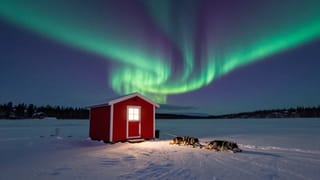
image_urls
Swap in your own when you run it.
PromptEN261 characters
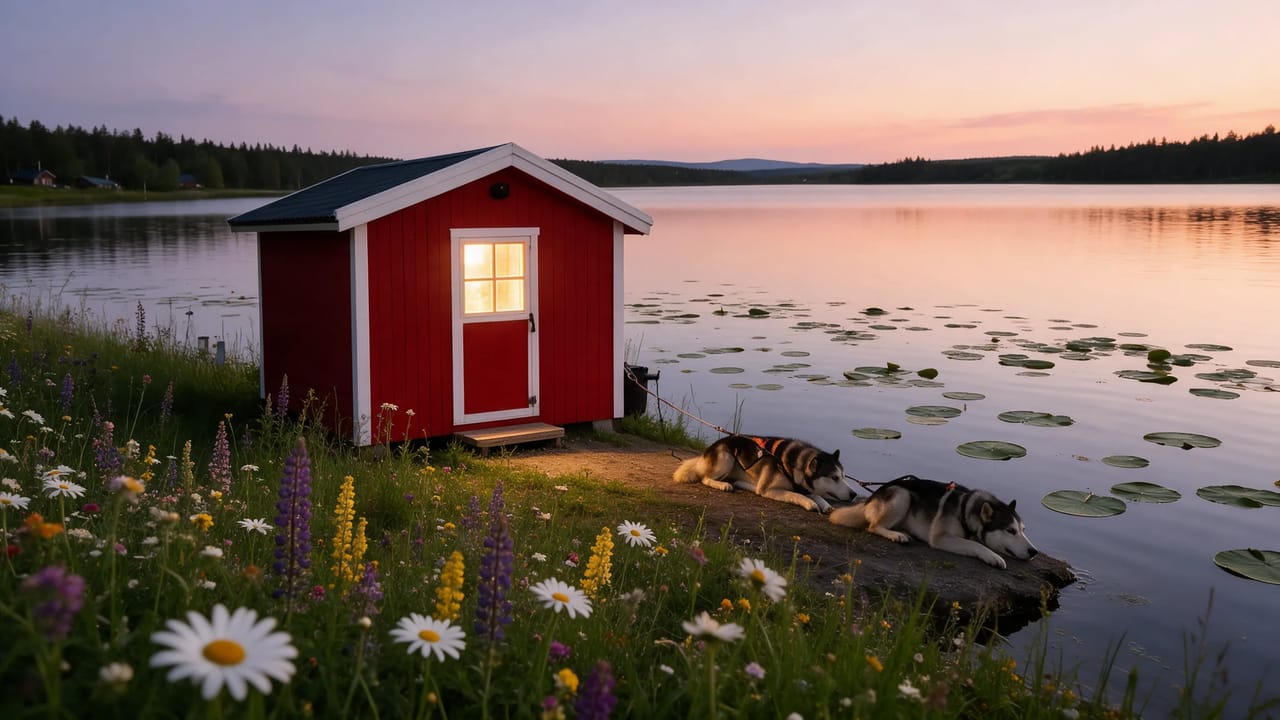
Keep the cabin, the lakeshore and the composition exactly as they are. Change the season from a frozen winter night to a midsummer evening: open water with lily pads, wildflowers along the shore, a warm peach sky, the windows still glowing. Change nothing else.Written in English, exactly as we sent it.
Run this example
Checking the price…
Opens the playground with every setting filled in and shows the exact price before you run.
Same model, starting from this prompt. Other settings use their defaults.
Why this prompt works
The prompt fixes the cabin and lakeshore and swaps only the season: a frozen aurora night becomes a midsummer evening with open water, lily pads and wildflowers, while the window stays lit as before. `aspect_ratio` is 16:9, `output_format` png, `resolution` 2k. The huskies from the source carry over untouched.
Settings used
| Setting | Value | What it does |
|---|---|---|
| resolution | 2k | 1k, 1.5k or 2k; 2k by default. The tier sets both the pixel count and the price band, so it is not just a sharpness knob: 1.5k carries roughly twice the pixels of 1k and costs less than 2k. |
| aspect_ratio | 16:9 | auto by default: the output takes the supported ratio closest to the first reference image, so a portrait source stays a portrait. Name one of the fifteen fixed ratios, from 1:3 to 3:1, when the placement dictates the shape. |
| output_format | png | jpeg by default, or png. png is lossless and the safer handoff into further retouching; it changes only the delivered file, not the image that was generated. |
More Seedream 5.0 prompts
All Seedream 5.0 prompts Preview blurred
 Preview blurred
 Preview blurred