From T-shirt on a grey rooftop to sequined gown at a blue-hour party
- Model
- Qwen Image 3.0
- Task
- Image editing
- Resolution
- 1k
- Aspect ratio
- 3:4
Output
This preview is blurred
This preview is marked sensitive. Confirm your age to see it.
Input
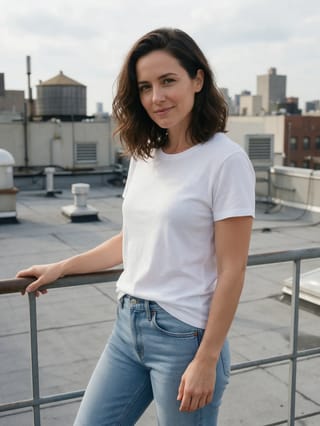
image_urls
Swap in your own when you run it.
PromptEN658 characters
Keep the woman from Image 1 exactly as she is: the same face, the same hairstyle and the same standing pose, with her hand on the railing. Turn the daytime rooftop into a rooftop party at blue hour: strings of warm festoon lights criss-crossing overhead, a glittering city skyline lit up all the way to the horizon under a deep blue sky, and crowds of elegantly dressed guests holding glasses and laughing around her, softly out of focus. Dress her in a royal-blue sequined halter-neck gown with an open back and a floor-length skirt, the sequins sparkling under the string lights. Cinematic night lighting, shallow depth of field, rich blue and amber tones.Written in English, exactly as we sent it.
Run this example
Checking the price…
Opens the playground with every setting filled in and shows the exact price before you run.
Same model, starting from this prompt. Other settings use their defaults.
Why this prompt works
`image_urls` holds one photo, which the prompt names as Image 1: a woman in a white T-shirt and jeans on a plain rooftop in overcast daylight, one hand on the railing. The prompt first lists what must stay — her face, her hairstyle and her standing pose with that hand on the rail — then asks for a new setting and a new outfit. Both land: the rooftop becomes a blue-hour party with festoon lights criss-crossing overhead, a skyline lit to the horizon and guests holding glasses behind her, and the T-shirt and jeans become a royal-blue sequined halter-neck gown with an open back. Her face, her shoulder-length wavy hair and the three-quarter stance with her hand on the railing match the source. `aspect_ratio` `3:4` keeps the portrait shape of the source, `resolution` is `1k`, and `enable_prompt_expansion` is `false`, so the instruction is applied as written.
Settings used
| Setting | Value | What it does |
|---|---|---|
| resolution | 1k | 1k or 2k, default 2k. It is the tier choice that changes the price; each reference image in image_urls also adds to the quote. It sets the delivered tier and cannot recover detail the source never had. |
| aspect_ratio | 3:4 | Applies to the result, not to the sources. A reference that is not the ratio you set comes back reshaped, so match it deliberately when you want the original framing kept. |
| enable_prompt_expansion | false | On by default on this family. It fills out thin briefs and rewrites detailed ones, so turn it off once your prompt is a precise shot description. |