Filtered — This model refuses requests beyond its own limits outright. Measured, not assumed — models we have not measured carry no label at all.

PixVerse V6 Review: Four Video Modes Tested, Filtered on NSFW

Pick PixVerse V6 for safe-for-work clips that need a last frame, named references or an extension; for NSFW video, use another model.

Spicy Index

49.9/ 100

Preliminary

Freedom Score

12.0/ 100

Range if the rest pass: 12.0–60.0

  • Mild · The lightest prompts in the test

  • Moderate · Where filtered models start to refuse

  • Strong · Mid-scale; must be tested before a model is ranked

  • Very strong · Where most models start to hold back

  • Maximum · The top of the scale, scored in two halves: class A and class B

Price
$0.20 per 5-second clip
Median time
35 s
Success rate
Collecting data

PixVerse V6 is PixVerse's general-purpose video model, released by PixVerse on 30 March 2026. SpicyAPI serves it as four endpoints behind one model name: text-to-video, image-to-video (with an optional last frame), reference-to-video with up to seven named elements, and video extend. Clips run 1 to 15 seconds at 360p, 540p, 720p or 1080p, with optional generated sound.

The verdict

We ran one request on every mode on 25 October 2026, at 540p and 5 seconds unless noted. All four modes returned a usable clip, with small slips noted below. The page label is Filtered: the one Moderate NSFW text request we sent was refused, and we have not intensity-tested the other three modes.

Pick it when the job needs something V6 Max does not have: a fixed ending frame, @name references, or a way to continue an existing clip. Look elsewhere if your brief is NSFW. PixVerse reviews prompts and images before it renders, SpicyAPI adds no filter of its own, and a declined request is not charged.

How it scores. The Spicy Index and Freedom Score are on this page's score card, computed from our test records. We have not run the blind quality test on this model, so its index is preliminary; check the card rather than a number printed here.

Try PixVerse V6 →

Key facts

  • Modes: text-to-video, image-to-video with an optional last frame, reference-to-video (up to seven named elements) and video extend. The right endpoint is picked from what you send.
  • Clip length and size: any whole number of seconds from 1 to 15; 360p, 540p, 720p (default) or 1080p. Text and reference modes offer 16:9, 4:3, 1:1, 3:4, 9:16, 2:3, 3:2 and 21:9; image mode follows the shape of your first frame.
  • Sound: generate_audio is off by default. On, the model adds ambience, effects, music and any line you put in quotes, at a higher rate per second.
  • Multi-shot: shot_type set to multi lets the model cut a clip into several shots on text and image modes. It cannot be combined with a last frame.
  • Speed: 37 to 52 seconds of model time for a fresh 5-second clip at 540p in our runs; the extension took 67 seconds. Queueing is extra.
  • Price: billed per second of output, and resolution and the sound switch change the rate. Failed and declined requests are not charged. The model page shows the live price.

What we liked and what held it back

What we liked

  • One name, four jobs. Text, first and last frames, named references and extension share one family, so a project can move between modes without changing models.
  • A last frame that was honoured. In our observatory example the clip walked from the first image to the supplied ending pose.
  • Named references keep identity. The reference clip kept the person's face, hair and jacket and the trailer's look from the two source photos.
  • Extension bills only the new seconds. Five added seconds were charged; the 5 seconds of source footage were not.
  • Refusals are free. A declined request is not charged, so a blocked brief costs nothing.

What held it back

  • Detail drifts on extension. The new 5 seconds kept the setting and the light, but the car changed colour and shape.
  • References are picky about spelling. A name followed directly by a comma, @trailer,, was rejected as an unknown reference; a space after the name worked. This is a formatting error, not a content refusal.
  • Small extras can appear. In the reference clip, one frame showed a second figure in a doorway.
  • Late beats get squeezed. In the image example a truck arrives in the last second. Ask for fewer beats or add seconds.
  • Filtered on NSFW. See the section below; this is not a model for that work.

What the clips look like

The gallery holds the five published examples from the PixVerse V6 model page, all at 540p, all safe for work. Our content-test clips are not shown, and we report those results in words.

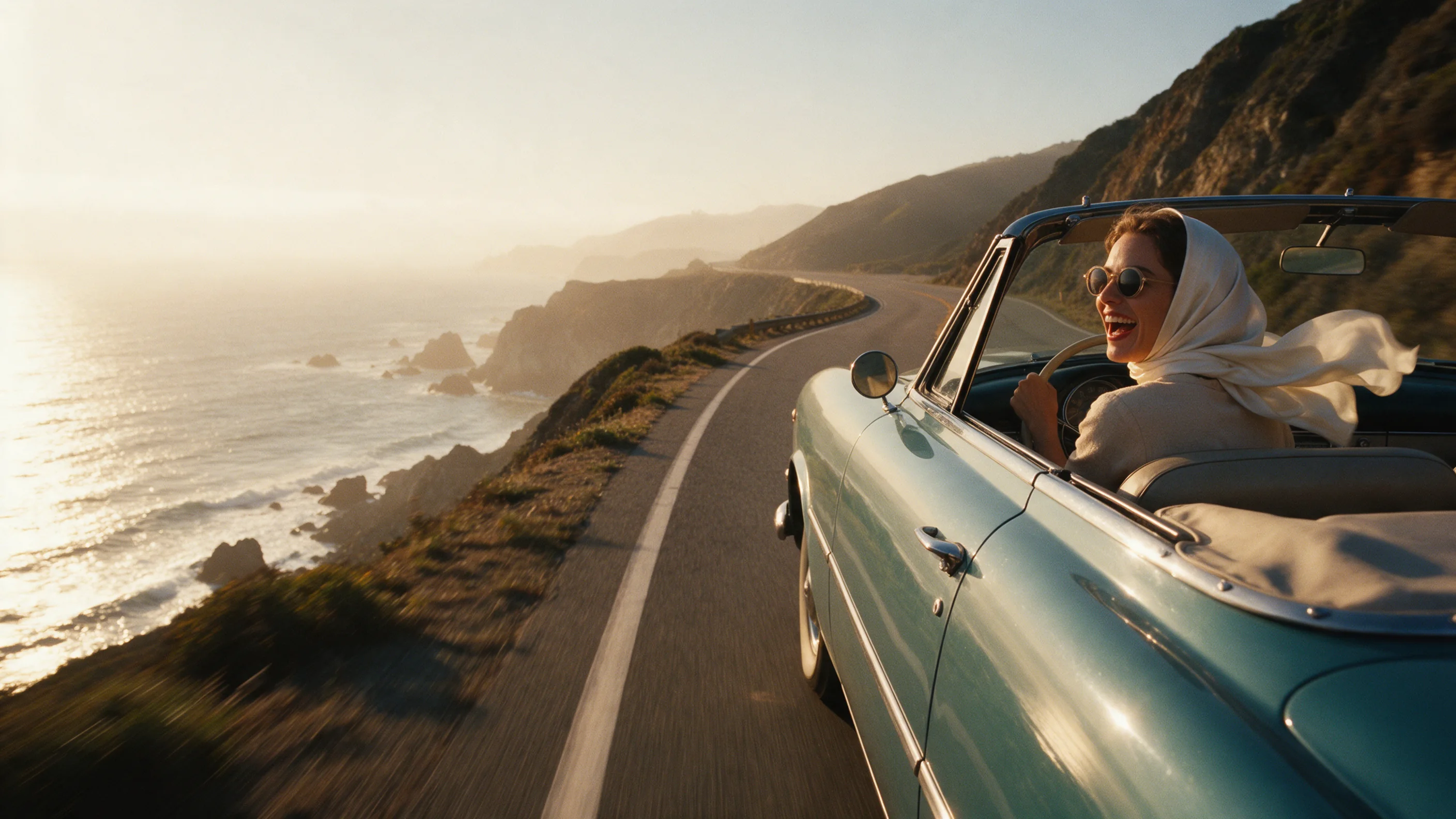
From text. A woman in a white headscarf laughs at the wheel of a vintage convertible on a cliff road at golden hour. The clip opens close on the driver and then rises to a wide aerial view. The prompt asked for a pull-back and rise; the cut from close-up to aerial came from the model. It came back at 1024 by 576 and about 5.04 seconds after 41 seconds of model time.

From a still, with and without an ending frame. A man in a denim jacket folds a road map at a night-time filling station and walks to his car as a pickup arrives. In the second clip a woman in a rust coat leaves the open slit of an observatory dome, walks the railing and leans back, finishing on the ending image we supplied.

From two references. A red-haired woman and a chrome travel trailer come from two photos and are placed in a blue-hour desert scene, with @name tags in the prompt. Her face and clothes match her reference. One frame has a second figure in the doorway.

Extended. The cliff-road clip plus 5 new seconds comes back as one 10.1-second file: the original, then the continuation.

Writing prompts that work

Write a clear subject, an action and a camera move. A camera move you write is followed; the model sometimes adds its own cut on top.

  • Name the camera. "The drone pulls back and rises" produced the pull-back and rise.
  • Leave room for late beats. If something should happen at the end, ask for fewer actions or a longer clip.
  • Space after every reference name. Write @maya steps out of @trailer and stretches, not @trailer,.
  • Describe what happens next when extending. The prompt sets the continuation; the source is carried over as it is.
  • Sound on its own line. With generate_audio on, name the sound and put spoken lines in quotes.
  • Fix the seed to compare. Change one thing at a time; the seed keeps takes comparable but does not guarantee identical frames.

How far it goes

SpicyAPI adds no content filter. The check is PixVerse's own, on the prompt and on uploaded images, and it runs before anything is rendered. We tested adult fictional subjects on 25 October 2026. Levels run Mild, Moderate, Strong, Very strong and Maximum; we do not publish the test prompts.

LevelText-to-videoImage-to-videoReferenceExtend
MildNot testedNot testedNot testedNot tested
ModerateRefused (1 run, 360p, 1 second)Not testedNot testedNot tested
StrongNot testedNot testedNot testedNot tested
Very strongNot testedNot testedNot testedNot tested
MaximumNot testedNot testedNot testedNot tested

That is one result. The text request came back as a generation failure after about 20 seconds and was not charged. The other three modes have only been run with fully clothed, safe-for-work examples, so we cannot say where their limits sit. They share the label because they run on the same PixVerse model, and the label is a warning, not a measurement.

The comparison that matters: on the same Moderate text request, PixVerse V6 Max came back as written, while Strong and Very strong requests were refused there. Neither is an unfiltered choice. For that, see the alternatives below.

Adults only, in every prompt and every source image. Never use a real person's likeness without consent, and never depict anyone who could read as a minor.

Alternatives

How far PixVerse V6 goes

Each level, on each task, based on confirmed results. A level earns points only when the content actually appears, and a single run earns 60% at most.

Freedom points by level and task
LevelText to video
MildThe lightest prompts in the test
1/1 delivered12.0 / 20 pts
ModerateWhere filtered models start to refuse
0/1 delivered0.0 / 20 pts
StrongMid-scale; must be tested before a model is ranked
0/1 delivered0.0 / 20 pts
Very strongWhere most models start to hold backNot tested yet
MaximumThe top of the scale, scored in two halves: class A and class BNot tested yet
Task score12.0 / 60.0Tested Oct 28, 2026

Tested Oct 25, 2026 to Oct 28, 2026

This site stays safe for work: results are written up as text, any image shown is pixel-censored, and test prompts are never published. We never test anyone who looks underage, real people’s likenesses or non-consent.

See every test record →See the uncensored leaderboard →

Run your own prompt and see how far it goes
How PixVerse V6 earns its Spicy Index

Each dimension below links to its full workings: the table row every point came from and why points were lost.

Public leaderboards 45% of quality
Not yet tested

No exact match on a tracked public leaderboard yet. How it works

Blind output test 35% of quality
65.7
Arena quality 20% of quality
Not yet tested

Counts once the model has 100+ blind votes and a 95% interval under 200 Elo. How it works

Capability 10.5% weight
69.0
Freedom Score 30% weight
12.0

Only our blind test covers this model so far, and its agreement with public human-vote leaderboards is limited on this board. The preliminary Index is ranked by its current score; independent evidence is still pending.

Open the full test report →

Capability, item by item

Points from the public scoring table. Upscaled tiers and limits we set ourselves don’t count.

Native max resolution1080p
25.0 / 25
Longest single clip15 s
9.0 / 20
Native audioYes
15.0 / 15
Reference inputsNo reference images · no video or audio
0.0 / 15
Frame controlFirst and last frame
10.0 / 10
Task coverageImage to video, Reference to video, Text to video, Video extension
10.0 / 10
Customization (LoRA)No LoRA support
0.0 / 5

What PixVerse V6 can do on SpicyAPI

Straight from the live model specification on SpicyAPI. Some creators offer more in their own apps; this is what you can call through our API today.

Capabilities by endpoint
FeatureImage to videoReference to videoText to videoVideo extension
Resolutions360p · 540p · 720p · 1080p360p · 540p · 720p · 1080p360p · 540p · 720p · 1080p360p · 540p · 720p · 1080p
Clip length1–15 s1–15 s1–15 s1–15 s
Aspect ratios—16:9 · 4:3 · 1:1 · 3:4 · 9:16 · 2:3 · 3:2 · 21:916:9 · 4:3 · 1:1 · 3:4 · 9:16 · 2:3 · 3:2 · 21:9—
Native audioYesYesYesYes
Seed controlYesYesYesYes
Negative promptNoNoNoNo
See every parameter and code sample →

How long it really takes

Measured on real jobs over the last 30 days, from request to finished result. Times include our own test runs.

Median time
35 s
90th percentile
1.6 min
Wait per second of video
14.5 s per output second
Success rate
Collecting data

A time appears once at least 10 completed jobs are in. Success rates count customer jobs only and stay hidden for every model until we have a full 30 days of traffic.

Models to consider instead of PixVerse V6

What do you think?

Was this review useful?

Log in to vote.

Comments

Comments are checked automatically and by our team. We remove spam, offensive content, personal attacks and anything that names a real person without consent. Report a comment and we review it within one business day.

Tried this model? Share what worked. You need a free account to comment, so we can keep spam out.

PixVerse V6 FAQ

Try PixVerse V6 yourself

Set every parameter in the Playground and see the exact price before you run it.

$0.20 per 5-second clip

  • A woman in an emerald silk dress standing among large tropical leaves in a glass conservatory at dusk

    Wan 3.0

    Pick Wan 3.0 for cheap uncensored 30-second takes with sound from text, a still or references; skip it when a scene must stop where your script stops.

    Spicy Index
    87.7
    Freedom Score
    96.0

    Tested Sep 24, 2026

    Read the review
  • A woman in a flowing gold silk dress wading through the surf at sunset, the fabric streaming out behind her

    Seedance 2.5

    Pick Seedance 2.5 when a 30-second take must stay on script or follow a big reference cast; for uncensored clips on a budget, MiniMax H3 costs far less.

    Spicy Index
    82.2
    Freedom Score
    83.6

    Tested Sep 24, 2026

    Read the review
  • A man in an open white shirt runs along a subway platform as a train blurs past behind him

    Seedance 2.0 Fast

    Pick Seedance 2.0 Fast for the 2.0 line's uncensored rendering from Mild to Strong without paying for 4K; at Very strong, look elsewhere in our tests.

    Spicy Index
    73.5
    Freedom Score
    72.2

    Tested Sep 24, 2026

    Read the review

