PixVerse V6 Effects Review: 50 Photo Templates Tested, Filtered on NSFW
Pick PixVerse V6 Effects for quick themed clips from one photo; it is not a prompt-driven model, and we have not tested NSFW levels on it.
Freedom Score
Not yet tested
- Price
- $0.20 per 5-second clip
- Median time
- 1.6 min
- Success rate
- Collecting data
PixVerse V6 Effects turns one photo and one of 50 PixVerse effect templates into a short themed clip. SpicyAPI serves it as one endpoint, image-to-video, where preset picks the template by name. The template sets the length and the motion; you choose the resolution (360p to 1080p) and whether the clip has sound.
- SpicyAPI Engineering
- Tested Oct 25, 2026
- Methodology v3.3 →
- We sell these models; scores ignore price →
What PixVerse V6 Effects made in our tests
Straight from our test runs. Copy a prompt or open it in the playground to try it yourself.
Make your own with PixVerse V6 Effects
The verdict
We ran a batch on 25 October 2026 at 540p with sound off: more than forty templates, each on a fresh photo. Every one we archived came back as a clip. We did not run the three templates that take two photos. The page label is Filtered, and we have not intensity-tested this model at all, so we make no claim about where its limits sit.
Pick it when you want a ready-made scene such as a goal celebration, a product showcase or a dance, with no prompt writing. Pick PixVerse V6 when you want to describe the shot yourself.
How it scores. The Spicy Index and Freedom Score are on this page's score card, computed from our test records. We have not run the blind quality test on this model, so its index is preliminary; check the card rather than a number printed here.
Key facts
- Templates: 50, picked by name with
preset. Sports celebrations, product showcases, dance, greetings and transformations are the main groups. A few examples: Knee Slide, Epic Save, Trophy Celebration, World Champion Lift, Product Landmark, Summer Postcard, Dai Dai Dance, Apex Dance, Magma Rise and Cyber Armor: Reborn in the Rain. - Photos: one for 47 templates, two for three of them. JPG, JPEG, PNG or WebP, up to 20 MB each.
- Length and shape: set by the template. The previews on the model page run from about 5 to 27 seconds. There is no duration or aspect ratio field.
- Prompt: optional, up to 5,000 characters, a nudge on top of the template. Leave it out and a neutral default is sent.
- Sound: off by default. On, it costs more per second.
- Speed: 36 seconds of model time for Knee Slide at 540p; across the batch most templates took roughly half a minute to a minute and a half. Queueing is extra.
- Price: billed per second of the clip the template delivers, at the same per-second rates as V6. The quote holds the 30-second maximum until delivery, then releases the difference. Failed and declined requests are not charged. The model page shows the live price.
What we liked and what held it back
What we liked
- No prompt needed. One photo and a template name is a complete request.
- Predictable cost per clip. A 5-second template is about five seconds of billing; a long one costs more, and the exact length is known only on delivery.
- The batch ran clean. Every template we archived returned a clip.
- Identity held on a simple template. In the dance template we reviewed, the person's outfit and face stayed steady through the motion.
- Free when it fails. A declined or failed request is not charged.
What held it back
- You do not control length or shape. A template can run 5 seconds or 27, and frame size varies: Knee Slide came back at 768 by 1024 and Summer Postcard at 1232 by 1648 in our runs.
- Scene-changing templates take liberties. Several templates cut between settings or restyle the person. On a racing-themed template the people looked different from the source photo by the end, and sign lettering in the background came out garbled. Check likeness and any text before you publish.
- Two-photo templates are untested. Three templates need two photos; we did not run them.
- Content limits are unknown. We only ran templates intended for page-safe use. Nothing here tells you how the model reacts to stronger requests.
- A lot is fixed. Because the template sets the motion, your prompt can nudge a clip but not redirect it.
What the clips look like
The gallery holds the published example from the PixVerse V6 Effects model page, safe for work. Our batch clips are not shown; we describe them in words.
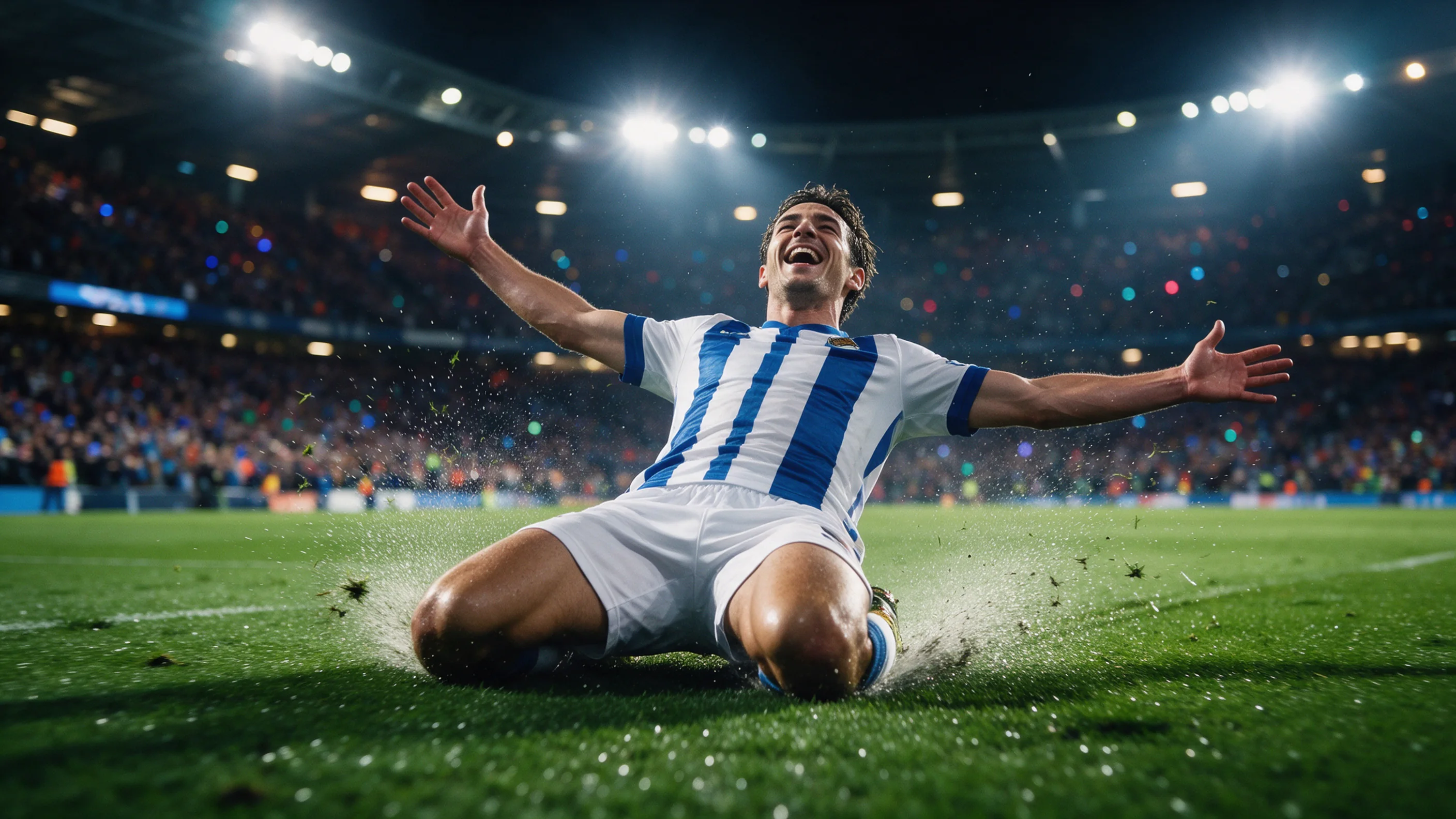
Knee Slide. A waist-up studio portrait of a smiling man in a tan shearling jacket becomes a 5-second goal celebration: he is placed on a stadium pitch in football shorts and socks and slides on his knees with his arms spread wide, crowd and floodlights behind him. It came back at 768 by 1024 after 36 seconds of model time, with the prompt "Knee slide goal celebration."
Dance templates. Apex Dance kept a model in a blue satin suit steady against a plain backdrop while the pose changed from frame to frame.
Product templates. Nail Lab, a close-up of a hand with tiny workers on the fingertips, rendered as a small diorama rather than a literal product shot. Expect a template's own idea, not your brief.
How far it goes
SpicyAPI adds no content filter. PixVerse checks prompts and images itself before it renders, and a declined request fails and is not charged. We did not intensity-test this model: Mild, Moderate, Strong, Very strong and Maximum are all untested here, and we do not publish test prompts.
What we can say comes from the shared model. PixVerse V6 refused the one Moderate text request we sent it, and the page carries the same Filtered label. PixVerse V6 Max went further on text but still refused Strong and Very strong requests. Treat Effects as a tool for page-safe clips, not for NSFW work.
Use photos you have the right to use and get consent from anyone who appears in them. Adults only; never anyone who could read as a minor.
Alternatives
- Describe the shot yourself? PixVerse V6 takes text, a last frame, named references and extension.
- Higher picture quality from text or one image? PixVerse V6 Max; see the PixVerse V6 Max review.
How PixVerse V6 Effects earns its Spicy Index
Each dimension below links to its full workings: the table row every point came from and why points were lost.
- Public leaderboards 45% of quality
- Not yet tested
- Blind output test 35% of quality
- Not yet tested
- Arena quality 20% of quality
- Not yet tested
- Capability 10.5% weight
- 42.5
- Freedom Score 30% weight
- Not yet tested
No exact match on a tracked public leaderboard yet. How it works
Not in our blind output test yet. How it works
Counts once the model has 100+ blind votes and a 95% interval under 200 Elo. How it works
Freedom evidence is untested or insufficient. The Index retains the original quality and capability score, is marked preliminary and still receives a rank. Missing evidence is not zero. How it works
Freedom evidence is untested or insufficient. The Index retains the original quality and capability score, is marked preliminary and still receives a rank. Missing evidence is not zero.
Open the full test report →Capability, item by item
Points from the public scoring table. Upscaled tiers and limits we set ourselves don’t count.
- Native max resolution1080p
- 25.0 / 25
- Longest single clipFixed length
- 0.0 / 20
- Native audioYes
- 15.0 / 15
- Reference inputsNo reference images · no video or audio
- 0.0 / 15
- Frame controlNo frame control
- 0.0 / 10
- Task coverageImage to video
- 2.5 / 10
- Customization (LoRA)No LoRA support
- 0.0 / 5
What PixVerse V6 Effects can do on SpicyAPI
Straight from the live model specification on SpicyAPI. Some creators offer more in their own apps; this is what you can call through our API today.
| Feature | Image to video |
|---|---|
| Resolutions | 360p · 540p · 720p · 1080p |
| Native audio | Yes |
| Reference inputs | 2 |
| Seed control | Yes |
| Negative prompt | No |
How long it really takes
Measured on real jobs over the last 30 days, from request to finished result. Times include our own test runs.
- Median time
- 1.6 min
- 90th percentile
- 2.9 min
- Wait per second of video
- 11.3 s per output second
- Success rate
- Collecting data
A time appears once at least 10 completed jobs are in. Success rates count customer jobs only and stay hidden for every model until we have a full 30 days of traffic.
Models to consider instead of PixVerse V6 Effects
PixVerse
PixVerse V6
Describe the shot yourself?
- Spicy Index
- 49.9+7.4
- Freedom Score
- 12.0
- Price
- $0.20/ 5 s clip
PixVerse
PixVerse V6 Max
Higher picture quality from text or one image?
- Spicy Index
- 52.3+9.8
- Freedom Score
- 24.0
- Price
- $0.244+22%/ 5 s clip
What do you think?
Was this review useful?
Log in to vote.
Comments
Comments are checked automatically and by our team. We remove spam, offensive content, personal attacks and anything that names a real person without consent. Report a comment and we review it within one business day.
Tried this model? Share what worked. You need a free account to comment, so we can keep spam out.
PixVerse V6 Effects FAQ
Try PixVerse V6 Effects yourself
Set every parameter in the Playground and see the exact price before you run it.
$0.20 per 5-second clip
More reviews
See the leaderboards →
Wan 3.0
Pick Wan 3.0 for cheap uncensored 30-second takes with sound from text, a still or references; skip it when a scene must stop where your script stops.
Tested Sep 24, 2026
Read the review
Wan 3.0 Spicy
Choose Wan 3.0 Spicy when its unfiltered lean fits the shot; avoid it when wardrobe continuity is essential.
Tested Sep 30, 2026
Read the review
MiniMax H3 HighSpeed
Pick MiniMax H3 HighSpeed if you want 768p takes with sound that we saw come back as written at Very strong; for cheaper drafts or 2K, look at Lite or H3.
Tested Oct 27, 2026
Read the review