Celebrity Look-Alike (look-alike-v1) turns one portrait into a generated celebrity-look-alike image for $0.05 per request. The response is an image only: no celebrity ID field, no ranking, no similarity score. The image itself can be a two-panel layout with a printed headline, a celebrity name and a handwritten-style signature, and the lettering can come out garbled. Plan the share card around that, and never present the name as verified identification.
Look-Alike fits a voluntary entertainment feature: upload a selfie, get a shareable frame. It has no prompt, no target-person selector and no strength control, so use an image editor for a directed wardrobe change or a recurring fictional character.
Pick the right kind of "look-alike" API
Most look-alike tools are one of two other things. Face-recognition services and open-source projects convert a face to a vector, search a celebrity database and return names with scores. Consumer finders show percentages like "92% match" with no method behind them. Look-Alike does neither.
| You want | Use |
|---|---|
| A generated, shareable look-alike frame from one photo | Look-Alike |
| Ranked celebrity names or a similarity number | A recognition service or your own embedding search over a database you are licensed to hold; Look-Alike returns neither |
| One person's face placed on a target image you choose | A face-swap endpoint |
What the endpoint accepts
| Item | Current contract |
|---|---|
| Model ID | spicyapi/look-alike-v1/edit |
| Input | One image_url: JPG, PNG, WEBP or GIF, up to 10 MB |
| Price | $0.05 per request, charged even when you dislike the match |
| Not available | Prompt, celebrity target, seed, size, strength, similarity |
| Retention | Source images are deleted after 1 day, results after 14 |
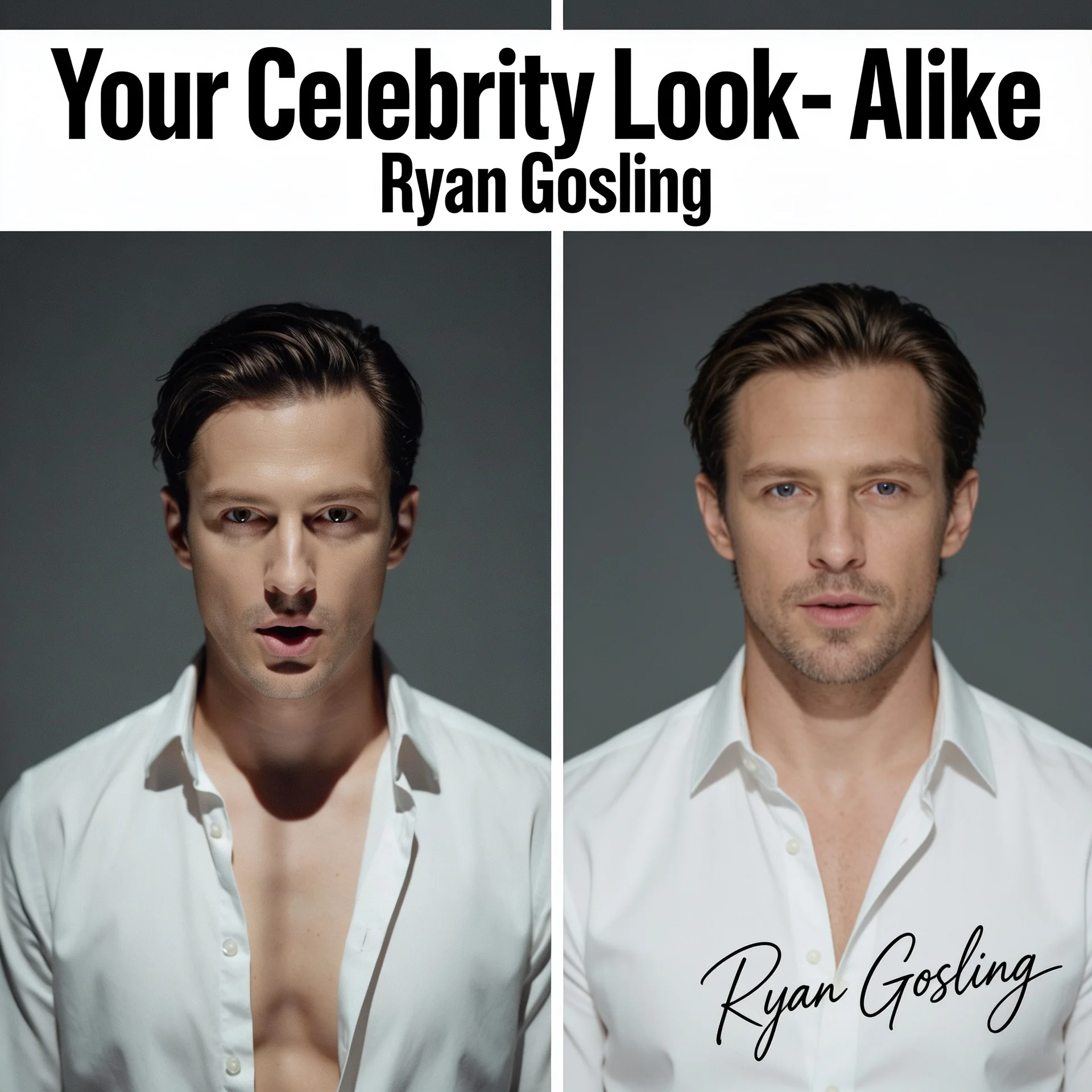
A Look-Alike example result from the model page: the returned image is a headlined two-panel collage with a real person's name printed in it, so a layout that assumes a clean single headshot will break.
The model-page example is a headlined two-panel collage with a printed name and a signature, so expect lettering and plan for it. Preview the actual export at your card size, keep its proportions (stretching it into a square distorts the faces), and if you crop out the lettering, remember the remaining face is still not a verified match.
Prepare the source photo
The model page names the failure cases: group shots, profile angles, sunglasses, hands or hair across the face, motion blur and very small faces degrade the match or make the call fail. Use a single, well-lit, roughly frontal face that fills a reasonable part of the frame, with both eyes and the hairline visible. Apply orientation and crop before upload, because a gallery thumbnail can ignore rotation metadata that your uploaded bytes still carry. Enlarging a tiny face from a group photo adds no detail; ask for a new photo instead.

Illustration, not a Look-Alike result: a roughly frontal adult portrait shows readable input framing.
Try it in the Playground first
- Open the Look-Alike page and stay on the Playground tab, in Form view. Sign in with a funded account to run.
- Drop a portrait of an adult who consented into Input image (JPG, PNG, WEBP or GIF, up to 10 MB), or paste a direct link with Asset URL. There is nothing else to set.
- Run it, then open the whole returned image and review it as described below.
Try your hardest source photo here before you write code: if the match is wrong in the Playground it will be wrong from the API, and the fix is a better photo.
Then call it from code
Install the Python SDK (pip install spicyapi), set SPICY_API_KEY in your server environment, and run:
import urllib.request
import uuid

from spicyapi import SpicyClient, output_assets

client = SpicyClient()  # reads SPICY_API_KEY from the environment

photo = client.upload_file("./authorized-adult-portrait.jpg")  # becomes a spicy:// URI

task = client.create_task(
    model="spicyapi/look-alike-v1/edit",
    input_data={"image_url": photo["uri"]},
    idempotency_key=str(uuid.uuid4()),  # new key per new request; reuse only to retry the same one
)

final = client.wait_for_terminal(task["taskId"])
if final["state"] != "succeeded":
    raise RuntimeError(f"Task {task['taskId']} ended as {final['state']}")

url = output_assets(final)[0]["url"]
# some script clients get 403 without a User-Agent
request = urllib.request.Request(url, headers={"User-Agent": "look-alike-example/1.0"})
with urllib.request.urlopen(request) as response, open("look-alike.webp", "wb") as out:
    out.write(response.read())
Send only image_url; extra properties such as a celebrity name are rejected. Uploads, waiting and retries are in the tasks guide and the Python SDK reference; for webhooks see the polling vs webhook guide. Results disappear after 14 days, so copy an image into your own storage if the user saves it.
Or let an Agent run it
When an assistant should run the requests, The CLI and MCP server show the price and ask you before a paid call; the Skill only adds instructions.
- CLI.
spicyapiruns one task from a terminal (npx @spicyapi/cliworks without installing). Put{"image_url": "spicy://..."}ininput.json, using the URI that the upload prints:
``bash spicyapi files upload ./authorized-adult-portrait.jpg spicyapi tasks create --model spicyapi/look-alike-v1/edit --input-file input.json --wait ``
- MCP server. Add the MCP server to your assistant, then ask: "Run Look-Alike on ./authorized-adult-portrait.jpg." It calls
spicyapi_upload_file, thenspicyapi_task_create, which stops for your price confirmation, thenspicyapi_task_wait. - Skill.
npx skills add spicyapi-ai/spicy-skillinstalls the Agent Skill, which has a coding assistant read the live model schema instead of guessing fields. It cannot run tasks by itself, so use it with the CLI or MCP.
Review the result before the share card
Open the whole returned image, not a face crop. Look for extra panels, headline text, real names, signatures, additional faces and a changed apparent age. Label the result Generated look-alike portrait. If you do not want the name shown, crop or cover the lettering; the remaining face is still not a verified match. Do not put "93% match" or "verified celebrity identity" beside it, and do not show a name extracted from the image by another model as if Look-Alike had assessed it. Embedded lettering is generated content and can be wrong.

Illustration, not a Look-Alike result: review the full image and anything around the face before choosing an export.
If the participant dislikes the image, offer to discard it or try another photo. Nothing steers the result toward a chosen celebrity, so a repeat is a new $0.05 candidate, not a refinement.
| Problem | Next action |
|---|---|
| Request rejected | Remove prompt, seed, size and name fields; send only image_url. |
| Source cannot be fetched | Replace a login page, expired URL or HTML response with a reachable image or spicy:// reference. |
| Face unclear or wrong person matched | Use a single-face crop from an adequate original, or ask for a clearer portrait. |
| Name or signature in the image you do not want to show | Hold the share and change the presentation; the name is not a response field you can request or remove. |
| Participant wants a specific character or outfit | Use a reference-capable image editor instead. |
| Download fails for a finished task | Retry the download; do not create a new request. |
Consent and sharing
The input is always a real person's face, so treat the feature like face recognition when you assess legal duties. Biometric data is separately regulated in the EU and parts of the United States; Illinois's BIPA, for example, requires written notice and informed consent before collecting biometric identifiers. Use photos of adults who knowingly agreed to this purpose, never photos of public figures or images taken from elsewhere, and do not use Look-Alike for identification, verification, surveillance or building a face database. Treat permission to generate as separate from permission to publish the source or the output.
Look-Alike runs without a safety checker, so your product has to enforce its own age and content rules. Do not use real-person portraits to make sexual, intimate or defamatory material, and do not present the result as a statement about a real person. A fully clothed adult chest-up portrait is the safe default input for a public entertainment feature.
Build a narrow flow: a private source preview, a processing state, the complete result, and an explicit save or share action. Do not publish automatically when generation finishes.