Use spicyapi/object-eraser-v1/edit with image_url and either a short prompt, a mask_url, or both. For a mask, white means remove; black means keep, and its pixel dimensions must match the source. The price is $0.03 per output image, however many objects the request removes. The result keeps the original canvas size and fills the selected area with surrounding scene content.
Choose a prompt or a mask
For a distinctive object with space around it, start with a short description:
the white paper cup on the floor beside the front right chair leg
Use a noun, a visible colour or material, and a position. "Make the scene clean and premium" does not identify what should disappear. The prompt can hold 1–1000 characters, but a longer brief is not a more precise selection.
| Situation | Input to use |
|---|---|
| One unmistakable cup on an open floor | prompt naming that cup |
| Two similar cups, only one unwanted | mask_url over the intended cup |
| Thin cable, or an object touching the frame edge | mask_url; descriptions often miss these |
| A description could point at the wrong object | Send both, describing and marking the same target |
| Need a transparent chair cutout | Background removal |
| Need more room around the photo | Outpainting after cleanup |
A description that matches nothing returns the image unchanged and the task still succeeds, so compare the output with the source before treating it as a removal.
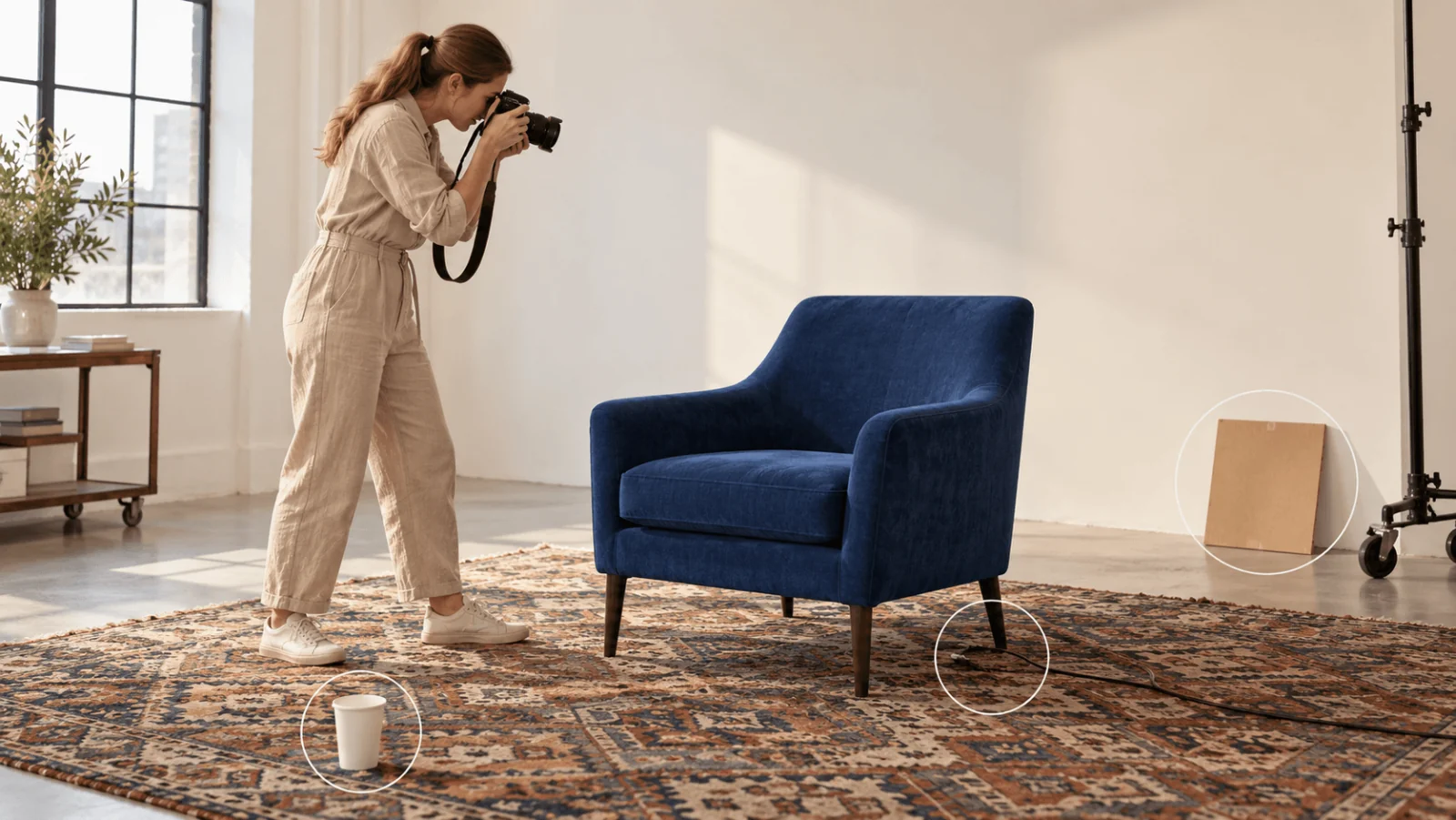
Illustration of potential selections. All marked objects are still present; this is not an API output.
Try it in the Playground first
- Open the Object Eraser page, stay on the Playground tab in Form view and sign in with a funded account to run.
- Add the photo under Input image (JPG, PNG or WebP, up to 10 MB). Drop a file, paste a link with Asset URL and Add URL, or browse.
- Either describe the target in Prompt, or add your black-and-white image under Mask, or fill in both. The form needs at least one of the two.
- Leave Output format on PNG (JPEG and WebP give smaller files) and run. The price is $0.03 per image.
- Open the result next to the original and the mask, and use the failure table below if something is left behind.
The Request body panel shows the same JSON the API takes, so a prompt or mask that works here can be copied straight into code. If it fails here, fix the prompt or the mask before you write a line of code.
Make the mask against the exact image you will submit
If you already know the region (a detector box or a UI selection), generate the mask in code. Its size comes from the source, so it always matches:
from PIL import Image, ImageDraw

src = Image.open("source.jpg")          # apply EXIF rotation and crop first
mask = Image.new("L", src.size, 0)      # black = keep
bbox = (src.width // 4, src.height // 3, src.width // 2, src.height // 2)
# Example coordinates only: adjust this box to the unwanted object in your photo.
ImageDraw.Draw(mask).rectangle(bbox, fill=255)  # white = remove
mask.save("mask.png")
For irregular shapes on a 2400×1600 source, prepare a 2400×1600 mask in an image editor:
- Finish the source's rotation and crop first, and save that working image.
- Add a black layer at full canvas size and lower its opacity while you draw so the target stays visible.
- Paint the cup white, including its unwanted edge and contact shadow, with a small margin where there is room. Keep the chair leg black.
- Set the layer back to full opacity and export it alone as an opaque black-and-white PNG, not a dimmed photo or coloured annotations.
- Overlay the exported mask on the working source and check the white region.
Matching aspect ratios are not enough: both files need the same width, height, crop and orientation. A slightly generous shape works where nothing else is nearby. The model page's own example mask for a rack at the frame edge is a black canvas the size of the photo with one plain white rectangle over the rack.
Shadows and reflections can sit outside the object's silhouette. Paint an unwanted reflection as its own white region. Where the cup's shadow overlaps the chair's grounding shadow, do not paint the whole dark patch white, or the chair can end up floating. The mask marks what to remove; it does not supply the hidden floor or product geometry.
Run large or overlapping removals as separate passes, building each mask on the accepted previous output. Two small objects in one request cost $0.03; two separate requests cost $0.06. Keep mask and image filenames paired so an older selection cannot silently edit a newer photograph.
Then run it from code
Install the Python SDK (pip install spicyapi), set SPICY_API_KEY in your server environment and run the request below; it uses the model page's own example photo, so it works as written. Files on your computer go through client.upload_file and come back as a spicy:// address. For a mask, add "mask_url" with your own file of the same pixel size as the photo.
import uuid
from spicyapi import SpicyClient, output_assets

client = SpicyClient()  # reads SPICY_API_KEY from the environment

task = client.create_task(
    model="spicyapi/object-eraser-v1/edit",
    input_data={
        "image_url": "https://cdn.spicyapi.ai/models/examples/inputs/fbc8d531c80e6d0d.jpeg",
        "prompt": "the wooden ladle lying across the sauna stones at the left",
        "output_format": "png",
    },
    idempotency_key=str(uuid.uuid4()),
)

final = client.wait_for_terminal(task["taskId"])
if final["state"] != "succeeded":
    raise RuntimeError(f"{task['taskId']} ended as {final['state']}: {final.get('errorCode')}")
print(output_assets(final)[0]["url"])  # copy the image to your own storage now
Uploads, creating, waiting, downloading, retries and error codes are covered in the tasks guide and the Python SDK reference. Generated files are kept for 14 days at most, so copy the result into your own storage.
Or let an Agent run it
When an assistant should run the edit, all three official tools show the price and ask you before a paid call.
- CLI. Upload the photo and mask, then create the task:
``bash spicyapi files upload photo.jpg spicyapi tasks create --model spicyapi/object-eraser-v1/edit --input-file input.json --wait ``
Put the returned spicy:// addresses in input.json as image_url and mask_url. See the CLI docs; npx @spicyapi/cli works without installing.
- MCP server. Add the MCP server to your assistant, then ask: "Remove the white paper cup from this photo with Object Eraser; the file is at /path/to/photo.jpg." It uploads the file with
spicyapi_upload_file, callsspicyapi_task_create, which stops for your price confirmation, thenspicyapi_task_wait. - Skill.
npx skills add spicyapi-ai/spicy-skillinstalls the Agent Skill, which has a coding assistant read the live model schema instead of guessing fields.
Fix the specific failure you see
Open erased.png next to the original and the mask. Check where the selection meets retained content first, then the centre of the fill.
| Result | What to change |
|---|---|
| Cup is still there after a prompt-only request | Switch to a mask over that cup. |
| Cable remains at the edge | Paint its whole visible length white on a full-resolution mask. |
| A faint outline remains | Extend the selection slightly past the object's edge, without covering neighbouring product edges. |
| Cup is gone but a dark oval remains | Add the cup's contact shadow to the mask, separately from the chair's shadow. |
| Part of the chair leg is rebuilt wrongly | Shrink the mask where it covers the leg. If the cup hides the leg itself, use another source photo. |
| The whole picture looks changed in a difference check | Align rotation and size first; compression noise alone is not an edit. Inspect fixed landmarks. |
| Request returns 400 | Check for a missing prompt and mask, or for fields the model does not have, such as strength, mask_blur or transparent_background. Nothing is charged for a rejected request. |
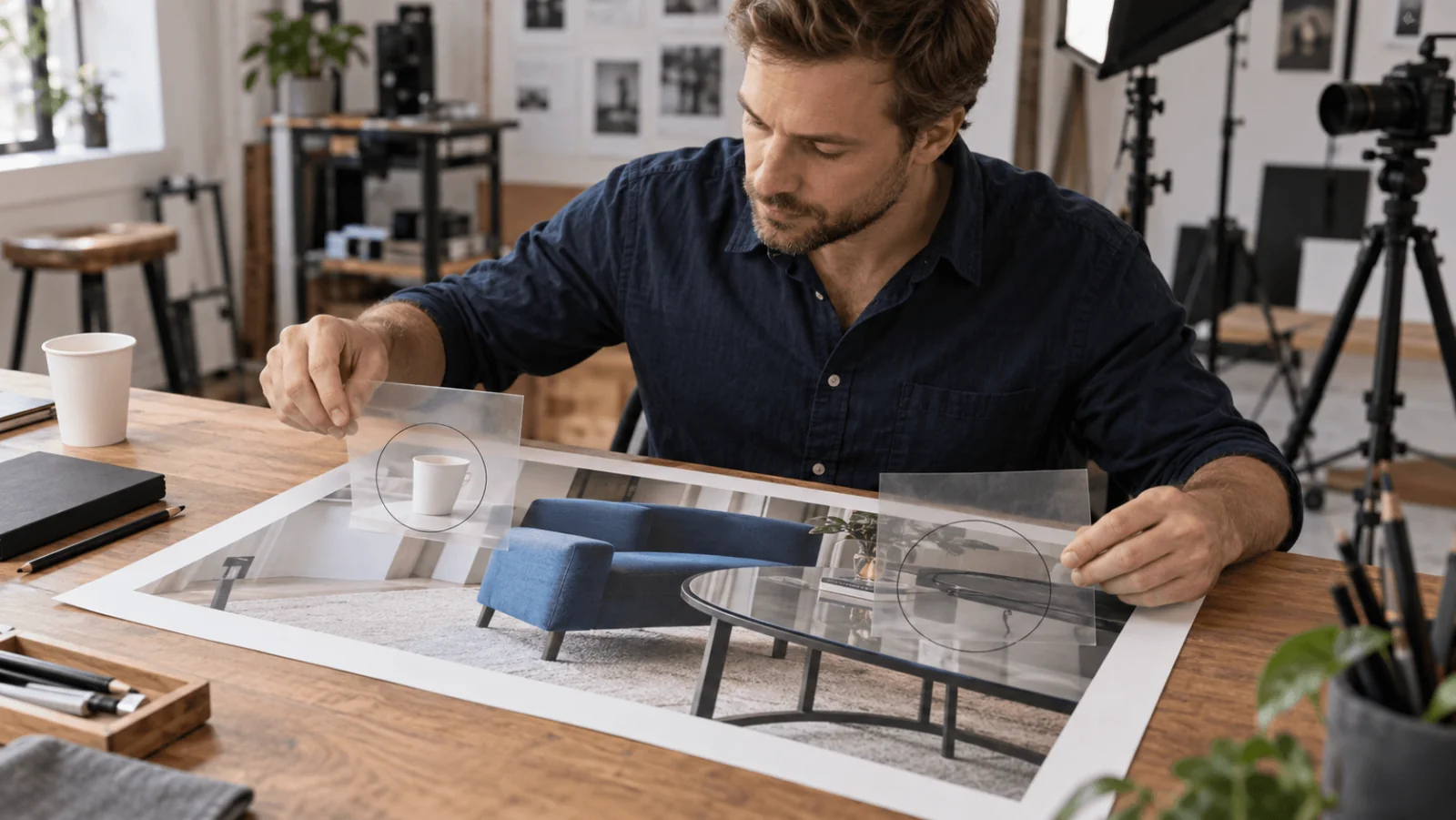
Illustration of shadow and reflection inspection. It does not show a completed removal.
The model rebuilds the hidden background; it cannot reveal what was really behind the object. For a product listing, do not accept an invented chair joint or changed upholstery seam because the floor looks cleaner. Reshoot when the removed object hides a detail the listing must show accurately.
SpicyAPI runs no safety checker on this model; the model itself decides what comes back.
Keep the source and mask with the accepted output, and add another pass only for a specific remaining object. The model page Examples tab shows real before/after results.