
A published Qwen Image 2.1 LoRA example: a style weight loaded through the loras field.
You have a trained .safetensors LoRA in a bucket or on a Hugging Face repo, and you want to use it without registering, uploading or waiting for approval. On Qwen Image 2.1 LoRA that is a request field: a URL and a strength number, fetched when the job runs. The model runs uncensored and the weights you point at are not reviewed.
That removes the upload queue and moves one dependency into your request path: the host that serves your weights. Below: how to try your file in the Playground, the code to run it, which bad links fail at once and which fail later, and what it costs.
Key takeaways
- A LoRA is a request field, not something you register.
lorastakes up to three{path, scale}entries; nothing is uploaded, scanned or approved. - Both endpoints take it, text-to-image and reference editing, so weights can also be applied to frames you already have.
- Some bad links fail at once, others only after the job is accepted. A web page instead of a file is a 400; a dead host or a link that expires later is accepted and fails afterwards, with the hold refunded.
- Loading is not the same as working. Compare against a run without the weights, same prompt and seed.
- The number of LoRAs does not change the price; on editing, the number of reference images does.
Try it in the Playground first
- Open the text-to-image page and stay on the Playground tab, in Form view. Sign in with a funded account to run.
- Write a prompt that describes the scene, not the style; let the weights carry the look.
- Under Style LoRAs, paste the direct file link into LoRA file and set Strength (1 is a normal start). Add item gives you up to three weights.
- Pick 1k for a cheap first look, then run the model.
- To see whether the weights did anything, set a Seed, run once, press Remove item, and run again with the same prompt and seed.
The Playground request body is the same JSON the API takes, so a setup that works here can be copied straight into code. If it fails here, fix the link or weights before you write a line of code.
Then run it from code
Install the Python SDK (pip install spicyapi), set SPICY_API_KEY in your server environment, and run:
import uuid
from spicyapi import SpicyClient, output_assets

client = SpicyClient()  # reads SPICY_API_KEY from the environment

task = client.create_task(
    model="alibaba/qwen-image-2.1-lora/text-to-image",
    input_data={
        "prompt": "A fishing harbour at first light, rowing boats at their moorings, "
                  "the far quay dissolving into mist over the water.",
        "loras": [{
            "path": "https://huggingface.co/your-account/your-style-lora/resolve/<commit-sha>/style.safetensors",
            "scale": 1,
        }],
        "aspect_ratio": "3:2",
        "resolution": "1k",
        "output_format": "webp",
    },
    idempotency_key=str(uuid.uuid4()),
)

final = client.wait_for_terminal(task["taskId"])
if final["state"] != "succeeded":
    raise RuntimeError(f"{task['taskId']} ended as {final['state']}: {final.get('errorCode')}")
print(output_assets(final)[0]["url"])  # copy the image to your own storage now
Creating, waiting, downloading, retries and error codes are covered in the tasks guide and the Python SDK reference. Results expire, so see retention and delivery before you build on the returned link.
Or let an Agent run it
When an assistant should run the generations, all three official tools show the price and ask you before a paid call.
- CLI. Put the same
inputobject ininput.json, then:
``bash spicyapi tasks create --model alibaba/qwen-image-2.1-lora/text-to-image --input-file input.json --wait ``
See the CLI docs; npx @spicyapi/cli works without installing.
- MCP server. Add the MCP server to your assistant, then ask: "Run Qwen Image 2.1 LoRA with this prompt and this weights link at strength 1." It calls
spicyapi_task_create, which stops for your price confirmation, thenspicyapi_task_wait. - Skill.
npx skills add spicyapi-ai/spicy-skillinstalls the Agent Skill, which has a coding assistant read the live model schema instead of guessing fields.
The loras array
loras takes up to three { "path", "scale" } entries on both endpoints, text-to-image and reference editing (1 to 10 images).
| Property | Value | Why it matters |
|---|---|---|
| Entries per request | Up to 3 | A fourth is rejected at once: loras: must contain at most 3 items |
path | Direct HTTPS link to a .safetensors file | Fetched at generation time, on every job, from wherever you host it |
scale | 0 to 4, default 1 | Strength against the base model; 1 is the usual starting strength. Above 4 is rejected |
- Use a file link, not a repository page. A Hugging Face repo URL or a
blob/main/...page is rejected. Use theresolve/...link to the file itself. - There is no registry. You never get an identifier for a weight and there is no "my LoRAs" list. The seed steadies a series but does not reproduce a frame, so store the
{path, scale}list, prompt, settings and task ID next to each output.
Choose weights documented as compatible with the exact task. The published Qwen Image 2.1 examples include 2512 generation adapters and Edit 2511/2509 editing adapters, so an older version in a file name does not by itself make it incompatible. Those older tasks are also available through Qwen Image 2512 LoRA, and our Qwen Image 2.1 LoRA guide covers which older files carry over.
Which bad links fail at submission
When you submit weights, the API tries the link. If the host answers and what comes back is not a file, you get a 400 before any task exists and before any funds are held:
Your path | Result |
|---|---|
Direct file link on a host that answers (a Hugging Face resolve/... link, your bucket) | Accepted |
| A file that returns 404 | 400: The LoRA link in loras does not lead to a file on <host>. Use the direct download link to the .safetensors file, not the model's web page |
A web page instead of a file (repository page, blob/ page, any HTML) | Same 400 |
| A Hugging Face path that is private or does not exist | 400: needs a sign-in on huggingface.co, so the model cannot download it |
A host that does not resolve, text that is not a URL, or a bare user/repo name | Accepted by the quote; may fail after acceptance |
| A link that works now and stops working later | Accepted; fails after acceptance |
Reference images on the editing endpoint get the same treatment: a missing image_urls file is a 400 naming the host.
The two accepted rows are the ones to guard against. A link that dies afterwards (an expired signed link, a repo that turns private, a renamed or deleted file) fails every request that references it, because the weights are fetched on every job. Based on our October 2026 test, a task whose weights host does not resolve was accepted and then failed quickly (about 3 seconds) with invalid_request; the hold was refunded (cost was 0, settled was true) and the message said a LoRA could not be loaded from the link provided. invalid_request is also what bad input returns, so the code alone does not point at the link, and with several weights the message does not name the entry. Set up the diagnosis before you need it: after an accepted quote, an invalid_request failure means check the weights URLs first.
Bisect with the array emptied
When an accepted task fails, send the same request once with loras empty and nothing else changed. Success points at the adapter, its loading or its interaction with the request; check the link, file format, compatibility and stack one at a time. A second failure makes the task's error code, source images and service status the next checks.
Keep one canary weight
Keep one small weights file you host yourself, never rotate, and whose effect is unmistakable, such as a strong stylistic weight. When a batch starts failing, run one generation with the canary. If it works, suspect your weights URL. If it also fails, check the task's errorCode and the service status before touching storage settings.
Check at deploy time, not per request
Run a free quote (spicyapi tasks quote --model alibaba/qwen-image-2.1-lora/text-to-image --input-file input.json) for every weights URL your configuration references, in your deploy pipeline and at service start. It catches clearly unusable links, not adapter compatibility. Do not quote before every generation; it adds latency and the link can still die a minute later.
Pin the address so it cannot move
- Hugging Face:
resolve/main/...follows a branch. Pin the commit:resolve/<commit-sha>/<file>.safetensors. - Your own storage: put a content hash in the key, such as
character-v7-4f9c81.safetensors, and never overwrite a key. - Expiring signed URLs: avoid them in long-lived configuration. For recurring jobs use a stable address, or mint a fresh link right before each submission that outlasts the job and any retries.
- Third-party repositories: authors can rename, gate or delete a repo at any time. If a file is load-bearing, copy it to storage you control, subject to its licence, and pin your copy.
Did the LoRA do anything?
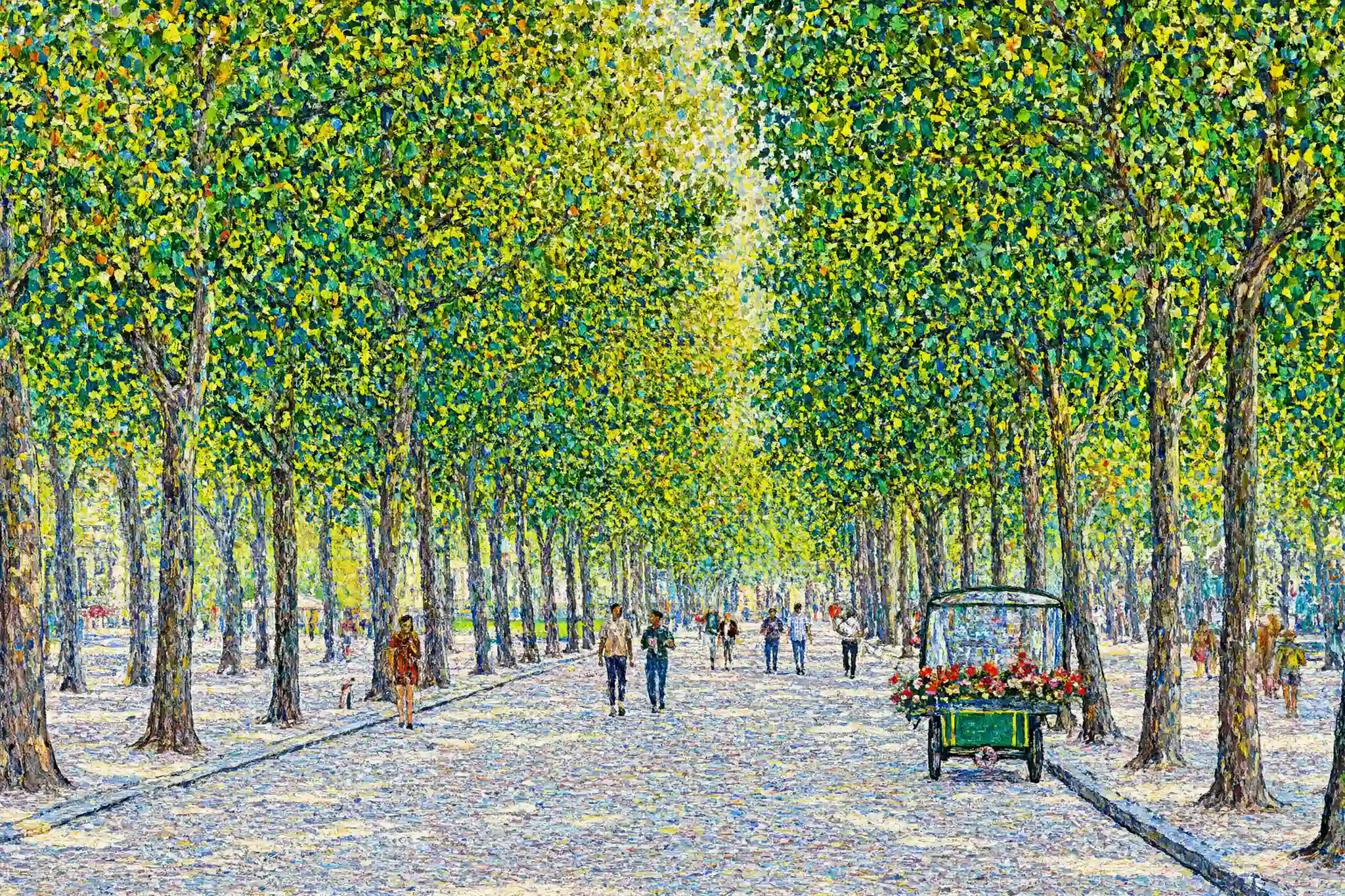
A published Qwen Image 2.1 LoRA style example. It shows what a style weight can do to a frame.
The response has no field saying your weights were applied, so judge it from the picture. A file can be fetched correctly and still change almost nothing, because of incompatible weights, a missing trigger phrase, weak scale or overlapping adapters.
- Pick a prompt whose failure is obvious: a subject the base model renders photographically, with a style the weight is meant to impose.
- Describe the scene, not the style. Ask for "loose impressionist brushwork" and the prompt alone produces it, so you will file the weight as working. Let the file carry the look.
- Run the same prompt and seed without weights and compare. If the result is indistinguishable, the comparison has not shown a visible adapter effect.
- Change one value at a time: scale 1, then 2, then 3. A weight that gets visibly stronger was just weak; one that stays inert at every step is probably built for another base. Also check the author's recommended base model and trigger words.
- Write the verdict next to the URL, and keep qualified and unqualified weights in separate lists.
The weights are fetched before generation, so a first call with a new file is slower by tens of seconds, more for larger files (about 25 seconds extra for a 1.2 GB file). Allow 90 to 120 seconds for the cold call.
Three slots
Three entries covers the usual stack: a character weight holding the person, a house-style weight at lower strength, a detail weight for skin or fabric.
- Move one scale per run. Change two and you cannot attribute the result.
- Give supporting weights room. A style weight at the same strength as the character weight tends to fight it; set the supporting entry well below 1.
- Do not restate in the prompt what a weight already carries.
- There is no negative prompt on this family. Put exclusions in the prompt.
What it costs
Prices are per image:
| Endpoint | 1k | 1.5k | 2k |
|---|---|---|---|
| Text to image | $0.03 | $0.054 | $0.102 |
| Editing, 1 reference | $0.042 | $0.078 | $0.15 |
- The number of LoRAs does not change the price. One entry and three quote the same.
- Loading weights carries a premium over the base model. Qwen Image 2.1 without the array is $0.024 at 1k and $0.048 at 2k, so a job that does not need weights should call the base family.
- On editing, every extra reference image adds a fixed amount: $0.012 at 1k and $0.024 at 2k.
| Editing request | 1k | 2k |
|---|---|---|
| 1 reference | $0.042 | $0.15 |
| 2 references | $0.054 | $0.174 |
| 5 references | $0.09 | $0.246 |
| 10 references | $0.15 | $0.366 |
In short: the request that costs the most is the one with many reference images at 2k, not the one with three LoRAs.
A hundred text-to-image frames cost $3.00 at 1k and $10.20 at 2k; a hundred edits with ten references at 2k cost $36.60. Iterate at 1k and promote keepers to 2k.
Editing with weights
Apply a character weight to a frame you already approved, with a house-style weight underneath at lower strength:
{
  "model": "alibaba/qwen-image-2.1-lora/edit",
  "input": {
    "prompt": "The source image is the character. Keep her face, her hair and the cut of the coat exactly as they are. Restage her on a wet city street at night, lit by shop windows from the left.",
    "image_urls": ["https://cdn.example.com/approved/frame-0412.png"],
    "loras": [
      { "path": "https://cdn.example.com/weights/character-v7-4f9c81.safetensors", "scale": 1 },
      { "path": "https://cdn.example.com/weights/house-grade-v2-0ab3de.safetensors", "scale": 0.45 }
    ],
    "aspect_ratio": "4:5",
    "resolution": "2k"
  }
}
Send it with the same code, using alibaba/qwen-image-2.1-lora/edit as the model. Copy field values from the live schema on the model page; the image generation guide explains how the image endpoints differ.
Uncensored and restricted-category weights
This family is uncensored: there is no maturity flag, no review of the weights you point at and no content scan added by SpicyAPI. Your obligations are unchanged: adults only, weights and training data you are entitled to use, no minors in any input or output, no non-consensual intimate imagery, and no deceptive impersonation of a real identifiable person.
Next steps
For the base model, see our Qwen Image 2.1 test; for editing with no mask field, our Qwen Image Edit test. The wider image model catalogue lists each model's live schema and estimate.
FAQ
Can I run my own LoRA on an API without uploading it?
Yes. loras takes up to three {path, scale} entries, where path is a direct link to a .safetensors file. There is no upload endpoint, approval queue or allow-list.
Does it accept Hugging Face links?
Yes, as https://huggingface.co/<user>/<repo>/resolve/<commit-sha>/<file>.safetensors. Repository pages, blob/ pages and private or missing paths are rejected.
Why did my LoRA request fail with no useful error?
Most often the path did not work after the task was accepted. A dead host, an expired signed link or a repository that turned private fails with invalid_request, which bad input also returns, so the code alone does not name the link. The hold is refunded. Bisect with loras emptied, or check the weights URLs first.
My LoRA barely changes the image. What is wrong?
Check its stated compatibility, trigger phrase and scale; then compare it alone, without the other entries. Older Qwen files are not all incompatible: several are used in this endpoint's published examples. Follow the scale steps above before discarding the file.
How many LoRAs can I stack, and does stacking cost more?
Three per request, each with its own strength. A fourth is rejected at once. One entry and three quote the same price, so choose the weights you need, not fewer. On editing, the number of reference images is what moves the price.
Can I use a LoRA when editing an existing image?
Yes. The edit endpoint takes the same loras array with one to ten reference images. Send the approved frame as the reference, say in the prompt what should change, and let the weights carry the identity.
What does scale do, and what should I set?
It weights the LoRA against the base model, from 0 to 4, with 1 as the usual starting strength. Below 1 seasons a look; above 1 lets a weight dominate.
How do I reproduce an image made with a particular stack?
Store the stack. There is no registry and the seed does not reproduce a frame, so keep the {path, scale} list, the prompt and the settings next to the output, with every path pinned to an address that cannot move.