You have an adult-oriented portrait and want a new outfit, light or room without losing the person.
Short answer: based on our September 2026 tests, the Qwen editors here are uncensored on our API. Edits at all five content levels (L1 Suggestive to L5 Extreme) came back as written on Spicy Edit, 2.1, 2.1 LoRA, 3.0 and 3.0 Pro. Qwen Image 2 did the same except at L4, where it toned down two of three edits. Check each result by looking at the image, not the status code.
Example: Qwen Image 2.1 got an L3 studio portrait with a red circle and one instruction, to put a small black rose tattoo inside the circle, erase the circle and change nothing else. The rose landed inside the circle, the circle was gone, and her face, hair and pose came back untouched. Price: $0.036.
The 30-second version
- Single-picture edits kept the person and overall pose recognizable in the examples here. That held for a new outfit, a tattoo and a new room. Both two-reference merge tests, on 3.0 and 3.0 Pro, came back with a younger, different face.
- The five editors that delivered every level cost $0.033 to $0.078 at the usual settings. Spicy Edit $0.038 flat, 2.1 $0.036, 3.0 $0.033, 3.0 Pro $0.043 at 1k and $0.078 at 2k, its default (3.0 and 3.0 Pro prices include one source picture). Two traps: 2.1 at 1.5k costs more than at 2k, and 2.1 LoRA at 2k costs $0.15.
- Among those five, pick on price, speed and inputs: 3.0 for the lowest price, 2.1 for a character built from up to ten pictures, Spicy Edit for one clean change to a picture you already like (about 20 seconds), 3.0 or 3.0 Pro when words in the frame matter. Qwen Image 2 and the cheaper 2512 LoRA editor without a LoRA both softened L4 requests.
How far each Qwen editor goes
L1 Suggestive · L2 Mature themes · L3 Strong · L4 Intense · L5 Extreme, in two kinds of brief: a consensual adult scene and a cinematic-violence scene. ✅ came back as asked · ⚠️ toned down · ❌ refused. Level definitions are on our methodology page.
| Editor | L1 | L2 | L3 | L4 | L5 |
|---|---|---|---|---|---|
| Qwen Image Edit Spicy | ✅ | ✅ | ✅ | ✅ | ✅ |
| Qwen Image 2.1 · edit | ✅ | ✅ | ✅ | ✅ | ✅ |
| Qwen Image 2.1 LoRA · edit | ✅ | ✅ | ✅ | ✅ | ✅ |
| Qwen Image 3.0 Pro · edit | ✅ | ✅ | ✅ | ✅ | ✅ |
| Qwen Image 3.0 · edit | ✅ | ✅ | ✅ | ✅ | ✅ |
| Qwen Image 2 · edit | ✅ | ✅ | ✅ | ⚠️ 2 of 3 toned down | ✅ |
Qwen Image 2's two toned-down L4 edits came back as a milder version of the scene, still a finished image, so check every L4 result on it. Uncensored on our model pages means we put no content filter of our own in front of the model. Full ladders: Spicy Edit · 2.1 · 2.1 LoRA · 3.0 · 3.0 Pro · Qwen Image 2.
What the edits actually look like
The circle pair below is cropped and pixelated by us; the other pairs are shown as the models returned them.
L3 Strong. The circle edit from the top of this page: the tattoo is the only new thing in the frame.
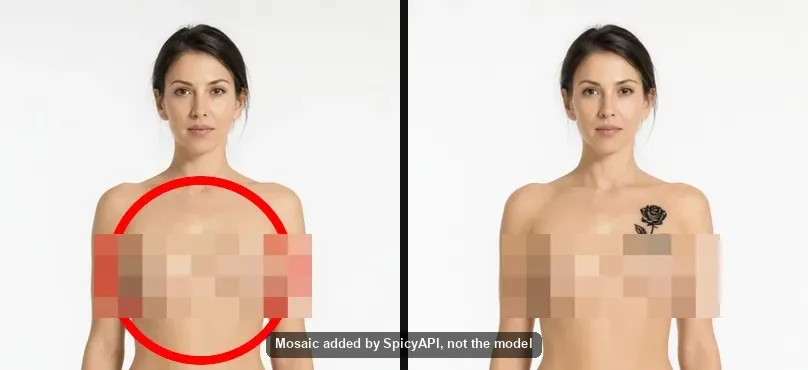
L4 and L5. From that L3 source, 2.1 added a second adult at L4 and returned exactly what we asked, nothing covered or cropped away. 2.1 LoRA, 3.0, 3.0 Pro and Spicy Edit did the same, and at L5 (both kinds of brief) all six editors in the grid returned every element we named. Qwen Image 2's exception was L4, not L5.
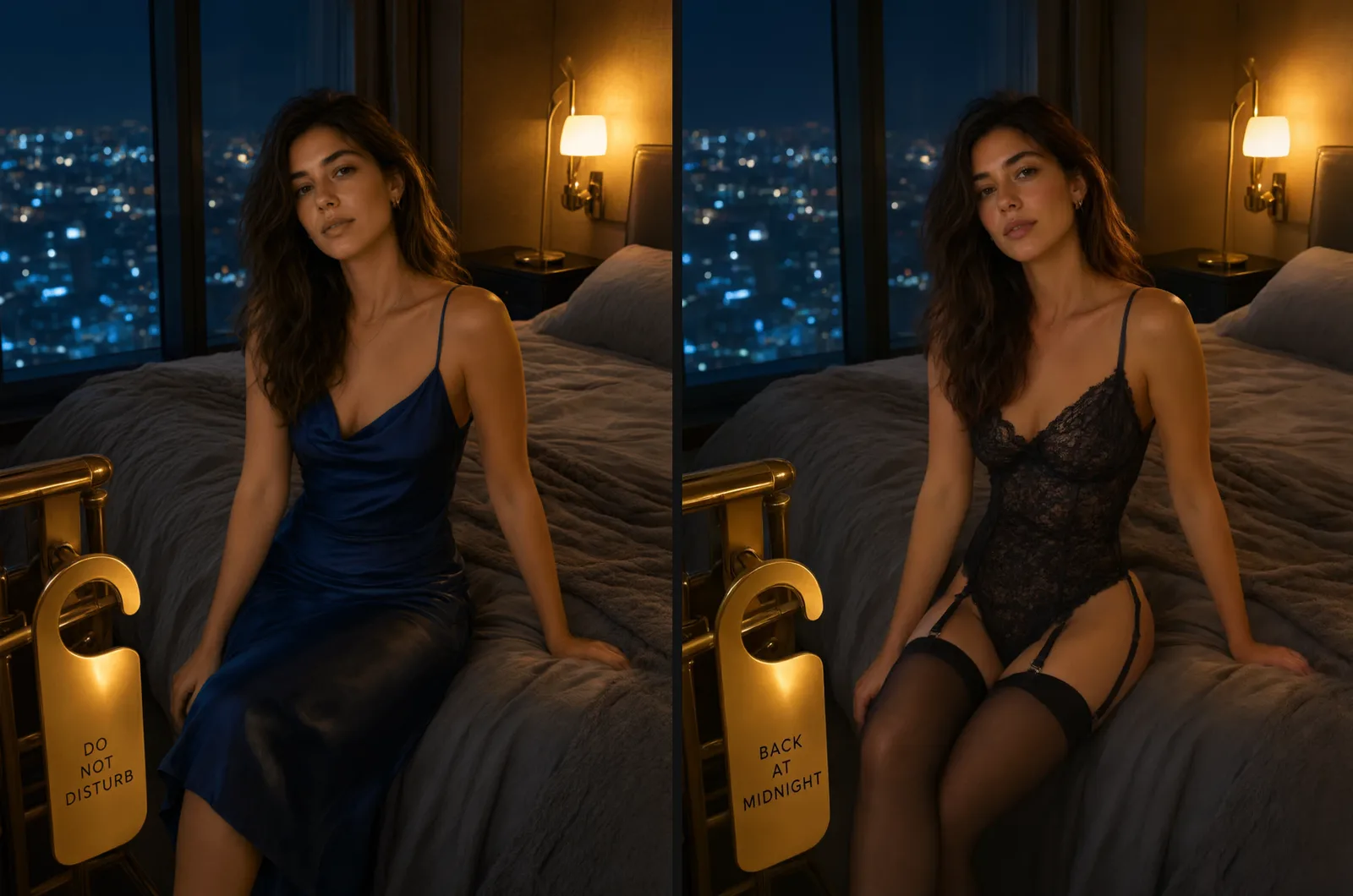
Same woman, new outfit. One Spicy Edit call swapped the navy slip dress for a black lace outfit and retyped the door sign. Her pose, hairstyle, earrings, hand positions and room layout stayed broadly consistent.
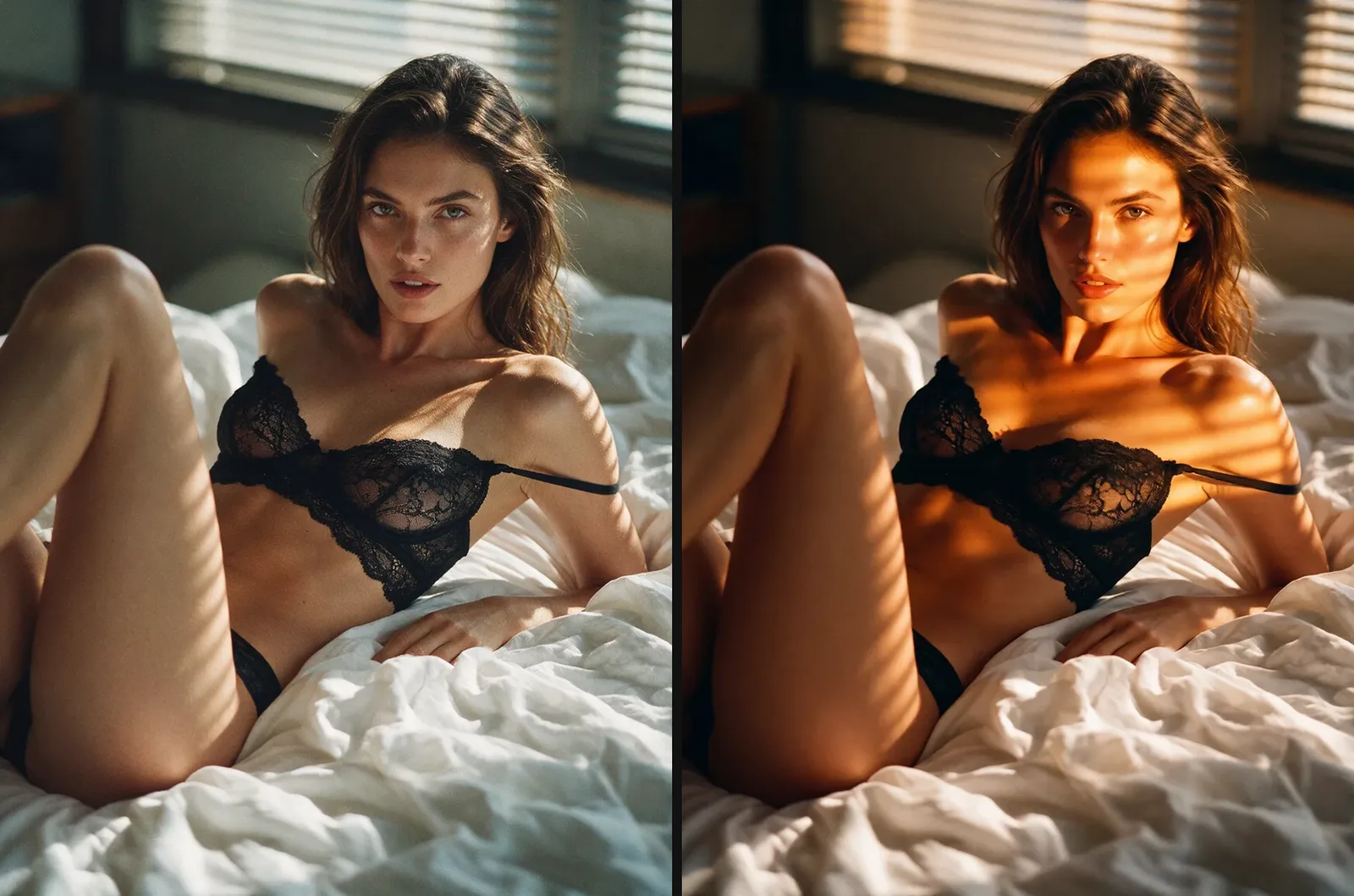
New light, same woman, mostly. Spicy Edit was asked to change only the light. Face shape, hair, pose, the lace strap and the room held. What moved: in the warm frame her eyes read warmer, her lips redder and fuller, her skin glossier, and the freckles are harder to see where the sun lands. Close, not pixel-identical.
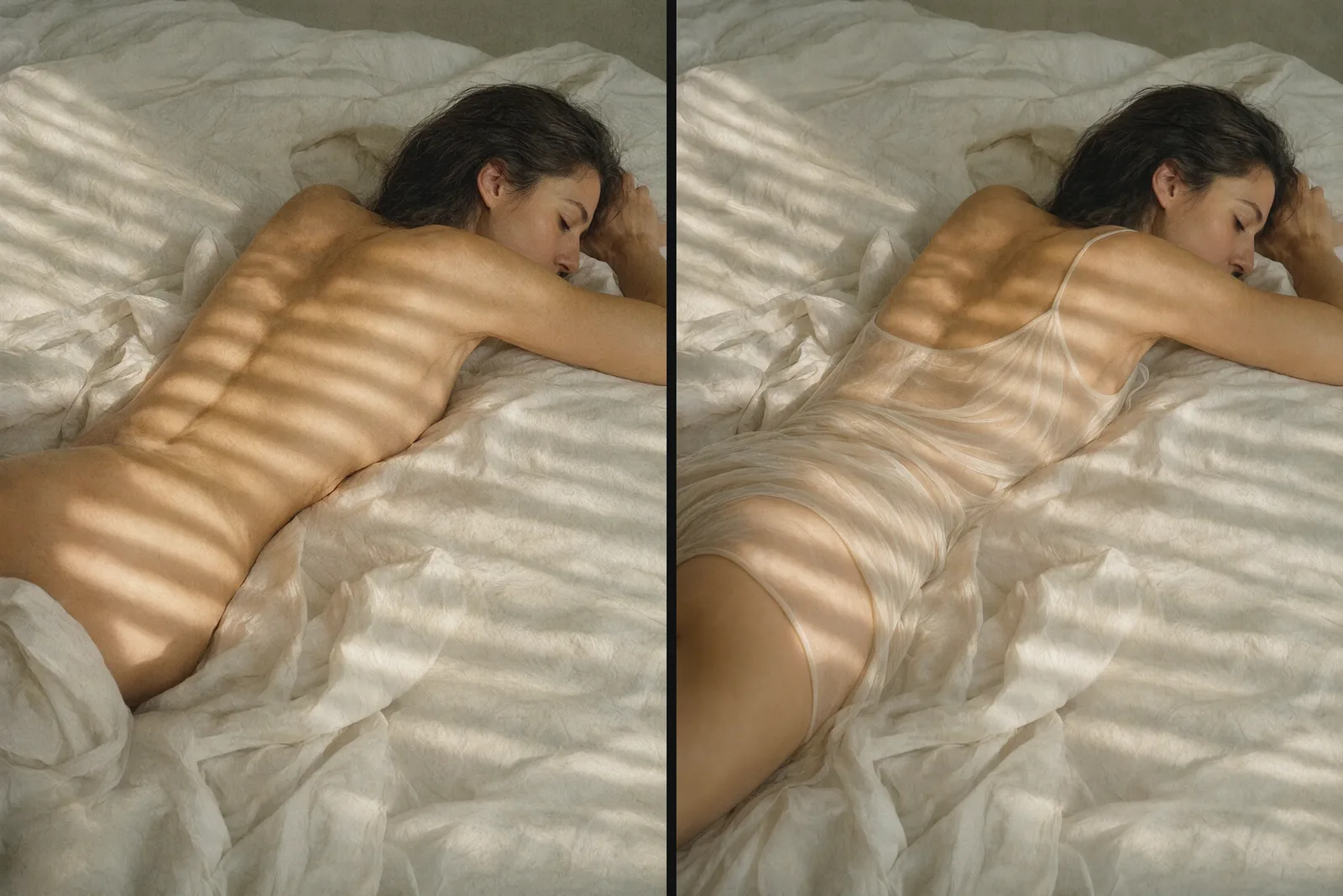
Add an outfit, keep the pose. 2.1 added an ivory slip dress while keeping her face, the arm under her head, the light stripes and the sheet layout broadly consistent.
Does Qwen Image Edit keep the same face?
The single-picture edits above kept the person and overall pose, but some outfit and light edits redrew small facial details, including lips, eye colour and skin gloss. Both two-reference examples below drifted, including one that asked only for a garment change; combining a new pose, set and outfit also left the face less reliable. That's where Qwen editing earns its bad reputation: in the 3.0 example below one change (a top taken from a second picture) still drifted, and the 3.0 Pro example changed three things at once. Local ComfyUI users report the same drift; the usual answers are a "keep the face consistent" line, an identity LoRA, or editing in small steps.
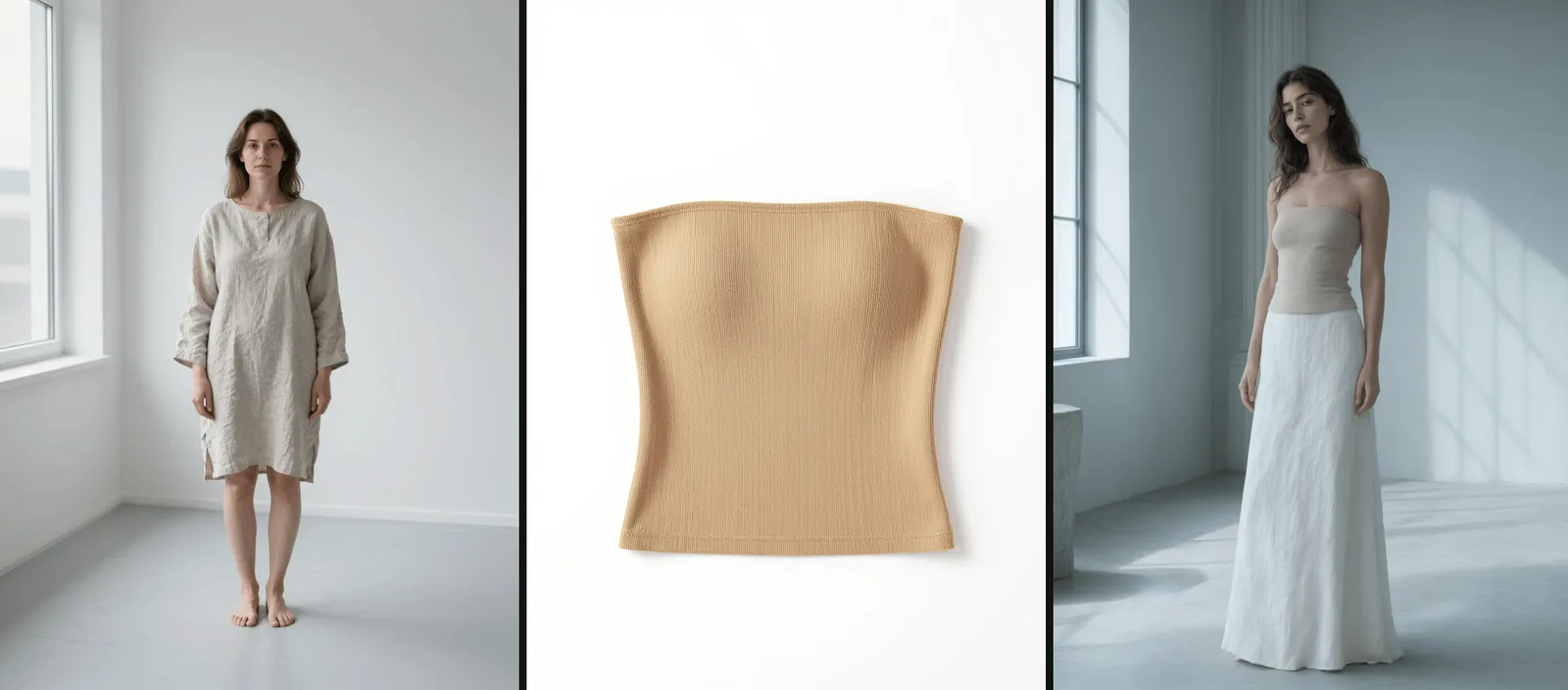
Qwen Image 3.0 was asked to keep the face, hair, body and pose from the first picture and dress her in the top from the second. The woman who came back is younger, slimmer and more polished, with a different face. The tan top came back grey-beige.
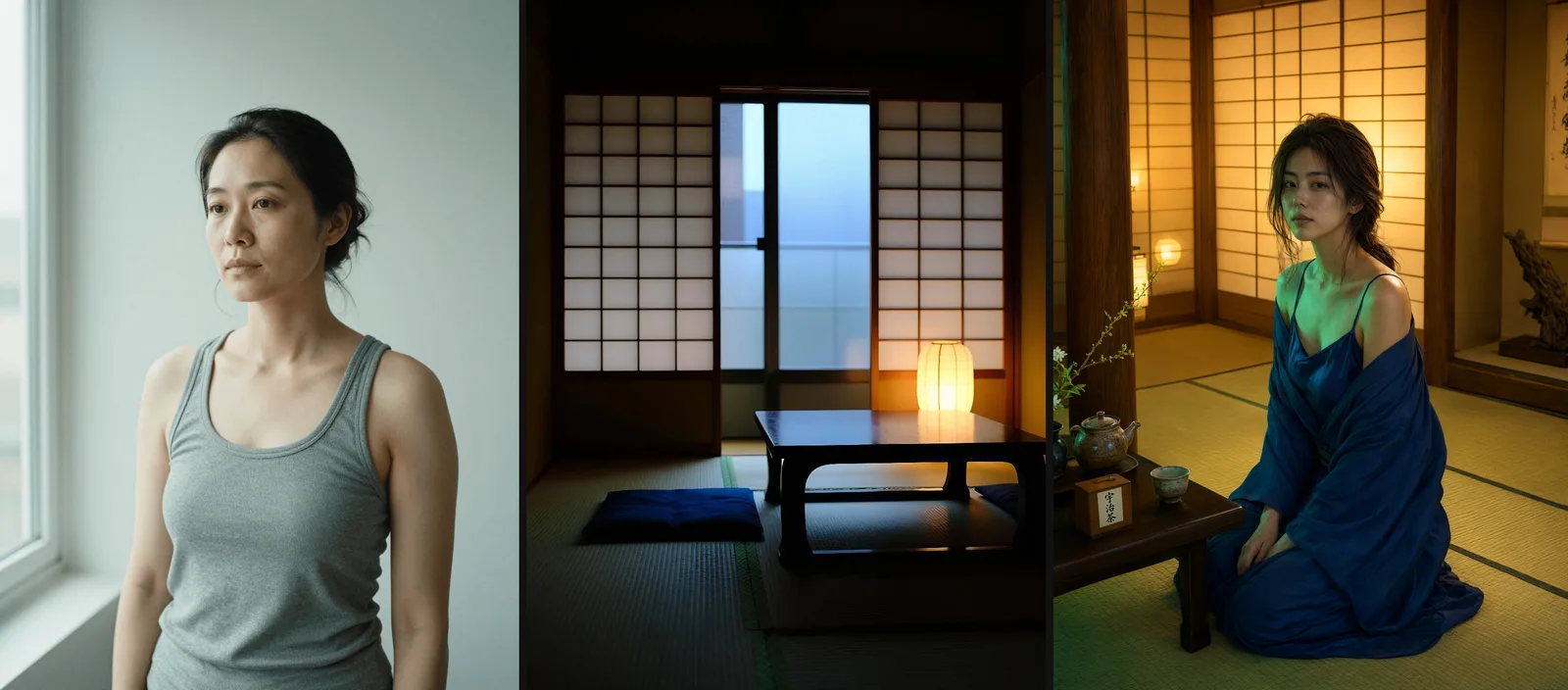
Qwen Image 3.0 Pro was asked for the face and hair from one picture, the room from another, a new kimono and a kneeling pose. The kimono and pose are right and the room is close but furnished. The face is a younger woman's.
What keeps the face:
- One change per call, from one picture when the face matters. Outfit, then light, then pose, each as its own edit.
- Choose the source for the next step. Use the accepted outfit edit as the source for a relight to carry the outfit forward. Chained edits can drift; if you return to the approved original, include the outfit and every other change you want to retain in the new instruction.
- Name what must stay. Face, hair, skin, build, pose, framing and light. This guides preservation but does not lock the pixels.
- Give every reference a job. "The first image is the woman, the second is the room." Explicit roles reduce ambiguity when the pictures contribute different things.
- Keep the file you like. On 2.1, the same seed twice gave two different pictures.
Copy-paste edit instructions
Write every instruction in three beats: what stays, the one change, what stays again.
Swap the outfit, keep the woman (Spicy Edit)
Keep the woman, the bed and the hotel room exactly as they are. Change her outfit to a black lace bodysuit with black stockings, and change the brass door hanger text to read 'BACK AT MIDNIGHT'. Keep the same pose, framing, lighting and colour grade.
Two small changes (outfit and sign) held here. Make bigger changes such as light, pose or room their own pass.
Weak: "Change her outfit." The editor picks the outfit and is free to redraw the face, the body and the room. Strong: the instruction above, which names everything that must survive.
Change only the light (Spicy Edit)
Keep the woman, her face, hair, pose, the lace strap and the room exactly as they are. Change only the light to a warm sunset glow raking across her skin from the window. Keep the framing and colour grade.
New time of day, same person (Spicy Edit)
A white sundress at midday becomes a black silk slip by candlelight, pose and balcony unchanged.
Keep the woman, her pose at the railing, the balcony, the iron rail and the geranium pots exactly as they are, and keep the same framing and camera angle. Change the time of day from hard midday sun to late night, lit only by a cluster of candles along the balcony rail. Change her white cotton sundress to a black silk slip dress. Keep her face and body identical.
Edit one spot: a mask on 2.1, or a drawn circle
Of the Qwen editors here, only 2.1 has a mask. Add a black-and-white Mask (white where the editor may repaint, black where it must leave the picture alone, same size as the source) to one source picture, and describe in the prompt what should appear in the white area. It works at 1k and 2k, not 1.5k. A drawn circle needs no extra input (shown here on 2.1): draw a red circle on your source in any image editor, then send it with this instruction:
Only inside the red circle, add a small black rose tattoo on her skin. Remove the red circle itself from the image. Everything outside that circle must stay pixel-identical to the source: same pose, same lighting, same background.
For strict pixel preservation, composite the edited patch over your original in an image editor.
New room, same person (2.1)
Name everything that must stay, outfit included, and say that nothing is added. Otherwise the editor is free to add a sheet or a garment.
Keep her face, hair, body, outfit and pose exactly as in the source, with nothing added or removed. Replace the white studio with a dim hotel room at night: rumpled white sheets, one warm bedside lamp, city lights through the window behind her. Match the light on her skin to the lamp. Change nothing else.
Two references: her face, your room (2.1)
The first image is the woman: keep her face, freckles, hair and build exactly as they are. The second image is the room: use its unmade bed, tall window and warm bedside lamp. Place her sitting on the edge of the bed in the black silk robe she wears in the first image, facing the camera, framed from mid-thigh up. No other people in the frame.
New pose, same face (2.1)
Do this as its own pass, using the accepted outfit-and-room result as the source. If you return to the original instead, add the settled outfit and room to the instruction too.
Keep her face, hair, skin, build and outfit exactly as in the source image. Change only her pose: she kneels on the bed and looks back over her shoulder at the camera. Keep the room, the lamp light and the framing.
Where Qwen editing trips up, and the fix
- A younger, slimmer stranger. In both reference-merge examples, 3.0 and 3.0 Pro redrew the face and body toward a more polished model. Fix: one change per pass, one source picture when the face matters, and name the face and build. If a chain drifts, return to the approved original and restate the full set of changes you want to keep.
- Plastic skin. At 1k, 2.1 smears fine skin, hair and fabric. Fix: rerun the keeper at 2k, which costs $0.048 instead of $0.036. Skip 1.5k on 2.1: it costs $0.072, more than 2k. On 3.0 Pro, 2k is already the default. On 2.1 LoRA the same fix costs $0.15 at 2k against $0.042 at 1k, so promote only the keepers.
- A square picture from a portrait. Qwen Image 2, 2.1, 2.1 LoRA, 3.0 and 3.0 Pro take the shape of the result from their aspect-ratio setting, which defaults to 1:1, not from your source. Fix: set it to your source's shape (with a mask on 2.1, the output keeps the source's shape). Spicy Edit and the 2512 LoRA editor follow the source's shape on their own.
- A garment in the wrong colour. 3.0 turned a tan top grey-beige. Fix: name the colour in words, even when the garment is in a reference.
- Your instruction, rewritten. 2.1, 3.0 and 3.0 Pro expand your instruction by default. Fix: switch prompt expansion off once you've written exactly what you want. On 2.1 that switch is offered at 1k and 2k, not at 1.5k. Spicy Edit, 2.1 LoRA and Qwen Image 2 have no such setting. 3.0 and 3.0 Pro also take a negative prompt (up to 2,000 characters) for seams at a garment edge, duplicated jewellery and leftover lettering.
- An instruction over the limit. Qwen Image 2 takes at most 800 characters and exactly one source picture; 2.1, 2.1 LoRA, 3.0 and 3.0 Pro take 5,000 characters.
Which Qwen editor should you use?
| Editor | How far it went | Source pictures | One edit | Typical time | Pick it for |
|---|---|---|---|---|---|
| Qwen Image Edit Spicy | Every level, as asked | 1 | $0.038 | about 20 s | One outfit, light or sign change on a picture you already like; fast iteration |
| Qwen Image 2.1 | Every level, as asked | 1 to 10 | $0.036 (1k), $0.048 (2k) | about 50 s | A character built from several pictures (up to ten); the only editor with a mask |
| Qwen Image 2.1 LoRA | Every level, as asked | 1 to 10, plus 3 LoRAs | $0.042 (1k) | about 35 s | Your own character or style weights |
| Qwen Image 3.0 | Every level, as asked | 1 to 3 | $0.033 | about a minute | The lowest price of the editors that delivered every level; 2k costs the same as 1k |
| Qwen Image 3.0 Pro | Every level, as asked | 1 to 3 | $0.043 (1k), $0.078 (2k) | a minute or more | Words in the frame; the high-detail tier; run lettering at 2k |
| Qwen Image 2 | Every level as asked except L4 (2 of 3 toned down) | 1 | $0.035 | about 17 s | Fast edits at L1 to L3 and L5; not for L4 |
| Qwen Image 2512 LoRA (edit, built on Qwen-Image-Edit-2511) | L1 to L3 and both L5 kinds as asked; L4 implied rather than shown without a LoRA | 1 to 3, plus 3 LoRAs | $0.03 flat | about 12 s | Your own LoRAs on the open-weight 2511 base at the lowest flat price |
In short: a character built from several pictures or a masked local edit, 2.1. One clean change to a picture you love, Spicy Edit. Words in the frame, 3.0 or 3.0 Pro. The lowest price among the editors that delivered every level, 3.0. Qwen Image 2 is quick but toned down L4, and the 2512 LoRA editor needs an adult LoRA loaded to show L4 rather than imply it.
Times are medians from each model's public test report, rounded; not a promise. The 2512 LoRA row is a seventh editor, not in the grid above: with no LoRA loaded, 15 of its 18 runs came back as written, and with one third-party adult LoRA loaded its L4 edit was rendered as asked.
Outside the Qwen line, graded reports exist for two edit models. Seedream 4.0 editing ($0.03) delivered L1 to L3 every time and about two of three L4 edits (report). Wan 2.7 editing ($0.03) rendered L4 and one of the two L5 kinds only about a third of the time and toned down the rest (report). For L4 and above, the Qwen editors are the safer choice. More in our image-to-image guide; for editing on the 2511 base and which LoRAs fit it, see Qwen Image 2512 LoRA for editing.
What an edit costs
| One edit | 100 edits | Each extra picture (the first is in the price) | |
|---|---|---|---|
| Qwen Image 2512 LoRA | $0.03 | $3.00 | No extra charge |
| Qwen Image 3.0, 1k or 2k | $0.033 | $3.30 | +$0.003 |
| Qwen Image 2 | $0.035 | $3.50 | One source only |
| Qwen Image 2.1, 1k | $0.036 | $3.60 | +$0.012 |
| Qwen Image Edit Spicy | $0.038 | $3.80 | One source only |
| Qwen Image 2.1 LoRA, 1k | $0.042 | $4.20 | +$0.012 |
| Qwen Image 3.0 Pro, 1k | $0.043 | $4.30 | +$0.003 |
| Qwen Image 2.1, 2k | $0.048 | $4.80 | No extra charge |
| Qwen Image 2.1, 1.5k | $0.072 | $7.20 | +$0.018 |
| Qwen Image 3.0 Pro, 2k (default) | $0.078 | $7.80 | +$0.003 |
| Qwen Image 2.1 LoRA, 1.5k | $0.078 | $7.80 | +$0.018 |
| Qwen Image 2.1 LoRA, 2k | $0.15 | $15.00 | +$0.024 |
2.1 at 1.5k costs more than at 2k, and the LoRA editor's 2k tier costs more than three times its 1k tier. LoRAs on 2.1 LoRA add nothing. A toned-down result is still billed. Each model page shows the live estimate before you submit.
The 3.0 and 3.0 Pro model pages list $0.03, $0.04 (1k) and $0.075 (2k) before the source picture. Each source adds $0.003, so one edit from one picture is $0.033, $0.043 and $0.078, as in the table. On 2.1 at 1k, four pictures cost $0.072 and ten cost $0.144, while at 2k the price stays $0.048 from one to ten pictures.
Try it in the Playground, then call it from code
In the Playground. Log in and open Qwen Image Edit Spicy; the Playground tab holds the form.
- Under Input image, choose a file or paste a direct link with Asset URL, then Add URL. JPG, PNG, WebP and GIF up to 10 MB work. You need the rights to the picture.
- Paste one of the instructions above into Prompt, or use its "Run this on" link, which opens the page with it filled in.
- Check the price estimate and run it. Seed is optional: the same seed with the same picture and instruction keeps two edits comparable.
The other editors use the same layout. On Qwen Image 2.1, Images takes one to ten pictures (name each one's job in the prompt), Resolution is marked "affects price", and Mask sits under Advanced parameters.
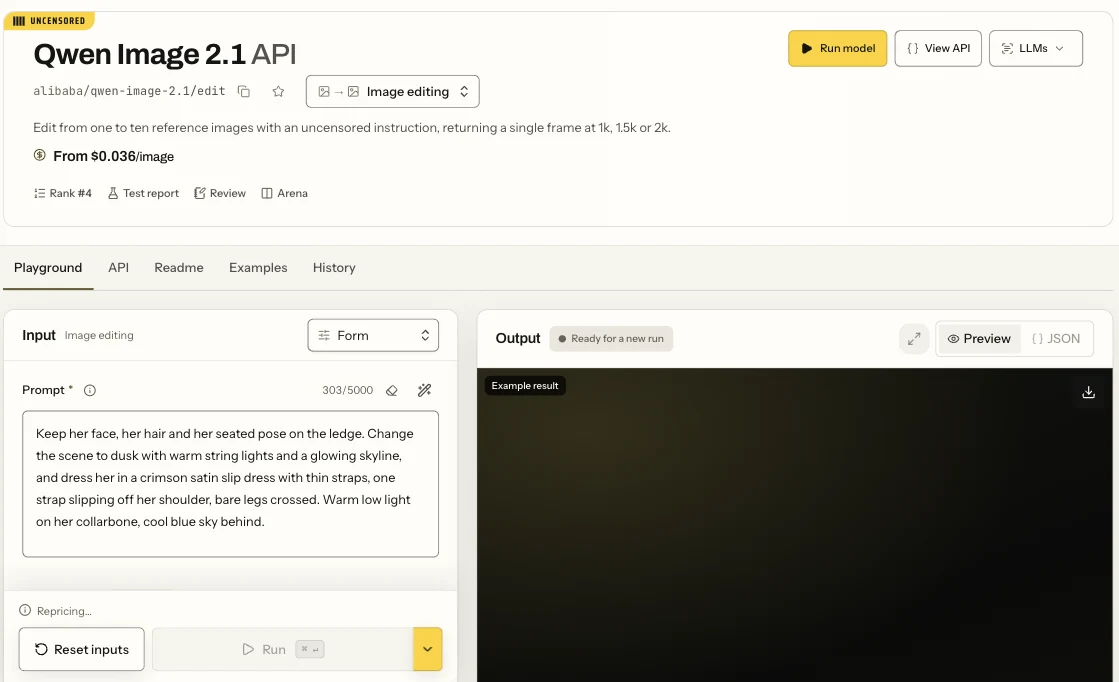
The Qwen Image 2.1 edit page in Form view: the Prompt field and the Run button.
From code. Install the Python SDK (pip install spicyapi), set SPICY_API_KEY in your environment, and run this:
import uuid

from spicyapi import SpicyClient, output_assets

client = SpicyClient()  # reads SPICY_API_KEY from the environment

source = client.upload_file("./sheets-morning.png")  # local files become spicy:// URIs

task = client.create_task(
    model="alibaba/qwen-image-spicy-edit/edit",
    input_data={
        "image_url": source["uri"],
        "prompt": "Keep the woman, her face, hair, pose, the lace strap and the room exactly as they are. Change only the light to a warm sunset glow raking across her skin from the window. Keep the framing and colour grade.",
    },
    idempotency_key=str(uuid.uuid4()),  # new key per new request; reuse only to retry the same one
)

print("Resume task:", task["taskId"], flush=True)
final = client.wait_for_terminal(task["taskId"])
if final["state"] != "succeeded":
    raise RuntimeError(f"Task {task['taskId']} ended as {final['state']}")

assets = output_assets(final)
if not assets or any(a.get("pending") or a.get("unavailable") or not a.get("url") for a in assets):
    raise RuntimeError(f"Task {task['taskId']} has no ready output; check this task before a new run")
print(assets[0]["url"])  # copy it to your own storage now
For the other editors, change model and take the picture field from that model's page (Spicy Edit uses image_url; the others use an image_urls list). Uploads, waiting, retries and every field are in the media docs, the task docs and the Python SDK reference.
Or let an Agent run it
When an assistant should run the edits, use the official CLI, MCP server or Skill; the CLI and MCP server show the price and ask you to confirm before a paid call.
- CLI. Put the same
inputobject ininput.json(with aspicy://URI fromspicyapi files upload ./sheets-morning.png), then run the command below. CLI docs;npx @spicyapi/cliworks without installing.
``bash spicyapi tasks create --model alibaba/qwen-image-spicy-edit/edit --input-file input.json --wait ``
- MCP server. Add the MCP server to your assistant, then ask: "Change only the light in ./sheets-morning.png to a warm sunset glow, with Qwen Image Edit Spicy." It calls
spicyapi_upload_file, thenspicyapi_task_create, which stops for your price confirmation, thenspicyapi_task_wait. - Skill.
npx skills add spicyapi-ai/spicy-skillinstalls the Agent Skill, which has a coding assistant read the live model schema instead of guessing fields. It cannot run tasks by itself, so use it with the CLI or MCP.
FAQ
Is Qwen Image Edit uncensored?
On our API, yes, with one exception: Qwen Image 2 toned down two of three L4 edits. All six editors in the grid carry the Uncensored label, and so does the 2512 LoRA editor. We don't add a content filter on our side; that does not guarantee every request is rendered as asked, as the L4 results show.
Is this the same as Qwen-Image-Edit-2509 or 2511?
Partly. Both are Alibaba's open-weight editors that people run locally, often with community LoRAs or all-in-one merges stacked on top. 2511 is available here: it is the editing side of Qwen Image 2512 LoRA, which takes one to three source pictures and up to three LoRAs of your own for $0.03. With no LoRA loaded, 15 of its 18 runs came back as written, and the three misses were L4 scenes that it implied rather than showed; with one third-party adult LoRA loaded the L4 edit was rendered as asked. The other editors in this article are different models, and 2509 isn't offered. Which LoRAs fit which base is covered in our weight-compatibility guide.
Why use a hosted editor instead of a local ComfyUI workflow?
Hosted means no GPU, no node patches or model merges to keep in step, and a price estimate before every run. The 2.1 LoRA and 2512 LoRA editors take your own weights.
Why does the face change when I change the pose or the scene?
A pose or scene change can redraw more of the frame than intended. Make the pose its own pass and name the face, hair and build as unchanged. Use the accepted previous edit to carry its changes forward; if you go back to the original, restate the outfit, room and other changes you still want.
Why did it change her body?
On 3.0, a two-reference edit came back slimmer. Name the build in the instruction ("keep her build and proportions exactly as in the source") and change one thing per call.
Why does my Qwen edit look plastic?
On 2.1, 1k smears fine skin. Rerun the keeper at 2k for $0.012 more (not on 2.1 LoRA, where 2k costs $0.15, and not at 1.5k on 2.1).
Can I use a photo of a real person?
Only a photo of yourself, or of an adult who has agreed to this exact use. See the last section.
Real people: consent first
For upper-level edits, use three kinds of source only: fictional adult characters you generated, pictures of yourself, and adults who have agreed to this specific use and can show it.
Never a partner, an ex, a colleague, a classmate, a stranger from social media or a public figure without their consent. A synthetic result is no defence: in the United States, the TAKE IT DOWN Act, signed on 19 May 2025, makes publishing non-consensual intimate images a federal crime in certain circumstances, AI-generated "digital forgeries" included, and requires covered platforms to remove them when the person depicted asks (Congress.gov summary). Check the law wherever you and your users are.
Everyone in every source and result must be an adult, you need the rights to everything you upload, and you're responsible for what you publish.
Run your first edit
Open Qwen Image Edit Spicy in the Playground, add a picture you own and paste the outfit instruction from above. One pass costs $0.038; for several references, switch to Qwen Image 2.1.