
Your adult character app promises one new image. The customer taps Generate, the spinner runs for a while, and then the page says the connection timed out. They tap again. A minute later, two pictures appear and the balance has fallen twice.
The second picture may be lovely. It is still an expensive way to discover that a connection timeout is not a failed generation.
For an NSFW image API, there are three different actions people call a retry: checking an existing task, replaying its original submission, and paying for another creative attempt. Keep those actions separate. If you have a task ID, check that task. If the creation response disappeared, replay the unchanged request with its original idempotency key. If the task completed but the image misses your brief, another generation is a new purchase.
That last distinction matters especially for mature character imagery. A model can finish successfully while toning down the requested scene, changing an outfit, or producing a different face. Task success tells you that a result was delivered; it does not promise that you will want to use it.
What happened, and which button should you offer?
| What the customer sees | What you actually know | Next action |
|---|---|---|
| The request timed out before returning an ID | Acceptance is uncertain | Replay the same create request with the same key |
You have an ID and the task is queued or running | A generation already exists | Check status; do not create another task |
The task is failed or expired | The attempt reached a terminal outcome | Read its reason and settled charge before a new attempt |
| A model refused the NSFW request | This particular request was rejected | Review the exact model/task's content behavior and billing note |
| An image arrived, but the character or scene is wrong | Generation succeeded; creative intent was missed | Decide whether editing or a new variation is worth another charge |
| The image will not download | Delivery is broken or the link expired | Recover the existing asset while it remains available |
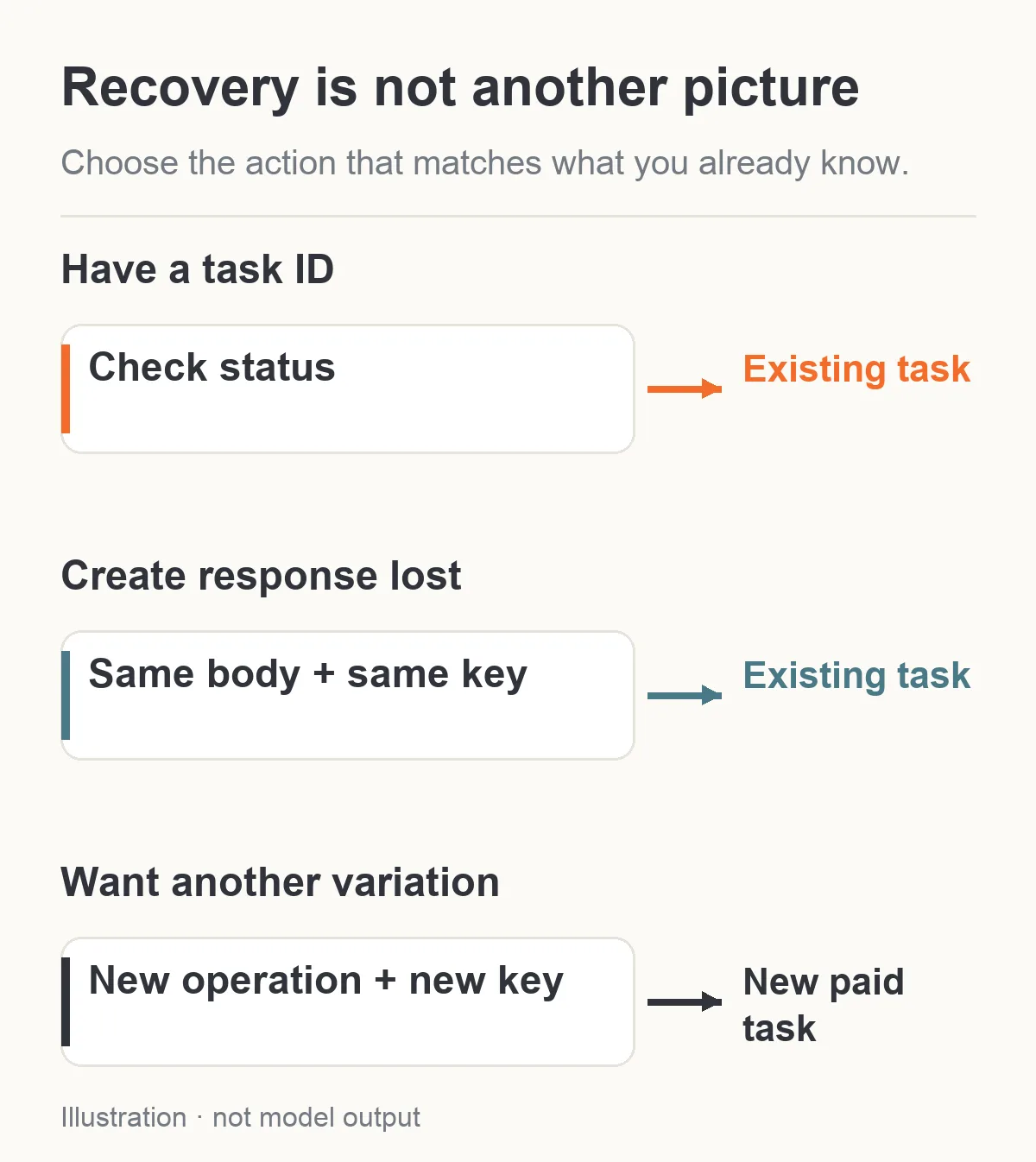
Waiting, submission recovery and a new variation are different actions.
A useful adult creator interface might label these actions Check existing image, Recover submission, Generate another variation, and Try downloading again. A single Retry label hides the difference between a free status check and authorizing new generation spending.
If you have a task ID, keep the original task
SpicyAPI's asynchronous image workflow accepts a request, returns a task ID, and makes the image available later. An accepted creation response is not the completed picture. The task moves through states such as queued, running, and succeeded; failed, canceled, and expired are also terminal states.
Save the task ID as soon as your server receives it, before updating the browser. If a customer refreshes the page, signs back in, or opens their project on another device, your application should retrieve that saved task rather than submit the prompt again.
For example, a creator requests a new evening portrait of their fictional adult character. Your server receives a task ID, but the browser loses its connection before rendering the waiting card. On return, the card should resume its connection to that task. The creator did not ask for a second portrait merely by refreshing a page.
Use GET /api/v1/jobs/recordInfo with the task ID to recover the current state. The task documentation describes the request and response. You can use a webhook for completion notifications, but a delayed webhook does not turn the existing task into a failure. Polling remains a recovery route.
Do not turn a local waiting limit into a billing decision. Your browser might stop waiting after 30 seconds, your server's outgoing HTTP request after 60 seconds, and the remote task may still be running. The returned task record includes an execution deadline, deadlineAt; that deadline describes remote execution, rather than how long your page keeps a connection open. A result's download-link expiry is a different clock again.
For the waiting screen, use a message such as “Your image is still processing. You can leave this page and return to the same task.” Do not claim a precise completion time unless you have measurements for that particular model and workload. A competitor's measured latency for ordinary product images is not a timing guarantee for your NSFW prompts.
If the creation response was lost, replay the same submission
The difficult case is a connection that drops after your server sends the request but before it receives an acknowledgment. You cannot tell from that connection error whether the platform accepted the job.
SpicyAPI provides an actual server-side safeguard: the optional Idempotency-Key header. For the same account and the same API key, repeating a key with the same normalized model, input, and callback URL within 24 hours returns the original task instead of reserving funds again. A changed request conflicts with that key. A different API key belonging to the same account cannot replay its mapping either; it receives a conflict without disclosure of the original task ID.
Make a stable key for the image the customer requested, rather than for each HTTP attempt. An application-generated value such as project-8-image-12-v1 illustrates the idea. Keep it free of personal details and raw prompt text. Generate and save it before sending the first create request. A new network attempt reuses it; a genuinely new picture receives a new version or operation ID.
A minimal recovery sequence is:
- Save the intended image operation, the original request body, and its key in your application.
- Submit that request with
Idempotency-Key. - If the acknowledgment is lost, mark the local operation as awaiting confirmation.
- Replay the unchanged body with the unchanged key through the same API credential.
- Save the returned task ID and switch to checking its status.
Keep the exact submitted request stable while recovering it. Do not ask the UI to rebuild it from controls the customer may have changed. If the creator changes from a close portrait to a wider composition, raises resolution, alters the prompt, or changes the callback URL, that is no longer the original submission.
The safeguard has a limit: 24 hours is not indefinite storage for your application's duplicate prevention. After the window has passed, do not assume that reusing the old key will recover an old job. Your own durable operation-to-task mapping needs to handle later returns. If acceptance remains uncertain and you cannot identify the original job, reconcile the account's task records or ask support before creating a replacement automatically.
A disabled Generate button is useful, but it is not enough
A button disabled during loading prevents a common double tap. It does not prevent duplicate submissions from two browser tabs, a reconnecting mobile client, a background worker, or a server restart.
Your application should attach all those events to one logical image operation. A uniqueness rule in your own database prevents two workers from independently claiming that same operation. The platform's idempotency key then protects the remote create boundary. These are different protections, and you need both if your app has more than one way to submit a job.
Consider a companion product that generates an optional new character portrait after a conversation. A user also presses the manual portrait button before that automatic request is acknowledged. If both actions are intended to fulfill the same portrait request, link them to one operation. If the manual button explicitly requests a second variation, show that it is another paid generation. Do not silently collapse two deliberate purchases, or silently charge twice for one promise.
The key itself does not decide those product semantics. Your application decides what counts as the same request. Nor does a locally deduplicated database row help when your outgoing client sends each recovery with a fresh remote key. The value needs to survive the whole path.
Refusal, technical failure and an unwanted image have different bills
A mature-content request can end in several ways. Avoid a blanket promise that failed NSFW generations always cost nothing, and avoid the opposite claim that every error is billed.
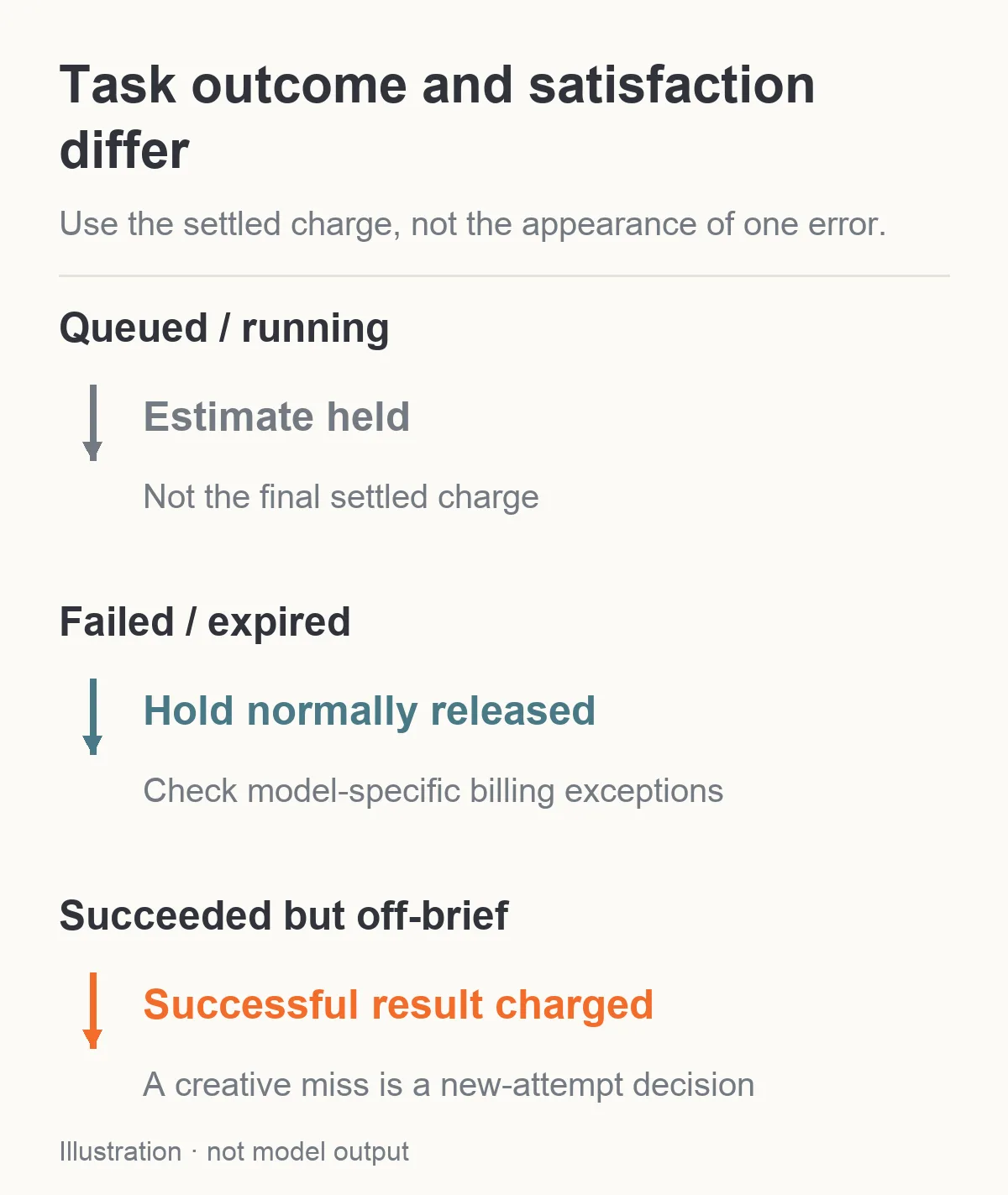
Task state and creative satisfaction differ. Check the settled record and any model-specific billing exceptions.
SpicyAPI reserves an estimated amount when a task is accepted. While settled is false, the task's cost is the held estimate. Once settled, it represents the final charge. A successful task is charged, up to the amount held; unused funds are released.
A failed or expired task normally releases its hold. There are exceptions described in the refund policy, including models whose pages say that rejected or failed requests are billed, and usage already delivered before an interrupted request. For an image task refused by the model, check that model's billing note and the final settled record. Do not make the HTTP error alone your account-balance explanation.
A successful but softened image is different. Imagine you asked for a confident fictional adult character in a specific mature editorial scene, but received a conventional portrait instead. If the task succeeded and delivered its result, dissatisfaction with the scene does not make that result a refundable technical failure. The same applies to a wrong hairstyle, unwanted accessory, or expression you dislike.
That is why a useful retry policy needs a creative spending limit, not just a network retry count. A worker that retries every image your app dislikes may keep buying successful outputs long after technical failures have been resolved.
Read the exact model page for the task you use. A permissive text-to-image route does not prove the editing route behaves identically, and a family name is not enough to predict every NSFW request. Use only adult characters and material you are entitled to submit; retries are not a way to make disallowed requests acceptable.
Retrying a terminal failure creates new work
The API also has POST /api/v1/jobs/retry, which takes a source task ID and creates a new task from an eligible terminal failure. It does not turn the old task back into a running job. Current model inputs, permissions, availability, balance and pricing are evaluated again. The source needs retained input and completed billing reconciliation; an active or successful task is not eligible for this retry action.
Use the same API key that created the source task. If you apply an idempotency key to the retry action, that key protects this particular new attempt and is scoped to the source task. Replaying the retry action can recover its newly created task; it is different from replaying the first create request to recover the original.
For a creator app, show this as a fresh generation attempt with a price. If the prompt itself needs changing, create a new request with the revised input rather than expecting the source-task retry to edit it. A failed request caused by an expired reference also needs a usable reference before another attempt can succeed. The original charge's release and the new attempt's hold are separate entries.
What repeated attempts actually cost
Here are current starting configurations for three image endpoints. The prices describe generation, not a guarantee that every resulting picture meets an NSFW brief.
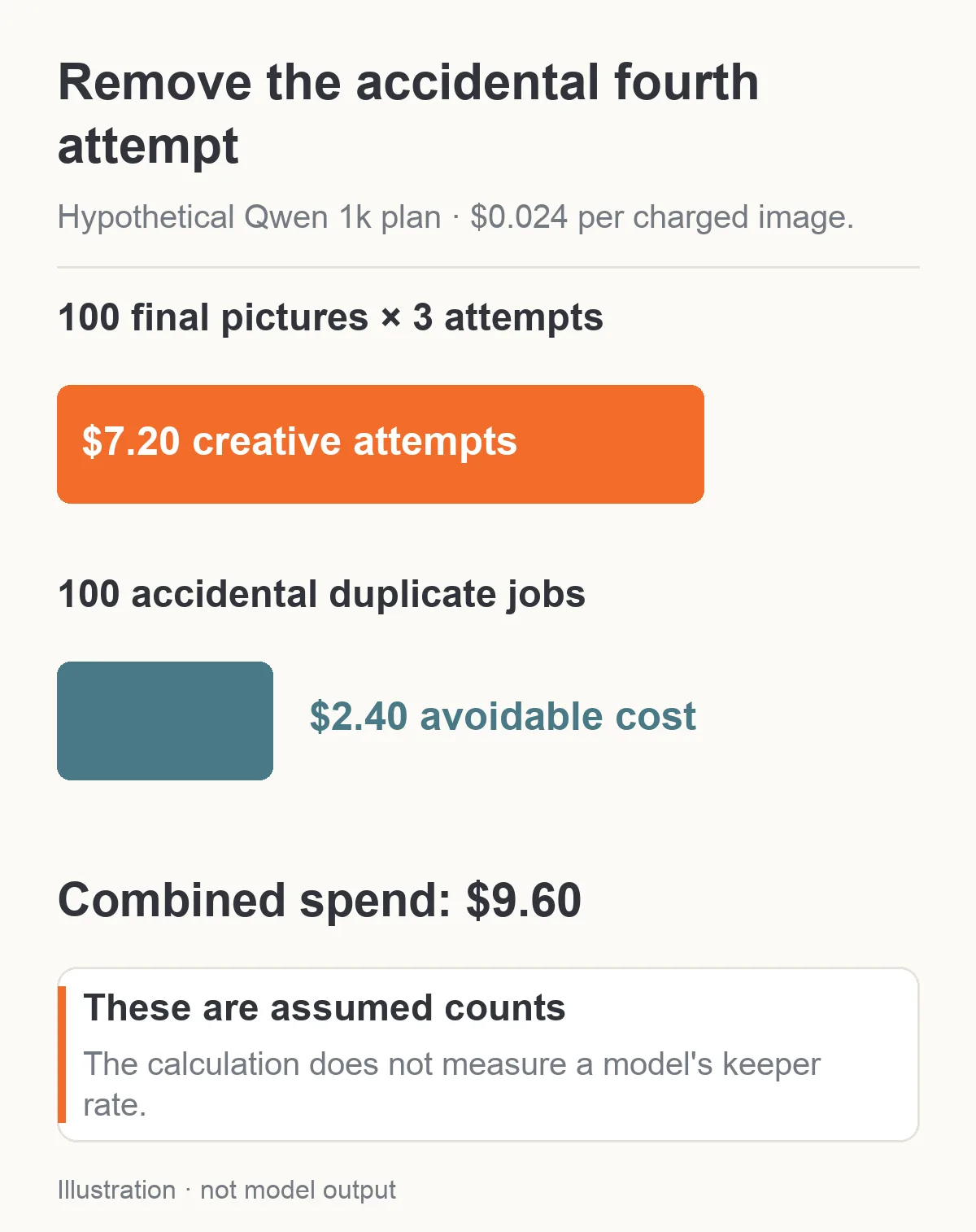
Hypothetical planning example: accidental duplicate jobs add $2.40 to $7.20 of intentional creative attempts.
| Endpoint and explicit configuration | Price per image | Three charged attempts | Ten charged attempts |
|---|---|---|---|
| Z-Image Turbo text-to-image, prompt expansion off | $0.010 | $0.030 | $0.100 |
| Qwen Image 2.1 text-to-image, 1K | $0.024 | $0.072 | $0.240 |
| Seedream 5.0 Pro text-to-image, 1K selected | $0.036 | $0.108 | $0.360 |
The details matter. Z-Image Turbo with prompt expansion enabled is $0.016 per image rather than $0.010. Seedream 5.0 Pro defaults to 2K, which is $0.072 rather than its $0.036 1K price. Explicitly selecting the tier makes the calculation match the job.
Suppose you plan 100 final Qwen Image 2.1 portraits at 1K. If each final picture needs an average of three charged creative attempts, your generation spend is $7.20: 100 × 3 × $0.024. If an acknowledgment bug also duplicates one submission for every final picture, it adds 100 × $0.024 = $2.40, bringing the spend to $9.60. Those figures are planning examples, not a measured success rate.
You cannot optimize a three-attempt creative process into one by changing your HTTP timeout. You can remove the accidental fourth attempt. Keep intentional variations and accidental duplicate jobs in separate totals so you can see which problem you are paying for.
For a small creator workflow, decide the limit before generating: perhaps one initial picture plus two revised attempts for this specific slot. That is an application budgeting suggestion, not a platform limit. If all three miss the same requirement, stop purchasing near-identical requests and change the approach.
A completed NSFW image misses the brief: change one thing that matters
If the face is right but the room or outfit is wrong, a targeted edit may be a better next purchase than a completely new text-to-image attempt. Preserve the useful result, describe what to change, and choose a model with an appropriate editing task. Editing still costs money; it is not a free correction included in the original generation.
If the same request keeps producing a softened scene, first identify whether the issue is a content refusal, an allowed request interpreted conservatively, or an overloaded prompt. Repeatedly resending an identical prompt does not tell you which one happened. Look at the delivered image and stable error code, if any, rather than treating the NSFW keyword as a universal switch.
For a non-graphic planning example, a portrait brief might require one fictional adult character, a dark satin jacket, a seated pose, warm side lighting, and an uncluttered room. If every result includes a busy room, remove secondary set details and keep the character and lighting instructions. If the wrong face appears, move to the appropriate reference-based workflow instead of adding more adjectives to a text-only prompt.
When a genuine new variation is needed, use a new operation and key. Replaying the first accepted request with its original key recovers the first task; it does not ask the model to imagine a better second picture. If you change a seed for a new variation, record it as a new creative attempt. A seed helps identify the request but does not guarantee the same character across different models.
After the first few attempts, compare the final usable-image cost, not just the advertised starting price. A $0.010 generation used four times costs $0.040. A $0.024 generation used once costs $0.024. This arithmetic is not evidence that the second model is more reliable; it tells you what to measure for your own character brief.
When an existing image fails to download
Do not regenerate a successful image because the download returned an error. The file may still exist while its temporary access link no longer works, or your application may have failed while copying it.
Keep the completed task and output asset identity. Recover a current authorized download route while the output is retained, then retry transferring that asset. Do not attach the API key to a separate signed media URL. Confirm that your destination actually contains the bytes before showing Saved in the customer's library.
The media delivery guide covers copying results into storage you control. For an adult creator, this is also a privacy boundary: a generated image or reference does not become a public gallery asset simply because copying succeeded. Recovery should preserve the intended private access.
If the original output has already been deleted under the task's effective retention policy, a task ID cannot restore the missing bytes. A replacement would be a new generation and might look different. Tell the customer that distinction rather than silently replacing an old portrait with a newly billed one.
Make the customer's next action match the charge
Show an existing task's status and settled charge together. If the job remains unresolved, retain its place in the project without presenting a fresh paid retry as the only way forward. If it failed, show its reason and whether the held amount was released. If it succeeded, separate Download again from Generate another variation.
For support, the useful evidence is the task ID, request ID where available, timestamp, amount, and a short description of the problem. If two different task IDs were created, that is different from one task charged twice. The refund policy specifically asks customers to report duplicate charges, charges above the hold, undelivered successful outputs, or failed-task holds not returned within 24 hours. Do not put API keys, signed media links, or sensitive creative prompts into ordinary logs or support screenshots.
A creator should be able to understand the history as “one portrait requested, one submission recovered, one result delivered,” rather than a list of invisible HTTP attempts. That is the outcome to aim for: network recovery preserves the original purchase, while another creative attempt is a deliberate decision with a visible price.