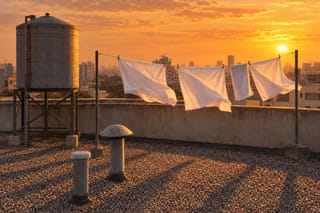
Take the camera language from the reference clip — a slow rise on a crane, never cutting — and stage it over the rooftop in reference image 1 at dusk. Time the top of the rise to the swell in the reference track.
Same model, starting from this prompt. Other settings use their defaults.
Why this prompt works
Three reference kinds split the job: `reference_video_urls` carries the move — a slow, uncut crane rise — `reference_audio_urls` the timing, `reference_image_urls` the set. Naming the move in words too backs up the footage. The output opens low on gravel and rises to the clip's dusk skyline, timed to the track's swell. `aspect_ratio` is `21:9`, wider than the reference footage.
Settings used
Setting
Value
What it does
resolution
720p
Output resolution: 480p, or 720p by default. It selects a rate tier and will not sharpen low-resolution references. Check that the references combine at a low tier, then raise it for the final take.
aspect_ratio
21:9
Output framing, adaptive by default: the clip takes its shape from the primary reference. When the references disagree or the placement is fixed, pick one of the six ratios from 21:9 down to 9:16 and say in the prompt how the subjects should sit inside it. No effect on what you are billed.
generate_audio
true
Whether a native soundtrack is rendered in sync with the picture. On by default; switching it off does not lower the rate in this tier. Turn it off for silent loops and for material you will score in post.
duration_seconds
12
Length of the finished clip in whole seconds, 4 to 15, default 5; -1 lets the model choose, with the estimate assuming 15 seconds. Together with the seconds of your reference clips it is the billed quantity. The more references a shot has to reconcile, the less 4 seconds can show them all — but confirm the combination short before paying for 15.


 Preview blurred