Three-shot evening story from one apartment still
- Model
- Wan 2.6
- Task
- Image to video
- Resolution
- 720p
- Duration
- 15 s
Output
Input
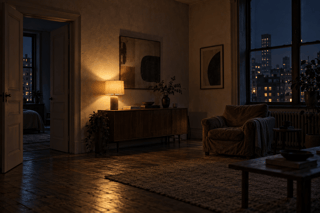
image_url
Swap in your own when you run it.
PromptEN337 characters
Shot 1: the lamp flickers once and the city lights outside the window blink on one block at a time. Shot 2: close on the armchair as a folded blanket slides off the arm onto the rug. Shot 3: the front door swings slowly open and warm hallway light spills across the floorboards. Quiet evening room tone, distant traffic, a clock ticking.Written in English, exactly as we sent it.
Run this example
Checking the price…
Opens the playground with every setting filled in and shows the exact price before you run.
Same model, starting from this prompt. Other settings use their defaults.
Why this prompt works
`shot_type` set to multi and `enable_prompt_expansion` true turn one static room into three distinct cuts: the wide shot as the lamp flickers and city lights click on, a close-up where the blanket has slid off the armchair, and the door swinging open with hallway light spilling in. `duration_seconds` is 15.
Settings used
| Setting | Value | What it does |
|---|---|---|
| shot_type | multi | single keeps one continuous take; multi lets the model cut between shots, which suits short stories but breaks continuity. Choosing multi also switches enable_prompt_expansion on for that request, because the cuts are planned while the brief is expanded. |
| resolution | 720p | 720p or 1080p, default 720p. It sets the per-second rate and how long the task takes. |
| duration_seconds | 15 | Exactly 5, 10 or 15. Multi-shot edits need the longer lengths to breathe. |
| enable_prompt_expansion | true | Off by default. Turning it on helps a one-line idea grow into a shot list for multi; leave it off when your prompt is already precise. With shot_type multi it is switched on regardless of this setting. |
More Wan 2.6 prompts
All Wan 2.6 prompts
Architecture & interiors on other models
Architecture & interiors
 Preview blurred