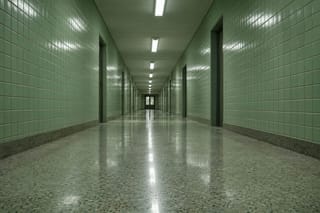
Copy the camera language of the reference clip — low, drifting right, never cutting — but stage it in the tiled corridor from reference image 1. One figure walking away from us, footsteps timed to the pulse in the reference track.
Same model, starting from this prompt. Other settings use their defaults.
Why this prompt works
The prompt names where each element comes from: camera from the clip, set from the image, timing from the track. "low, drifting right, never cutting" tells the model exactly what to extract. The output holds one figure walking away down the corridor from `reference_image_urls`, low and uncut start to finish. `aspect_ratio` `21:9`, `resolution` `1080p`.
Settings used
Setting
Value
What it does
resolution
1080p
480p, 720p, 1080p or 4k, default 720p, and it feeds the billed quantity directly. It sets the output tier only and will not sharpen low-resolution references. Test whether the references combine at a low tier, then raise it for the final take. No upscaling or enhancement tiers exist here.
aspect_ratio
21:9
Defaults to `adaptive`: the model finds framing that accommodates every referenced subject, which matters most when the reference assets do not share a shape. Lock a fixed ratio only for a hard delivery requirement — `9:16` for a vertical feed, for example — and check that no referenced person or product ends up cropped. No effect on billing.
generate_audio
true
On by default. Produces a native soundtrack synchronized to the picture. Even with `reference_audio_urls` supplied, turning it off means no soundtrack is rendered — reference audio shapes pacing and performance, it is not the output track. Switch it off when the edit will be scored in post.
duration_seconds
10
4 to 15 seconds, default 5, or -1 to let the model pick the length (the estimate assumes the 15-second maximum; the charge follows the delivered length). Fifteen seconds is the ceiling of this generation; for a longer single shot, move to the 2.5 endpoint. Note that this and the length of your reference clips are two independent contributions to the billed quantity, so maxing both is where a single request gets expensive.






 Preview blurred