Model response
Workbench
Output
Ready for a new runExample result
Related models and next tasks
Missing the model you need?
RECORDED SPEECH TO TEXT
Word-level transcripts with speaker labels across 102 languages.
Key numbers
- Language codes
- 112
- ElevenLabs Scribe V3 lists 112 language codes, and an empty selection is detected.
- Longest file
- 1 h
- ElevenLabs Scribe V3 accepts a recording of up to one hour.
- Minimum bill
- 10s
- ElevenLabs Scribe V3 bills per second of audio, with a 10-second minimum, and does not charge a failed request.
- Extra hints
- 100
- ElevenLabs Scribe V3 accepts up to 100 additional language codes you expect to hear.
- Speaker labels
- OFF
- ElevenLabs Scribe V3 leaves speaker labels off until you enable them.
- Event tags
- ON
- ElevenLabs Scribe V3 marks non-speech sounds unless you turn that tagging off.
What it does
OBSERVED TRANSCRIPT
A short note with word timings
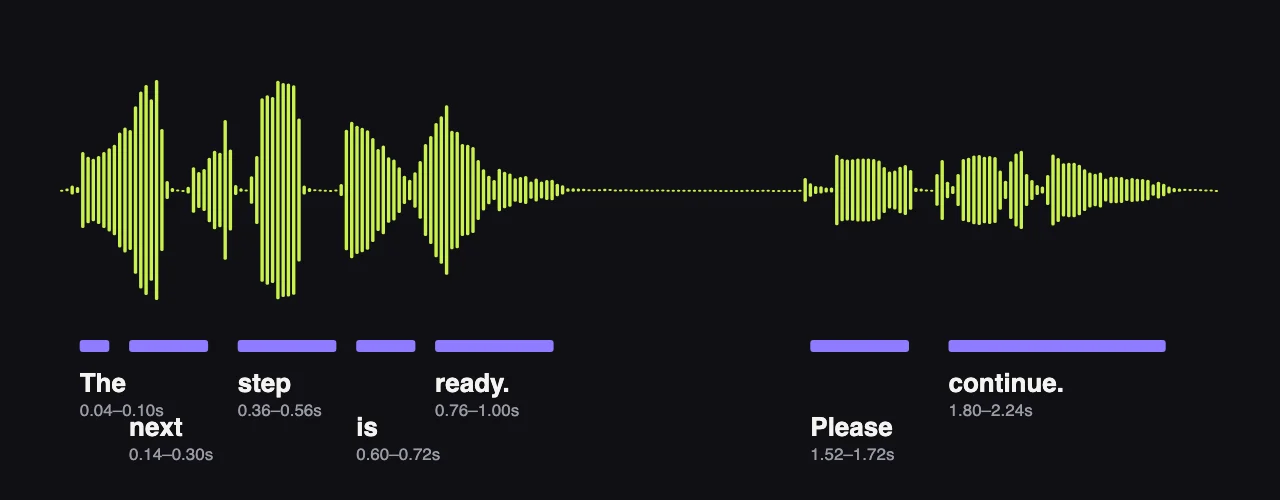
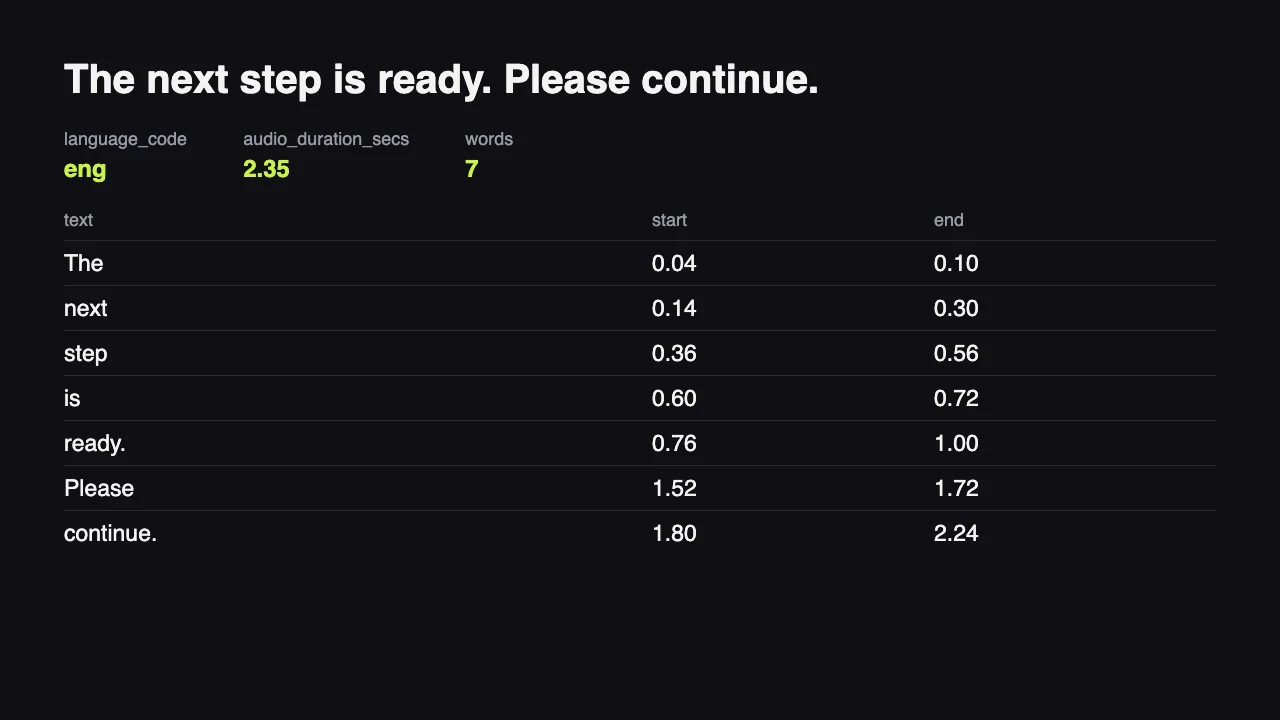
Our November 18, 2026 run used a 2.35-second English recording. It returned “The next step is ready. Please continue.”, language code eng, and start and end times for every word and space. Use those timings to locate the wording in the source recording.
LANGUAGE CONTEXT
Declare the languages you expect
Leave the spoken language empty for detection, or set a supported code when you know it. Add up to 100 other expected language codes as hints. Set this context for interviews, field recordings and talks where you know which languages to expect.
TRANSCRIPT PRESENTATION
Choose labels, events and numbers
Speaker labeling starts off, while audio event tagging starts on. Change those controls to suit an interview transcript or an editorial draft, then choose digits or words for spoken numbers. Review the resulting text and labels against the source recording.
Where it fits
Interview transcripts for editors
Request speaker labels with diarize when organizing a recorded interview into speaking turns. Review the labels against the audio before assigning quotations to people.
Caption preparation for recorded talks
Use word timings to locate speech while preparing captions in an editing workflow. Our English note returned start and end times for words and spaces; caption layout and final timing still need editorial review.
Language context for field recordings
For recordings expected to contain more than one language, set the main spoken language and add the other expected codes as hints. Leave the main language empty when you want it detected.
Quantity checks in work interviews
Choose digits when reviewing spoken quantities, or words when preparing prose. The number-format control sets the presentation; listen back to figures before carrying them into a report.
Short spoken progress notes
Turn a brief recorded status message into text that can be reviewed alongside the audio. Our 2.35-second clip returned “The next step is ready. Please continue.” with detected language eng and timings for each word and space.
Model reference
ElevenLabs Scribe V3 API reference
ElevenLabs Scribe V3 API specifications
- Publisher
- ElevenLabs
- Release date
- November 10, 2026
- Task
- Recorded speech to text
- Required input
- audio_url: a nonempty recording URL
- Language selection
- ISO 639 code from the supported list; leave empty for detection
- Additional language hints
- Up to 100 expected language codes
- Number formatting
- digits or words
- Speaker labels
- diarize; off by default
- Audio event tags
- tag_audio_events; on by default
- Recording length
- Up to one hour
- Billing
- Per second of audio; 10-second minimum per request; failed requests are not charged
- Observed output
- 2.35-second English clip; transcript, language code eng, and start/end timings for words and spaces
How to call the ElevenLabs Scribe V3 API
Prepare the recording URL
Provide audio_url for a recording of up to one hour. Listen to the source so you know which passages, speaker changes and numbers will need attention during review.
Choose the language context
Set language to a supported code when known, or leave it empty for detection. Add other expected languages through language_hints, with one code per row.
Set transcript presentation
Enable diarize if you need speaker labels, and decide whether to retain audio event tags. Select digits or words for numbers when your editing workflow needs a consistent form.
Review text against the audio
Submit the recording and compare the returned wording with the source, using word timings to find passages. Check speaker turns and important numbers before using the transcript in published work.
The short version
Bring a recorded interview, talk or spoken note and turn it into text you can review alongside the source. Choose the language context, enable speaker labels for conversations, and decide how numbers and sound events should appear. Our English example returned the note’s wording with a detected language and timings for words and spaces. Use those timings to locate passages, then check quotations and figures before publication. Recordings can run up to one hour; estimate the charge using the displayed per-second rate and the 10-second minimum per request.
ElevenLabs Scribe V3 API questions
It returns a transcript of recorded speech with word timings. In our 2.35-second English run, the response contained the text, detected language code eng, and start and end times for every word and space. Speaker labels and audio event tags are available through separate controls.
Provide the recording URL in audio_url. Add a language code if you know the spoken language, then choose whether to label speakers, tag audio events or format numbers. Only transcribe recordings you have the right to use.
Set language when you know the spoken language. Leave it empty for detection, and use language_hints for other languages expected in the recording, with up to 100 codes. ElevenLabs says Scribe transcribes speech in its spoken language rather than translating it; see its [number and language guide](https://elevenlabs.io/docs/eleven-api/guides/how-to/speech-to-text/batch/number-and-language-options).
Yes, enable diarize to request speaker labels. It is off by default, so choose it deliberately for an interview or meeting transcript. Check the labels against the recording before assigning quotations to speakers.
Audio event tagging is on by default. The tag_audio_events control marks sounds such as laughter in the transcript; switch it off when those markers are not wanted.
Yes, set numbers_format to digits or words. This controls how spoken numbers are written, which can help when reviewing quantities in an interview or preparing narrative copy. Check important values against the recording.
A recording can run up to one hour. Supply its URL in audio_url and choose the language and transcript settings for that recording.
Audio is billed per second with a 10-second minimum per request. Use the current price displayed on this page to estimate a job. A clip shorter than 10 seconds still reaches that minimum, and failed requests are not charged.
ElevenLabs says Scribe V3 makes 27% fewer word errors than Scribe V2 across 102 languages in its [launch announcement](https://elevenlabs.io/blog/scribe-v3). When choosing between Scribe V3, Whisper 1 and Grok STT, compare transcripts from recordings representative of your work, checking wording, speaker turns and important numbers.
This endpoint transcribes recordings supplied by URL. ElevenLabs describes Scribe V3 as its recorded-audio model and Scribe V3 Live as its realtime model in the [announcement](https://elevenlabs.io/blog/scribe-v3). Choose this endpoint for recorded interviews, talks and spoken notes.
All ElevenLabs models7
 ElevenLabs Scribe V3CurrentSpeech to text$0.0002per second of input audio
 ElevenLabs Sound Effects V3NewText to audio$0.0024per output second
 ElevenLabs Audio IsolationAudio to audio$0.0022per output second
 ElevenLabs v4 TurboText to speech$0.048per 1,000 characters
 ElevenLabs v4Text to speech$0.096per 1,000 characters
 ElevenLabs Voice ChangerAudio to audio$0.0048per output second
 ElevenLabs DubbingVideo translation · Audio to audio$0.012per output second