Introduction
Write one brief for a whole sequence and receive the images in order. Add up to ten references when a character, garment, or product has to appear throughout.
| Field | Value |
|---|---|
| Input | Text |
| Output | Image |
| Publisher | Kling |
| Release date | November 17, 2026 |
| Images per request | 2–10; default 4 |
| Prompt length | 1–21,000 characters |
| Resolution choices | 2k (default), 4k, 8k |
| Output aspect ratios | auto by default; also 16:9, 9:16, 1:1, 4:3, 3:4, 3:2, 2:3 and 21:9 |
| Shared references | Optional; up to 10 images |
| Reference formats | JPG or PNG |
| Reference file size | Up to 30 MB per image |
| Reference dimensions | At least 300 px on each side |
| Reference aspect ratio | Between 2:5 and 5:2 |
| Billing basis | Per delivered image at the selected resolution, plus an input charge for each reference |
Key features & highlights
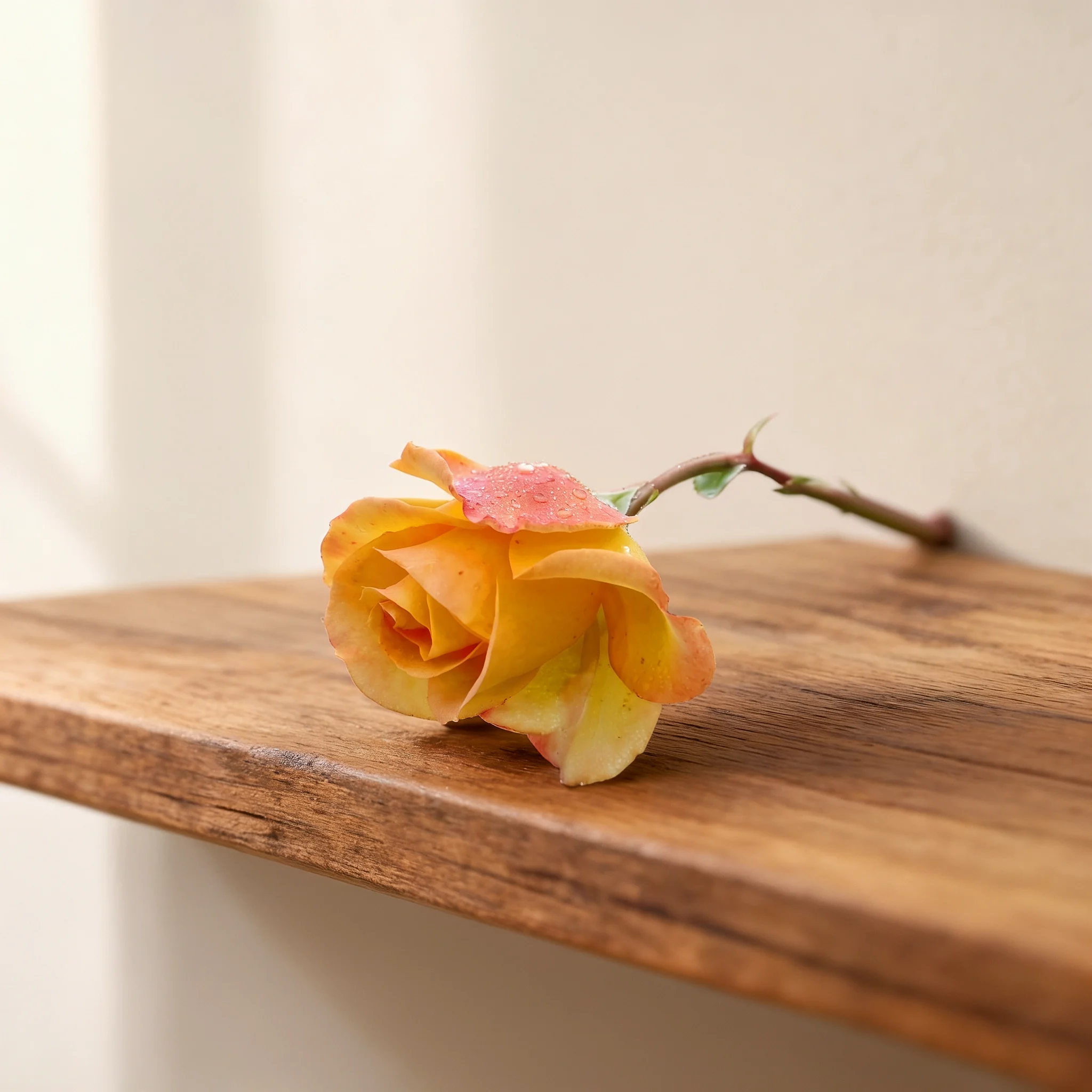
A rose on the same shelf in two lights
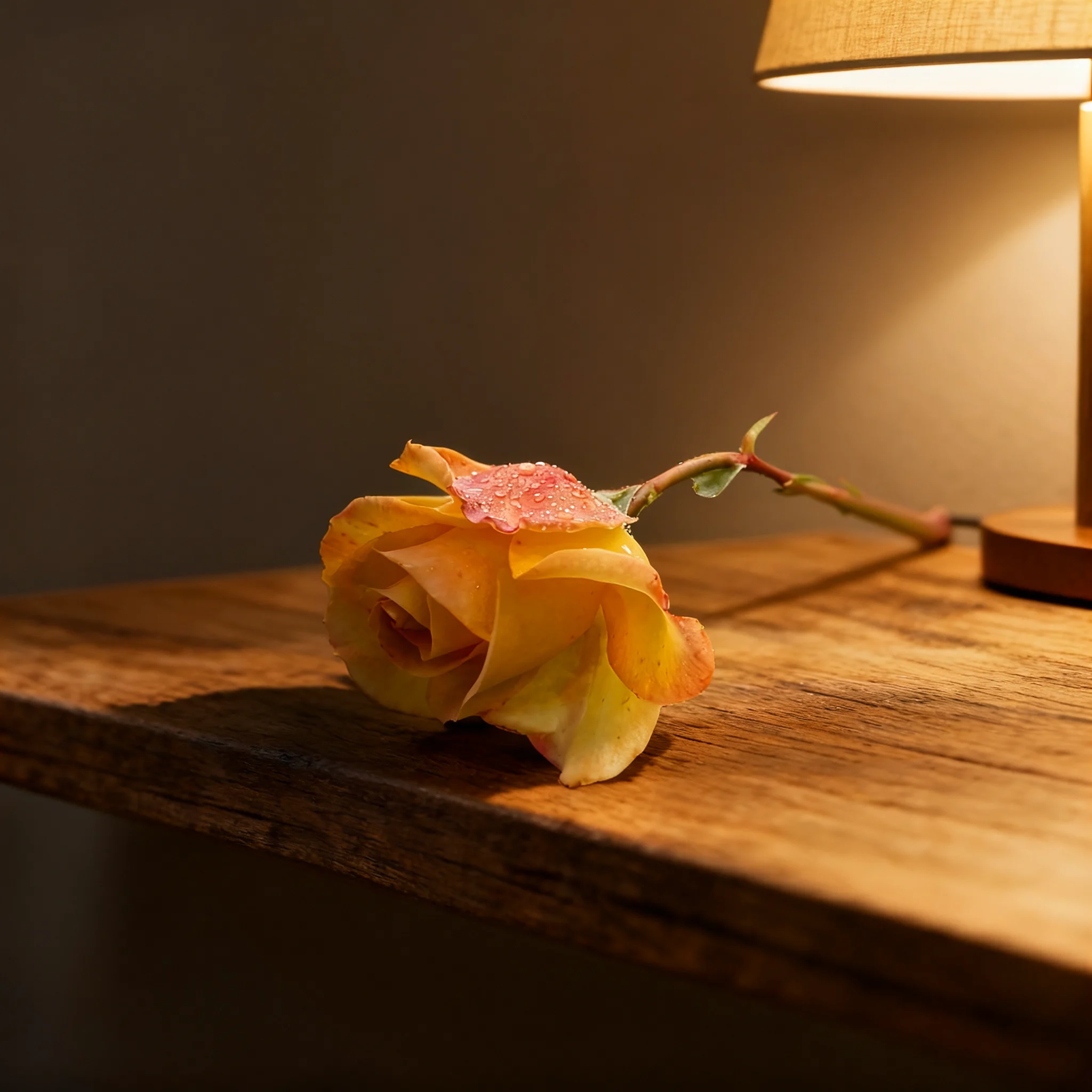
Our two-image request used one product reference and asked for the product to stay identical. The morning output shows the same rose on the same wooden shelf as the evening view. Both returned files were 2048 × 2048 PNGs at the 2k setting.
Warm lamp light changes the scene
The companion output puts the rose and wooden shelf under a warm table lamp. It came from the same request as the pale morning image, with two outputs and a square canvas. Compare the pair to see how the requested lighting change sits alongside the retained subject and shelf.
Give every frame a defined role
Write the shared requirements once, then describe the images in sequence. The request accepts two to ten outputs, up to ten shared references, and a resolution choice of 2k, 4k, or 8k. Count, shape, and resolution are separate decisions; make each agree with the series you intend to review.
Request parameters
| Parameter | Required | Description |
|---|---|---|
prompt | Yes | Required, up to 21,000 characters. Give the series-wide rules, then describe each image in order. at least 1 characters · at most 21000 characters |
reference_image_urls | No | Optional, up to 10 images shared by the entire series. Files must be JPG or PNG, 30 MB at most, 300 px or more per side, with a ratio from 2:5 to 5:2. at most 10 items |
num_outputs | No | Images in the series, from 2 to 10. The default is 4, and each delivered image is charged. |
resolution | No | Series tier: 2k, 4k, or 8k. The default is 2k, and larger tiers raise the price of every image. |
aspect_ratio | No | Shape used by the whole series: auto, 16:9, 9:16, 1:1, 4:3, 3:4, 3:2, 2:3, or 21:9. The default is auto, and the choice has no effect on the charge. |
Pricing
Each image delivered in the series is charged at the rate of the chosen resolution, and every reference image adds a small input charge.
| Specification | Price |
|---|---|
| $0.063 / image |
| $0.094 / image |
| $0.157 / image |
Use cases
Product lighting studies
Compare a product under different lighting conditions while asking for the object and its placement to remain fixed. Our rose request returned a morning view and an evening lamp view of the same shelf scene.
Craft process boards
Describe a workshop task as numbered stages and match num_outputs to the planned sequence. Name the tools, materials, and workspace details to carry through the process board.
Catalog angle planning
Assign each image a different product angle, with a shared reference and a written list of details to preserve. Inspect the returned objects against that reference before selecting catalog material.
Campaign composition studies
Use a common subject and palette across a series, giving each image a distinct composition. Choose a supported ratio for the intended placement and review the group for visual continuity.
Prompt guide & pro tips
Define the shared subject
Describe the product, place, or professional subject that connects the series. State the details you want preserved before listing the individual pictures.
Assign a purpose to each image
Number the images in the order you need them and describe one view or moment per image. Set
num_outputsto that count, between two and ten.Map references and set the canvas
Add shared references when you need a visual anchor, citing them as @
image_1and @image_2. Select the resolution and aspect ratio for the series.Review the sequence as a whole
Compare subject details and composition across every returned image. The rose example offers a two-image lighting study to inspect before writing your own brief.
Build a sequence around a shared subject
The Kling Image 4.0 Set endpoint accepts a brief for two to ten related pictures. Describe the series as a whole, then give each image a position and a visual purpose. Optional reference images apply across the request, so a product picture can anchor a lighting study or a set of viewing angles.
The distinction to plan around is continuity: decide which details should remain recognizable and which should change. For a lighting study, name the object and its placement as fixed details, then assign a different light source to each image. For a process sequence, define the workspace once and describe the task at each stage.
Request parameters
These are the public fields for this endpoint. Keep the requested image count aligned with the numbered descriptions in your prompt.
| Field | Required | Choices and limits | Role |
|---|---|---|---|
prompt | Yes | 1–21,000 characters | Describe the series, the images in order, and the details to preserve. Cite references as @image_1, @image_2. |
reference_image_urls | No | Up to 10 JPG or PNG files | Shared visual references. Each file may be up to 30 MB, must measure at least 300 px per side, and must have a ratio between 2:5 and 5:2. |
num_outputs | No | 2–10; default 4 | Number of related images requested. |
resolution | No | 2k, 4k, 8k; default 2k | Resolution tier used to determine the image rate. |
aspect_ratio | No | auto, 16:9, 9:16, 1:1, 4:3, 3:4, 3:2, 2:3, 21:9; default auto | Shape setting for the series; auto chooses from the prompt and references. |
Count the images and the references separately
A reference supplies visual input; it does not set the number of pictures in the series. The rose request used one reference with num_outputs set to two. Select the count deliberately rather than assuming that the number of uploads determines it.
Budget for the delivered series
Use the price shown on this page for the selected resolution. Each image delivered is charged at that rate, and every reference image adds a small input charge. A series is therefore billed by its delivered images plus its reference inputs, rather than as a single picture. Review the output count, resolution, and reference count together before submitting your request.
Write a brief with fixed details and planned changes
Begin with the shared subject, setting, and visual treatment. Follow with numbered image descriptions and a clear preservation instruction. Spend the prompt space on details a reviewer can check, such as product proportions, shelf placement, camera view, and lighting.
Assign one visual job per image
For a product series, one image might establish the object and another might examine it under different light. For a workshop process, each image can depict a named stage. Describe what distinguishes each picture so the request has a useful progression.
Give references a named role
Identify the product in @image_1 or the setting in @image_2, then say what the series should retain from each. Make sure those numbers match the input order.
Keep shape and resolution deliberate
The series has a shared aspect ratio setting and a shared resolution tier. If a square layout is required, choose 1:1 rather than leaving the shape to auto. The rose run selected 1:1 and 2k. Review the composition and the retained subject details before deciding whether a different tier is appropriate for your work.
What the rose request returned
On November 18, 2026, we submitted a prompt asking for the referenced product on a wooden shelf in two lighting conditions. The settings were one reference, two outputs, 2k resolution, and a 1:1 aspect ratio. The request returned two 2048 × 2048 PNGs.
Morning and evening from the same brief
The morning image shows the rose on the wooden shelf in pale light. Its companion shows the same rose on the same shelf under a warm table lamp. Both views came from the same request. Compare the two images together when judging the preservation goal and the requested change in illumination.
Review the group before selecting images
Place the returned pictures together and compare them against the shared requirements in your prompt. For a product study, inspect the object's proportions and position as well as the planned lighting changes. For a process board, check that every requested stage is present and that the workspace details connect the sequence. If a view needs revision, make its image description more specific while keeping the shared instructions clear.
Limits and related choices
The image count must remain between two and ten, and the prompt must fit within 21,000 characters. Check every reference against the file, dimension, and ratio requirements in the table. Series generation still needs a visual review: compare product details and the intended changes across all returned pictures before using them in a catalog or campaign.
For a standalone image brief, compare Kling Image 4.0. For a continuous page composition, consider Kling Image 4.0 Long: Kling says its long-image mode produces one complete page image. Choose according to whether your deliverable needs separate images or a continuous page layout.
API quick start
# Generate the idempotency key once; reuse it when retrying after a lost response.
export SPICY_IDEMPOTENCY_KEY="${SPICY_IDEMPOTENCY_KEY:-$(uuidgen)}"
curl -X POST https://api.spicyapi.ai/api/v1/jobs/createTask \
  -H "Authorization: Bearer $SPICY_API_KEY" \
  -H "Content-Type: application/json" \
  -H "Idempotency-Key: $SPICY_IDEMPOTENCY_KEY" \
  -d '{
  "model": "kling/image-4.0-set/text-to-image",
  "input": {
    "aspect_ratio": "auto",
    "num_outputs": 4,
    "prompt": "A ceramic teapot on a linen cloth, soft window light, muted palette",
    "resolution": "2k"
  }
}'

# Copy data.taskId from the response into TASK_ID, then poll the status.
TASK_ID="TASK_ID_FROM_RESPONSE"
curl "https://api.spicyapi.ai/api/v1/jobs/recordInfo?taskId=$TASK_ID" \
  -H "Authorization: Bearer $SPICY_API_KEY"
See the API reference for authentication, the complete schema, polling, and error handling.