Introduction
Upload your product photos, list the selling points, and receive a finished detail page. Choose how long the page runs and which resolution suits your storefront.
| Field | Value |
|---|---|
| Input | Image |
| Output | Image |
| Publisher | Kling |
| Release date | November 17, 2026 |
| Page tasks | Webpage design; e-commerce detail page |
| Prompt size | 1 to 71,000 characters for either task |
| Resolution tiers | 1k (default), 2k |
| Product detail length | short, medium (default), long |
| Webpage reference count | 0 to 3 images |
| Required product photo count | 1 to 3 images |
| Input image requirements | JPG or PNG; up to 30 MB; at least 300 px per side; ratio 2:5 to 5:2 |
| Recorded webpage output | 2048 x 16469 PNG at 2k |
| Recorded product page output | 1024 x 5021 PNG at short length and 1k |
Key features & highlights
A pottery brief became a full scroll
The Tideline Ceramics request named the hero headline, bowls, studio story and footer. The returned 2k PNG measured 2048 x 16469 and contained those page sections. Check small body text before reusing a page this tall.
A short layout anchored to a rose photo
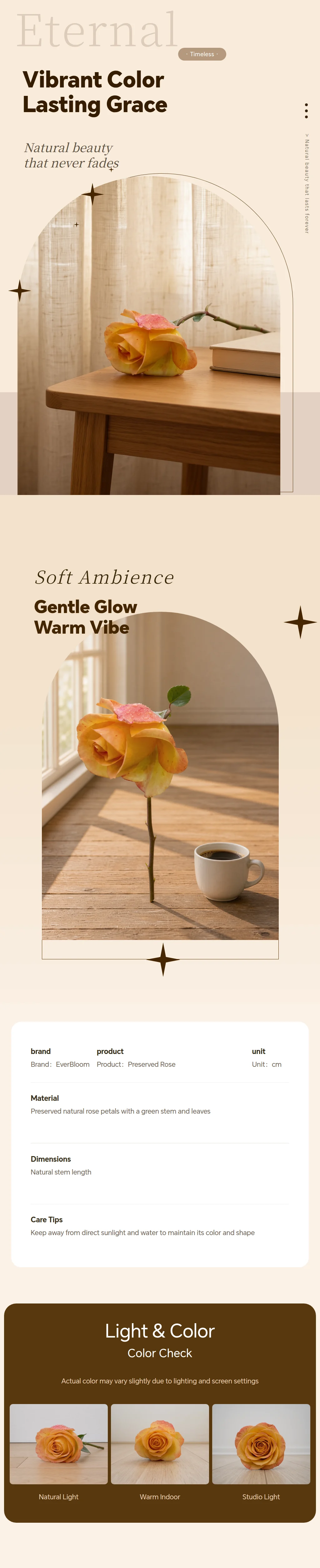
Our preserved-rose request used a supplied product image, short page length and 1k resolution. It returned one 1024 x 5021 PNG arranged as a product detail page around that photo.
Give each section a job and its words
Both endpoints accept a prompt of up to 71,000 characters. Spend the space on the reading order, supplied copy and reference roles. Website references are optional; a product detail page needs one to three product photos.
Separate length from resolution
Both tasks offer 1k and 2k, with 1k as the default. Product detail pages add a short, medium or long length selector. These choices affect the page price, while each input image carries a small input charge.
Request parameters
| Parameter | Required | Description |
|---|---|---|
prompt | Yes | Required, up to 71,000 characters. Provide product facts, selling points, and the module order, citing photos as @ |
image_urls | Yes | One to three product photos are required. Use JPG or PNG files of 30 MB or less, at least 300 px per side, with a ratio from 2:5 to 5:2. at least 1 items · at most 3 items |
page_length | No | How long the page runs: short, medium, or long. The default is medium, and longer pages cost more. |
resolution | No | Page tier: 1k or 2k, with 1k as the default. The 2k tier costs more at every length. |
Pricing
Each finished page is charged by its length and resolution, and every product photo adds a small input charge.
| Resolution | Page length: short | Page length: medium | Page length: long |
|---|---|---|---|
| $0.235 / image | $0.47 / image | $0.784 / image |
| $0.282 / image | $0.549 / image | $0.862 / image |
Use cases
Pottery studio website concepts
Outline a hero, featured bowls, a studio story and opening hours for a ceramics business. Our Tideline Ceramics run returned those sections in one 2048 x 16469 PNG, with small body text needing review before reuse.
Gift product detail layouts
Start with a product photo and request a hero, selling points, care instructions and a gift message panel. The short preserved-rose run returned one 1024 x 5021 PNG built around the supplied photo.
Brand direction for a design handoff
Use optional website references to communicate a palette or subject, then supply the audience and section order in the prompt. Review the resulting page picture with the team before building the website.
Merchandising briefs by page length
For a storefront product, organize verified information into modules and choose short, medium or long. Keep the text budget appropriate to that choice and inspect the generated page for missing or altered facts.
Prompt guide & pro tips
Match the endpoint to your brief
Choose webpage design for a site visual described in text, with optional references. Choose the product detail endpoint when you can supply product photos and verified selling points.
Write the scroll from top to bottom
Put the modules in reading order and quote the headline, body copy and button labels for each. Explain which image each numbered reference supplies and how it should be used.
Choose the page settings
Select 1k or 2k resolution for either endpoint. For a product detail page, also choose short, medium or long; medium is the default.
Inspect the downloaded page
Read the image at a useful viewing size and compare its wording and product claims with your brief. Check the flow between modules before handing the visual to a designer or preparing a listing graphic.
Build a product story around supplied photos
This endpoint takes product photography and a merchandising brief, then composes a continuous detail-page image. Use it when a shopper should see the item, understand the supplied selling points and follow the information through a sequence of modules. Bring the product facts with the photos; the brief should define what the page is being asked to communicate.
Unlike webpage design, this task requires product photos and provides a page length control. The result is a flat page visual for review or preparation as a listing graphic. It does not provide an editable storefront or a set of separate module files.
Product inputs and page controls
Prepare the images and checked copy before choosing the length and resolution. Both settings affect the page price, and the uploaded product photos add input charges.
| Parameter | Requirement | Purpose |
|---|---|---|
prompt | Required string, 1 to 71,000 characters | Provide product facts, selling points and module order; refer to photos with @image_1, @image_2. |
image_urls | Required array of 1 to 3 photos | Use JPG or PNG files up to 30 MB, at least 300 px per side, with a ratio between 2:5 and 5:2. |
page_length | Optional: short, medium or long; default medium | Select how long the detail page runs. |
resolution | Optional: 1k or 2k; default 1k | Choose the output tier independently of the length. |
Set the page length to suit the amount of product information you want to present. Choose resolution separately, then review the resulting image with its intended storefront placement in mind.
Choose photos for the information they carry
Show the product clearly and explain what each numbered image contributes, such as its overall appearance or a close view of a detail. Distinguish information visible in a photo from specifications supplied as text. Explain which view should introduce the product and which should support a detail module, keeping each photo connected to a clear part of the page.
Assemble the merchandising brief
Start with the product identity and verified facts. Then list the modules in the order a shopper should encounter them: a hero, the supplied selling points, supporting product details and a closing panel. Include care instructions when you have checked wording to provide. Do not ask the model to invent dimensions, materials or claims to fill an empty section.
Write copy that can be checked
Quote the headline and the text for each information block, with its intended section beside it. Where a fact is missing, omit it from the requested copy. A list of broad adjectives gives a reviewer little to verify; a supplied statement about a product feature can be compared directly with the returned image. Keep facts, visual direction and module order clearly expressed in the brief.
Match the content budget to the length
Use the selector to request short, medium or long and write a brief that fits the chosen scope. A compact page can focus on a concise product introduction, while a longer brief can allocate room to additional supplied information. Give each module a distinct purpose and remove repeated selling points before submitting the prompt. Changing resolution is a separate decision and should not substitute for editing down crowded copy.
Observations from the preserved-rose run
Our November 18, 2026 request supplied one rose photo and asked for a hero shot, three selling points, care instructions and a closing gift message panel in an amber and ivory palette. Its controls selected short length and 1k resolution. The brief connected the product photo to a sequence from introduction through care and gifting.
The response contained one 1024 x 5021 PNG laid out as a short product detail page around the supplied rose photo. Check the product appearance through the sequence and compare the selling points, care text and closing message with your supplied wording before preparing the page for shoppers.
Charges and publication checks
Check the current price shown on this page for the selected length and resolution. Each finished product detail page is charged by those two choices, and every product photo adds a small input charge. Include all supplied photos when considering that input charge rather than treating the product image requirement as a cost-free attachment.
Before preparing the image for a storefront, compare the pictured item with the supplied photos and read every claim, number and care instruction against the fact sheet. Review the spacing and reading order at the intended viewing size. The result is one page image, so later layout or text revisions need an image-editing or design workflow.
When another family fits the deliverable
Kling says its standard image workflow is intended for individual visual assets and its series workflow for coordinated separate images. Compare Kling Image 4.0 for an individual product graphic, or Kling Image 4.0 Set for a separate image collection. Stay with this endpoint when the requested deliverable is a continuous product detail page based on your photos.
API quick start
# Generate the idempotency key once; reuse it when retrying after a lost response.
export SPICY_IDEMPOTENCY_KEY="${SPICY_IDEMPOTENCY_KEY:-$(uuidgen)}"
curl -X POST https://api.spicyapi.ai/api/v1/jobs/createTask \
  -H "Authorization: Bearer $SPICY_API_KEY" \
  -H "Content-Type: application/json" \
  -H "Idempotency-Key: $SPICY_IDEMPOTENCY_KEY" \
  -d '{
  "model": "kling/image-4.0-long/edit",
  "input": {
    "image_urls": [
      "https://example.com/reference.png"
    ],
    "page_length": "medium",
    "prompt": "A ceramic teapot on a linen cloth, soft window light, muted palette",
    "resolution": "1k"
  }
}'

# Copy data.taskId from the response into TASK_ID, then poll the status.
TASK_ID="TASK_ID_FROM_RESPONSE"
curl "https://api.spicyapi.ai/api/v1/jobs/recordInfo?taskId=$TASK_ID" \
  -H "Authorization: Bearer $SPICY_API_KEY"
See the API reference for authentication, the complete schema, polling, and error handling.