
You ask Claude for a product photo, a thumbnail or a scene for a story, and instead of a picture you get a drawing made of code. Or Claude tells you it can't make images at all. Yet other people post screenshots of Claude handing them finished photos. Both are true, and the difference is whether an image tool is connected.
Short answer: Claude cannot generate images by itself, but it can when you connect an image-generation tool to it through MCP (Model Context Protocol). Claude then writes the prompt, calls the tool, waits for the result and gives you the file link. The picture comes from the image model you connected, not from Claude.
- Without a tool: Claude has no image model. Anthropic's help center says it doesn't generate photos or illustrations the way image tools do; it builds diagrams, charts and other visuals in HTML and SVG, and it can read images you upload.
- With an MCP image tool: Claude can create real PNG images and videos. We tested this in Claude Code with the SpicyAPI MCP server: one image and one 4-second video, $0.05 in total.
- Which Claude app: Claude Code works (tested below). Claude Desktop can run the same local server from a config file (documented, not tested by us), and it also accepts hosted custom connectors. Claude in a browser only takes hosted connectors, which Anthropic's cloud reaches over the internet, so a server running on your own computer can't connect there. If you mostly use claude.ai, install Claude Desktop and add the local server, or skip Claude for the image itself and use the AI image generator in your browser.
- What it costs: Claude's side is your normal Claude plan. Each image or video is charged by the image service you connect. In our test, one image cost about half a cent ($0.0051) and a 4-second clip about four and a half cents ($0.045).
- Unfiltered images: Claude still follows Anthropic's Usage Policy when it writes and sends the request, so connecting a tool does not make Claude produce images that policy rules out. If that is what you need, use a generator directly.
What Claude does when you ask for an image without a tool
Claude reads images well, but it has no model that paints pixels. When you ask for a picture in a plain chat, it does one of two things: it says it can't, or it writes the picture as code. On claude.ai and in Claude Desktop that usually means an SVG drawing or an interactive HTML visual that renders in the conversation. Anthropic describes this in its help article Can Claude produce images? (dated 16 March 2026).
Users see the same thing. In a July 2026 Hacker News thread, one developer asked Claude Opus 4.8 in Claude Desktop for a picture of a horse; it drew an SVG and replied that it had drawn it "by hand in code, not with an AI image generator," because "there's no diffusion/photo image model wired into this session" (comment).
SVG is fine for icons, logos, diagrams and flat illustrations. It is the wrong tool for a product photo, a portrait, a landscape or anything that should look like a camera took it. For those you need an image model, and MCP is how Claude reaches one.
How MCP image generation works in Claude
MCP is an open standard that lets an AI assistant use outside tools. An image-generation MCP server adds tools such as "list models", "get a price" and "create a task". When you ask for a picture:
- Claude picks a model from the tool's catalog (or uses the one you name) and reads which settings it accepts.
- Claude writes the prompt and settings and asks the tool for a price.
- You confirm the charge (with SpicyAPI, a question your app shows to you, not to Claude).
- The image service generates the file. Claude waits, then hands you a link, and in Claude Code it can also save the file into a folder for you.
Two consequences follow. Image quality depends on the model you connect, not on which Claude model you chat with. And Claude doesn't look at the result unless you ask it to download and open the file. After our video finished, Claude said plainly: "I haven't watched the clip, so I can't confirm the push-in, steam and leaves came out as asked."
The SpicyAPI server gives Claude one catalog of over 100 image and video models on one key, billed per use. Browsing models and getting quotes is free.
Which Claude app can generate images
| Where you use Claude | How tools connect | SpicyAPI MCP | What we did |
|---|---|---|---|
| Claude Code (terminal, interactive) | Local server added with claude mcp add | Works, with a confirmation prompt before each charge | Tested: 1 image, 1 video |
Claude Code headless (claude -p) | Same local server | Free tools work; paid tasks are declined automatically | Tested: no task created, nothing charged |
| Claude Desktop (Mac, Windows) | Local server in claude_desktop_config.json, or a hosted custom connector | Supported as a local server by the server's setup docs | Not tested by us |
| claude.ai in a browser, Claude mobile apps | Hosted custom connectors only (added in the browser, Cowork or Desktop; the mobile apps aren't listed as a place to add them): a URL that Anthropic's cloud reaches over the internet | Can't connect, because the server runs on your computer | Not applicable |
The last row is where most confusion comes from. Anthropic's custom connector guide says hosted (remote MCP) connectors can be added in Claude, Cowork and Claude Desktop, on Free, Pro, Max, Team and Enterprise plans (Free accounts get one). Claude connects to them "from Anthropic's cloud infrastructure, rather than from your local device", so the server "must be reachable over the public internet". A local server like ours isn't, so in the browser you would need a service that offers a hosted connector. Otherwise switch to Claude Desktop or Claude Code, which can also start a server on your own computer.
Set it up in Claude Code (tested)
You need Node.js 22.13 or newer (node --version), Claude Code, and a SpicyAPI key with some balance on the account.
- Create a key on the API keys page. It starts with
sk-spicy-and is shown once. - In your terminal, put the key in an environment variable, then register the server:
export SPICY_API_KEY="sk-spicy-..."   # paste your own key

claude mcp add spicyapi \
  -e SPICY_API_KEY=$SPICY_API_KEY \
  -- npx --yes --package=@spicyapi/mcp spicyapi-mcp
This adds the server to the current project. Add --scope user to use it in every project. Don't use --scope project, which writes your key into a .mcp.json file inside the repository.
- Start
claudeand type/mcp. You should seespicyapiconnected. Asking "What is my SpicyAPI balance?" confirms the key works and costs nothing.
If spicyapi shows as failed, run node --version (it must be 22.13 or newer). If it connects but the balance check reports a missing or invalid key, the variable didn't reach the server: claude mcp add copies the value from your current terminal, so run claude mcp remove spicyapi, export the key in the same terminal and add the server again.
- Ask for an image in plain words. Naming the model and settings keeps the price predictable; otherwise Claude chooses.
This is the request we typed in our test, word for word except for a first sentence asking Claude to answer in English:
Prompt
Use SpicyAPI to generate one image with openai/gpt-image-2/text-to-image at 1:1, quality low, 1k: a studio product photo of a matte sage-green ceramic coffee mug on a pale oak table beside a window, soft morning light, shallow depth of field. Wait for it to finish and give me the result link, the task ID and what it cost.Claude looked up the model, fetched a quote and stopped. Claude Code then showed this question from the MCP server (re-rendered from the session text). Claude itself can't answer it; you tick the box and choose Accept or Decline.
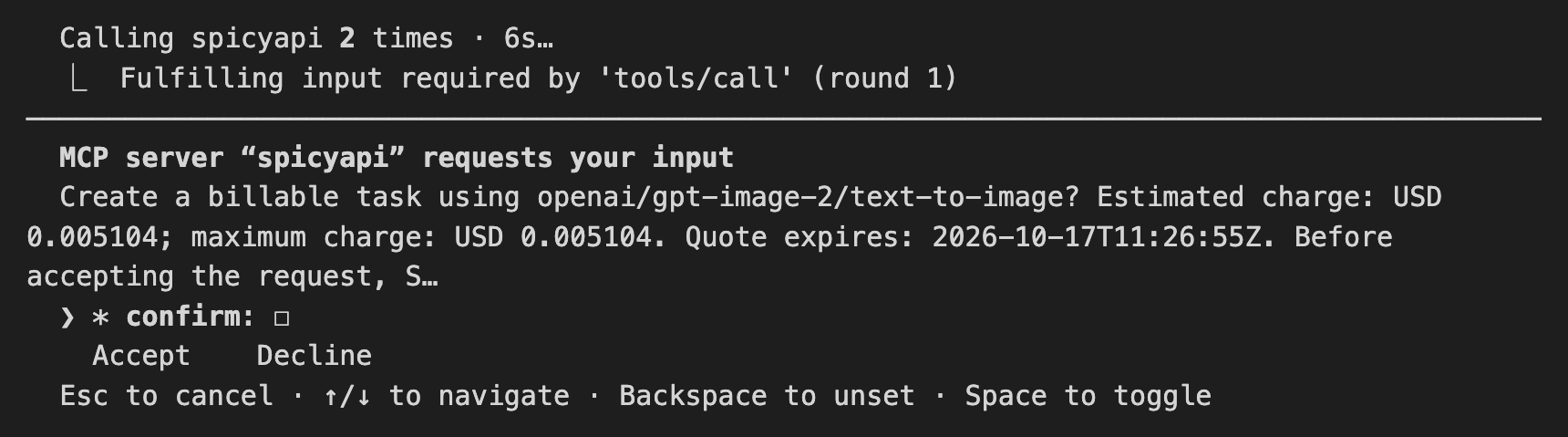
The confirmation Claude Code displayed during our test, before anything was charged. Terminal text captured from the session and re-wrapped to fit the page.
After we accepted, the task finished in about a minute (1 minute 19 seconds for the whole turn) and Claude returned the task ID, the price and a download link.

The image Claude Code produced through the MCP server: GPT Image 2, 1:1, low quality, 1k (1024 × 1024 PNG), first attempt, about half a cent. The model printed a real magazine name on the book spine on its own, which our prompt never asked for.
Turning the image into a video from the same chat
Next we asked Claude to animate that picture with "the cheapest SpicyAPI image-to-video model and settings that keep the total under USD 0.30", with a slow push-in, rising steam and swaying leaves. Claude compared quotes and picked a 1-second clip on Vidu Q3 Turbo for about four cents. We declined that confirmation, because one second is too short for three movements. Declining created nothing and charged nothing. Claude then pointed out the alternative it had found, Seedance 1.5 Pro at 480p for 4 seconds for a fraction of a cent more, and we accepted that one.
The clip finished in under 30 seconds of generation time and shows the push-in and the steam; the leaves move very little. Claude wrote the motion prompt itself from our sentence and passed the first image as the start frame, so we never uploaded anything by hand.
What the two tasks cost and how long they took:
| Task | Model and settings | Charged | Generation time |
|---|---|---|---|
| Image | GPT Image 2, 1:1, low, 1k | $0.005104 | 63 s |
| Video | Seedance 1.5 Pro, 4 s, 480p, 1:1, no audio | $0.0448 | 28 s |
| Declined quote | Vidu Q3 Turbo, 1 s, 540p | $0 | not created |
Prices are the SpicyAPI rates shown at the time of our test (17 October 2026) and vary with resolution, quality and length. Your Claude plan's usage is separate; the image service bills only the tasks you confirm.
The headless gotcha: claude -p won't spend money
If you script Claude Code with claude -p "...", free tools (catalog, prices, balance, task status) work, but in our test with Claude Code 2.1.302 every paid task stopped. The create call came back with:
operation declined; no task was created and no funds were reserved or charged (only the free price quote had been requested)Headless mode has no one to show the confirmation to, so in that version it was declined automatically; newer Claude Code releases may handle it differently. That is a safety feature of the server, not a bug in your script. For unattended jobs, call the SpicyAPI CLI or the API from your script instead of going through Claude.
Set it up in Claude Desktop (from the setup docs, not tested by us)
Claude Desktop runs the same local server. We did not run Desktop for this article; these steps come from the SpicyAPI MCP guide.
- In Claude Desktop, open Settings → Developer → Edit Config. The file is
~/Library/Application Support/Claude/claude_desktop_config.jsonon macOS and%APPDATA%\Claude\claude_desktop_config.jsonon Windows. - Add the
spicyapientry (merge it intomcpServersif the file already has other servers) and replace the placeholder with your key:
{
  "mcpServers": {
    "spicyapi": {
      "command": "npx",
      "args": ["--yes", "--package=@spicyapi/mcp", "spicyapi-mcp"],
      "env": { "SPICY_API_KEY": "YOUR_SPICY_API_KEY" }
    }
  }
}- Quit Claude Desktop completely and reopen it. It reads the file only at launch.
- Ask "Check the SpicyAPI service status", then "What is my SpicyAPI balance?". Both are free.
The key sits in this file as plain text, so don't copy the file into a shared folder or a repository. Paid tasks need the app to show the same confirmation question you saw in the Claude Code screenshot above. The server's documentation notes that Claude Desktop versions have differed in how they handle it. If your version can't show it, creating a task stops with an error that usually mentions did not declare the required capability, and nothing is created or charged. In that case, use Claude Code or the website for paid generation.
Getting better results from Claude
These come from how the tools behave, and most of them showed up in our test:
- Name the model and the settings when cost matters. "Generate an image" lets Claude choose, and prices on one model can range from under a cent to over fifty cents depending on quality and resolution. "GPT Image 2, 1:1, low, 1k" or "the cheapest 4-second option" keeps it bounded.
- Ask for a comparison before the run. "Compare what a 5-second image-to-video clip costs on three models" is free; quotes cost nothing.
- Use the confirmation to steer. Declining is free. When Claude picked a 1-second clip, declining and naming the 4-second option fixed it in one message.
- Ask Claude Code to save the file. Result links are short-lived (20 minutes in our test), and generated files are deleted after 14 days. Say "download it into ./images" and Claude Code will save it locally.
- Use your own photos. Give Claude Code a file path ("turn ~/Desktop/product.jpg into a 5-second video") and the server uploads it. Images up to 10 MiB are accepted.
- Ask Claude to check the result if it matters. It doesn't look at outputs by default. In Claude Code you can ask it to download the image and describe what it sees before you use it.
- Say "no text or logos" for product shots. Our mug photo came back with a real magazine name on a book in the background, which we never asked for. If the image is going on a store page or an ad, add "no text, no logos, no brand names" to the prompt and check the background before you publish it.
What about NSFW images?
Connecting an image tool does not change Claude's rules. Claude is the one writing the prompt and deciding whether to send it, and Anthropic's Usage Policy lists sexually explicit content among the things its models should not generate. Expect Claude to decline or tone down requests for unfiltered images, whatever image model sits behind the tool. We did not run unfiltered prompts through Claude for this article, and we don't offer ways to get Claude around its policy.
The SpicyAPI platform itself adds no content filter; what a request can produce depends on the model you choose. If your work needs images without a content filter, skip the assistant and go straight to the generator: the uncensored AI image generator in the browser, or the same models through the API, where you write the prompt yourself.
Other ways to get images while using Claude
| Option | Good for | Limits |
|---|---|---|
| Claude's own SVG and HTML visuals | Icons, diagrams, charts, simple flat illustrations | No photos or realistic images |
| Claude + an image MCP server (this guide) | Real images and video from a conversation: text-to-image, image editing, image-to-video, text-to-video, video extension and upscaling, with per-use billing | Local servers need Claude Code or Claude Desktop; unfiltered requests still follow Claude's rules |
| Claude + a single-provider MCP server | One model you already pay for, such as a Gemini image key | One model and its pricing; setup varies by project |
| Claude writes the prompt, you paste it into a generator | Full control over each image and setting | One more copy-paste step |
FAQ
Does Claude have image generation built in?
No. Claude can read images and draw SVG or HTML visuals, but it has no model that generates photos or illustrations. Real images come from a tool you connect through MCP.
Can Claude Code generate images?
Yes, once an image MCP server is added with claude mcp add. In our test it produced a 1024 × 1024 image for about half a cent and a 4-second video for about four and a half cents in the same session. In headless claude -p mode (Claude Code 2.1.302 in our test), paid tasks were declined automatically.
Can I generate images on claude.ai in the browser?
Only through a custom connector, which must be a hosted server that Anthropic's cloud can reach over the internet. Local servers, including the SpicyAPI MCP server, don't work there; use Claude Desktop or Claude Code, or make the image in the AI image generator without Claude.
Is image generation in Claude free?
Claude's side is part of your Claude plan. The image service charges per image or video. Browsing models and getting quotes through the SpicyAPI server is free, and you confirm every charge before it happens.
Can Claude edit an image I already have?
Yes, through the same tool. Give Claude Code the file path and ask for an edit or a video; the server uploads your file and Claude picks an editing or image-to-video model.
Bottom line
Claude can't paint pixels, but it is a capable operator of tools that can. If you work in Claude Code, connecting an image MCP server takes one command and turns "make me a product photo" into a real file, with a price you approve first. Claude Desktop can run the same server from a config file, while Claude in the browser and the mobile apps can't reach a local server. For unfiltered work, use the generator directly rather than asking Claude.
To try it, create a key on the API keys page, run the claude mcp add command above, and ask Claude for your first image.