To edit an existing picture with GPT Image 2, use the edit task, put the image you want to keep first, name one change, then list what must stay. A PNG mask can point at the area to repaint, but it guides the model; it does not lock the other pixels. A one-source edit at medium quality, 3:4, 1k costs about $0.041; the same edit at high quality costs about $0.13. Each source image adds roughly one cent to every output.
GPT Image 2 suits clothed, design and product work: retyping a cover, changing a garment colour, swapping a background, placing a person in another scene. It is filtered, so lingerie and other adult edits are refused (not charged). For those, start from Is GPT Image 2 uncensored? and the best uncensored image editors.
What one good edit looks like
This is the GPT Image 2 edit task given one magazine cover and one instruction. Medium quality, one source, input fidelity high, 3:4.
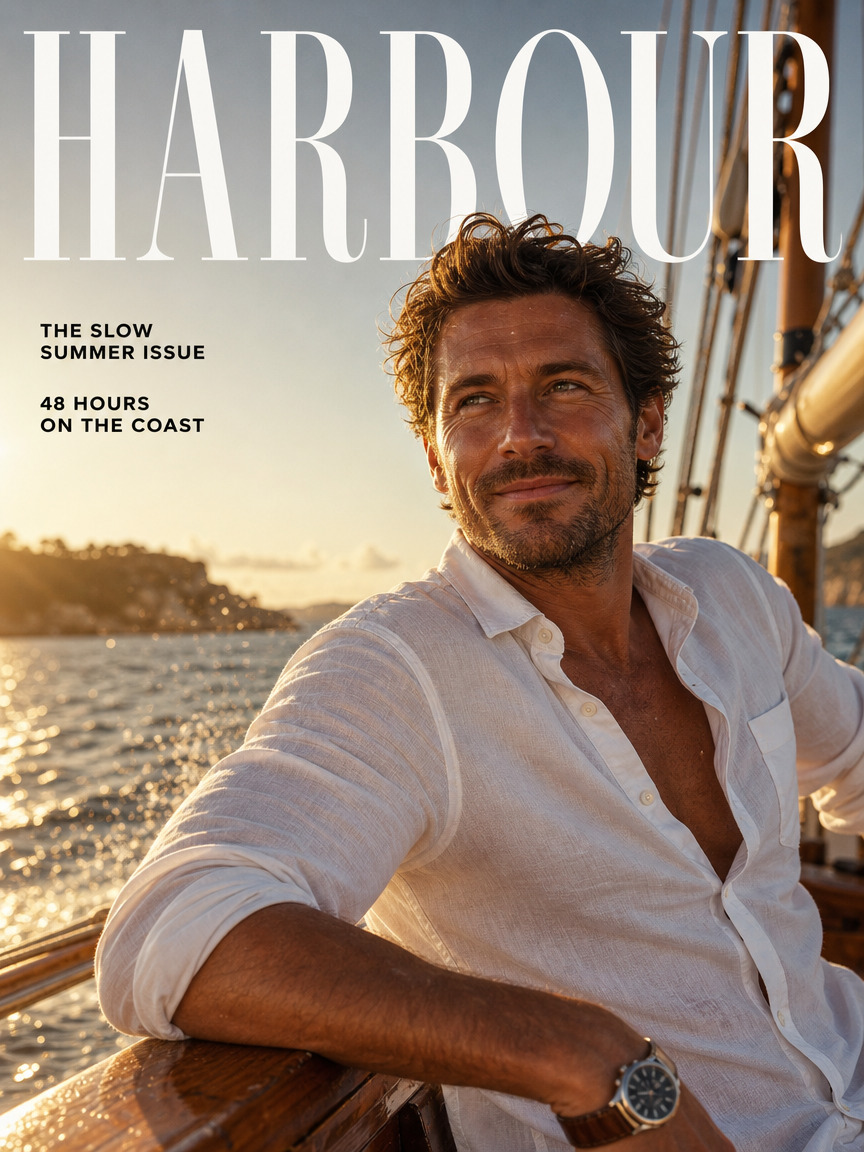
Source: the HARBOUR cover, with a white linen shirt and the lines “THE SLOW SUMMER ISSUE” and “48 HOURS ON THE COAST”.
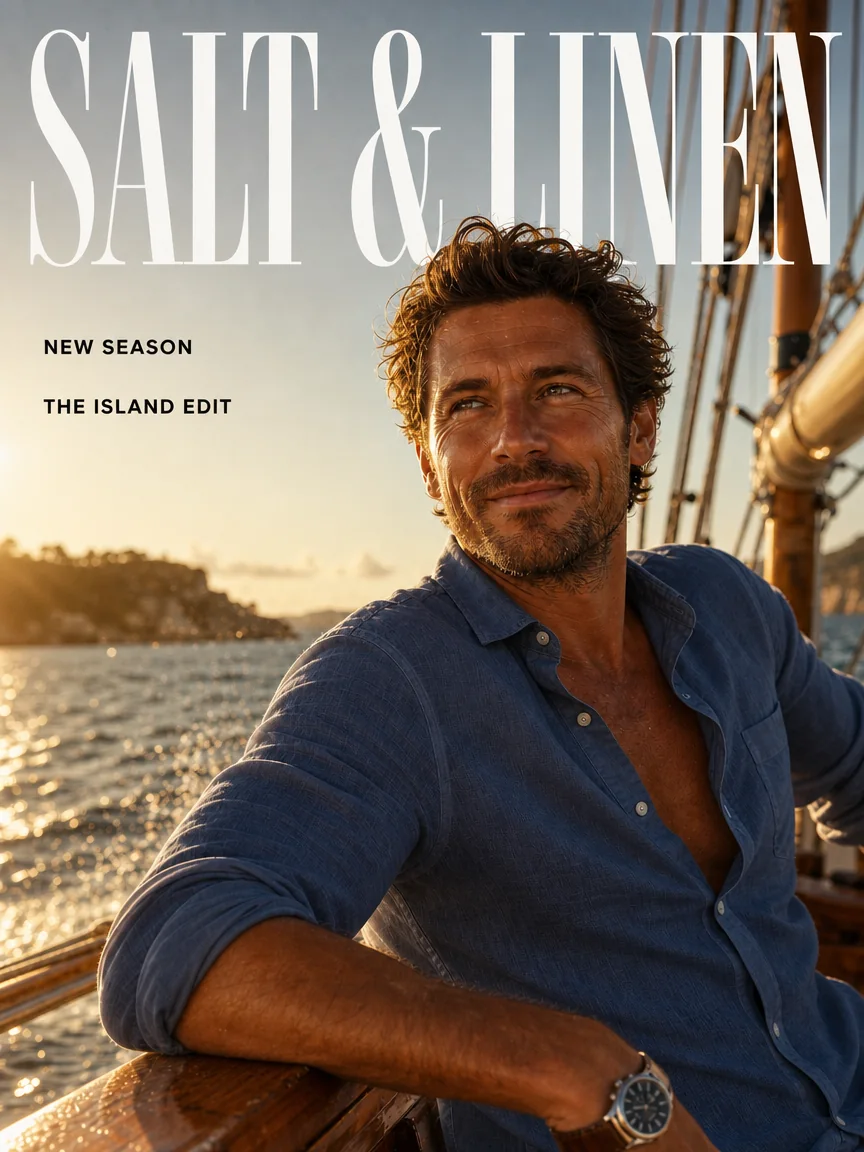
GPT Image 2 edit: “SALT & LINEN”, “NEW SEASON” and “THE ISLAND EDIT”, plus a navy shirt. The face, seated pose, boat rail and golden sea light remain visually consistent with the source.
Retype this magazine cover. Change the masthead to read "SALT & LINEN" in the same tall serif, and change the two cover lines to "NEW SEASON" and "THE ISLAND EDIT" in the same small bold sans-serif. Change his white linen shirt to a washed navy linen shirt. Keep his face, pose, the boat, the sea and the golden light exactly as they are.
Three habits apply to every edit: put every word to appear in double quotes; list the change first, then everything that must not move; and keep one request to a few related changes, not a new viewpoint plus outfit plus setting. Anything you do not protect may be redrawn.
Try it in the Playground
- Open the GPT Image 2 edit page and log in with a funded account. The form is on the page itself.
- Under Images, choose Add a file (or Add URL) and add the image you want to keep. Paste your instruction into Prompt, or start from the cover example: Run this prompt on GPT Image 2 edit → and add the cover above as the image.
- Set Aspect ratio to the source's own shape (for example 3:4), Resolution 1k and Quality medium. Open Advanced parameters for Input Fidelity (high) and Mask (see below).
- Read the price shown under the form, then press Run.
Set up a background edit
Add the approved portrait or product image (the original file, not a screenshot) as source one and start with these values:
| Field | Start with | Why |
|---|---|---|
aspect_ratio | The source's own ratio (for example 3:4) | A fixed ratio lets resolution apply. auto follows the source's shape at about 1.5 megapixels and ignores the 1k/2k/4k tier; use it if the source's ratio is not in the list |
resolution | 1k | Judge the composition before paying for 2k |
quality | low for drafts, medium for most finals, high for small type and skin detail | Each step costs about three times the one below at 3:4 1k |
num_outputs | 1 | Every output is billed separately |
input_fidelity | high for faces, fabric and printed labels | Free; keeps those details closer to the source |
output_format | png | Lossless review master |
background | opaque | Controls transparency only, not the new backdrop; this model has no transparent option, so leave it on opaque |
Sources can be JPG, PNG, WEBP or GIF, up to 10 MB each, 1 to 10 per request. The prompt can run to 5,000 characters.
For a portrait, pick a source with a readable face and a clear garment edge: hair and shoulders are where a background change shows its seams.
A background-change prompt that follows the same shape:
Replace the pale gray wall with a muted sage studio background. Preserve the fictional adult's face, short brown hair, navy jacket, opaque cream shirt, pose and camera angle. Keep the existing light direction. Reconstruct the background naturally around the hair and shoulders. Add no lettering, furniture or jewelry.
Use a mask when words do not pin down the area
mask_url takes a PNG the same size as source one. Transparent pixels mark the area to repaint; opaque pixels mark what to keep. To make one:
- Open the exact submitted source in an editor that supports transparency.
- Create a same-size layer: opaque over the area to protect, transparent over the area to repaint.
- Export PNG with alpha and reopen it to confirm the transparency survived.
- Submit the portrait first and the mask as
mask_url.
In the Playground, drop the mask into Mask. In code, upload local files first; see media upload and retention.
Say it in the prompt as well: "Only edit the transparent region of the mask," then the change and the keep list. For a background, trace the garment edge and the gaps around the hair. If the mask seems ignored, check the polarity (easy to invert) and that it matches the first source exactly.
A mask is guidance for a generative edit, not a Photoshop selection. If the face must stay pixel-for-pixel original, composite the original person over the accepted new background in a normal editor instead of asking the model to redraw the face faithfully.
Add a second reference image without changing the person
Refer to sources by order in the prompt, and give each one a single job:
Image one defines the person, clothing and framing. Image two supplies only the wall color; do not copy any objects or layout from it.
A plain colour swatch is less ambiguous than a photograph with its own face and outfit. If an object leaks in from source two, swap in a cleaner reference rather than adding prohibitions. The mask always belongs to source one. The same pattern places a person in another scene: "the woman from the first image, in the setting of the second."
What the settings change
- Resolution: 1k, 2k or 4k (a square is 1024, 2048 or 2880 pixels across).
- Input Fidelity: set it to high for faces and printed labels; it costs nothing extra but will not rescue a prompt that asks for too much.
- Output format: JPEG or WebP compression cannot fix a moved eye or a missing seam.
There is no transparent output on GPT Image 2, and PNG alone does not create transparency. For cut-outs use GPT Image 2.5 Flare or Sunburst, which expose a transparent background option on editing, or a background-removal step.
What an edit costs
Totals for one source image, one output, with a short prompt, in USD at current catalogue prices:
| Quality | 3:4 at 1k | 3:4 at 2k | auto (any tier) |
|---|---|---|---|
| low | $0.0137 | $0.0171 | $0.0157 |
| medium | $0.0413 | $0.0722 | $0.0596 |
| high | $0.1345 | $0.2583 | $0.2078 |
Each extra source adds about $0.0098 to every output. A square 1k medium edit is $0.0524. auto is one flat price whatever tier you pick: dearer than a 1k fixed ratio, cheaper than 2k or 4k but capped at about 1.5 megapixels. Choose the ratio you will publish in, then the tier. Prompts beyond 100 tokens add a small charge shown in the quote.
Because the source charge is fixed, a low draft costs about a third of a medium one: four low 3:4 drafts cost about $0.055, a medium final about $0.041. And a wrong face is not fixed by paying for high; remove competing references and extra pose or camera instructions first.
Then send it through the API
The Playground's Request body shows the same JSON, so a setup that works there can be pasted into code.
IDEMPOTENCY_KEY="$(uuidgen)"
curl -X POST https://api.spicyapi.ai/api/v1/jobs/createTask \
  -H "Authorization: Bearer $SPICY_API_KEY" \
  -H "Content-Type: application/json" \
  -H "Idempotency-Key: $IDEMPOTENCY_KEY" \
  -d '{
    "model": "openai/gpt-image-2/edit",
    "input": {
      "image_urls": ["https://example.com/portrait.png"],
      "mask_url": "https://example.com/wall-mask.png",
      "prompt": "Only edit the transparent region of the mask. Replace the pale gray wall with a muted sage studio background. Preserve the face, hair, jacket, pose and camera angle. Keep the light direction. Add no lettering or props.",
      "aspect_ratio": "3:4",
      "resolution": "1k",
      "quality": "medium",
      "input_fidelity": "high",
      "output_format": "png"
    }
  }'
Retries, polling and downloading results are covered in the Tasks docs.
Or let an Agent do it. Save the input object as input.json and run spicyapi tasks create --model openai/gpt-image-2/edit --input-file input.json --wait (CLI docs), or ask an assistant with the MCP server to run this edit (it calls spicyapi_task_create); both show the price and ask you to confirm. npx skills add spicyapi-ai/spicy-skill installs the Agent Skill, so a coding assistant reads the live schema instead of guessing fields.
Fix the failure you can actually see
| Result | Next action |
|---|---|
| Correct wall, changed face | Return to the original source; remove competing portraits; set input_fidelity to high; use a composite if exact face pixels are required |
| Wall unchanged | Check the transparent mask region, source order and whether the wall was named |
| Beige fringe around hair | The mask protected old wall pixels; widen the transparent area or clean that edge in an editor |
| Whole portrait reframed | Use the source's own ratio and remove camera-movement words |
| Garbled or misspelled text | Put each word in double quotes and say where it goes; for final artwork, keep lettering in an editable layer |
| Drift after several edits in a row | Edit again from the original, or the last version you approved, instead of chaining on each result |
| Image looks rough only in a small preview | Open the returned file at full size before changing settings |
If swapping the wall keeps altering the face, more variations rarely help. Keep the accepted portrait, take the generated background from the edit, and join the two in an editor where you control the boundary.