Relight takes one photo and one sentence about the light you want, and returns the same people and scene lit that way. Write "blue hour, the truck's headlights on" and a midday photo comes back at dusk. It costs $0.03 per image.
About "free": there is no free tier on SpicyAPI. You are billed only for images delivered; a failed task is not charged (see the tasks guide).
Before and after: midday to blue hour
The input is a bright salt-flat photo with a woman beside a pale green truck. The prompt: "Relight the image as blue hour just after sunset: cool blue sky light, the truck's headlights switched on and glowing warm."
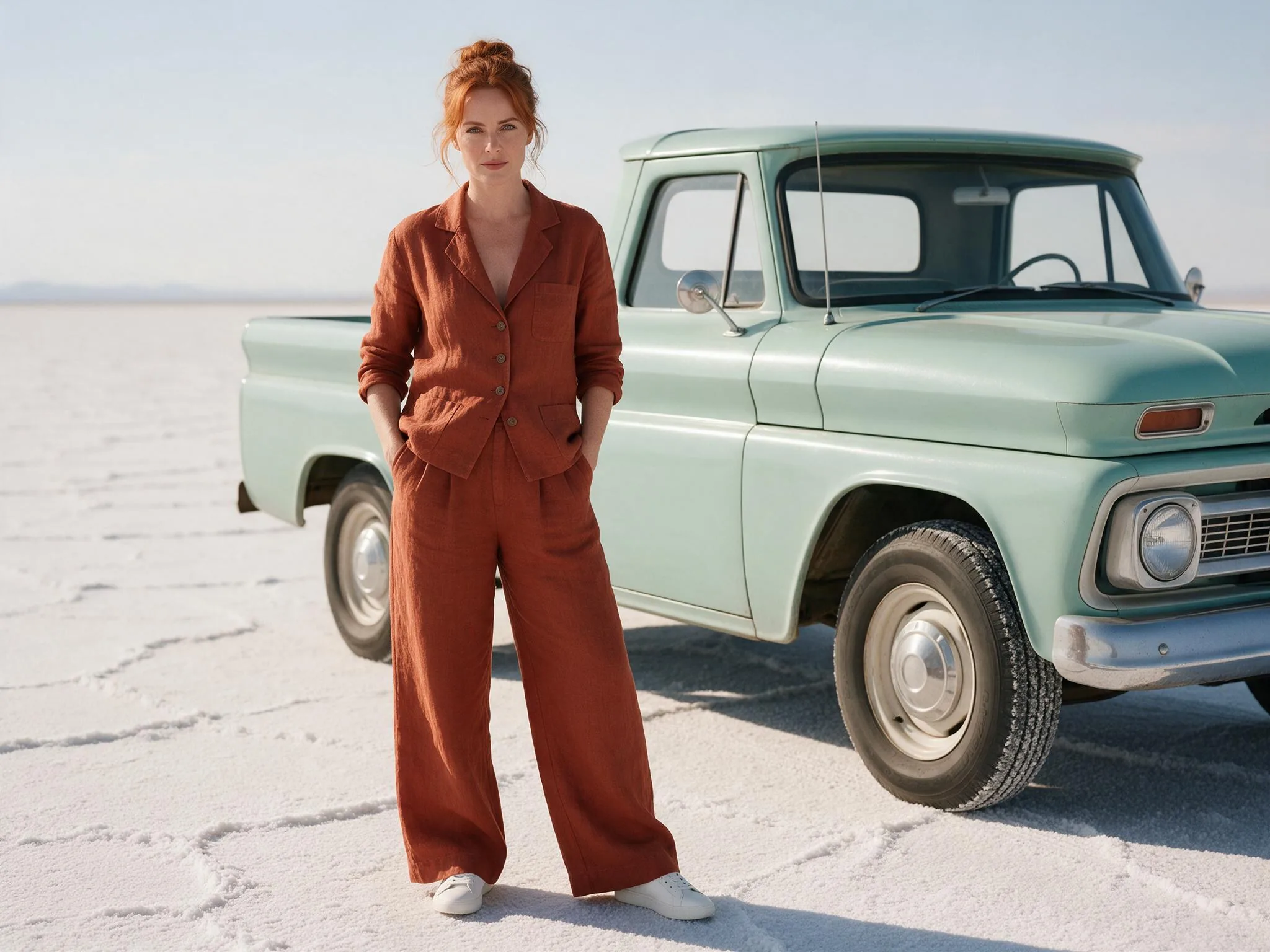
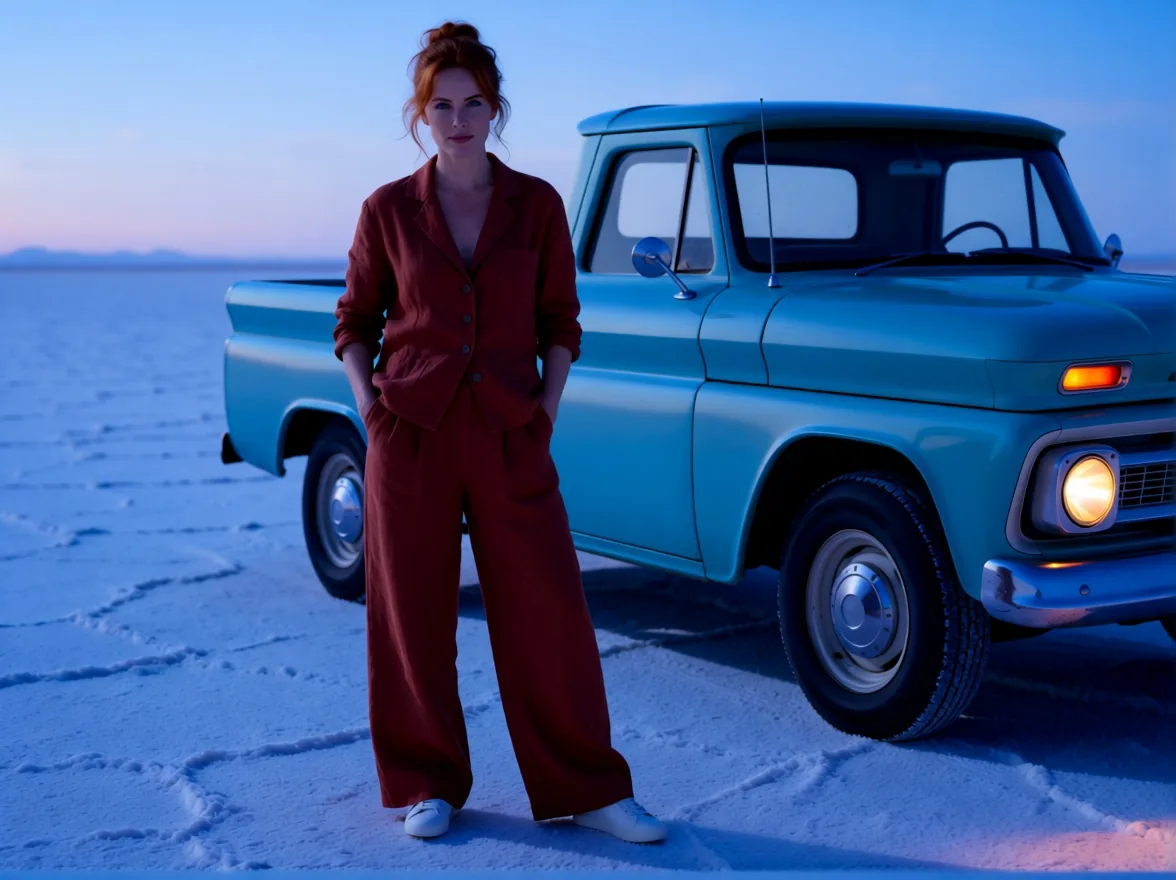
Notice that the prompt asked for something that was not in the photo (lit headlights) and got it. Light sources you describe can be added.
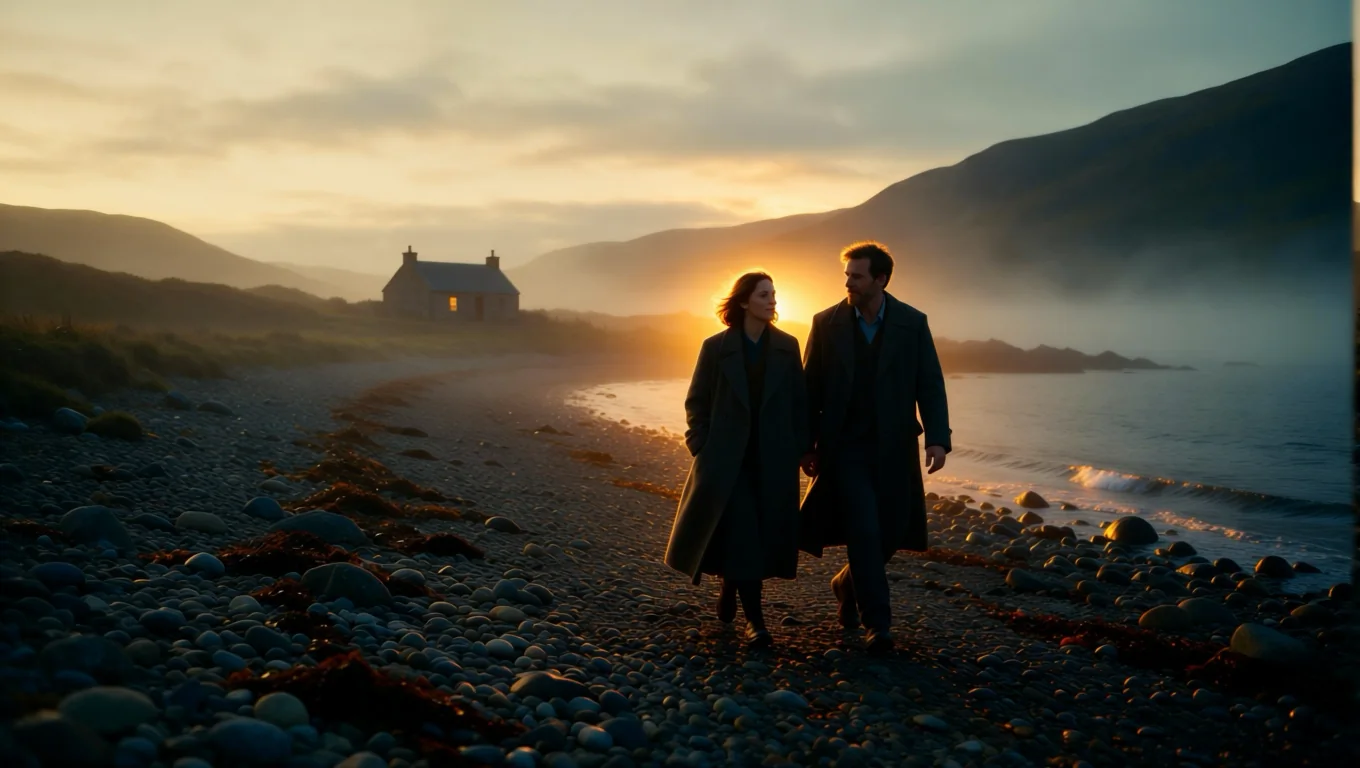
A misty shore turned into a golden sunset
Second test, a 16:9 film still of a couple walking on a pebble shore at dawn. The prompt: "Relight the image with a low golden sunset behind the couple: warm rim light on their hair and coats, long shadows across the pebbles."
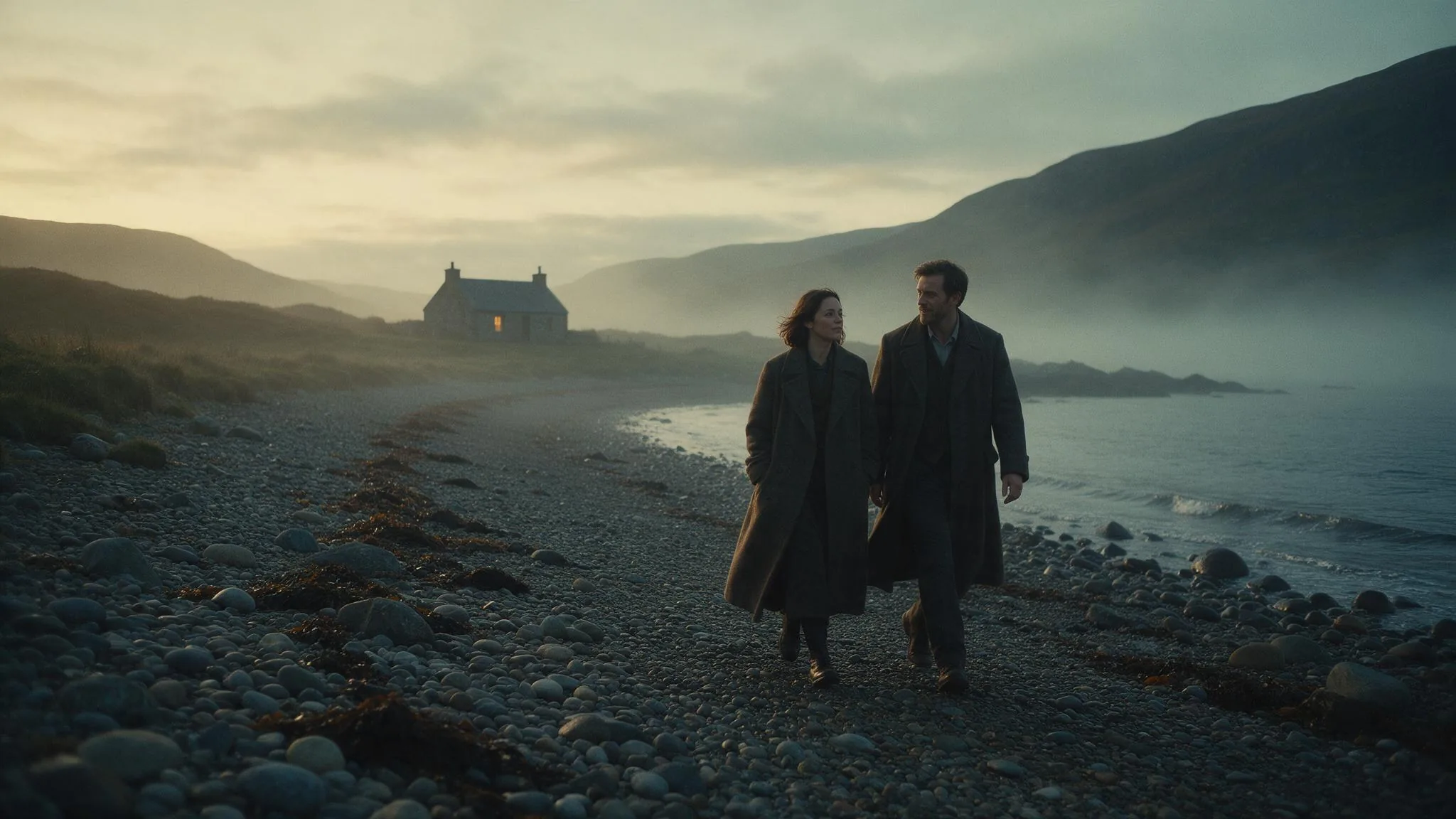
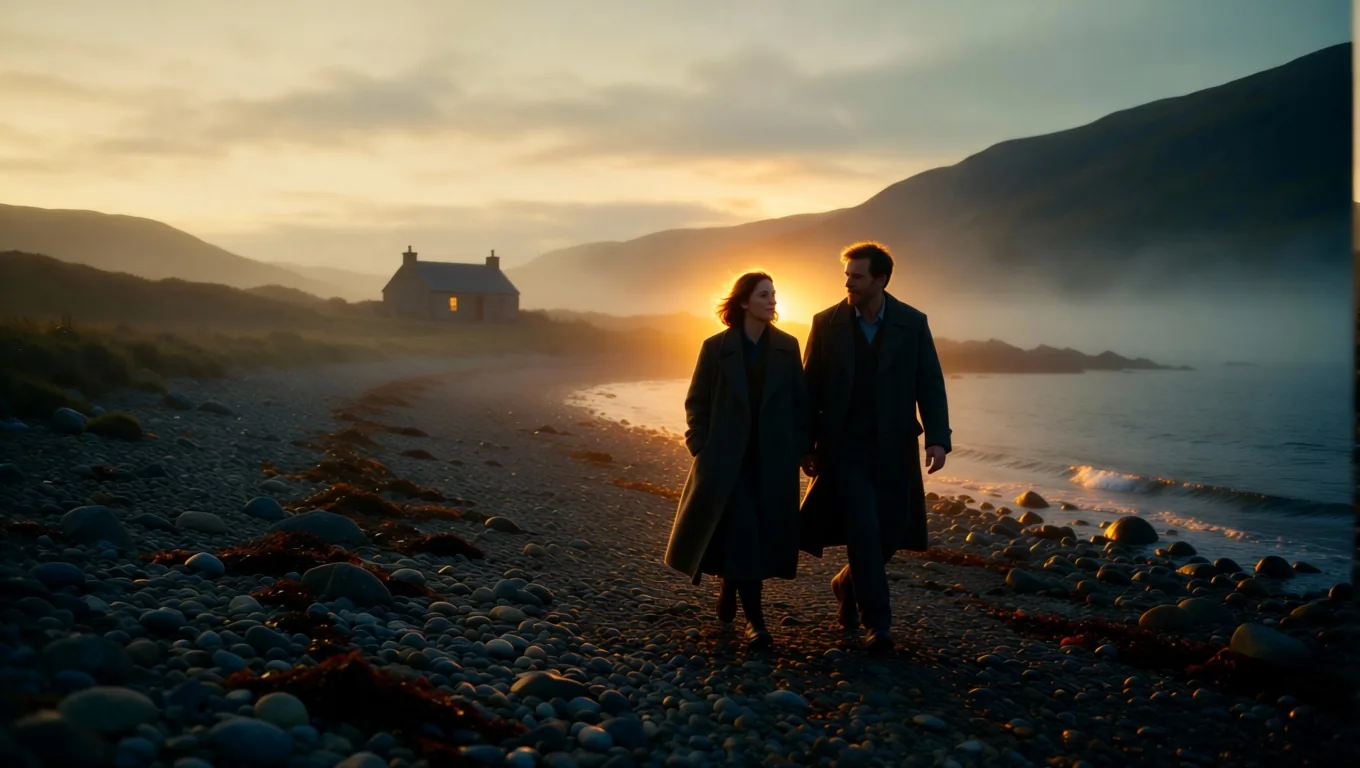
The cottage, the hills and the water stay where they were; the sun is new and the colour of everything moved with it.
A dark room and one spotlight
Third test: a dancer in a white studio, prompt "Relight the image with a single hard spotlight from directly above in a dark studio, deep shadows all around him."
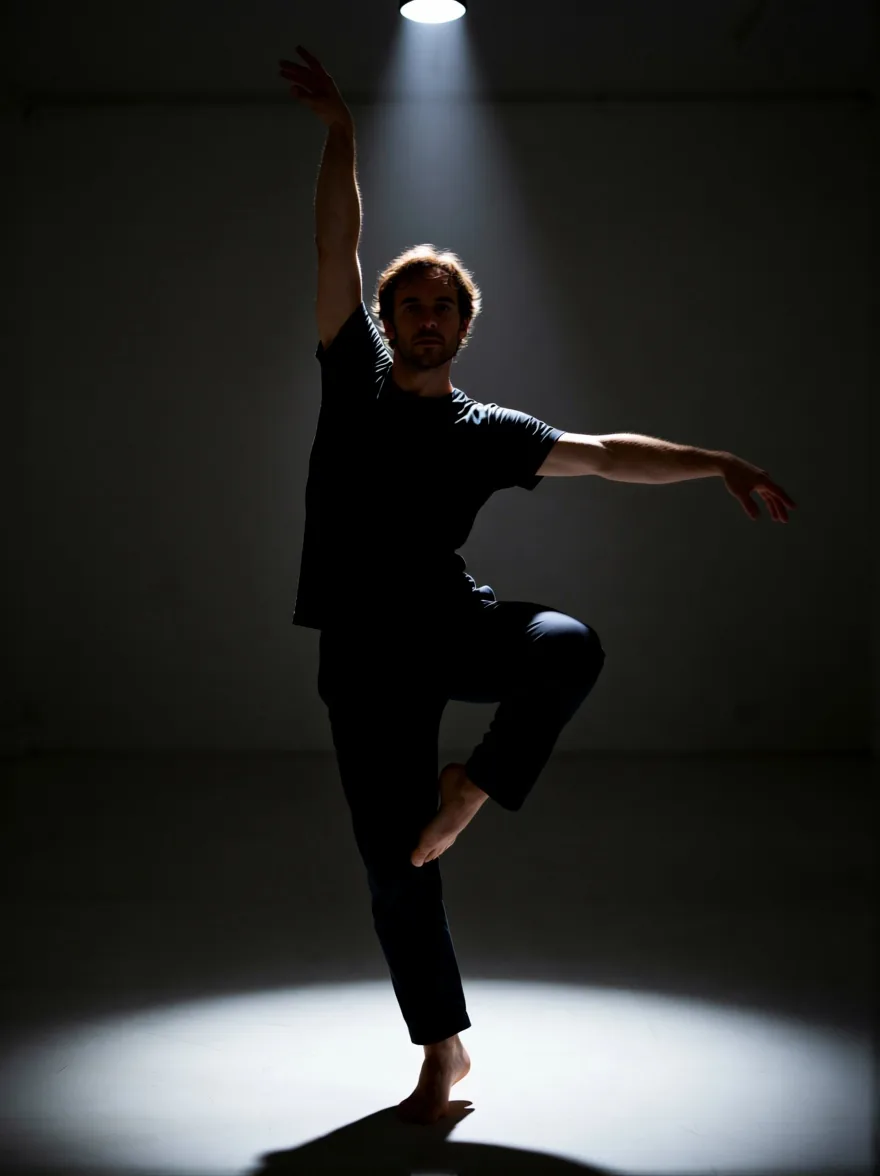
This is the biggest change of the three. The pose is kept. The room is not the same room any more, because the background had to go dark to make the light believable.
What the Relight add-on adds, in one test
Relight runs Alibaba's open Qwen-Image-Edit-2509 with the Relight LoRA by dx8152, an open community adapter. The relighting skill is that author's work; we package it so you send only a photo and a sentence.
In one test we ran a studio portrait through the base edit model with the same instruction and the same seed, with and without the add-on. The base model relit it too, adding a window and warm light. With the add-on the light was harder and more directional: a warm rim in the hair and window-pane patches on the wall. That is one portrait, so read it as an observation, not a measurement. The base-model result is not shown here.
Writing the prompt
The prompt is the light, so there is no default. Start with "Relight the image with" or "Relight the image as", then give the source, direction, colour and hardness. What we saw in our tests:
- Blue hour (salt flat): naming a source that is not in the photo, "the truck's headlights switched on and glowing warm", added it.
- Sunset (shore): giving a position and an edge, "a low golden sunset behind the couple: warm rim light on their hair and coats", produced the warm outline on both figures.
- Spotlight (dancer): "a single hard spotlight from directly above in a dark studio" darkened the whole room, not only the person.
- Window light (studio portrait, not pictured): the prompt asked for window light and the result added window-pane patches on the wall. If you do not want new objects, describe the light only. That is our suggestion, which we did not test separately.
- Untested suggestion: change one thing per run, and keep the
seedwhen a result is close so two versions compare cleanly.
What it cannot do
- It does not copy lighting from another photo. Relight is driven by text. Matching the light of a reference image is a different tool.
- Hard existing shadows fight the new light. Run Shadow Remover first, then relight the clean result. The shadow removal guide shows the first step.
- Big moves change the background. In the spotlight test the room went dark. That is the point, but it is not a pixel-for-pixel edit.
- The result is about one megapixel. For print size, use Image Upscaler.
- Faces are not locked. In our three examples the faces looked unchanged, but we did not measure drift, so compare with the original before you replace a portrait that matters.
Try it in the Playground
- Open the Relight page and sign in with a funded account.
- Upload a JPEG, PNG or WebP photo up to 10 MB.
- Write the new light in the prompt box. Leave the aspect ratio empty to keep your photo's shape.
- Run it. In our three example runs the model took 7 to 30 seconds.
Call it from code
Set SPICY_API_KEY in your server environment, then create the task:
curl https://api.spicyapi.ai/api/v1/jobs/createTask \
  -H "Authorization: Bearer $SPICY_API_KEY" \
  -H "Idempotency-Key: $(uuidgen)" \
  -H "Content-Type: application/json" \
  -d '{
    "model": "spicyapi/relight-v1/edit",
    "input": {
      "image_url": "https://example.com/your-photo.jpg",
      "prompt": "Relight the image as blue hour just after sunset: cool blue sky light, the truck headlights switched on and glowing warm.",
      "seed": 51
    }
  }'
You get a taskId back; read the result by polling or a webhook (see the tasks guide). image_url must be a public HTTPS link to your photo. Optional fields are aspect_ratio, seed and output_format (jpeg, png or webp). Copy the output to your own storage; generated files are kept for 14 days at most.
FAQ
Is there a free AI relight?
Not on SpicyAPI. Relight costs $0.03 per delivered image and a failed task is not charged. Other tools advertise free daily limits; check their current terms.
Will it change the person?
In our three examples the faces looked unchanged, and pose, clothes and framing stayed. We did not measure drift, so compare with the original.
Can it relight a photo from a reference photo?
No. It follows your text only.