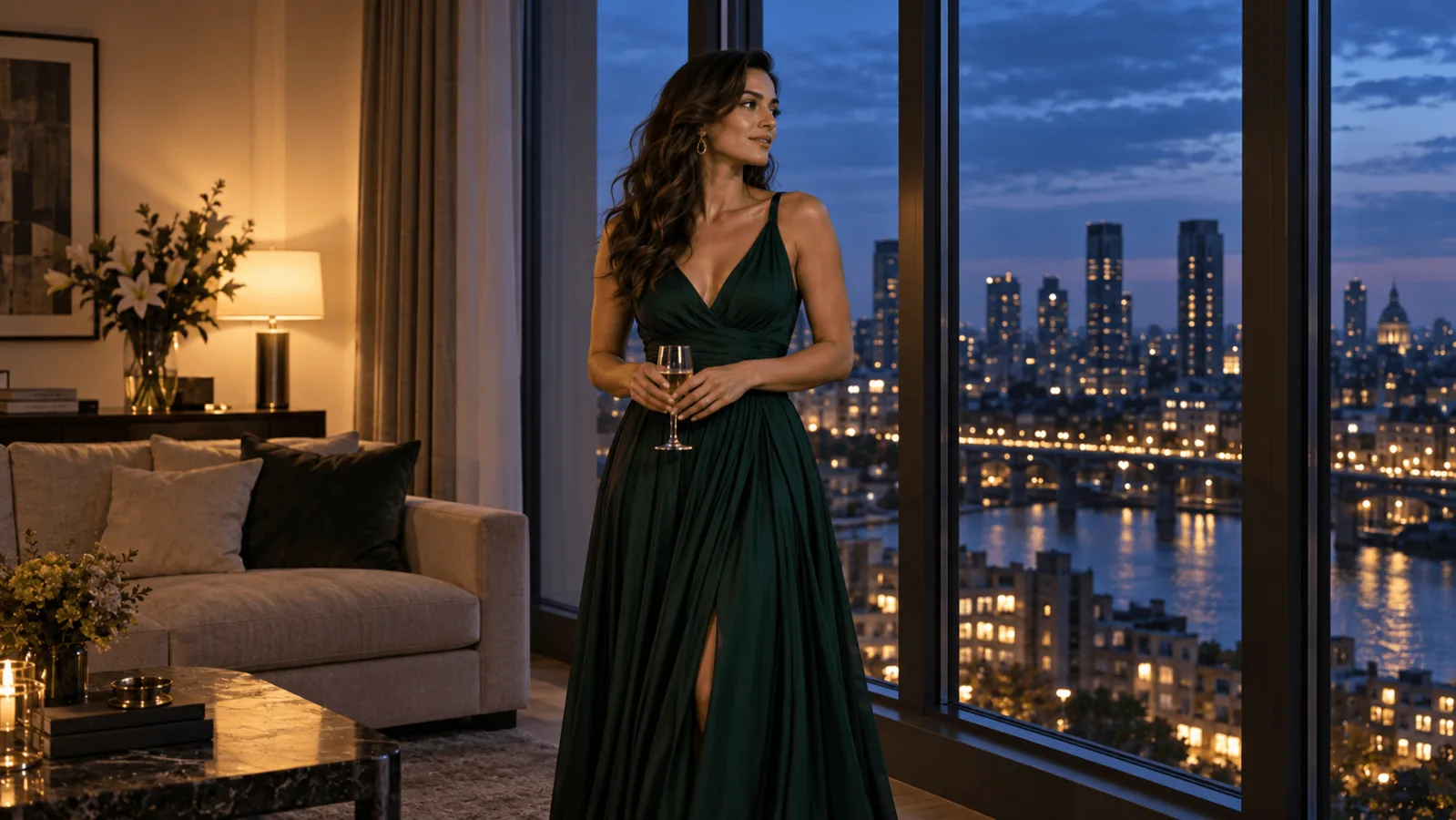
You gave an image-to-video model a good still and asked for one small movement, and the clip came back slowly pushing in. Based on our October 2026 tests, the most reliable fix was a sentence in the prompt: "Locked-off camera on a tripod, no camera movement, no zoom, no pan." On Seedance 1.5 Pro it held the frame both times, while the camera_fixed switch alone did not: the view drifted or pushed in. Seedance 1.5 Pro and Seedance 1.5 Pro Spicy are the only two video models in the current SpicyAPI catalog with that switch (a five-second test at 480p with audio off lists at $0.056 and $0.060). MiniMax H3, MiniMax H3 Spicy and Seedance 2.5 Spicy have no such input, so the written lock is all they get, and on H3 it held once and slipped once. The rest covers how to word the lock, how to check the result against fixed anchors in the picture, and when a stabilization pass is worth the crop.
Choose the route before writing the shot
| Route | Camera lock | Length and resolution | Five seconds at 480p | Choose it when |
|---|---|---|---|---|
| Seedance 1.5 Pro | camera_fixed | 4–12 s; 480p, 720p, 1080p | $0.056 with audio off | You want the switch plus a written lock and the still is a general-purpose image |
| Seedance 1.5 Pro Spicy | camera_fixed | 4–12 s; 480p, 720p, 1080p | $0.060 with audio off | Same switch, adult-oriented stills; the prompt is optional and the output ratio follows your still |
| MiniMax H3 | None | 4–15 s; 768p, 2k | $0.185 at 768p (no 480p tier) | The lowest price of the three routes without a switch; you will lock the shot with wording |
| MiniMax H3 Spicy | None | 3–15 s; 480p, 540p, 768p, 1080p | $0.190 | A three-second shot, a seed, or the extra resolution steps |
| Seedance 2.5 Spicy | None | 4–30 s; 480p, 720p, 1080p, 4k | $1.080 | A shot longer than 15 seconds or a 4k deliverable (4k is an upscale of the 1080p render and lists at $2.16 per second, $10.80 for five seconds) |
Prices are per generated second, so a five-second clip is five times the listed rate. Audio is on by default for both Seedance 1.5 routes and doubles their price: five seconds at 480p becomes $0.112 on Seedance 1.5 Pro and $0.120 on the Spicy edition. A default request (720p, audio on) on the Spicy edition lists at $0.26 for five seconds, so set resolution and audio yourself for tests. H3 renders sound in the same pass with no toggle, and Seedance 2.5 Spicy costs the same with audio on or off.
The Seedance 1.5 routes stop at 1080p and 12 seconds. On the standard Seedance 1.5 Pro the aspect ratio is one of six fixed values, defaulting to 16:9 with no "follow the input" option; if it differs from your still, the picture is reframed and the subject can lose its margins, so request the ratio of your still. The Spicy edition follows the still. On the standard Pro, the closing frame and the seed work at 480p and 720p only; a 1080p request that sets either is refused. The prompt is required on Pro (at least three characters) and optional on the Spicy edition.
No other image-to-video model in the catalogue exposes a camera or lock input. Kling, Wan, Vidu, LTX, HappyHorse and Seedance 2.0 and 2.5 do not; some expose negative_prompt or movement_amplitude, which are exclusion and motion-strength controls, not camera locks. Base Seedance 2.5 ($0.617 for five seconds at 480p) is cheaper than the Spicy edition ($1.08) but has no lock input either. The Spicy tier is aimed at adult-oriented stills, so for an ordinary still use Seedance 1.5 Pro if you want the lock.
For what H3 handles, see the MiniMax H3 review.
What a held frame looks like in real clips
Two model-page examples show what "held" looks like.
In both clips the background moves by less than one percent of the frame width. That is hard to judge by eye and easy to check once you pick an anchor and measure it.
The boxing run is the useful surprise: the switch was off and the prompt alone held the frame. In our tests on Seedance 1.5 Pro, the written lock with the switch off kept the window and shelf within 1 px over five seconds in both runs. With only the switch on, the view slid about 2% of the frame width in one run and pushed in, the shelf edge dropping about 4% of the frame height, in the other. With no lock at all it drifted by roughly 1.6% to 3.7% of the frame height. H3 with the written lock held in one run and slid about 3.5% of the frame width in the other, so on a route without a switch, plan for the clip where the lock fails.
Build a first frame with visible anchors
Use a waist-up portrait of a fictional adult wearing a charcoal jacket beside a rectangular window. Place the subject slightly left of center, with both elbows inside the frame and a plain wall behind the moving hand. Keep the window frame, a shelf edge and a distant wall corner visible. Those straight lines are what you measure against at the beginning and end of the clip. Generate the still with an image model at the ratio you will request (3:4 in the JSON below), for example with Seedream 5.0 Flash at about $0.029 per image, and re-roll until the window, shelf edge and wall corner are all visible with room around the elbows.
A blurred outdoor background can hide a slow push-in; straight architectural edges expose it. Avoid a foreground curtain blowing across the image on a first attempt: it produces global-looking motion even with a stationary camera. If the subject grows while the window does not, the person leaned toward the camera; if both grow together, the frame is pushing in or scaling. Compare the background before naming the failure.
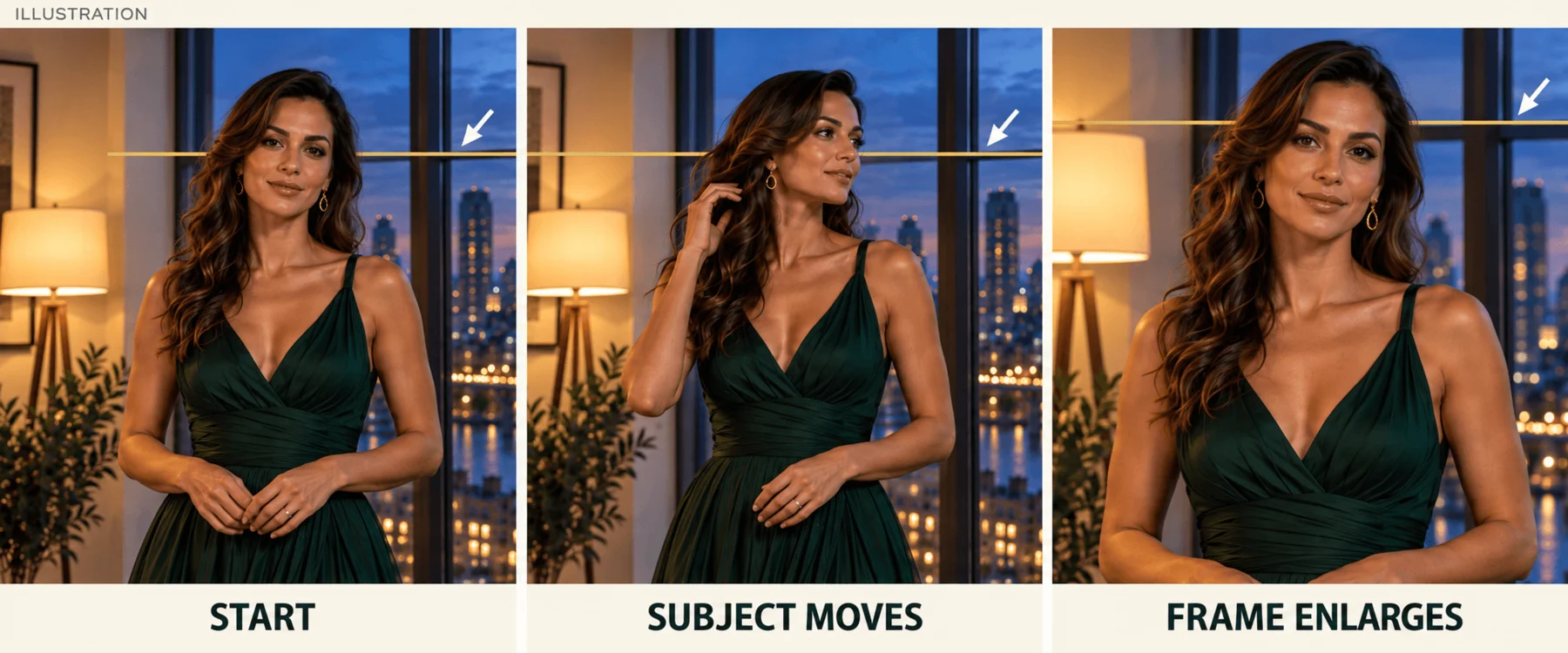
Illustration, not model output: compare the window crossbar as well as the face; local subject movement and whole-frame enlargement are different clues.
Write the prompt for the route you chose
Try it in the Playground first. Open Seedance 1.5 Pro image-to-video (or the Spicy edition for adult-oriented stills), add your still under Input image, paste the prompt below into Prompt, switch Lock camera on, set Resolution to 480p, Duration to 5 and Generate audio off, match Aspect ratio to your still, and press Run model. Do not rely on the switch alone: put the written lock first, then give the verbs to the subject. A camera instruction (a push, a pan) pulls against the lock.
Locked-off camera on a tripod, no camera movement, no zoom, no pan. The fictional adult slowly turns their head a little toward the window, then turns back and holds. Shoulders and feet stay in place. Only the face and a little hair move. The window, shelf and wall corner stay fixed in the frame.On H3, H3 Spicy and Seedance 2.5 Spicy there is no switch, so the written lock is everything: put it first, name one movement, then say what stays fixed. On H3 use the same prompt at 768p; H3 no longer rewrites your prompt, so the lock runs as written. H3 has no seed, no aspect-ratio field and no camera input; the Spicy routes accept a seed, which is for comparing prompt edits, not a camera instruction. If the clip drifts, change one phrase at a time between attempts.
Then the API, once the shot works and you want it in your own app:
{
  "model": "bytedance/seedance-1.5-pro/image-to-video",
  "input": {
    "image_url": "https://YOUR-ASSET-HOST/approved-adult-portrait.png",
    "prompt": "Locked-off camera on a tripod, no camera movement, no zoom, no pan. The fictional adult slowly turns their head a little toward the window, then turns back and holds. Shoulders and feet stay in place. Only the face and a little hair move.",
    "aspect_ratio": "3:4",
    "duration_seconds": 5,
    "resolution": "480p",
    "generate_audio": false,
    "camera_fixed": true
  }
}
Replace the asset URL with a fetchable image you control and set aspect_ratio to that image's ratio. Create the task as described in the task docs.
Let an Agent do it. An agent can make the same call through the CLI, the MCP server or the Agent Skill; CLI and MCP show the price and ask you to confirm first. Save the JSON input object above as input.json, then:
# CLI
spicyapi tasks create --model bytedance/seedance-1.5-pro/image-to-video --input-file input.json --wait

# MCP: the assistant calls the spicyapi_task_create tool
# Skill: npx skills add spicyapi-ai/spicy-skill
Pin the ending when the action returns. All five routes accept a closing frame (last_image_url; on the standard Pro only at 480p or 720p). If the movement ends where it began, such as a glance and back or a breath, send the same still as both first and last frame. The closing frame fixes the ending, not the middle, and a clip drifts further from it the longer it runs, so this narrows the problem rather than removing it. Keep light and camera the same between the two frames, and change one clear state at most, or the middle can turn into a cut. For a loop that must cut seamlessly, see the seamless loop guide.
Change the action without losing the frame
For a second shot, keep the same source and replace the head turn with a small cuff adjustment. The hand needs a complete travel path: resting near the waist, lifting toward the opposite wrist and returning. Leave that entire path inside the first frame, with extra space beyond the elbow.
Locked-off camera on a tripod, no camera movement, no zoom, no pan. The same fictional adult makes one small cuff adjustment with their right hand, then returns the hand to its resting position. Both elbows remain inside the frame. The torso stays in the same place. The window and shelf stay fixed in the composition.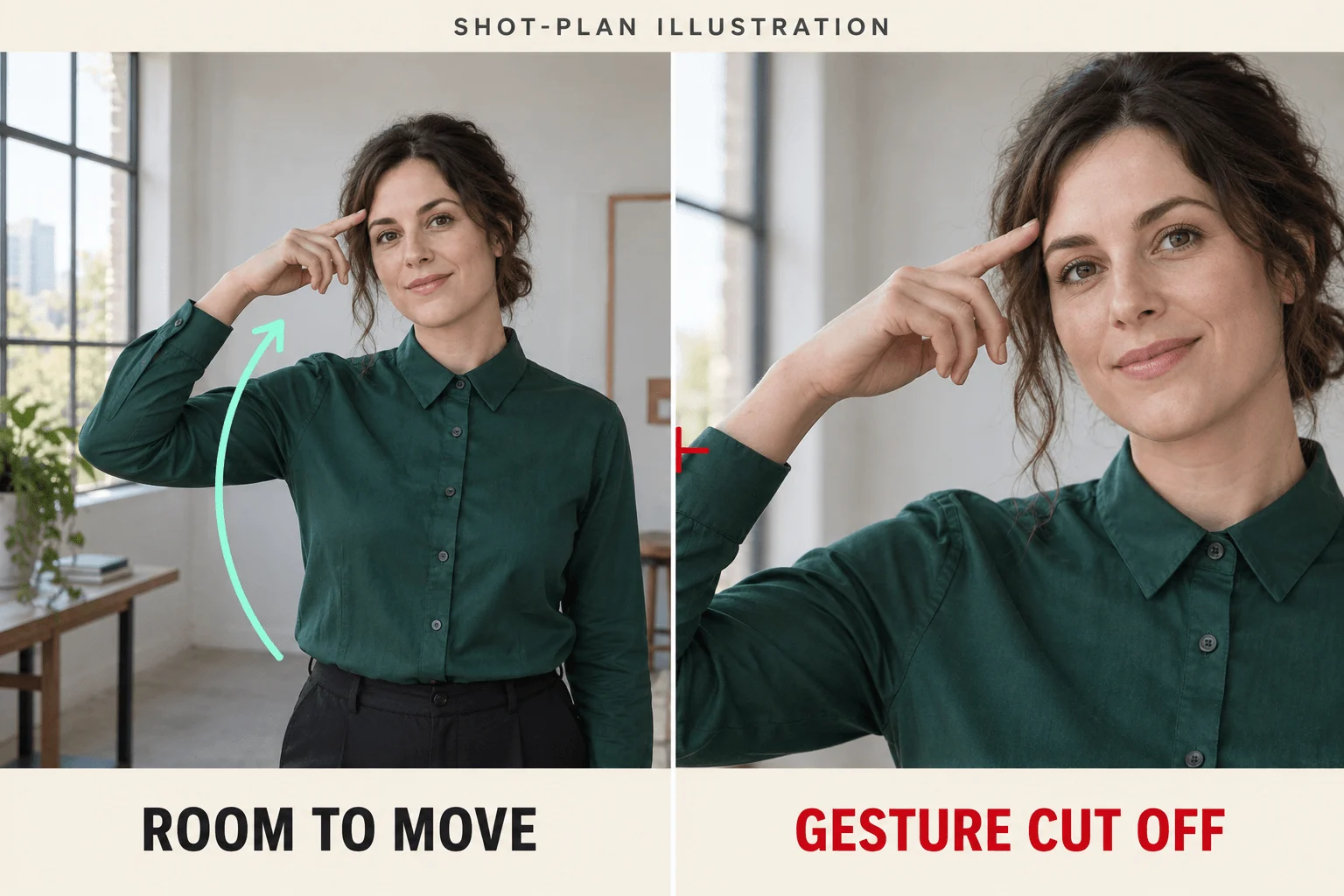
Shot-plan illustration, not model output: the wider view contains the elbow and hand path; the tight crop removes part of the gesture.
If the still cuts through an elbow, adding "both elbows visible" asks the video model to invent missing space while also animating the gesture. Widen or rebuild the still first. A full-body turn exposes unseen clothing, the far shoulder and a different face angle, so use a small head turn when the purpose is to keep a recognizable portrait, and save larger turns for a source that already shows the needed body. Confirm any shot at 4 or 5 seconds before paying for 12: a shot driven by a single frame drifts further the longer it runs.
Diagnose the visible error and make one specific repair
| What appears in the clip | Likely cause | Next change |
|---|---|---|
| Person and background grow together | Push-in or global scaling | Put the written lock in the first words (the switch alone did not hold in our tests) and remove "cinematic reveal", "dramatic close-up" and approach language |
| The picture is framed differently from your still | Aspect-ratio reframing (standard Seedance 1.5 Pro has no "follow the input" option) | Request the ratio of the still, or use the Spicy edition, which adapts |
| Background stays still but the face grows | The subject leans forward | Add "head stays above the same shoulder position"; choose a turn instead of a lean |
| A near object slides against the distant wall | Camera translation or invented depth | Remove a close foreground prop from the still; use a flatter arrangement |
| The window bends while its center stays put | Local deformation | Use a cleaner still with fewer fine repeating edges; stabilization cannot straighten this |
| Hands leave the edge | The still has no movement space | Recompose or expand the still before generating again |
| A cut appears halfway | Several moments in the prompt, or first and last frames that differ in light or camera | Ask for one continuous shot and one action; make the closing frame match the opening frame |
| The switch is on but the frame creeps late in the clip | Single-frame shots drift with length | Shorten to 4–5 seconds |
If a shorter simple prompt still produces the same global move on a no-switch route, try the same still on Seedance 1.5 Pro with the written lock before adding more words. Compare at the same duration and resolution so a longer action does not pass for a model difference.
When stabilization is worth the crop
Reserve stabilization for a take worth keeping: regenerating five seconds on Seedance 1.5 Pro lists at $0.056. In a video editor, put the first and last frame side by side and pick two stationary window corners. If both moved by about the same amount, the clip drifted as a whole and a position correction can bring it back. If the distance between them changed, the frame scaled, and the correction needs scale as well.
In Premiere Pro's Warp Stabilizer, set Result to No Motion, which attempts to remove all camera motion and is meant for footage where part of the subject stays in the frame. Set Method to Position or Position, Scale, Rotation rather than the default Subspace Warp: Adobe notes that Subspace Warp can introduce unwanted warping, which is a risk on AI clips whose geometry is already soft. Set Framing to Stabilize Only first, which shows how far the edges swing, then switch to Stabilize, Crop, Auto-scale and cap Maximum Scale at the crop you can afford. Details are in Adobe's Warp Stabilizer reference. DaVinci Resolve's stabilizer offers the same trade: its Translation mode corrects pan and tilt only, Similarity adds zoom and rotation, and Perspective, the default, adds perspective correction and can introduce wobble.
Work out the crop before you accept the result. At 110% scale, the visible width and height each become about 90.9% of the original, so about 4.55% disappears from each side when centered. On a 1280×720 clip that is about 58 px from the left and right and 33 px from the top and bottom. At 120%, only 83.3% of each dimension remains: about 107 px from each side and 60 px from top and bottom. A wrist already close to the frame edge may disappear after correction, which is why a tightly framed gesture can survive generation and fail stabilization.
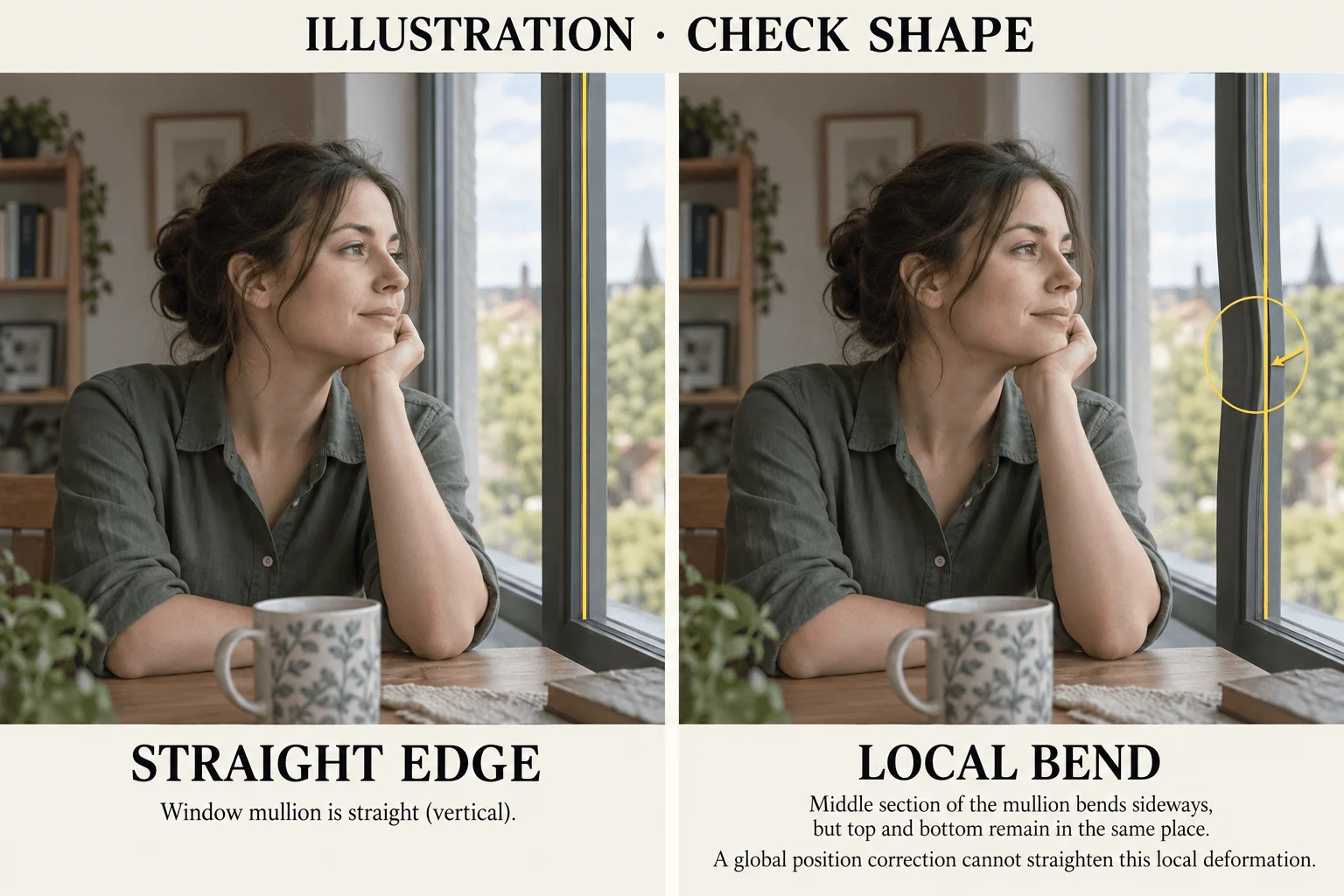
Illustration, an edited image and not a video-model output: a bent window edge is a local shape defect, and moving the whole frame cannot make it straight.
A stabilizer cannot fix a bending window, changing fingers or a sliding shelf: those are local deformations, and a global position or scale correction cannot restore the geometry. If the repair would sacrifice the hand or headroom the shot needs, rebuild the still with more space and regenerate the short action.
Which route to pick
If the frame must not move, run the still on Seedance 1.5 Pro (or the Spicy edition for adult-oriented stills) at 480p, audio off and five seconds, with the written lock as the first sentence of the prompt and camera_fixed on as a second request. Match the aspect ratio to the still. Move to H3 or Seedance 2.5 Spicy when the shot needs more than 12 seconds or a resolution above 1080p; there the lock is only a written request, so put it first, pin the closing frame where the action returns, and measure against the window corners before paying for a longer take.
For the related problem of keeping the camera at a character's eye line, see the first-person video guide.