You asked for a first-person shot and the clip shows the other person from behind the observer's shoulder, or the camera slides in toward their face. Start by looking for conflicting camera cues in the opening frame and motion wording. A close-up, direct eye contact and the label "POV" do not make a viewpoint. A high-angle shot specifies camera height; first person specifies whose eyes the camera represents.
For this eye-level setup, the opening frame comes from the observer's position. Keep the observer's head and torso outside it; hands or forearms may enter from the lower edge, but they are not required to establish first person. Describe what the other person does separately from what the camera does.
Below is a seated restaurant-table setup for Seedance 2.5 image-to-video, then the fixes for the failures you will actually see, hands that act, a moving POV, and how to chain shots. All illustrated people are fictional adults. The illustrations show camera position, not generated video.
Build the first frame from the seat the viewer occupies
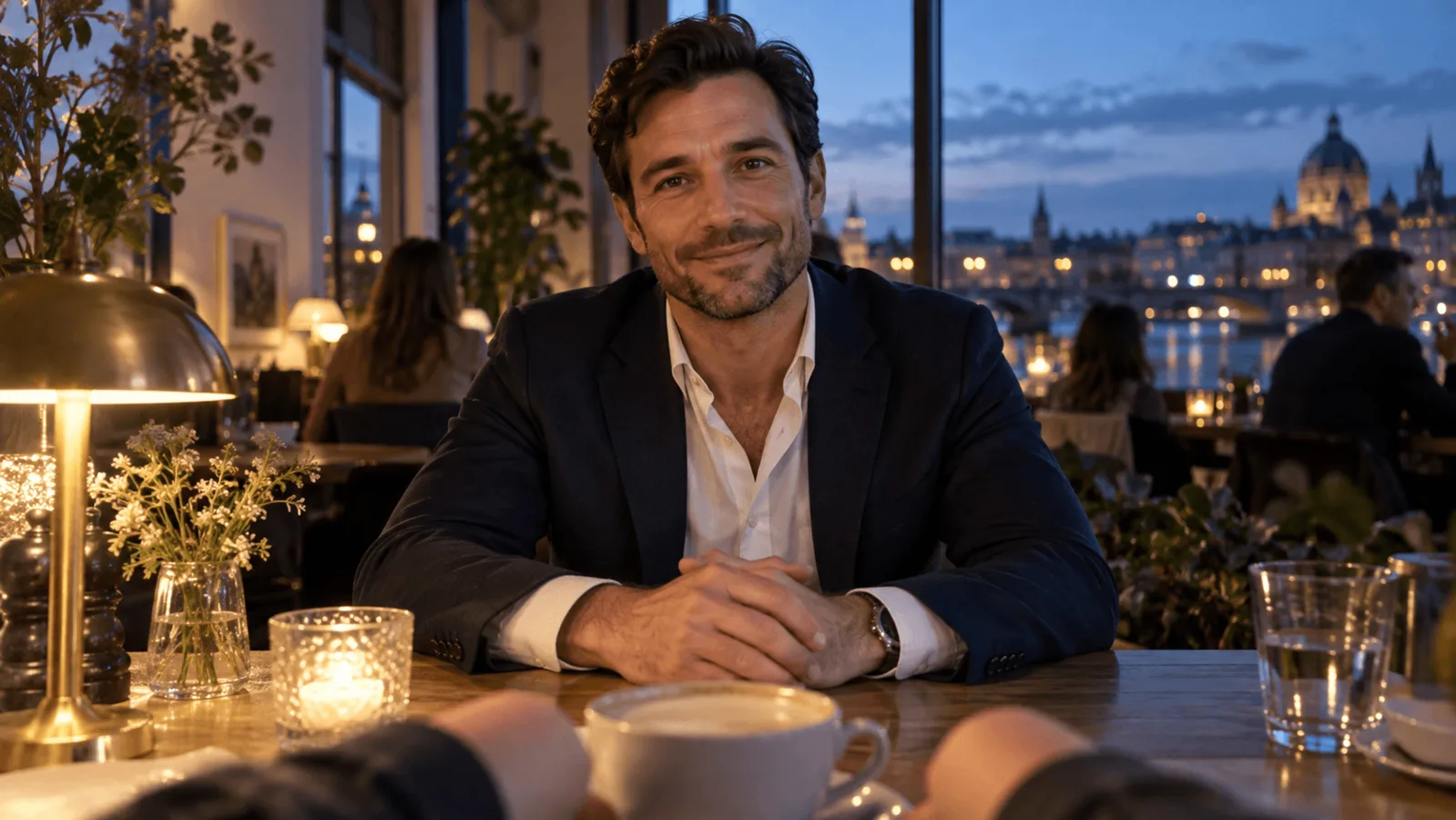
The reference should look like a picture taken through the eyes of a seated observer. Across a small table sits an adult man in a navy blazer over an open-collared white shirt, his eyes roughly level with the lens. The near table edge runs along the bottom, and the observer's forearms enter from the lower corners. There is no back of the observer's head, no shoulder silhouette and no separate camera operator.
Use this brief in your image tool, or stage the same scene with authorised photography:
Photographic first-person view from a seated adult observer at a restaurant table beside a large window at dusk. A fictional adult man in a navy blazer over an open-collared white shirt sits directly across the small table at conversational distance, hands loosely clasped. Camera at the seated observer's eye height. His face and upper torso are unobstructed. Only the observer's relaxed forearms in dark sleeves enter from the lower corners, resting near the near table edge beside a white coffee cup. A candle in a glass holder and a small vase of flowers stand between them. Warm lamp light against a blue-hour city view through the window. The observer's head, face, shoulders and torso are outside the frame. One continuous room, no mirrors, no over-the-shoulder composition.
A shoulder at the edge is not a harmless detail: it tells the model the camera may be behind the observer. Crop it out if what remains is still a coherent seated view. If cropping leaves a sideways or elevated angle, rebuild the frame, because animation will not move the camera for you.
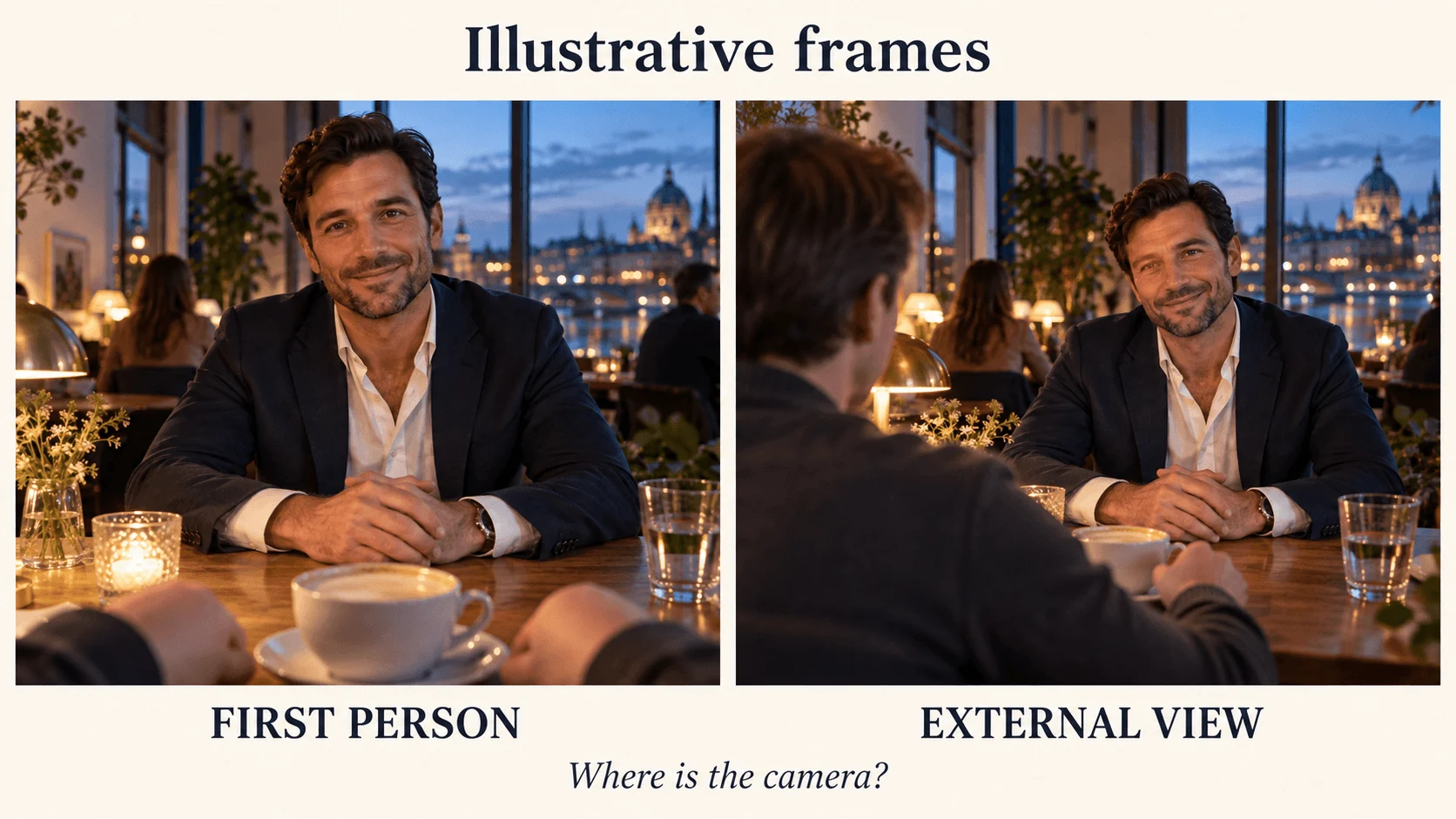
Illustration: foreground forearms can support first-person framing; a visible head and shoulder establish an external view.
Seedream 5.0 Flash lists at about $0.029 per image, so re-rolling the frame five or six times costs less than one wasted video. Its edit task is the place to fix a single flaw, such as a stray shoulder or a hand that is too large, without rebuilding the scene. Before uploading to Seedance 2.5 image-to-video, check its input limits: each side between 300 and 6000 pixels, up to 10 MB, JPG, PNG, WEBP or GIF. The output follows the still's shape, so crop it to your delivery ratio first. Use a fictional or authorised subject; Seedance's input check may turn away a photo of a real, identifiable face.
Draft with one small action
In the Seedance 2.5 image-to-video Playground, upload the approved frame, choose five seconds at 480p, turn sound off and paste the motion prompt. Leave the ending image empty for the first take. The output follows the still’s shape; viewpoint comes from the image and the words, not a POV switch.
Copy this prompt:
One continuous five-second first-person shot from the seated observer's eyes. The adult man across the table looks toward the observer, gives one small smile and tilts his head slightly. The observer remains seated and still. Keep the camera position, eye height and framing unchanged. The man's hands stay on his side of the table. The observer's forearms remain low in the foreground. Stable warm lamp light. One take, no cut, no orbit, no zoom, no external view, no dialogue.
Seedance 2.5 image-to-video lists at $0.1234 per second at 480p, so the draft is $0.617 for five seconds. At 720p the rate is $0.2773 per second, or $1.3865 for the same clip, and 1080p is $0.6823 per second ($3.4115). Audio is on or off at the same rate. For an audible final render, turn generate_audio on and add "Sound: quiet restaurant ambience, cutlery, low voices; no music or captions." Draft at 480p to check composition and movement cheaply; rendering at 720p or 1080p once the frame and wording are settled adds resolution, not a changed camera position. Use a fresh quote for your actual task.
Avoid "camera circles him", "cinematic reveal", "pull back to show the couple" and "over his shoulder". Each requests a different viewpoint. A subject can look down at a cup while the camera stays put; describing that glance as a camera move creates a conflict you then have to debug.
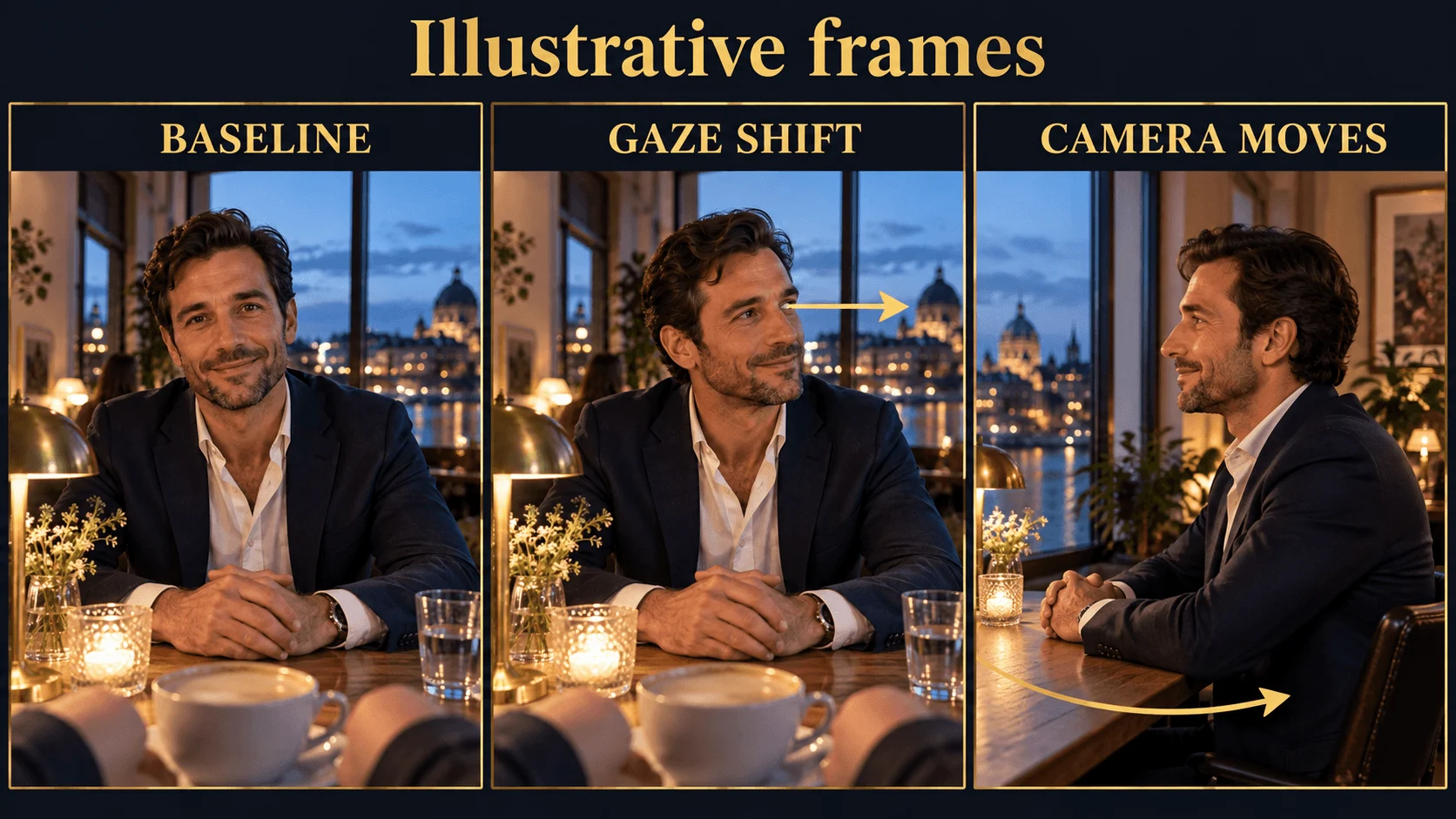
Illustration: a subject's gaze shift and a camera move produce different shots.
Fix the visible symptom instead of adding more POV synonyms
| What appears in the result | Likely instruction or reference conflict | Try this revision |
|---|---|---|
| The observer's head or back appears | The source or reveal wording suggests an external camera | Replace the source with an eye-position view; remove reveal and over-the-shoulder wording |
| The table is seen from above | Reference camera is too high | Rebuild at seated eye height; keep the man's eyes near the lens height |
| The camera drifts toward the face | Close-up or push-in wording conflicts with a stationary observer | Remove those cues; keep the table edge and window frame as fixed composition anchors |
| Eye contact disappears but framing stays fixed | The character changed gaze, not viewpoint | Say when he looks toward the observer; do not regenerate because a deliberate glance is off-axis |
| Hands enter from the wrong person | Both people receive ambiguous "you reach" instructions | Name "the man across the table" and "the observer's right hand" separately; animate only one pair first |
| A cup blocks the face | The prop starts high or the action lifts it into the sightline | Keep the cup on the table; use a small slide instead of raising it toward the lens |
| A phone, camera or reflection of the observer appears | "Selfie", "vlog" or mirror wording, or a reflective surface in the frame | Remove those words, avoid glass and mirrors behind the subject, and state that no camera or phone appears on screen |
| The observer's hand vanishes after the first second | The subject let go or moved out of reach | Keep the contact continuous in the prompt ("keeps hold of the observer's hand") or plan a cut after the hand leaves |
Change the conflicting input before you try a different seed; otherwise the next request repeats the same spatial ambiguity.
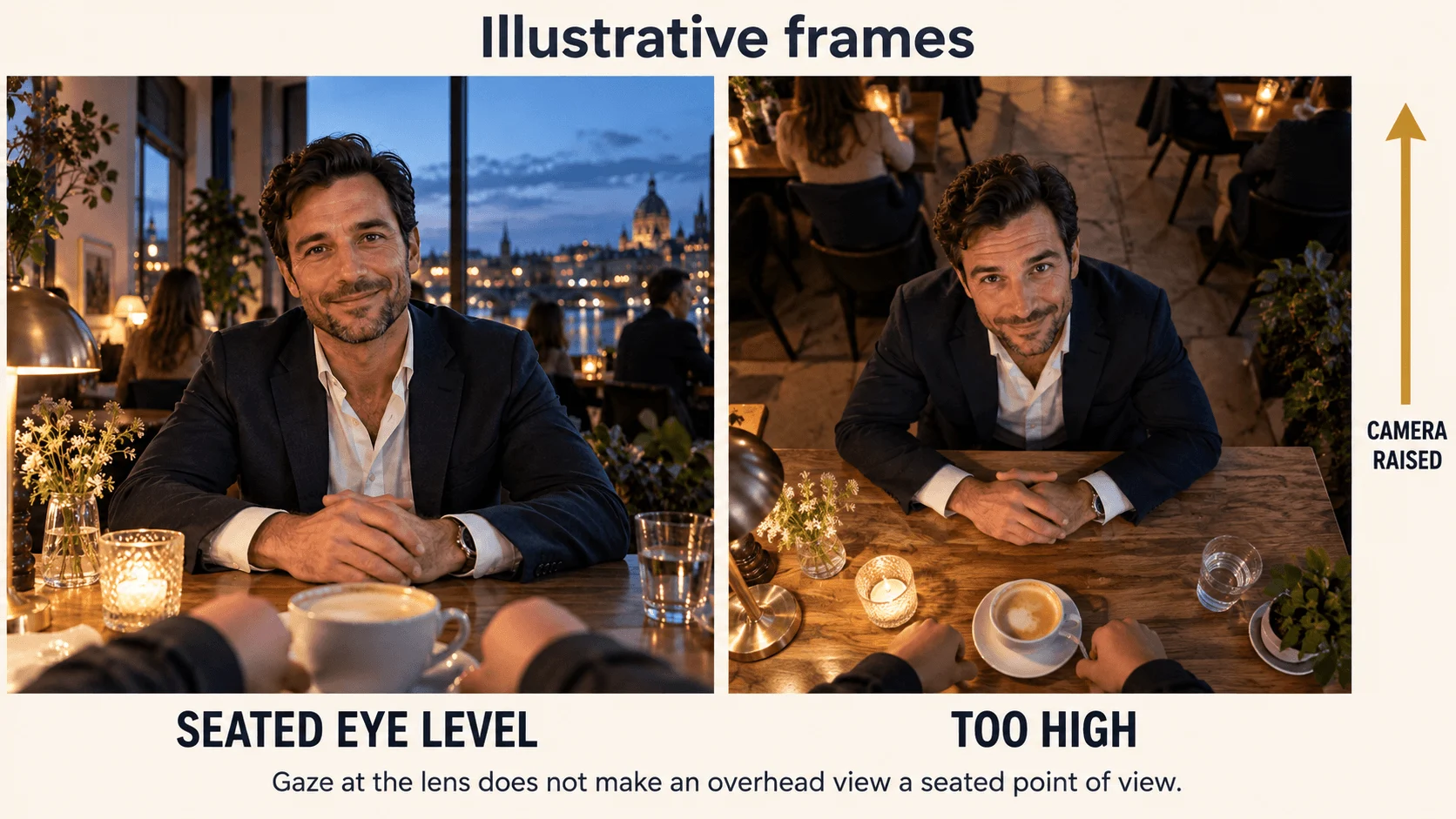
Illustration: eye height changes the relationship between the viewer, face and tabletop.
Give the observer's hands something to do
A POV shot feels inhabited when the observer's hands act. The rule is the same as for the viewpoint: put the situation in the first frame and use the prompt only for the next movement. If the observer should hold a cup, put the cup in the observer's hand in the frame, with the forearm entering from the lower edge, and ask for one slow movement:
From the seated observer's fixed eye position, the observer's right hand lifts the white coffee cup a few centimeters and sets it back on the saucer. The man across the table watches, then smiles. One continuous shot, unchanged camera height and distance, no cuts.
Hand-over actions need clear ownership. Start with the other person's action, which is easier to describe spatially than an interlocking exchange. This one needs a different first frame: the cup must start on his side of the table, near his hands, as in the figure below, so edit the approved frame (or rebuild it) to move the cup before you animate it. Then use this prompt:
From the seated observer's fixed eye position, the adult man across the table uses his right hand to slide the white cup a short distance toward the observer, then releases it. The cup stays on the tabletop throughout. The observer's hands remain resting at the near edge and do not touch the cup. The man briefly glances at the cup, then back toward the observer. One continuous shot, unchanged camera height and distance, no cuts.
Do not ask the observer to grab the cup in this first trial: a new hand has to enter, make contact and take ownership while the other hand releases. If the story needs that exchange, stage it as a second action after the cup has stopped, from a frame that already shows both hands correctly.
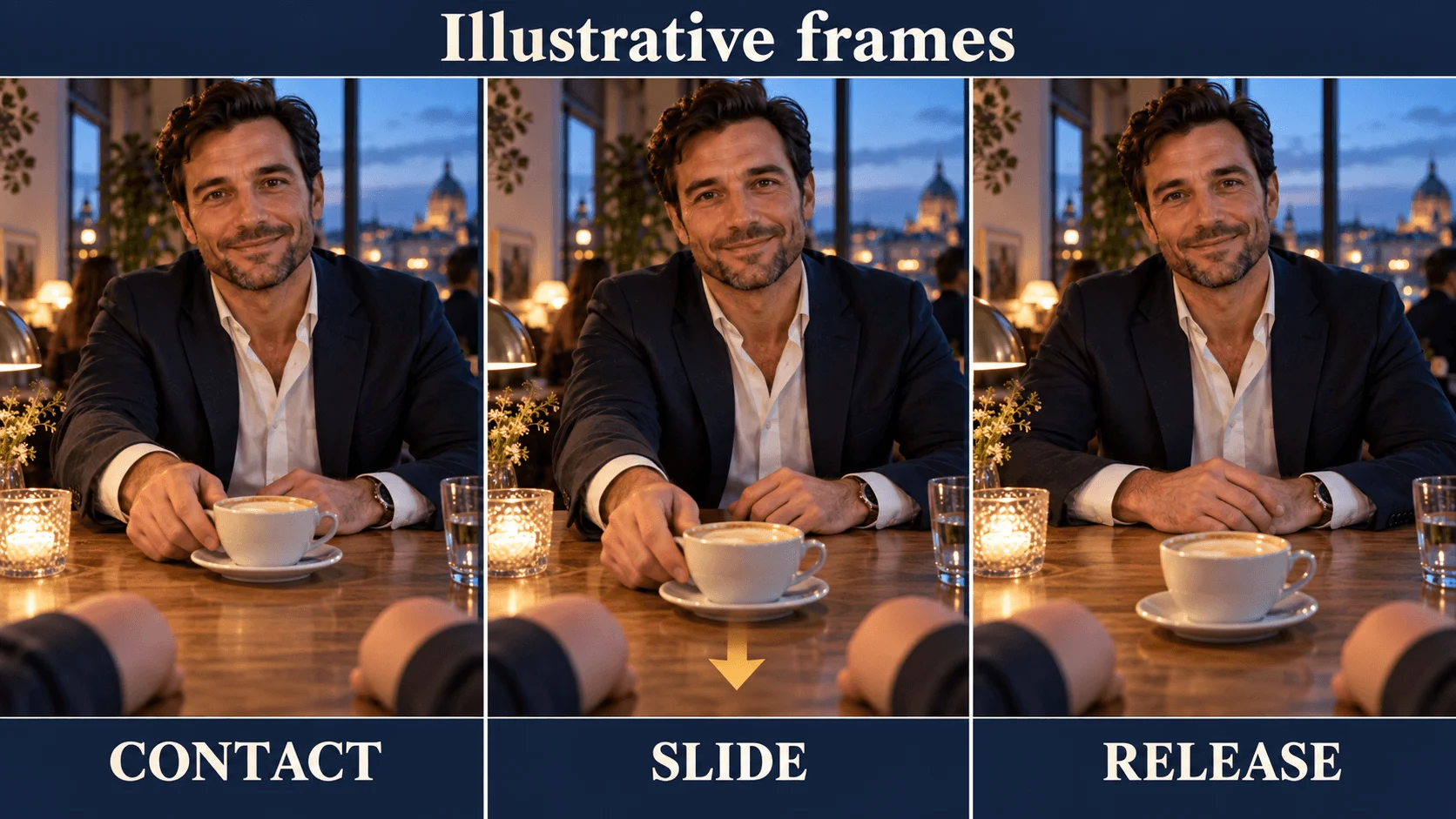
Illustration: contact, slide and release belong to the man across the table; the observer's hands remain separate.
When the camera has to move
A first-person shot can move if the movement is the observer's. The published example on the Seedance 2.5 Spicy image-to-video page is a good reference for how it looks: the opening frame holds the observer's hand in hers, and the prompt says she closes her hand around the viewer's and pulls, "breaking into a run and towing the camera after her", with handheld first-person motion.
The camera moves along at roughly a person's eye height with handheld sway; she turns back toward the lens laughing. There is no orbit or aerial view. The observer's hand appears only at the beginning; this example does not show a continuous handhold. If that contact matters to the scene, ask her to keep hold of the hand and check it throughout the clip.
For walking POV, prepare a frame with a clear path and ask for forward motion along it. Keep the movement instructions separate from the sound cue:
One continuous first-person shot at standing eye height. The observer walks forward along the lit corridor at an easy pace; the camera advances at walking speed with a slight handheld sway and keeps the corridor centered. No one enters the frame from behind and the observer's body stays out of the frame. Sound: footsteps on tile and faint room tone.
Do not add a locked-camera line to a walking prompt; the two instructions contradict each other. Walking is a different camera assignment, not a stronger version of a seated close-up. Avoid asking for an orbit, backward subject movement and a hand interaction in the same take.
For a standing greeting, replace the whole setup: camera at a standing adult's eye height in a doorway, another adult two steps inside the room, no foreground chair or seated forearms. Prompt the other adult to open the door slightly and smile while the observer stays still. Reusing the seated restaurant frame with "standing doorway POV" asks the model to solve two incompatible spaces.
Chain the next beat from the last frame
Once a stationary shot works, build the sequence in short takes. Each take starts from a frame that already has the right camera position, so the viewpoint carries forward by construction.
- On Seedance 2.5, set
return_last_frametotrueand the response includes the clip's final frame as a separate image. Use it as the nextimage_url. - On a clip you already have, export the last frame yourself:
ffmpeg -sseof -0.2 -i input.mp4 -update 1 -q:v 2 last-frame.png. - To make the shot end where you want, send a second still as
last_image_url, always together withimage_url, and describe the bridge between the two. Prepare both stills at the same aspect ratio, because mismatched framing can distort the closing composition. Seedance 2.5 Spicy accepts the same pair. You can supply the same still at both ends to request a return to that composition; check the rendered ending rather than assuming an exact match.
Longer is not safer. The model page's own advice is to confirm the motion at five seconds before extending, because anatomy and set dressing drift as a frame-driven shot runs longer, and several short takes cut together hold better than one 30-second take.
Review the clip, then trim or re-render
If the first four seconds stay first-person and the last second pulls back, trim before the viewpoint change. If an unwanted shoulder stays along the edge throughout, a crop helps only when the central scene still reads from the observer's position. Cropping cannot rebuild a missing eye-position view or correct the table's perspective.
Review the original downloaded file, not the player thumbnail, which can hide a brief viewpoint change. This command extracts four evenly spaced review images from a five-second clip:
ffmpeg -i input.mp4 \
  -vf "fps=4/5,scale=480:-2,tile=2x2" \
  -frames:v 1 pov-review.jpg
Use the contact sheet to find changes in framing, then play the full clip to judge motion and hand contact; a short defect can fall between samples. To remove an unusable ending, this exports only the first four seconds and preserves an audio track when present:
ffmpeg -i input.mp4 -t 4 -map 0:v:0 -map 0:a? \
  -c:v libx264 -crf 18 -pix_fmt yuv420p -c:a aac pov-trimmed.mp4
The filters are documented by FFmpeg.
If a scene needs a reverse angle, make it a deliberate cut to another shot. A shot from behind the observer can be good storytelling, but it is third-person. Keep the first-person section spatially coherent, then cut to the new viewpoint as its own shot. The shot-planning guide shows how to place such cuts in a short scene.
Choose the route for your shot
- You have an approved frame: Seedance 2.5 image-to-video, as above. It anchors the opening composition you built; check whether the clip holds it.
- You only have words: text-to-video accepts a first-person description, but the model decides where the camera sits, so it gives you less control over the opening composition. Open with where the camera is ("the camera is a person seated at a table") before what happens.
- The same character appears in several POV shots: use reference-to-video with your stills, or follow the consistent-character workflow.
- The stationary eye position keeps drifting: some models have a real camera-lock input; the fixed-camera guide lists them and explains how to word the lock on models without one.
- Adult-oriented first-person scenes: Seedance 2.5 Spicy is the uncensored, LoRA-tuned edition and lists first-person points of view among its use cases. It uses the same frame-first logic, has no
aspect_ratioorreturn_last_frameinput, and lists at $0.216 per second at 480p, $0.432 at 720p and $1.08 at 1080p. The uncensored video prompt guide has first-person prompts, and the uncensored image-to-video guide covers preparing the still.
Use the approved POV shot in your app
Set SPICY_API_KEY in your environment and SPICY_IMAGE_URI to your opening image’s accessible URL or uploaded spicy:// URI. This Python 3 example submits one new shot after you confirm its price.
import json
import os
import urllib.request
import uuid

base = "https://api.spicyapi.ai/api/v1"
headers = {"Authorization": "Bearer " + os.environ["SPICY_API_KEY"],
           "Content-Type": "application/json", "User-Agent": "SpicyAPI-Blog/1.0"}
settings = {
    "duration_seconds": 5,
    "resolution": "480p",
    "generate_audio": False
}
settings["prompt"] = 'One continuous fixed-camera first-person shot from a seated observer. The man across the table gives one small smile. Keep the camera height, framing, room and clothing unchanged.'
settings["image_url"] = os.environ["SPICY_IMAGE_URI"]
payload = {"model": "bytedance/seedance-2.5/image-to-video", "input": settings}

def post(path, body):
    request = urllib.request.Request(base + path, json.dumps(body).encode(), headers)
    with urllib.request.urlopen(request, timeout=60) as response:
        result = json.load(response)
    if result.get("code") != 200:
        raise RuntimeError(result)
    return result["data"]

quote = post("/jobs/quote", payload)
if input(f"Maximum charge ${quote['maxCharge']}. Type yes to generate: ") != "yes":
    raise SystemExit("Stopped before generation")
headers["Idempotency-Key"] = str(uuid.uuid4())
print("Request key:", headers["Idempotency-Key"], flush=True)
task = post("/jobs/createTask", {**payload, "quoteId": quote["quoteId"],
                              "expectedCost": quote["estimatedCost"]})
print("Task ID:", task["taskId"])
Keep the printed request key for recovery of that same request; a new shot gets a new key. Task API documentation covers result delivery and recovery.
For repeated shots, let an Agent use an approved input file: CLI spicyapi tasks create --model bytedance/seedance-2.5/image-to-video --input-file input.json --wait; MCP ask it to call spicyapi_task_create with that model and input; Skill ask “Use the spicyapi Skill to generate this approved shot and return the result.” CLI and MCP show the price before creation. See the Agent integration documentation.