A natural AI video loop needs the end to continue into the beginning: position, direction of movement, lighting and sound. Matching two poses is not enough. Start with a small gesture that returns on its own, generate a short shot, and pick the join in an editor. If the action cannot return naturally, generate the way back as a second clip, blend the join, or accept a deliberate forward-and-reverse effect.
Seedance 2.5 image-to-video is a good starting point: 4 to 30 second shots, 480p, 720p or 1080p, and an optional closing frame. It has no loop switch, so the seam is your job.
Generate a gesture that can return
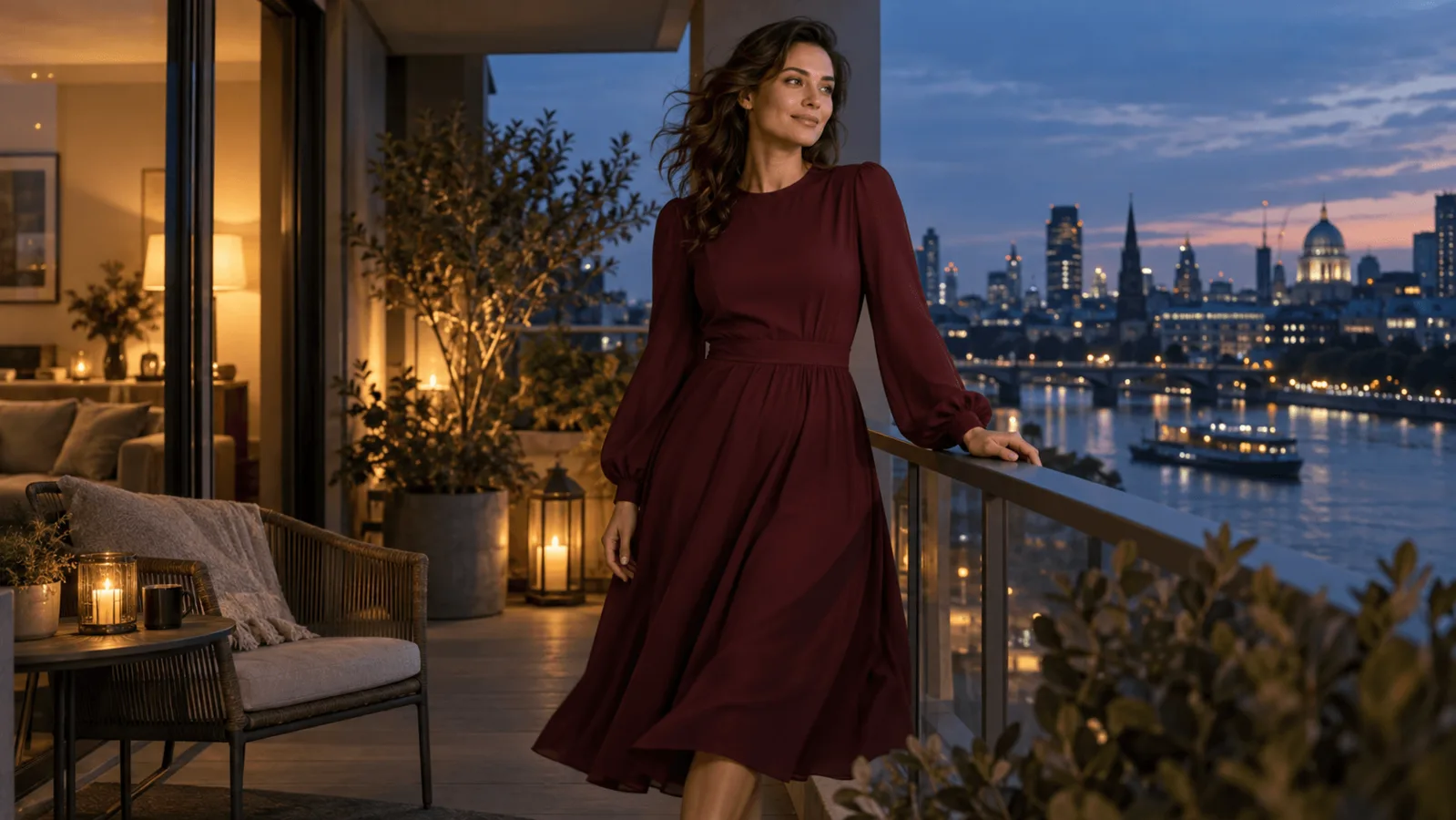
Prepare a 16:9 reference of a fictional adult woman in a fully covering burgundy dress at a balcony railing. Show both shoulders, leave space around her hair, and keep the city background still. Use a relaxed opening pose. Avoid actions that change the scene's state: a cup being emptied, a garment coming off, someone entering the frame.
Copy this motion prompt:
One continuous six-second medium portrait of this fictional adult woman on the balcony. She slowly turns her gaze from the city toward the viewer, holds a soft smile briefly, then returns her head and eyes to the opening position. Her hands stay where they are. The camera stays at the same position and scale. Stable dusk illumination, a still background, very slight hair movement. No cut, no zoom, no new objects, no dialogue.
Try it in the Playground
- Open Seedance 2.5 image to video with this prompt filled in. Stay on the Playground tab in Form view; sign in with a funded account to run.
- Add the balcony reference under Input image and the same file under Closing frame.
- Set Duration to 6, Resolution to 480p for the first look (720p for the keeper), keep Aspect ratio on Auto, switch Generate audio off, and under Advanced parameters switch on Return last frame.
- Check the price estimate, run it, and judge the join as described below.
The same controls under their field names:
| Control | Starting value | Why |
|---|---|---|
image_url | Your approved reference | Becomes the first frame |
last_image_url | The same reference | Asks for a similar closing image; it does not guarantee matching motion |
duration_seconds | 6 | Room for the turn and return |
resolution | 720p | $0.2773 per second |
aspect_ratio | adaptive | The only accepted value; crop the input beforehand |
generate_audio | false | Audio is on by default; add ambience separately |
return_last_frame | true | Gives you the final frame for the two-clip method below |
Six seconds at 720p is $1.6638. Preview at 480p, 6 s ($0.7404), to check the motion before the 720p run. Longer shots drift more, so keep the loop unit short and repeat it rather than generating 30 seconds.
Run it from code
cat > input.json <<'J'
{
  "prompt": "One continuous six-second medium portrait of this fictional adult woman on the balcony. She slowly turns her gaze from the city toward the viewer, holds a soft smile briefly, then returns her head and eyes to the opening position. Her hands stay where they are. The camera stays at the same position and scale. Stable dusk illumination, a still background, very slight hair movement. No cut, no zoom, no new objects, no dialogue.",
  "image_url": "<your reference image URL>",
  "last_image_url": "<the same reference image URL>",
  "duration_seconds": 6,
  "resolution": "720p",
  "aspect_ratio": "adaptive",
  "generate_audio": false,
  "return_last_frame": true
}
J
spicyapi tasks create --model bytedance/seedance-2.5/image-to-video --input-file input.json --wait
Setup, uploads of local files and results are in the CLI docs.
Or let an Agent run it. Give your assistant the CLI above, the MCP server (it calls spicyapi_task_create), or the Skill (npx skills add spicyapi-ai/spicy-skill). The CLI and MCP show the price and ask before a paid run.
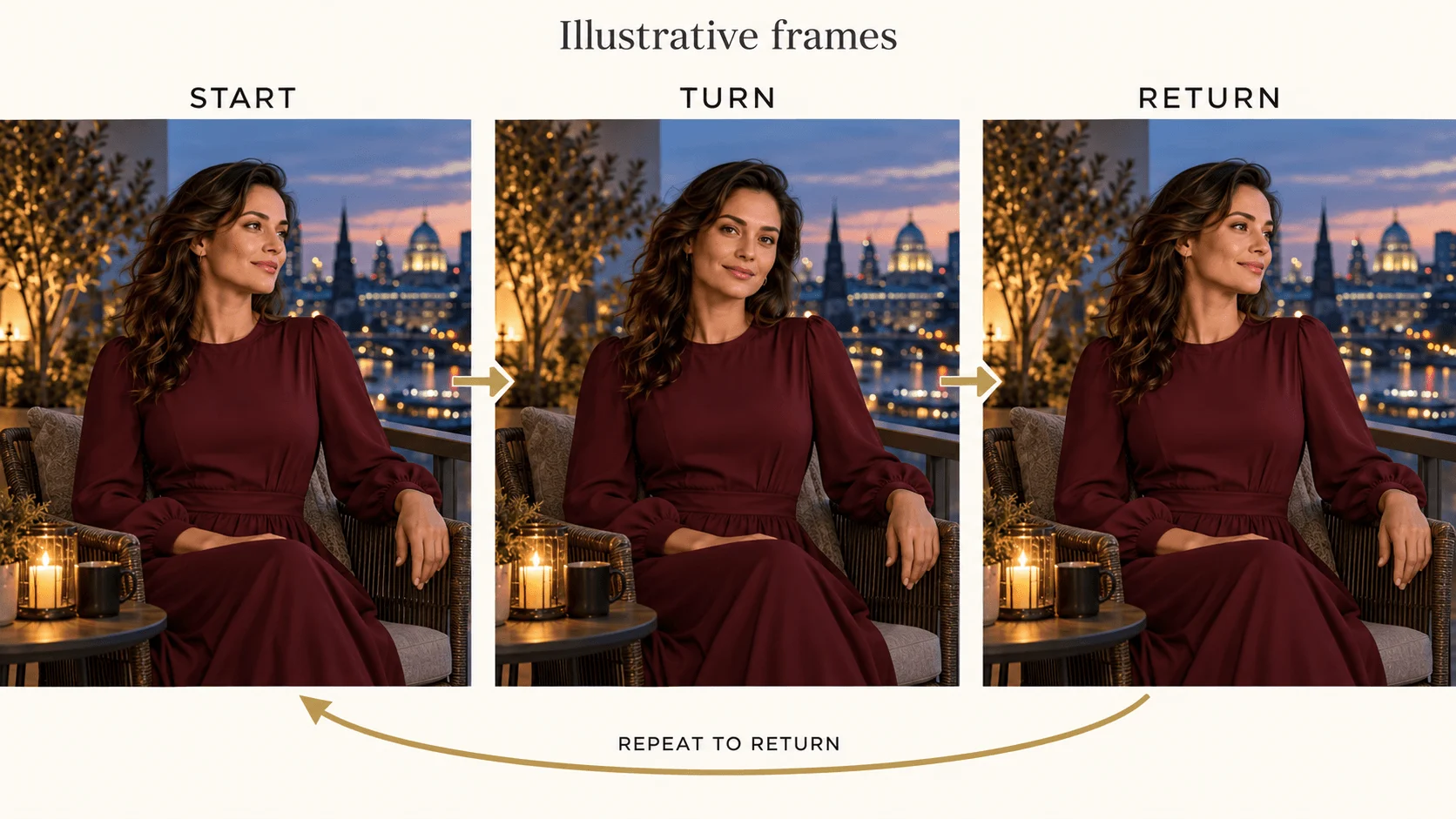
Illustration, not a Seedance frame: a proposed turn-and-return action.
If she turns and never comes back, simplify the action to a small head tilt instead of adding more instructions. If the whole image pushes toward the viewer, remove cinematic camera language and use a reference with obvious fixed anchors, such as the railing corners. Identical first and last images only encourage the same composition; hair, sleeves and hands in between can still end up elsewhere.
When the single clip will not return: generate the way back
Identical start and end images are the usual advice, but the middle of the shot can still wander. A more controllable route is two clips:
- Generate clip A from your reference with
return_last_frameon. - Use A's returned last frame as
image_urland the original reference aslast_image_urlto generate clip B, describing the movement back, for example: "Continuing from this frame, she turns her head and eyes back to the opening position, then holds still. Same camera, same lighting, no cut." - Join A and B. A's last frame is B's first frame, so drop B's first frame:
ffmpeg -i A.mp4 -i B.mp4 -filter_complex "[1:v]trim=start_frame=1,setpts=PTS-STARTPTS[b];[0:v][b]concat=n=2:v=1:a=0" -an AB.mp4You pay for two clips (2 x $1.6638 = $3.3276 at 6 s, 720p) and both joins need checking (A to B, and B's end to A's start, as described below), but both clips are anchored to the original reference at the loop point.
Find the join by watching movement, not just poses
Place two copies of the candidate next to each other in your editor and watch the boundary at normal speed. Then step through about five frames either side, following one landmark such as the outer shoulder. Does it keep moving in a compatible direction?
Two identical shoulder positions still jolt if the first copy ends moving left and the second starts moving right at full speed. For a returning gesture, choose the join near the relaxed turnaround, where motion slows. For continuous motion such as a rotating object, match both too.
Use a background corner to tell camera movement from a gesture. If the railing and the face both change scale, trimming cannot remove that push-in. If only the eyelids change at the join, move the trim away from the blink. If the dress changes neckline, pick an intact section or regenerate; a dissolve blends two different costumes.
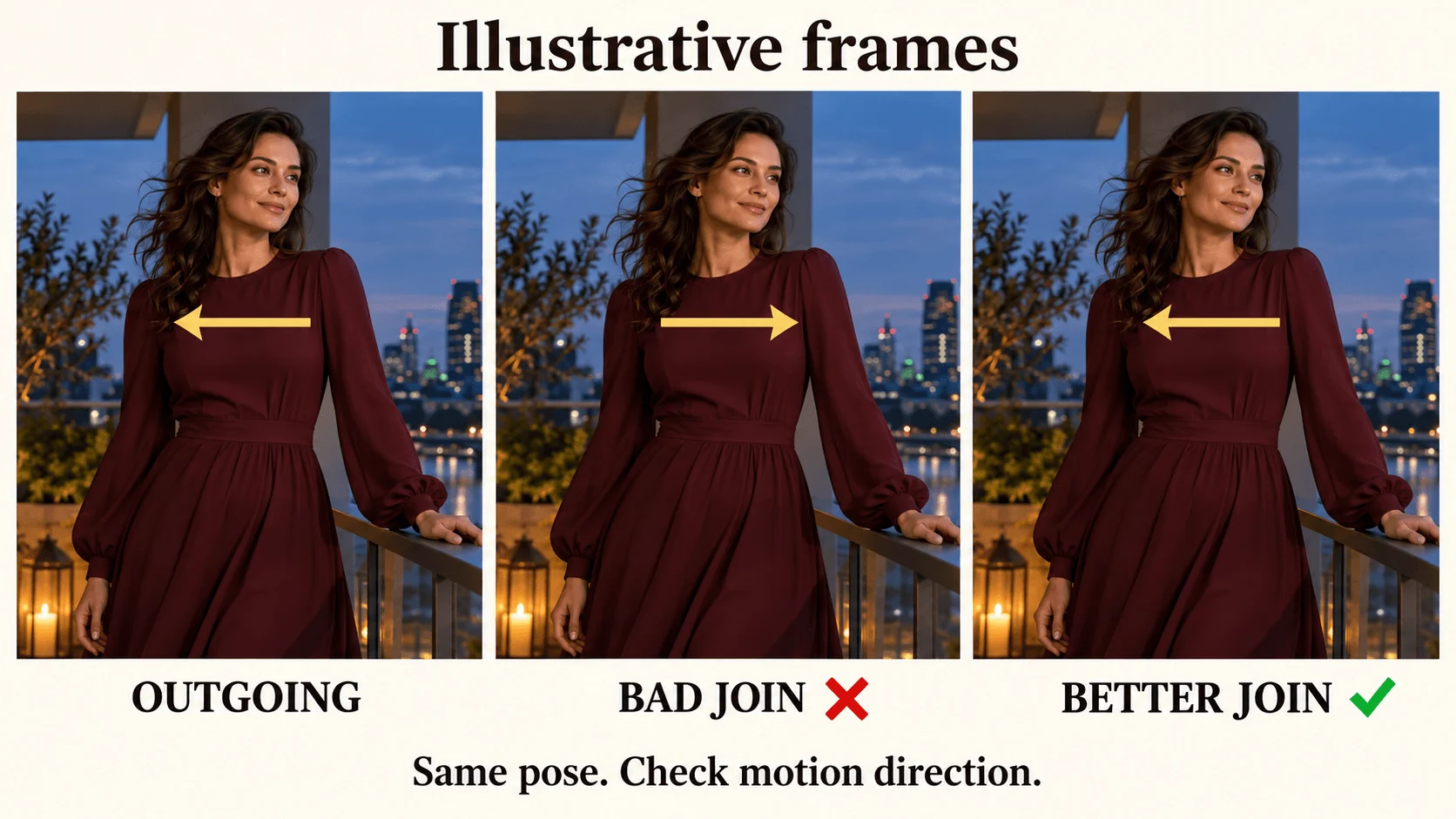
Illustration, not a Seedance frame: similar poses can hide incompatible movement.
Export just the chosen range. This example keeps seconds 1 to 5; replace them with your boundaries:
ffmpeg -i input.mp4 \
  -vf "trim=start=1:end=5,setpts=PTS-STARTPTS" \
  -an -c:v libx264 -crf 18 -pix_fmt yuv420p loop.mp4
ffmpeg -stream_loop 2 -i loop.mp4 -c copy review-three-cycles.mp4
The second command only builds a three-cycle review file. -an drops audio; add sound after the picture is approved. A player's Repeat or Loop control only restarts playback and cannot hide a visible join, so use loop.mp4 as the repeating unit.
Blend the join when a small mismatch remains
A short crossfade can soften a small brightness or pose difference. It cannot restore an object that disappeared or stop a face from double-exposing. The command below blends the last 0.5 seconds of a 6 second, 24 fps clip into its first 0.5 seconds, so the loop's final frame leads straight into its first. The result is 5.5 seconds long:
ffmpeg -i input.mp4 -filter_complex \
"[0:v]split=3[a][b][c];\
[a]trim=start=5.5:end=6,setpts=PTS-STARTPTS[tail];\
[b]trim=start=0:end=0.5,setpts=PTS-STARTPTS[head];\
[c]trim=start=0.5:end=5.5,setpts=PTS-STARTPTS[mid];\
[tail][head]xfade=transition=fade:duration=0.5:offset=0[xf];\
[xf][mid]concat=n=2:v=1:a=0,format=yuv420p[v]" \
-map "[v]" -an -c:v libx264 -crf 18 blended-loop.mp4
For another length D and overlap X, use trim=start=D-X:end=D for the tail, trim=start=0:end=X for the head and trim=start=X:end=D-X for the middle, with duration=X in xfade. Write the computed numbers into the command. Start with 8 to 12 frames of overlap. If the eyes split into two pairs or fingers leave transparent trails, shorten the overlap or abandon the blend.
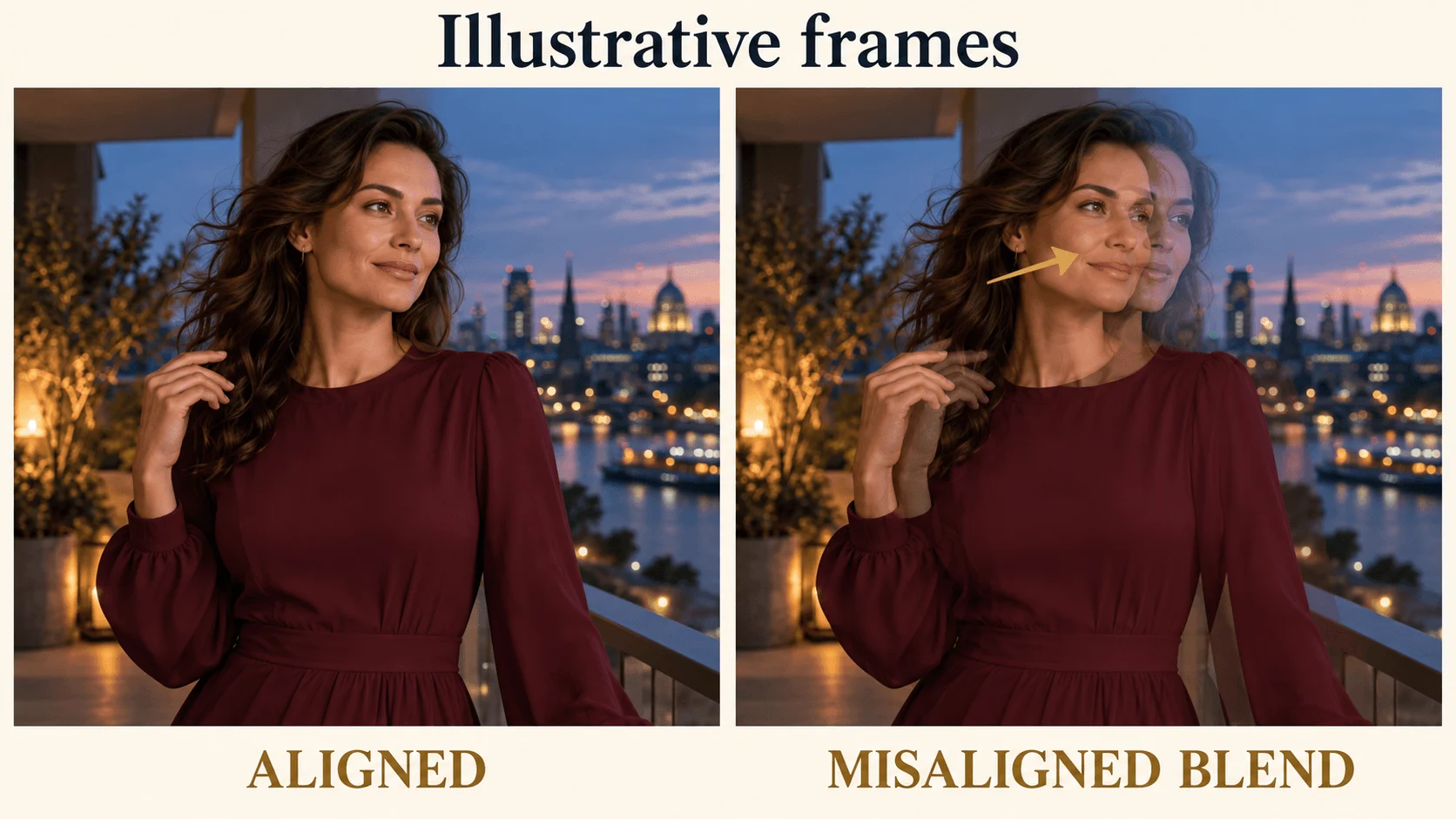
Illustration, not a Seedance frame: a misaligned blend doubles facial features.
Blending suits a nearly stationary portrait. It is a poor choice for a large head turn, overlapping hands or a camera move. If the problem is a small exposure change, balance the two ends before blending; if the geometry changes, return to the source selection.
Make an intentional boomerang when reversal fits
A forward-and-reverse loop works for a gentle head tilt. Do not use it for speech, walking forward, falling hair, pouring water or a hand placing an object down: reversed causality shows.
The command takes the first five seconds at 24 fps, plays frames 0 to 119 forward, then 118 to 1 backward, dropping the duplicate endpoint frames that would otherwise create a brief hold:
ffmpeg -i input.mp4 -filter_complex \
"[0:v]fps=24,trim=start_frame=0:end_frame=120,setpts=PTS-STARTPTS,split[f][r];[r]reverse,trim=start_frame=1:end_frame=119,setpts=PTS-STARTPTS[back];[f][back]concat=n=2:v=1:a=0,format=yuv420p[v]" \
-map "[v]" -an -c:v libx264 -crf 18 boomerang.mp4
The source needs at least five seconds of video; the output is 238 frames, about 9.9 seconds. Choose a source that moves slowly at its endpoints, or the direction change still looks abrupt. The reverse filter buffers everything it processes, so trim a short section first (FFmpeg filter documentation).
Add sound after the picture works
For a silent profile preview, keep the loop muted. For ambience, lay a separate room-tone or city bed under several cycles, crossfade the ambience ends independently of the picture, and listen across the repeat with headphones. To build a bed three times as long with smooth joins, crossfade copies of one ambience file (each join shortens the result by one second):
ffmpeg -i bed.wav -i bed.wav -i bed.wav -filter_complex "[0][1]acrossfade=d=1[x];[x][2]acrossfade=d=1" bed3.wavDo not reverse speech or attach a distinct sound event to every repetition unless that is intended.
Before delivering, check the three-cycle file at its display size for a camera reset, clothing jump, doubled face or audio click. If the portrait is stable but one background detail will not loop, a masked cinemagraph is the alternative: keep an approved still portrait and animate only a separate curtain or light region. That is compositing around a static subject, not a seamless generated performance.