You have an approved character portrait. The outfit edit looks attractive at first, but one shoulder strap ends halfway down the top, the lace has become a blurry floral surface, and the character's eyes have changed. For an NSFW character series, those are three different problems. “Make it more detailed” does not tell the editor which one to solve.
Use the original character image as the base and a clean garment reference for the outfit. Describe where the straps attach, which fabric forms the opaque lining, and where the lace or print belongs. Keep the pose, light and framing fixed for the first swap. If the face is correct and only a small clothing edge is wrong, consider a conventional repair before requesting another whole-image edit.
Seedream 5.0 Pro editing accepts 1–10 reference images and returns one image per request. The current SpicyAPI task has no mask, strength slider or seed control. Face preservation must be judged in the returned image.
ByteDance describes native material replacement and reference fusion, while also acknowledging room to improve pixel-level editing consistency in its Pro announcement. That makes careful reference images worth using, but leaves exact garment artwork and unchanged face pixels as requirements you must verify rather than assume.
Choose a source that shows the garment's boundaries
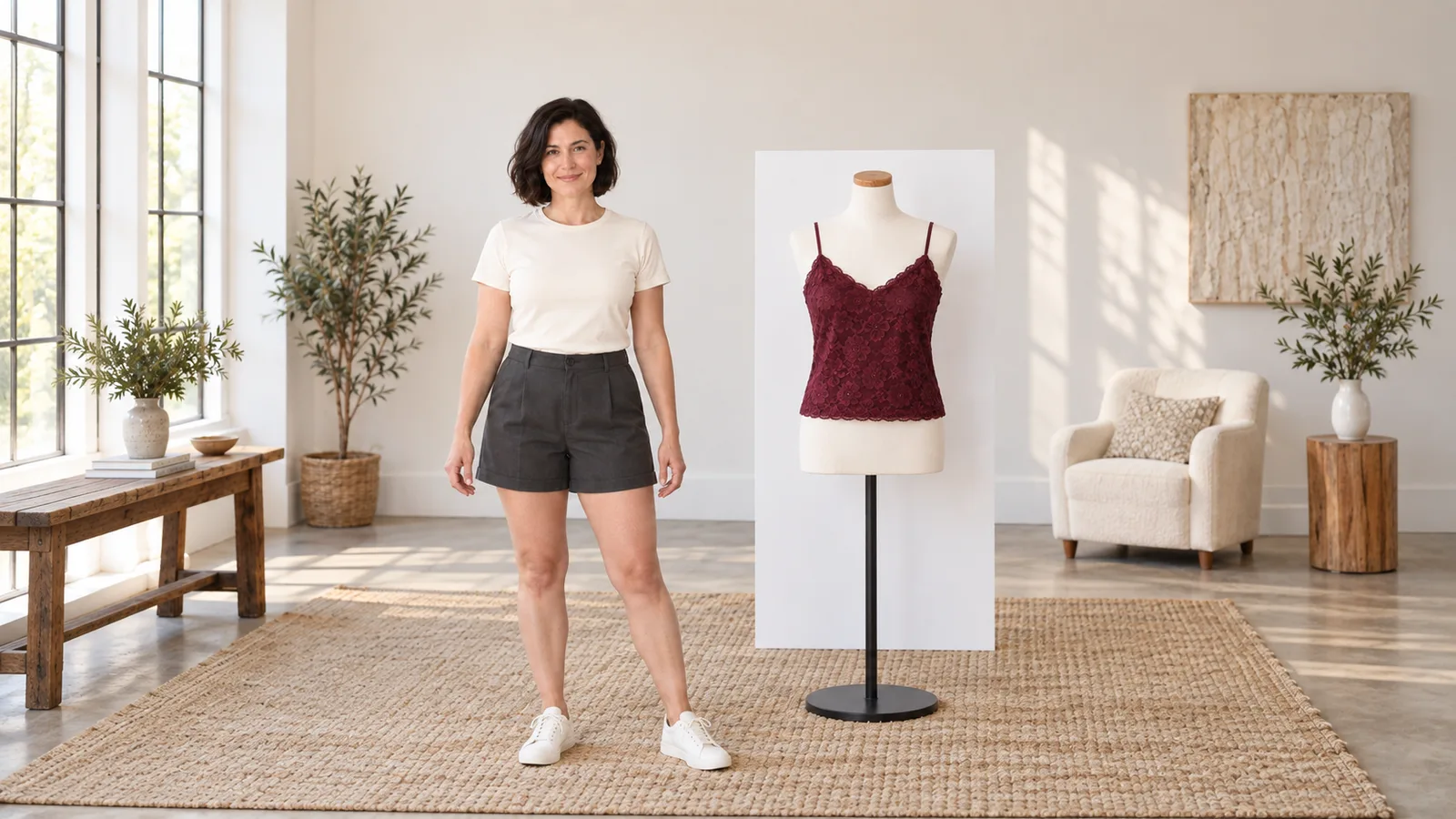
Our example is Nadia, a fictional woman aged 38 with a dark bob, wearing a plain opaque crew-neck top and high-waisted charcoal shorts. Her approved photograph is front-facing, framed from the head to mid-thigh, with her arms relaxed away from her torso. The edit replaces only the top with an opaque burgundy lace-overlay camisole. The shorts, person and room stay the same.
Choose the base photograph for three visible checks:
- Identity: a readable face and an approved expression.
- Construction: uncovered shoulders and neckline, so you can inspect the strap attachments. Hair or a hand can hide a join.
- Fit and length: the waist and hem inside the frame. A tight headshot cannot establish either.
Pick an existing approved image with the clearest view of the area you want to edit. If only a cropped portrait exists, first establish and approve the missing composition; that is a separate job from reproducing a garment accurately.
For the clothing reference, use a front view of the whole camisole on a plain surface or mannequin. Keep both straps, the neckline, side seams and hem visible. A close-up of beautiful lace cannot tell the model how the top is constructed. A fashion photo containing another person's face can introduce a competing identity; crop away that person when the garment remains readable.
Save a separate close-up only if the full reference does not show an important detail. It must be the same garment, not a second top with similar lace. A reference with crossed back straps and another with straight straps asks the editor to choose between two designs.
Make one complete outfit edit before changing the pose
Open the Seedream 5.0 Pro edit task in the Playground and upload the reference images in this order:
- Image 1 — character and composition: Nadia's approved photograph supplies identity, pose, room and framing.
- Image 2 — whole garment: the full camisole view supplies cut, straps, neckline and length.
- Optional image 3 — detail: a crop of that same garment supplies lace or print detail that the full view cannot show.
Draft at 1k; switch to 2k when inspecting fine strap joins and lace. Use PNG, an opaque background and an aspect ratio matching the base photograph, or auto to follow the first reference. For the proposed 4:5 portrait, choose 4:5. Use a different supported ratio if your actual source has another shape; squeezing a wider scene into a new portrait crop adds a composition change to the clothing job.
PNG is useful for later retouching because it avoids another lossy file encode. It does not create better garment structure by itself. The 2K tier gives you more image detail to inspect than 1K, but cannot guarantee correct strap attachments or exact lace reproduction. Keep thinking at its default to begin with. If a tight brief keeps acquiring unwanted garment details, compare one attempt with it off; the price is unchanged.
Paste the prompt below, review the estimate and generate one candidate. Compare the face, strap attachments and lining with the two uploaded images before approving it.
Here is a complete starter prompt for those two reference images:
Image 1 is the base photograph of Nadia, a fictional adult woman aged 38. Preserve her facial identity, dark bob, expression, body proportions, pose, hands, camera position, room and existing soft window light. Replace only her crew-neck top with the burgundy camisole in image 2. Keep her high-waisted charcoal shorts unchanged. Image 2 defines the garment only: two narrow burgundy shoulder straps, each connected to the corresponding front neckline corner; a shallow V neckline; opaque burgundy lining underneath a decorative lace overlay; a narrow scalloped lace border following the neckline; and a scalloped lace hem ending at the hip over the top of the high-waisted shorts. Keep the lining fully opaque. Fit the garment naturally to her existing pose, with folds following the fabric. Do not transfer a mannequin, background or different person's features from image 2. Keep the original head-to-mid-thigh framing.
The garment described must match image 2. If yours has a square neckline or a longer hem, replace those clauses rather than hoping the reference overrides conflicting words. “Two straps” is appropriate for this design, not a universal requirement for all adult-oriented clothing.
Seedream 5.0 Pro is an uncensored editor on SpicyAPI. In our September 2026 tests, all three suggestive-wardrobe edits delivered the requested scene; one of three higher-intensity adult edits came back softened. For lingerie or swimwear, use the same construction-first method: define the cut, lining and reference roles. A softened scene is not fixed by a hidden adult-mode switch. The content-test article covers the model’s response across scene types.
Thin straps need attachment points, not just a width
“Spaghetti straps” describes their general appearance. It leaves open how many exist, whether they cross, and where they join the garment. Define the design's visible path: each narrow strap runs over its shoulder and connects to its own neckline corner. If the source shows straight straps, do not add “crossed straps” because the phrase sounds more fashionable.
Look at the attachment rather than only the line across the shoulder. A convincing strap should meet the garment edge without a gap, merge or extra branch. A dark strand of hair is not proof that a strap continues underneath it. Equally, do not demand a visible line through hair that should occlude it. For an attachment check, a source with the shoulder unobstructed is more informative.
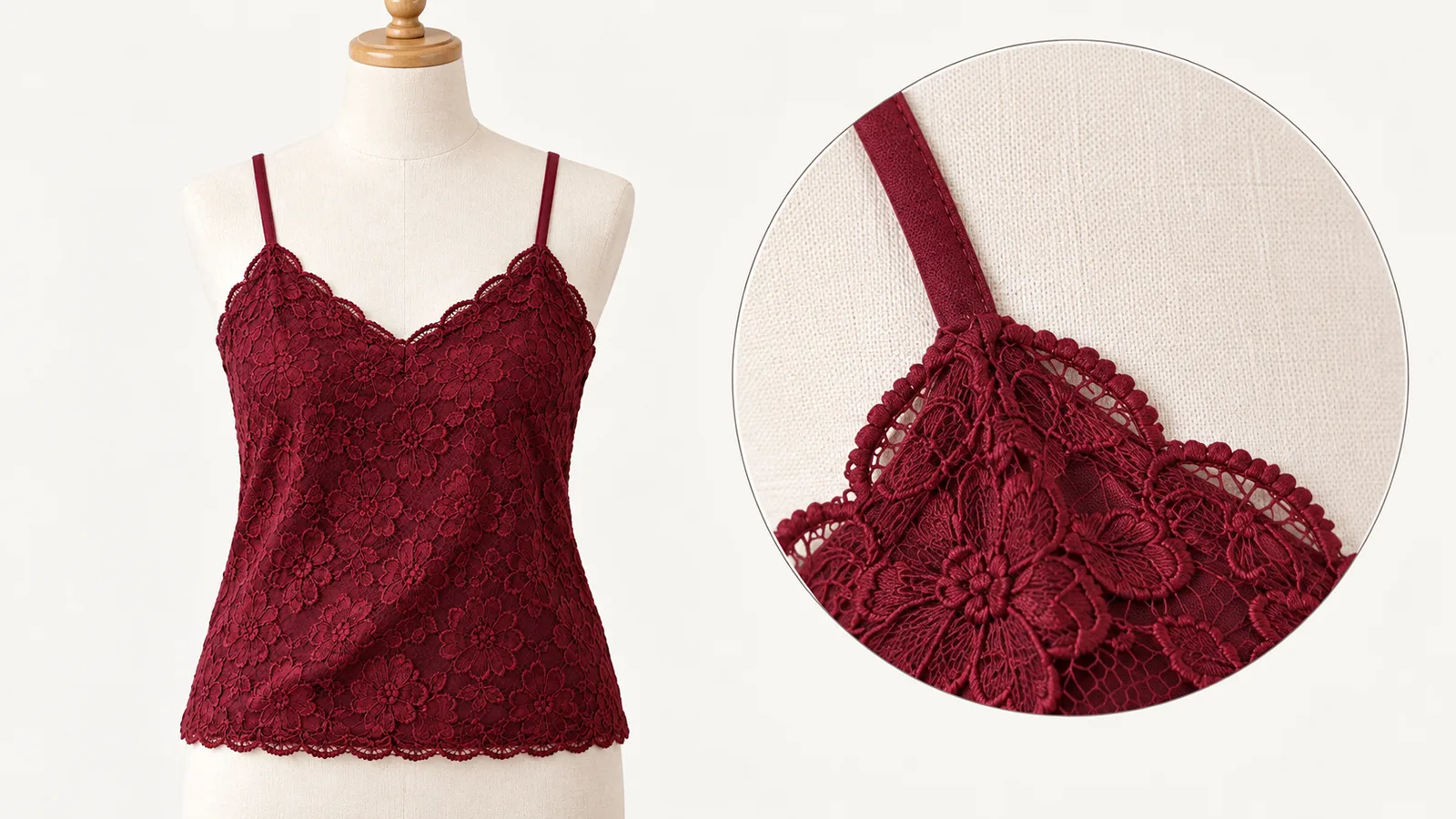
Illustration, not a Seedream result: inspect where each strap joins the neckline, rather than approving a line that stops above the garment.
If the first result has a doubled strap on Nadia's right, a repair instruction is:
Keep this image's face, pose, shorts, room and the rest of the camisole. Correct only the camisole strap on Nadia's right shoulder, which appears on viewer-left in this front-facing image: one narrow burgundy strap, continuously attached to the right neckline corner, with no extra branch. Retain the opposite strap and existing garment cut.
Here the candidate becomes the first reference because its clothing already contains the desired design. Keep the garment image second. This is still a generative edit of the image, so compare the face afterward. If the issue is one short gap, painting or cloning a small strap segment in an editor may preserve more of the accepted result with less uncertainty.
Separate lace decoration from the layer underneath
“A lace top” can describe several visually different things. For this outfit, lace is the decorative surface over an opaque burgundy lining, with a scalloped strip at the neckline. Spell out that relationship. Otherwise a model can place the pattern across the whole torso, turn the neckline trim into a thick collar, or change the underlying material while retaining a vaguely floral look.
Give the border a location and scale relative to the garment. “A narrow scalloped border following the shallow V neckline” is more useful here than “intricate luxury lace.” If the original reference has a wide border, describe that instead.
When the full garment view is too small to show the trim, add its close-up as image 3 and append:
Image 3 is a close-up of the same garment's neckline. Use it only for the scalloped border and lace texture. Image 2 still defines the full garment's cut and length; image 1 defines Nadia and the composition. Keep the opaque burgundy lining beneath the decorative lace.
The crop supplies missing surface information without replacing the whole design. It cannot guarantee that every tiny loop or flower is reproduced. If the exact lace artwork is essential, retain the accepted garment shape and manually place or repair the approved texture rather than treating a similar floral pattern as an exact match.
Keep a print on the garment and let it follow the fabric
For a printed variant, first decide what continuity actually requires. It may be the same burgundy floral motif, approximate motif size and direction, plus one distinctive flower near the hem. Exact repetition of every small element across different poses is a much stricter task.
Suppose the garment reference has small vertical floral repeats and a larger flower on its front-right lower panel. Describe those features, specifying wearer's right. In a front view, that panel appears on viewer-left. Checking only “the flower is on the left” can approve a mirrored design by mistake.
Use a sentence such as:
Keep the small floral repeats at the reference's relative scale, running vertically on the garment panels. Keep the larger flower on the wearer's front-right lower panel. The print follows the camisole's folds and remains on its fabric; it does not continue onto the shorts, arms or background.
This does not require an undeformed flat pattern on a curved body. Folds compress and obscure motifs; side seams can interrupt repeats. The important distinction is between plausible projection of the same design and an invented pattern covering neighbouring objects.
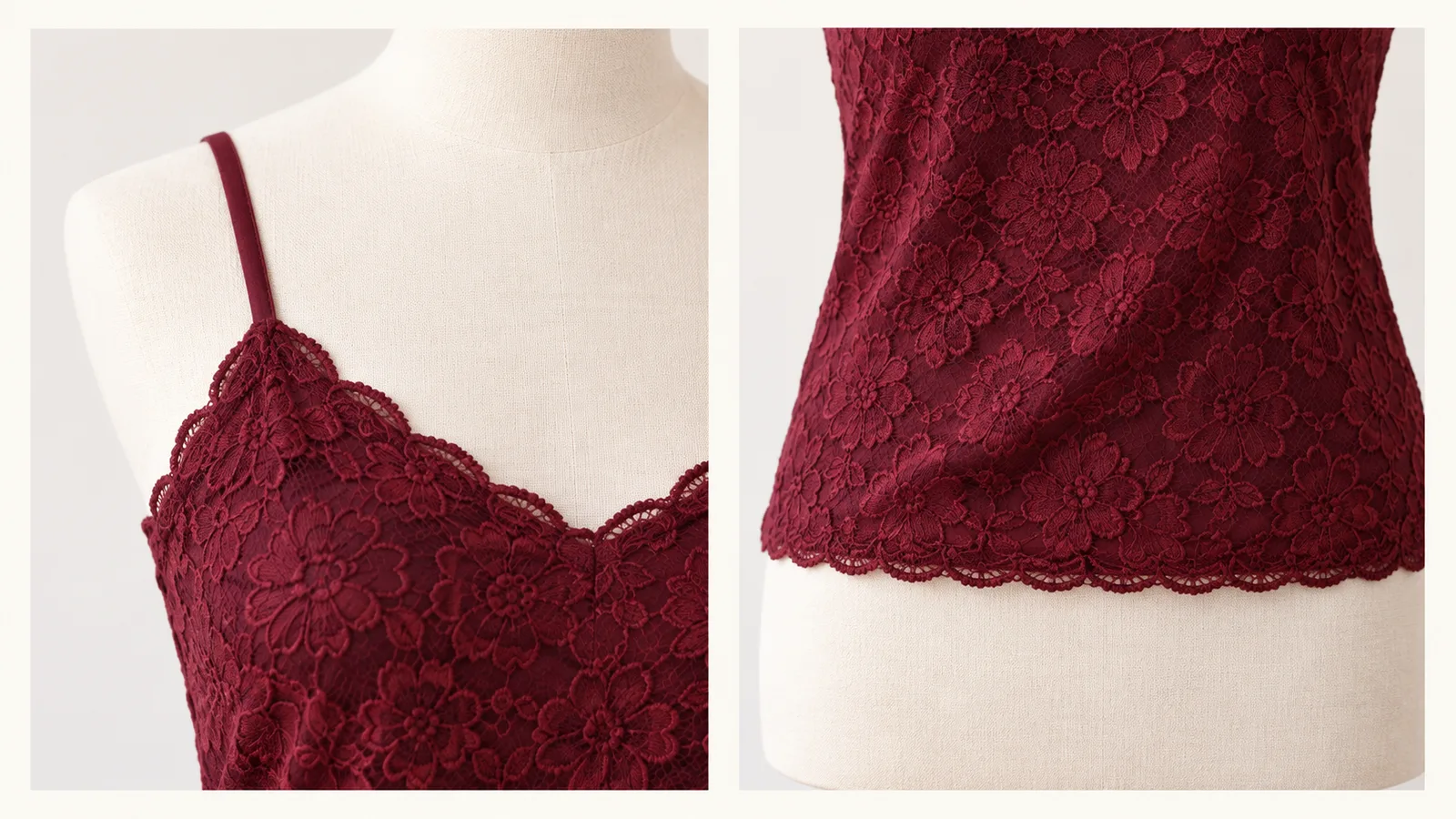
Illustration, not a Seedream result: describe the lining, lace and garment edge separately. The floral pattern belongs on the cloth and ends at its hem.
A rigid grid that ignores a fold is not more faithful merely because its spacing is regular.
For a series with a signature motif, keep the front garment image and any approved side view. A frontal reference cannot establish the back print. If the next post shows the back, supply an approved back design or intentionally design one; do not label an invented reconstruction an exact transfer.
Fix the failed detail without sacrificing the useful image
Compare the output at two scales. At the intended post size, ask whether Nadia remains recognizable and the outfit reads clearly. At full size, inspect strap joins, neckline trim and the printed landmark. An appealing thumbnail can hide a gap that becomes obvious in a close crop.
| Failure | Practical next move |
|---|---|
| New face, otherwise good outfit | Return to the approved character image. Remove any competing person from the clothing reference and repeat only the outfit swap, keeping pose and light fixed. |
| Old top blended into the camisole | Name the item being replaced and the retained shorts separately. Remove leftover collar/sleeves in the instruction; do not ask to retain the old top's construction. |
| One strap or scallop is wrong, face is correct | Try a narrow clothing instruction or repair the small edge conventionally. Avoid a full new lighting/pose brief. |
| Lace pattern is indistinct across the whole garment | Supply a same-garment detail crop and keep the full view as the cut reference; check at 2K. |
| Motif moved to the opposite panel | Specify wearer's side, verify the source is not mirrored and use the unflipped garment image. |
| Pattern changed again after a pose edit | Reuse the approved garment reference alongside the accepted outfit portrait, assigning identity and clothing separately. |
If the editor repeatedly replaces Nadia's face, more preservation adjectives are not a dependable solution. For an otherwise correct same-pose edit, conventional compositing can keep the approved head and background while bringing in the revised garment area. Align the two images first, mask around the garment, and examine the neck, hair, shoulders and shadows at the transition. This works best when camera position and pose agree; it is not a shortcut for a new head angle or incompatible lighting.
For a tiny clothing flaw, repairing that flaw is often simpler than compositing the whole outfit. A continuous strap segment, a short hem edge or a displaced single motif can be handled locally. A wrong silhouette, different body proportions or missing garment panel is a larger failure: return to the original reference images rather than trying to patch the entire torso.
What the attempts cost
Pro editing starts at $0.036 for 1K or $0.072 for 2K with one reference. Each additional input image adds $0.003; one request returns one image.
| References in the request | 1K / image | 2K / image |
|---|---|---|
| Character only | $0.036 | $0.072 |
| Character + full garment | $0.039 | $0.075 |
| Character + full garment + its detail crop | $0.042 | $0.078 |
A small allowance of three two-reference 1K attempts, followed by one three-reference 2K attempt, totals $0.195: 3 × $0.039 + $0.078. That is a planning example for four returned images, not an expected success rate. If the first 1K output cannot show the lace detail you need to judge, move that decision to 2K rather than approving it from a blurry preview. Four two-reference 2K attempts cost $0.30.
Adding more images that disagree about the neckline or print does not buy precision.
Build the wardrobe series from approved reference images
Once Nadia's camisole is accepted, save that outfit portrait alongside the original character and clean garment sources. For a colour variant, keep the construction and decorative pattern fixed and change only the stated colour. For a pose variant, keep the garment design and choose a modest change supported by the available views. Make colour and pose changes separately if you need to identify which step caused drift.
Do not let a flawed intermediate become the permanent wardrobe reference. One shortened strap can propagate into the next post; a moved floral landmark can become the model's new interpretation of the outfit. Return to the approved clothing design when that happens.
For a larger collection, the character reference workflow explains how to keep identity and individual scenes separate. For the outfit swap itself, keep the task smaller: an established adult character, one clearly defined replacement garment, and a precise decision about which remaining detail needs generation and which needs a direct repair.
Use the approved setup through the API
Set SPICY_API_KEY in your environment. Set CHARACTER_IMAGE_URL, GARMENT_IMAGE_URL to your approved images’ direct HTTPS URLs. Run with Python 3; confirm the displayed quote only when you want a new paid attempt.
import json
import os
import uuid
from pathlib import Path
from urllib.request import Request, urlopen

payload = {"model": 'bytedance/seedream-5.0-pro/edit', "input": {
    'prompt': 'Image one defines Nadia, a fictional adult woman aged 38. Keep her face, dark bob, pose, shorts, room and framing. Replace only her top with the opaque burgundy camisole in image two. Keep two shoulder straps connected to their neckline corners, an opaque lining under the decorative lace, and a scalloped hem at the hip. Image two supplies the garment, not a person or background.',
    'image_urls': [os.environ['CHARACTER_IMAGE_URL'], os.environ['GARMENT_IMAGE_URL']],
    'resolution': '1k',
    'aspect_ratio': '4:5',
    'output_format': 'png',
    'background': 'opaque',
}}

def api(action, body, key=None):
    headers = {"Authorization": "Bearer " + os.environ["SPICY_API_KEY"],
               "Content-Type": "application/json"}
    if key:
        headers["Idempotency-Key"] = key
    request = Request("https://api.spicyapi.ai/api/v1/jobs/" + action,
                      data=json.dumps(body).encode(), headers=headers)
    with urlopen(request, timeout=60) as response:
        result = json.load(response)
    if result.get("code") != 200:
        raise RuntimeError(result)
    return result["data"]

quote = api("quote", payload)
print("Maximum charge (USD):", quote["maxCharge"])
if input("Create this new attempt? Type yes: ").strip() != "yes":
    raise SystemExit("No task created")
key = str(uuid.uuid4())
body = {**payload, "quoteId": quote["quoteId"],
        "expectedCost": quote["estimatedCost"]}
Path(key + ".json").write_text(json.dumps({"key": key, "request": body}))
task = api("createTask", body, key)
Path(key + ".task.json").write_text(json.dumps(task))
print("Task ID:", task["taskId"])
Keep the saved key for retries of that same request. Result retrieval and file handling are in the task API guide.
For repeated edits, an Agent can handle the approved brief:
- CLI:
npx @spicyapi/cli tasks create --model bytedance/seedream-5.0-pro/edit --input-file input.json --waituses the same input fields. - MCP: ask it to use
spicyapi_task_create, thenspicyapi_task_wait. - Skill: install with
npx skills add spicyapi-ai/spicy-skill, then ask thespicyapiSkill to run this setup after showing its quote.
Frequently asked questions
How many reference images do I need for an outfit swap?
Two are a practical starting point: the approved character and a clear whole-garment view. Add a third crop only for a detail the full view cannot show. The task accepts up to ten, but contradictory neckline or strap designs make the brief less definite.
Why did the face change when I requested only a new top?
The task edits the image generatively and has no face lock or spatial mask. Remove other faces from the garment source, retain the original pose and framing, and return to the approved character image. If the outfit is useful in the same pose, compositing its garment area into the original can preserve the accepted face.
Should I regenerate a whole image for one broken strap?
If the face, pose and garment are otherwise correct, first consider repairing the short gap locally. A new full-image edit introduces another opportunity for drift. For an incorrect neckline or garment silhouette, return to the reference images and revise the construction instruction instead.
Does PNG make the lace more accurate?
PNG avoids another lossy encode when retouching; it does not improve garment understanding. Choose 2K when the lace must be inspected closely, with an opaque background for this example. Transparent output is a separate setup requiring PNG and exactly one PNG source with an alpha channel. It is not a way to preserve the face.