Introduction
Upload a motion clip, then add up to 10 reference pictures or describe the character. The result follows the length of the clip.
| Field | Value |
|---|---|
| Input | Text |
| Output | Video |
| Task | Character animation from a motion video |
| Required source | Motion video URL; clip up to 30 seconds |
| Reference pictures | Optional; up to 10; image at the start identifies the performer |
| Prompt | 1 to 2,000 characters when supplied; required without pictures |
| Output height | 480p or 720p; default 720p |
| Resolution pricing | 720p costs twice as much as 480p |
| Audio control | Generate new sound by default; turn off to keep source sound |
| Video guidance | Result follows source length, camera and background |
| Billing basis | Per started second of the motion video; four-second minimum |
| Unsuccessful runs | No charge |
| Recorded output | 480 x 854 MP4; 4.71 seconds from a 5-second clip |
Key features & highlights
A routine performed by the reference character
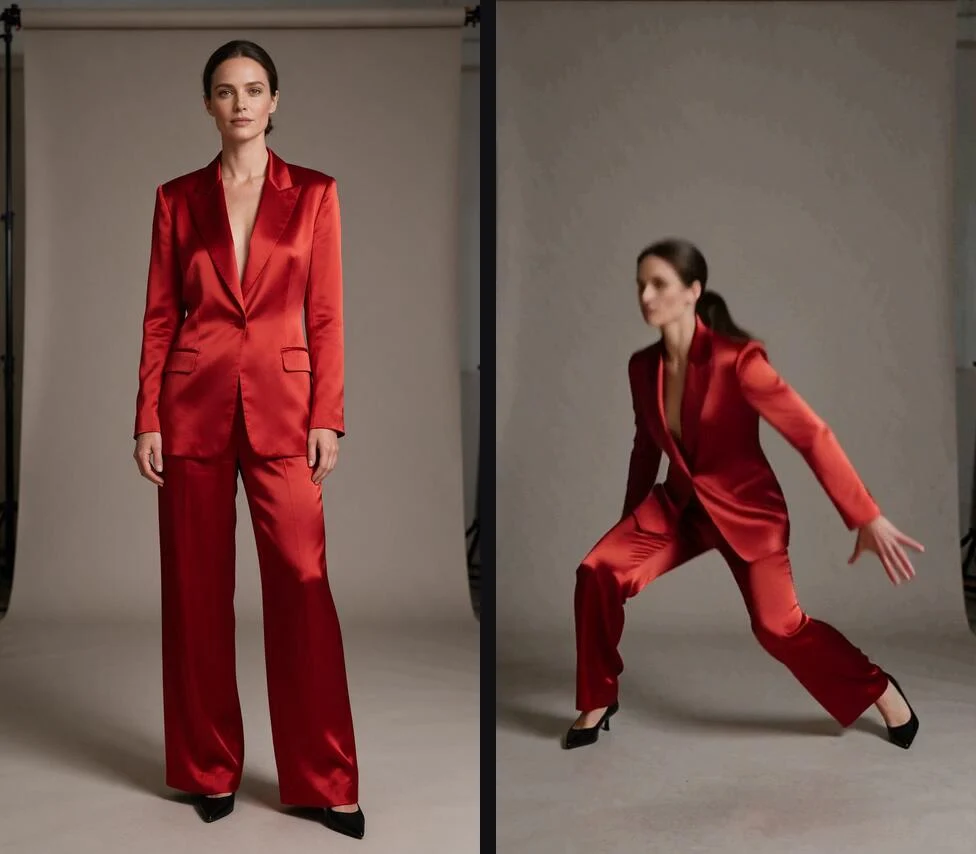
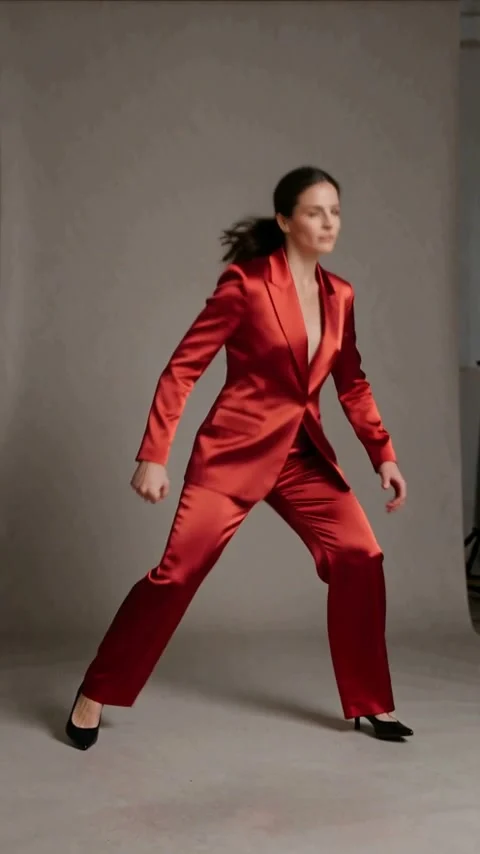
One character image and a 5-second driving clip returned a grey studio performance at 480p. The MP4 measured 480 x 854 pixels and lasted 4.71 seconds. Review that duration alongside the input when planning a timed edit; the recorded result is shorter than the source.
Choose who moves; show how they move
The motion clip supplies the movement, camera and background. Place the performer image at the start of a list of up to 10 pictures, or define the character in text when you have no pictures. A prompt can also add direction to an image-led request.
Set resolution and audio deliberately
Output height is 480p or 720p, with 720p selected by default at twice the 480p rate. Sound generation is also on by default. Switch it off when the sound of the driving clip should stay with the performance.
Request parameters
| Parameter | Required | Description |
|---|---|---|
video_url | Yes | The motion clip, up to 30 seconds. Shorter than 4 seconds is billed as 4. at least 1 characters |
reference_image_urls | No | Up to 10 pictures. The first is the character who performs the motion. at most 10 items |
prompt | No | Extra direction. Required when you add no pictures. at least 1 characters · at most 2000 characters |
resolution | No | 480p or 720p (default). 720p costs twice as much. |
generate_audio | No | On by default. Turn it off to keep the sound of the motion clip. Default: |
Pricing
Motion Control Flash is billed per started second of the motion video, with a four-second minimum. Unsuccessful runs carry no charge.
| Specification | Price |
|---|---|
| $0.162 / second |
| $0.324 / second |
Use cases
Studio choreography studies
Pair a routine clip with a character image to review that performer carrying out the movement. Our grey studio example returned a 480 x 854 MP4 at 480p, lasting 4.71 seconds from a 5-second source.
Presenter gesture rehearsals
Use a recorded presenter gesture as the motion reference and add the character image. Choose footage with the camera and background you want for the presentation, then review the returned gestures before editing.
Character concepts from a description
Describe a workshop instructor, gallery guide or other professional in ordinary work clothing, then supply the performance clip. The prompt defines the character when you have no pictures to upload.
Performances with existing sound
Keep a routine paired with its existing sound by turning sound generation off. Review the returned audio and video together before fitting the performance into a longer sequence.
Prompt guide & pro tips
Choose the performance clip
Supply a motion video URL for a clip up to 30 seconds. Pick footage whose action, camera and background fit the intended result.
Define the performer
Add up to 10 pictures, placing the character image at the start, or describe the character in a required prompt when using no pictures.
Set picture size and sound
Choose 480p or 720p, with 720p selected by default at twice the 480p rate. Leave sound generation on for new audio or turn it off to retain the motion clip sound.
Review the returned performance
Check the movement, character appearance and returned duration against your source. Our studio example returned 4.71 seconds from a 5-second driving clip, so inspect the result before placing it on an edit timeline.
Direct a character with a recorded performance
Motion Control Flash character animation takes a motion video and renders a performance by a character supplied through pictures or a description. The driving clip sets the movement, camera and background. Choose this workflow when you already have a recording of the action you want to reuse.
A motion video is required even when you describe the character in text. The prompt adds direction; it does not replace the recorded performance.
Request parameters
Separate the performance source from the character reference when preparing the request. These controls set the inputs, output height and handling of sound.
| Parameter | Requirement and choices | Role in the request |
|---|---|---|
video_url | Required nonempty string; motion clip up to 30 seconds | Supplies the performance, camera, background and reference length. |
reference_image_urls | Optional array; up to 10 pictures | The image at the start of the list identifies the character who performs the motion. |
prompt | Optional with pictures; required without pictures; 1 to 2,000 characters when supplied | Describes the character or adds direction. |
resolution | 480p or 720p; default 720p | Selects output height; 720p costs twice as much as 480p. |
generate_audio | Boolean; default true | Generates new sound when on; keeps the motion clip sound when off. |
Define a character with pictures or text
Place the intended performer image at the start of the reference list. You can include up to 10 pictures. Check the order before submitting so the intended performer remains at the start of the list.
Without pictures, write a character description in the prompt. A useful draft names a profession, ordinary clothing and the character’s role in the scene. For an image-led request, identify the pictured character and add the direction that matters, rather than describing an unrelated performance.
Choose the clip before writing the prompt
Because the result follows the source camera and background, begin with footage whose framing and setting fit the intended video. Trim the source to the action you need within the 30-second input limit. Watch the source through before submitting and decide which movements you will check in the returned performance.
Give the prompt a focused job
The recorded request used: "The character from image 1 performs the routine in a warm grey photo studio." It connects the pictured character to the routine and names a setting without listing a new sequence of moves. Use that division of roles when writing your own direction: the clip demonstrates the performance, while the text identifies or clarifies the subject.
Choose a source that agrees with your written setting. The driving clip supplies the background, so keep your scene description consistent with the source. Keep the prompt within 2,000 characters and save it with the selected inputs for later review.
Resolution, sound and pricing
Use the price shown on this page for the chosen resolution. Billing is per started second of the motion video, with a four-second minimum, and unsuccessful runs carry no charge. The charge basis is the input motion video, so do not estimate it from the returned file duration.
The default output height is 720p. Select 480p deliberately when that height suits your draft; 720p costs twice as much. Our studio example returned a portrait MP4 measuring 480 x 854 pixels at 480p.
Decide whether to retain source sound
Sound generation starts on. Leave it enabled when you want new sound, or set generate_audio to false when you want the sound of the motion clip. Listen to the returned file before using it in an edit.
A grey studio routine
On November 18, 2026, we submitted a 5-second driving clip with one reference image, the studio prompt above and 480p selected. The returned MP4 showed the referenced character performing the routine in a grey studio. It measured 480 x 854 pixels and lasted 4.71 seconds.
The returned duration was shorter than the source. Check the media duration before aligning the result with another track or placing it into a timed sequence. Review the start and end of the action alongside the source, then use the returned file’s actual length when arranging your edit.
Limits and related choices
Prepare motion clips of up to 30 seconds, no more than 10 reference pictures and a prompt within the stated character limit. Review movement, appearance, framing and sound in the returned file. Keep the input clip, character references and prompt together so you can identify what to adjust for the next version.
Compare another family when the inputs differ
If you do not have a suitable motion clip, inspect Kling 3.0 for its workflow before choosing an endpoint. When comparing another character animation family, inspect Wan 2.2 Animate and check its required inputs and output settings. Choose by the source material you have and the controls your scene needs.
Choose a motion clip whose performance, camera and background fit your intended scene.
API quick start
# Generate the idempotency key once; reuse it when retrying after a lost response.
export SPICY_IDEMPOTENCY_KEY="${SPICY_IDEMPOTENCY_KEY:-$(uuidgen)}"
curl -X POST https://api.spicyapi.ai/api/v1/jobs/createTask \
  -H "Authorization: Bearer $SPICY_API_KEY" \
  -H "Content-Type: application/json" \
  -H "Idempotency-Key: $SPICY_IDEMPOTENCY_KEY" \
  -d '{
  "model": "spicyapi/motion-control-flash/character-animation",
  "input": {
    "resolution": "720p",
    "video_url": "https://example.com/reference.mp4",
    "reference_image_urls": [
      "https://example.com/reference.png"
    ]
  }
}'

# Copy data.taskId from the response into TASK_ID, then poll the status.
TASK_ID="TASK_ID_FROM_RESPONSE"
curl "https://api.spicyapi.ai/api/v1/jobs/recordInfo?taskId=$TASK_ID" \
  -H "Authorization: Bearer $SPICY_API_KEY"
See the API reference for authentication, the complete schema, polling, and error handling.