
You have a job in mind, say a 5-second 720p clip or a 1024-pixel product image, and two price pages that don't use the same unit. The fix is to turn every rate into the cost of that one deliverable. Done that way, same-name models turn out to differ a lot: a 5-second Seedance 2.0 clip at 720p is $0.76 on SpicyAPI, $0.90 on Replicate and about $1.52 on fal, while fal's Wan 2.2 is cheaper than SpicyAPI's flat-priced one. Prices below come from the providers' public pages and SpicyAPI's live catalogue on October 4, 2026.
This page compares providers and shows how to convert units. For SpicyAPI-only price tables, minute-long budgets and app subscriptions, see the per-unit pricing guide.
The same model across providers
One image or one 5-second clip, matched by model name and task, with the rate multiplied out. Provider-specific implementations and controls can differ; this is a billing comparison, not a matched output-quality test. "Per MP" means per megapixel.
| Task | fal | Replicate | SpicyAPI |
|---|---|---|---|
| Seedream 4.0 text to image, one image | $0.03 per image | $0.03 per output image | $0.03 per image |
| Z-Image Turbo text to image, one 1 MP image | $0.005 per MP | $0.005 up to 1 MP, $0.01 up to 2 MP (PrunaAI build) | $0.01 per image |
| FLUX.1 dev text to image, 1024 × 1024 | $0.025 per billed MP, rounded up; quote the exact size | $0.025 per image | none; FLUX.1 dev LoRA is a different family at $0.018 |
| Seedance 2.0 text to video, 5 s, 720p | $1.52 with audio ($0.3034 per second) | $0.90 ($0.18 per second, no video input) | $0.76 ($0.152 per second), audio on or off |
| Seedance 2.0 text to video, 5 s, 1080p | $3.41 with audio ($0.682 per second) | $2.25 ($0.45 per second, no video input) | $1.87 ($0.374 per second), audio on or off |
The next three video tasks compare fal with SpicyAPI:
| Task | fal | SpicyAPI |
|---|---|---|
| Wan 2.2 image to video, 5 s, 480p / 720p | $0.20 / $0.40 at 80 frames (16 fps; 81 frames is $0.2025 / $0.405) | $0.24 / $0.48 flat per request |
| Wan 2.5 text to video (fal preview endpoint), 5 s, 480p / 720p / 1080p | $0.25 / $0.50 / $0.75 | $0.225 / $0.45 / $0.675 |
| Seedance 2.0 Fast text to video, 5 s, 720p | $1.21 with audio ($0.2419 per second) | $0.484 ($0.0968 per second) |
What the tables say:
- Seedream 4.0 is a three-way tie at $0.03. Pick by features and policy, not price.
- Z-Image Turbo is a tie at 1 MP between fal and Replicate, both half of SpicyAPI's $0.01. Size sets their price: fal publishes a per-MP rate, while Replicate's PrunaAI README lists resolution tiers. Below 1 MP those rules can produce different bills. SpicyAPI's is per image. fal's optional prompt expansion adds $0.0025 per request.
- Seedance 2.0 is cheapest on SpicyAPI at both resolutions: about half of fal and 15 to 17% below Replicate. Turning audio on adds nothing on SpicyAPI.
- Wan 2.5 is about 10% cheaper on SpicyAPI.
- Wan 2.2 is cheaper on fal. Its 5-second clip is $0.04 below SpicyAPI at 480p and $0.08 below at 720p, because fal bills frames at 16 per second while SpicyAPI charges a flat price for a fixed 5-second request. fal also lets you set the frame count and has a 580p tier at $0.06 per second; SpicyAPI's base task does not. Replicate's Wan 2.2 Fast is a PrunaAI-optimised build billed per output video ($0.05 at 480p, $0.11 at 720p for the base variant), a different product from either.
Sources: fal Seedream 4.0, fal Z-Image Turbo, fal FLUX.1 dev, fal Wan 2.2 A14B, fal Wan 2.5, fal Seedance 2.0; Replicate Seedream 4, Replicate Seedance 2.0, Replicate Z-Image Turbo, Replicate Wan 2.2 Fast, Replicate pricing; SpicyAPI rows are the Seedream 4.0, Wan 2.2, Wan 2.5 and Seedance 2.0 pages. Same name does not mean same output: compare controls and results before moving a workload.
Convert units before you compare
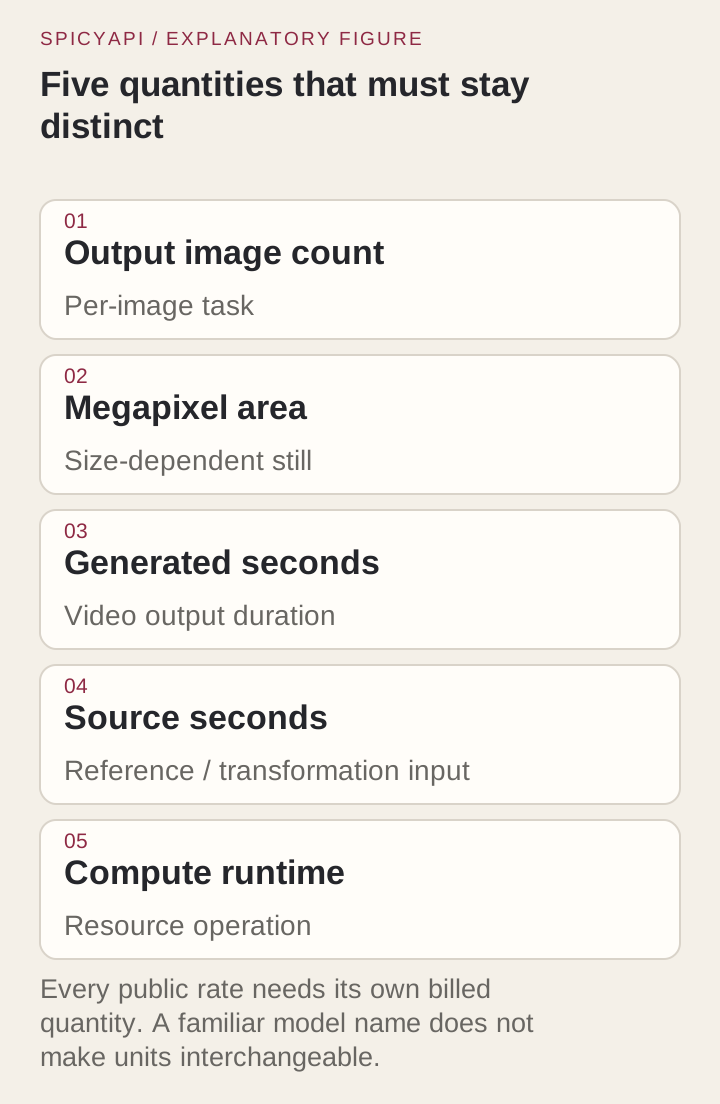
Providers bill five different things, and a dollar amount per unit looks the same in all of them:
- Output images: a flat price per delivered picture.
- Megapixels: price follows image area, often rounded up.
- Generated seconds: the length of the new clip.
- Source seconds: the length of the input you send to a transformation, such as an upscale.
- Compute seconds: runtime on hardware.
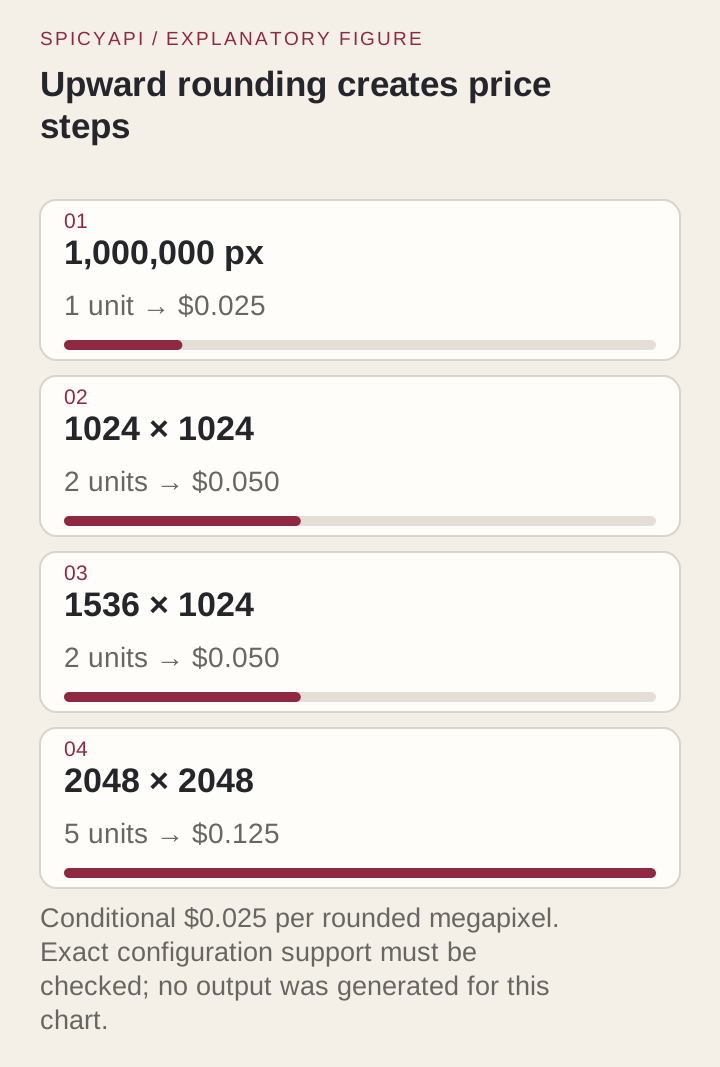
Rounding can create price steps. At $0.025 per billed megapixel, one unit costs $0.025, two cost $0.050 and five cost $0.125. Determine the billed quantity from the exact endpoint: image dimensions alone do not establish whether it treats 1024 × 1024 as one or two units. The following illustration and calculation use an explicit decimal assumption of 1,000,000 pixels per unit.
from decimal import Decimal
from math import ceil

width, height, count = 1024, 1024, 1
rate = Decimal("0.025")  # illustrative decimal-MP billing, not an endpoint quote
megapixels = Decimal(width * height) / Decimal(1_000_000)
cost = rate * ceil(megapixels) * count
print(megapixels, ceil(megapixels), cost)  # 1.048576 2 0.050
Count outputs too: if an endpoint returns four images by default, a per-image price is four times the single-image figure. Store width and height, not a label such as "1K". File format does not change megapixel billing; a smaller WebP costs the same as a PNG of the same dimensions.
Video: frames, resolution, audio
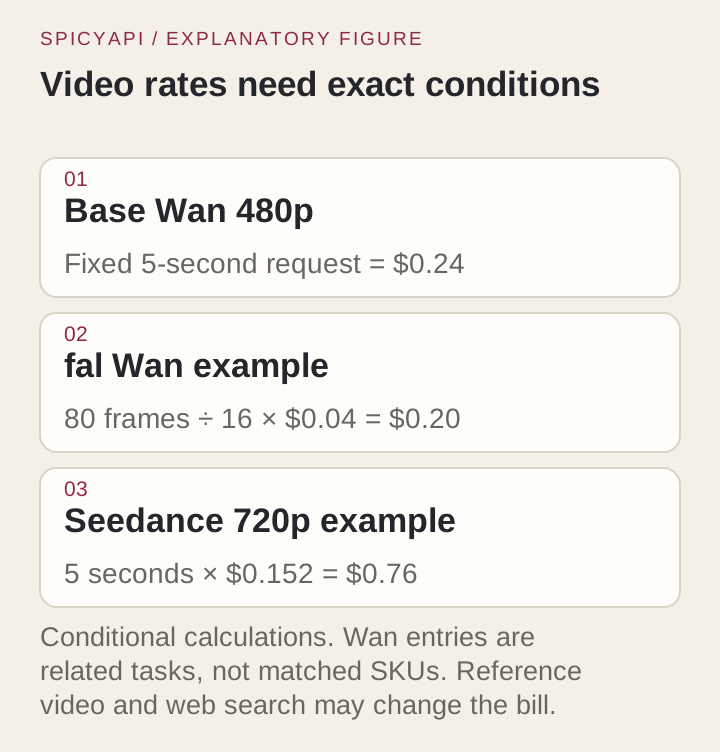
fal bills Wan 2.2 in video seconds at 16 frames per second, so frame count sets the price: 80 frames is 5 billing seconds, $0.20 at 480p; 81 frames is 5.0625 seconds, $0.2025. SpicyAPI's base Wan 2.2 takes a fixed 5-second request at a flat $0.24 (480p) or $0.48 (720p). Wan 2.2 Spicy and the LoRA versions are separate families with their own prices and controls, so don't drop them into a base-Wan row.
For Seedance 2.0, SpicyAPI prices per generated second: $0.07 at 480p, $0.152 at 720p, $0.374 at 1080p, $0.778 at 4K, and the same price with audio on or off. Five seconds at 720p is $0.76, ten seconds $1.52, three five-second candidates $2.28. Two things move the bill: web search on text-to-video (480p goes from $0.07 to $0.114 per second), and reference video on reference-to-video, whose seconds are billed on top of the output. Reference clips are normalized before billing, and a minimum reference length can apply based on output length. For example, a 5-second output has a 4-second billed-reference minimum: even a 2-second reference produces 9 billed seconds, not 7. Smart duration lets the model pick the length, so budget the maximum or choose a fixed duration.
Where comparison tables go wrong
Roundup posts and price trackers often quote one number per model. When you copy from them, check these three things against the provider's own page:
- Resolution. A "from" price is usually the 480p or 720p rate. Seedance 2.0 on SpicyAPI is $0.152 per second at 720p and $0.374 at 1080p, so a headline built on the lower tier understates a 1080p job by more than half.
- Variant. Fast, Mini, Pro, Spicy and LoRA versions share a name stem but have their own rates and controls.
- Audio and extras. "With audio" rates, web search, reference video and prompt expansion each change the bill on some models.
Finishing steps belong in the budget
A delivered asset often needs more than one call. These SpicyAPI rows are flat or per source second, so they are easy to add:
| Step | Price | Example |
|---|---|---|
| Background Remover | $0.0048 per image | 100 cutouts: $0.48 |
| Image Expander | $0.024 per image | 3 layout variants of one source: $0.072 |
| Video Upscaler | $0.006 per source second at 720p or 1080p, $0.012 at 2K, $0.024 at 4K | 5.2-second source at 1080p: 6 seconds, $0.036 |
The upscaler rounds source seconds up, has a 3-second minimum and accepts 3 to 60 seconds. Its quote assumes the 60-second maximum and releases the difference when the task settles: at 4K that is $1.44 on the quote, far less for a short clip. If you trim a generated clip before upscaling, the upscaler bills the trimmed file, not the original generation.
Quote, reservation, settlement
A quote prices a proposed request. A reservation holds funds when the quantity is uncertain, as with smart duration or the upscaler's maximum. Settlement is the final charge. Show them as three different numbers in your app.
If a price-affecting field changes (duration, resolution, a reference file, a trimmed source), ask for a new quote; an old one no longer describes the request. Keep one job identity through retries so a lost response never creates a second paid task. A dissatisfied reviewer is not a refund event; technical failures follow the model's billing terms on its page.
Runtime pricing needs a measured runtime
Replicate bills some models by hardware time. Its public schedule lists an A100 at $0.0014 per second and an H100 at $0.001525 per second, so 20 billable A100 seconds cost $0.028. This is an assumed runtime, not a measured benchmark for any model. That is a per-image cost only once you know the exact model, hardware, billable setup and idle time, and the runtime for your size and settings. Divide spend by accepted outputs, not tasks received. Use a fixed per-output rate when the task is simple and the volume is uneven; runtime billing can pay off for a custom model you keep busy.
Cost per accepted asset
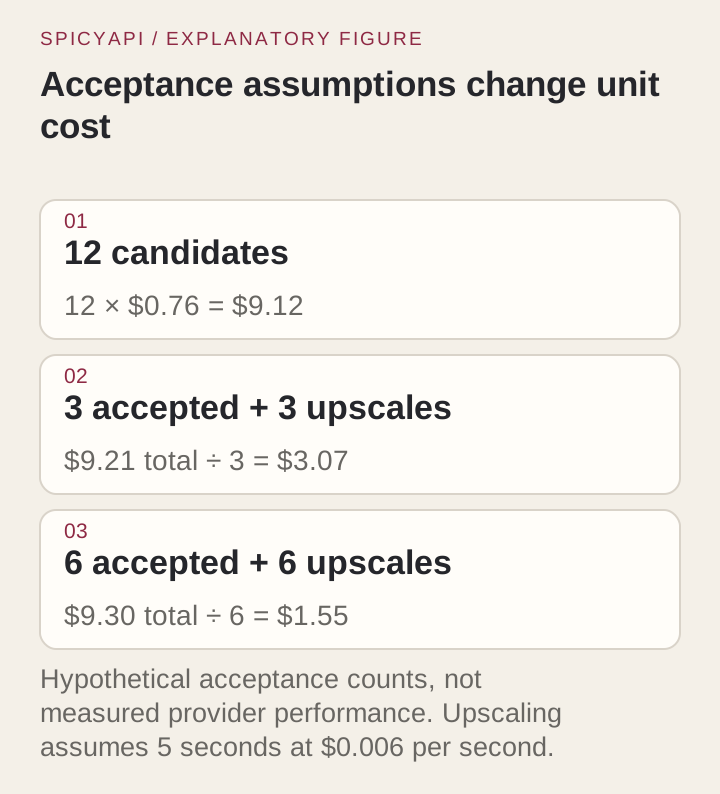
Here, an accepted asset means a keeper selected for delivery, not an HTTP 202 response accepting a job. The model charge is only the numerator. Take twelve 5-second Seedance 2.0 candidates at 720p: 12 × $0.76 = $9.12. If three are kept and each is upscaled at 1080p, that is 3 × 5 × $0.006 = $0.09 more, $9.21 total or $3.07 per master. If six are kept, the same $9.12 plus $0.18 of upscaling is $9.30, or $1.55 per master. These acceptance counts are example assumptions; use your own. The point is that review and retake rate move cost per master far more than a few cents of difference in the unit rate, and that labour and source-image creation belong in the total.
Find which assumption drives the total
Change one input at a time: size, duration, candidate count, accepted count or finishing tier. Six five-second candidates and three ten-second ones use the same seconds but buy different things: more separate takes versus more time per take. Give the largest uncertain line a low and high case before committing the batch.
Credits, discounts and storage
Compare list prices first and treat promotions separately: a credit lowers the first invoice, not the unit rate, and a volume discount applies only to the account that negotiated it. Don't treat one credit as one image or one second unless the platform publishes that conversion; a quote in dollars avoids the question.
Provider result retention is not your archive. Copy deliverables to your own storage (retention and permanent storage guide) and measure real file sizes before pricing storage and transfer: bytes depend on codec and bitrate, not on megapixels or generated seconds.
A ledger you can reconcile
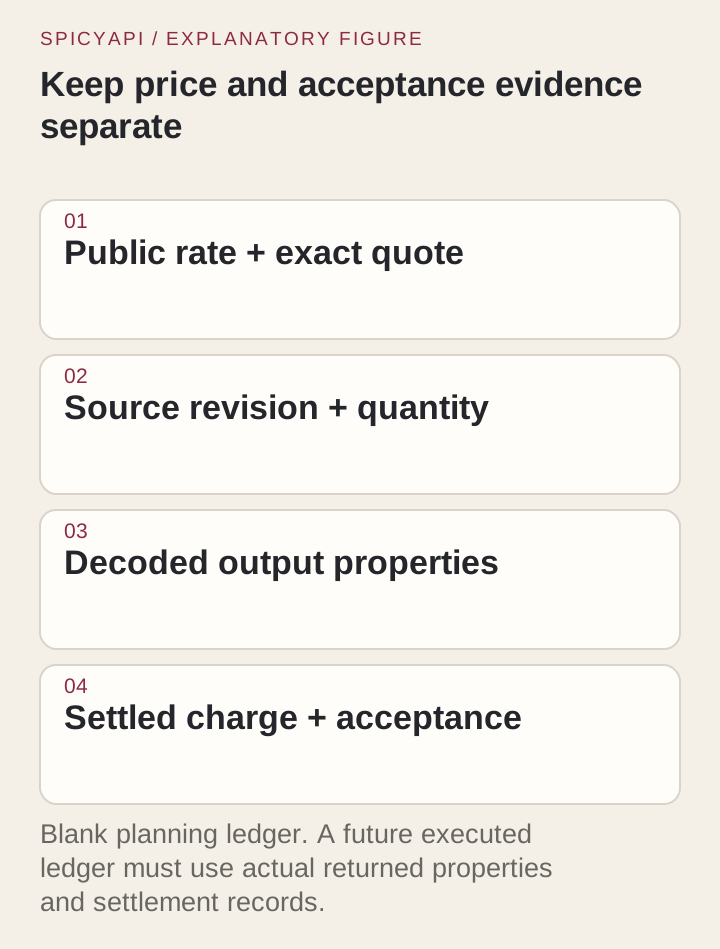
For each paid job, keep five fields: price source and quantity, quote, task ID, decoded output properties (dimensions, duration, format), and settled charge plus the accept or reject decision. Leave credentials and temporary signed links out of it.
What to do next
- Same task on two providers: multiply each rate by your real size or duration, then request the exact quote.
- Different units: convert both to the cost of one deliverable, as in the table above.
- Different model variants: compare controls and output first, price second.
- Missing task: price that step wherever it exists and add it to the total.
FAQ
Which is cheaper, fal, Replicate or SpicyAPI?
It depends on the model and settings in the tables. Seedance 2.0 and Wan 2.5 are cheapest on SpicyAPI; Z-Image Turbo is cheaper on fal and Replicate, which tie at 1 MP; base Wan 2.2 is cheaper on fal; Seedream 4.0 is $0.03 on all three.
Why does a megapixel price look cheaper than a per-image price?
Area-based prices grow with billed size and can round up to whole units. Compare the exact size quote with the flat per-image rate; a per-megapixel headline alone does not establish the cheaper provider.
Does audio cost extra?
On SpicyAPI's Seedance 2.0 the price is the same with audio on or off. The fal Seedance 2.0 rates quoted above are for output with audio.