Introduction
What this endpoint does
It removes the background music from a video's sound track and returns the same video. The picture is not processed.
Inputs that matter
video_url is the only field: a video up to 10 minutes, uploaded or linked directly.
What you get back
One MP4 with the source frame size, frame rate and length, and a sound track without the music.
| Field | Value |
|---|---|
| Input | Video |
| Output | Video |
| Endpoint | Video edit |
| Kept | Dialogue, picture, length and frame rate |
| Billing | Per second of source, 3-second minimum |
Key features & highlights
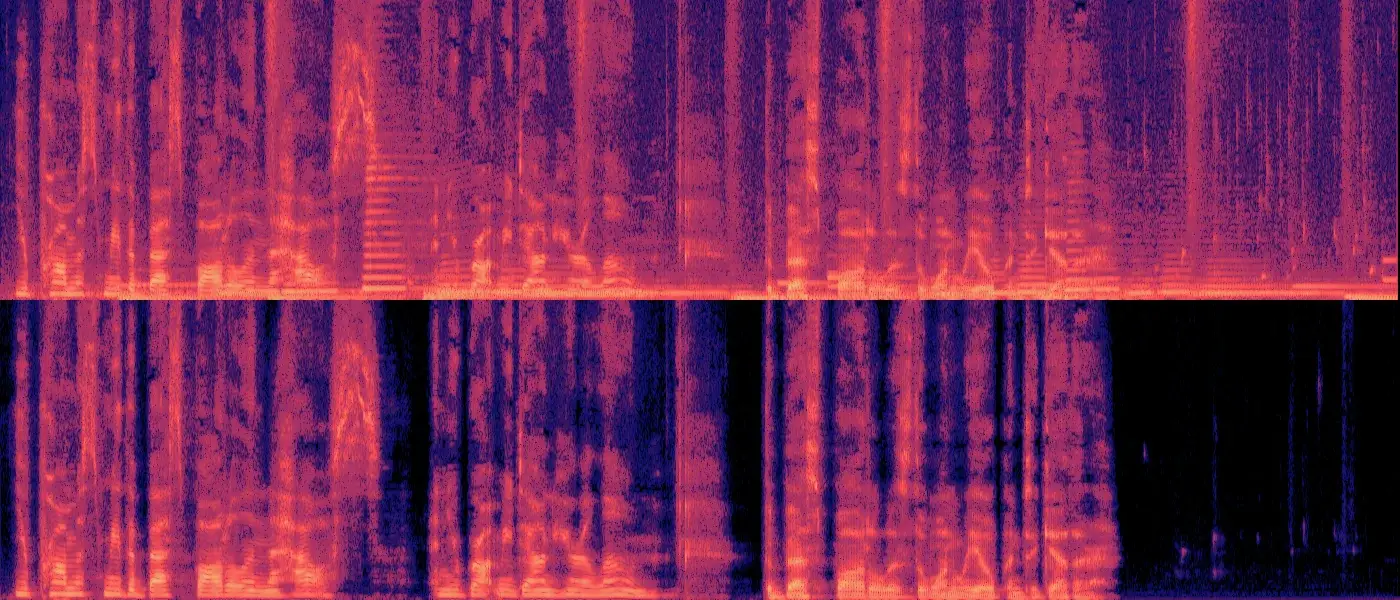
Jazz bed out, conversation in
Top: the mixed soundtrack of an 8-second wine-cellar dialogue with a jazz trio underneath. Bottom: the output. The steady musical lines are gone, the speech is intact, and the stretch after the last line is now silent.
The video comes back untouched
Only the audio is processed. The cleaned clip has the same 1280×720 frame, 24 fps and length as the upload, so it drops straight back into an edit.
Keep the dialogue, lose the song
Use it when the talking should stay and the soundtrack should go. If you need the music as a separate stem instead, Vocal Isolator returns both parts of an audio file.
Request parameters
| Parameter | Required | Description |
|---|---|---|
video_url | Yes | The video whose background music should be removed, up to 10 minutes: an MP4 or WebM upload, or a direct link. The picture is returned unchanged. at least 1 characters |
Pricing
$0.0024 / output second
Billed per second of the source video, rounded up to the whole second, with a 3-second minimum; clips longer than 10 minutes are refused at submission. Failed requests are not charged.
Use cases
Reposting without a licensed song
Take the copyrighted track out of a clip and keep the talking, so it can be posted with music you have rights to.
Re-scoring an edit
Swap the temp music in a draft cut for the final score without going back to separate dialogue stems.
Preparing footage for dubbing
Remove the music bed before translating the speech, then add music back under the new voices.
Prompt guide & pro tips
Send the video
Upload an MP4 or WebM up to 10 minutes, or link straight to the file. There are no other settings.
Wait for the task to finish
An 8-second clip took about 77 seconds in our test; longer clips take longer.
Add the new sound
Lay a new score under the cleaned track, or send the clip on to a dubbing tool. The picture is unchanged, so it stays in sync.
Introduction
Video Music Remover takes a video and gives it back without the music bed. Dialogue stays and the picture is passed through untouched. It is the quick way to drop a licensed song, replace temp music or prepare a clip for dubbing.
Request
{
 "video_url": "https://example.com/vlog.mp4"
}
video_url is the only field. Clips up to 10 minutes are accepted.
What we saw in testing
We mixed a jazz trio about 4 dB under an 8-second, 1280×720 dialogue between two people in a wine cellar. The clip came back after about 77 seconds at 1280×720 and 24 fps. Measured against the clean dialogue we started from, the music was no longer detectable in the output, while both voices were intact and the silence after the last line was clean.
Task flow
The call is asynchronous: create the task, poll until it finishes and download the MP4 from SpicyAPI storage. Billing is per second of the source video, and failed requests are not charged.
Tips
- Singing is treated as music, so a vocal track in the background goes too.
- Need the music as a separate file instead? Extract the audio and use Vocal Isolator (
/models/vocal-isolator-v1). - For noisy speech without music, ElevenLabs Audio Isolation (
/models/elevenlabs-audio-isolation) is the better fit.
API quick start
# Generate the idempotency key once; reuse it when retrying after a lost response.
export SPICY_IDEMPOTENCY_KEY="${SPICY_IDEMPOTENCY_KEY:-$(uuidgen)}"
curl -X POST https://api.spicyapi.ai/api/v1/jobs/createTask \
  -H "Authorization: Bearer $SPICY_API_KEY" \
  -H "Content-Type: application/json" \
  -H "Idempotency-Key: $SPICY_IDEMPOTENCY_KEY" \
  -d '{
  "model": "spicyapi/music-remover-v1/video-edit",
  "input": {
    "video_url": "https://example.com/reference.mp4"
  }
}'

# Copy data.taskId from the response into TASK_ID, then poll the status.
TASK_ID="TASK_ID_FROM_RESPONSE"
curl "https://api.spicyapi.ai/api/v1/jobs/recordInfo?taskId=$TASK_ID" \
  -H "Authorization: Bearer $SPICY_API_KEY"
See the API reference for authentication, the complete schema, polling, and error handling.