Introduction
Submit one MP4 and 1–4 character images to the asynchronous video-edit endpoint. Optional prompt lines bind images to people; no output-duration or aspect-ratio parameter is exposed.
| Field | Value |
|---|---|
| Input | Video |
| Output | Video |
| Publisher | ComfyUI |
| Endpoints | video-edit |
| Inputs | MP4 + 1–4 character images; optional role lines |
| Source clip | Single shot, at most 15 seconds |
| Resolution | 480p / 540p / 768p (default) / 1080p |
| Audio | Original source audio retained |
| Execution | Asynchronous; source seconds determine billing |
Key features & highlights
Make the image order do useful work
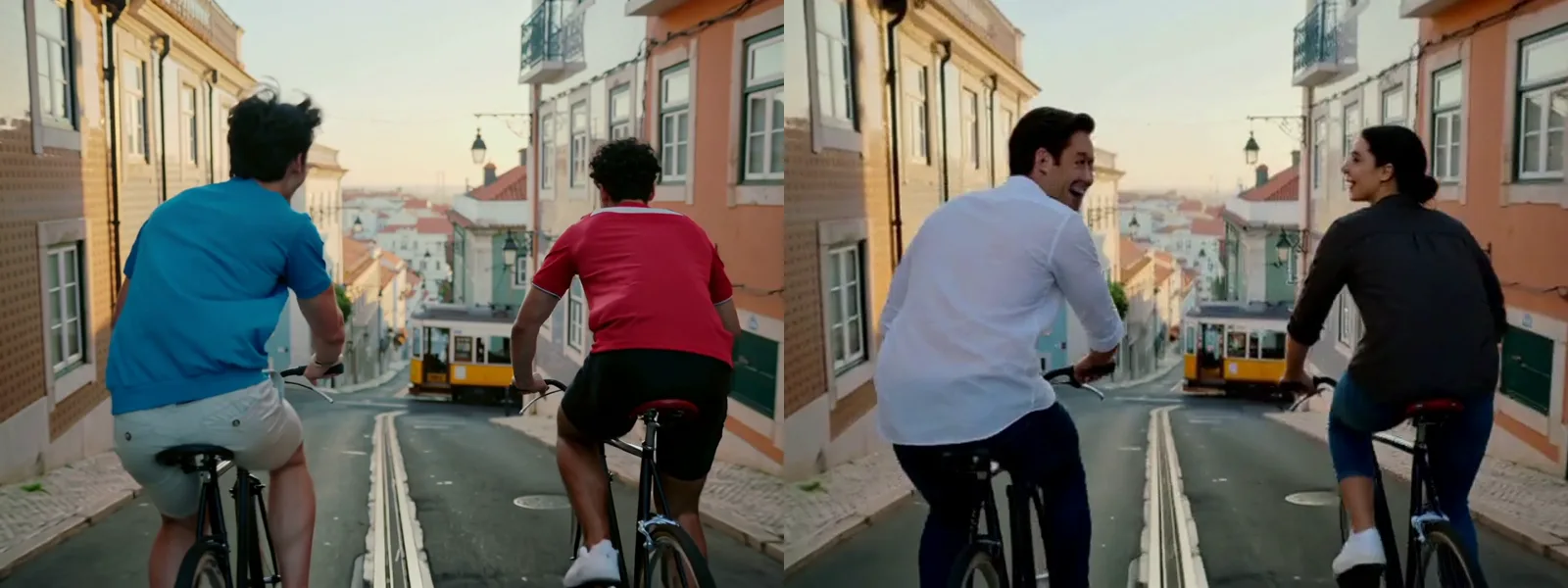
In the two-rider trial, the first reference is assigned to the blue-shirted rider on the left and the second to the red-shirted rider on the right. Keep those descriptions on separate prompt lines in image order. Compare each rider separately rather than treating a changed crowd as proof that both assignments landed.
Judge the silhouette as well as the face
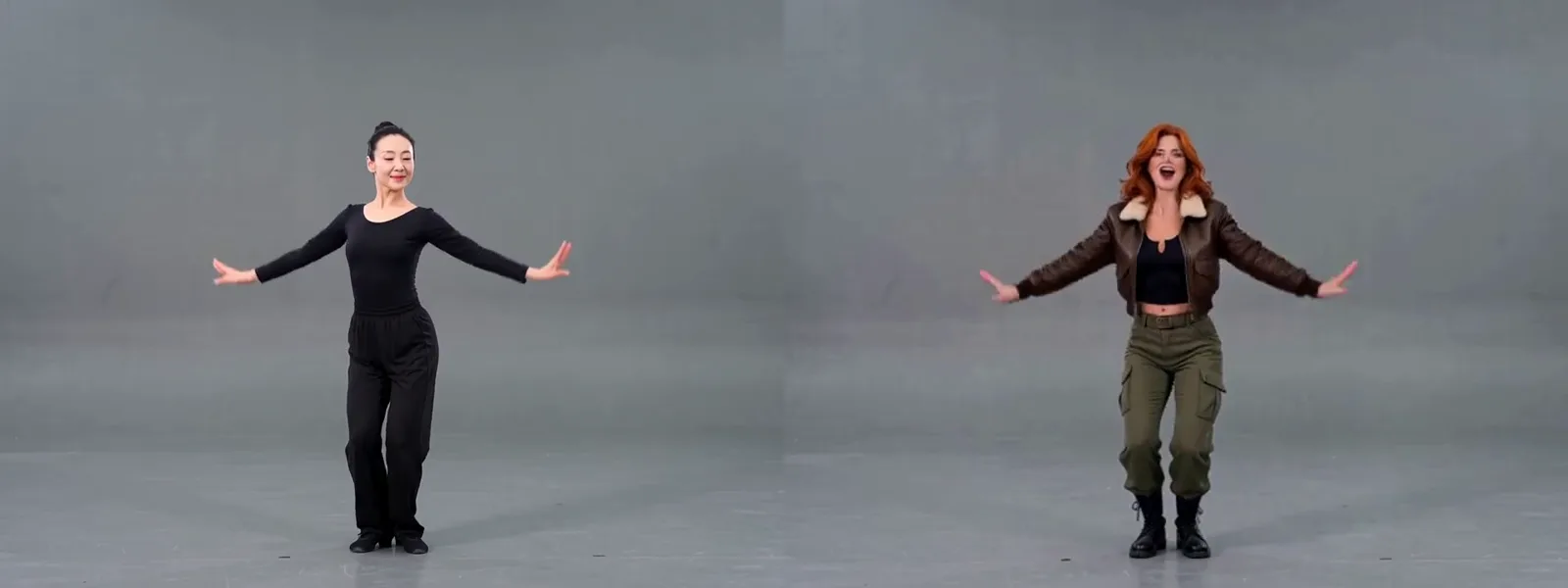
The studio trial uses a drawn red-haired heroine to recast a filmed adult dancer. Hair and costume change across the body while the source pose guides the performance. Inspect sleeves, waist and hair during movement; an attractive face alone cannot establish that the full character treatment works.
Check the tail of a short take
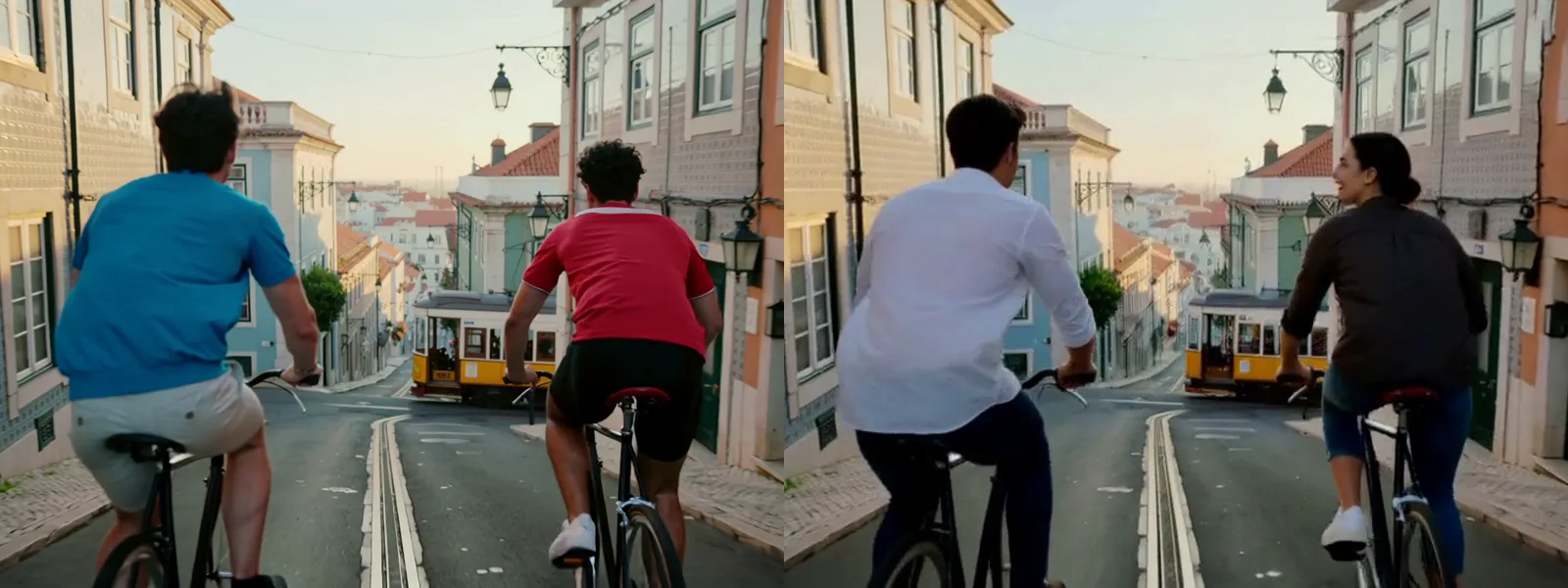
This later frame returns to the same two-rider trial at 3 seconds. Compare the bicycles, spacing and street alongside the new characters, then play through the ending: this five-second source produced roughly four and a half seconds. Plan edits from the delivered duration instead of padding the preview to imply equal lengths.
Request parameters
| Parameter | Required | Description |
|---|---|---|
video_url | Yes | Required MP4 source, one continuous take up to 15 seconds. Every replacement target must be visible in the opening frame. at least 1 characters |
reference_image_urls | Yes | Required array of 1–4 photos, illustrations or 3D renders; each image supplies one character. Prefer full-body views. at least 1 items · at most 4 items |
prompt | No | Optional role assignment: one person per line, matching image order, for example the woman in black on the left. at most 600 characters |
resolution | No | 480p, 540p, 768p or 1080p; default 768p. Higher tiers increase the source-second rate. |
seed | No | Optional integer, 0–2147483647. Hold the random source steady to compare one changed input at a time; it does not guarantee identical frames. |
Pricing
For character recasting, source seconds are rounded upward, with at least 3 seconds billed. The selected resolution sets the rate; reference images add no charge, failed tasks are free, and sources over 15 seconds are refused before charging.
| Specification | Price |
|---|---|
| $0.105 / second |
| $0.119 / second |
| $0.14 / second |
| $0.28 / second |
Use cases
Recast a short drama
Explore a different cast on an authorised actor’s existing performance.
Two riders, two roles
Assign two character images to two riders while their bicycles and street remain in the shot.
Drawn character, filmed movement
Use a comic or 3D character reference for an adult performer’s routine.
Social and advertising variants
Compare fictional spokescharacters against the same camera move and action.
Prompt guide & pro tips
Check permission before casting
Confirm rights to the footage and every likeness; everyone depicted must be 18 or older. Use yourself, actors with signed permission, or fictional characters you generated.
Line up the character images
Supply 1–4 images, preferably full body. Write one line per image, in the same order, identifying the person it replaces.
Run a short casting trial
Select a resolution, submit the clip, and inspect the returned video for character identity, outfit and timing before publishing.
Introduction
Submit one MP4 and 1–4 character images to the asynchronous video-edit endpoint. Optional prompt lines bind images to people; no output-duration or aspect-ratio parameter is exposed.
How it works
Submit the public fields for openjutsu/character-swap/video-edit, retain the returned task ID, poll the task until it succeeds or fails, then retrieve the result video from the successful task’s assets. The clip keeps its original audio; our observed processing time was 1–4 minutes.
Parameters
video_url: Required MP4 source, one continuous take up to 15 seconds. Every replacement target must be visible in the opening frame.reference_image_urls: Required array of 1–4 photos, illustrations or 3D renders; each image supplies one character. Prefer full-body views.- prompt: Optional role assignment: one person per line, matching image order, for example the woman in black on the left. Empty means the main person for one image, or appearance order for several, left to right when simultaneous. Unmatched images are ignored; unmentioned people remain.
- resolution: 480p, 540p, 768p or 1080p; default 768p. Higher tiers increase the source-second rate. Observed landscape sizes: 864×480, 960×544, 1376×768, 1920×1056.
- seed: Optional integer, 0–2147483647. Hold the random source steady to compare one changed input at a time; it does not guarantee identical frames.
Billing
For character recasting, source seconds are rounded upward, with at least 3 seconds billed. The selected resolution sets the rate; reference images add no charge, failed tasks are free, and sources over 15 seconds are refused before charging.
Tips
Use full-body references and explicit role lines when the cast is ambiguous. For other source lengths, after a generic failure, trim the source to a whole-second boundary and try again. Inspect the costume as well as the face.
Limits
- Character replacement needs consent for both the source and the intended scene. Public portraits, celebrities and acquaintances are not available for use without permission; do not put real people into scenes they have not approved.
- The input must be one continuous MP4 take of no more than 15 seconds, with targets visible in the first frame; edited sequences with cuts are unsupported.
- Reference clothing is guidance, not an exact wardrobe guarantee: one adult photo reference produced a white long dress rather than the pictured outfit.
- For character recasting, sources of about 5.17 seconds (5.13–5.20 seconds) are automatically trimmed to exactly 5 seconds before processing, removing about 4 opening frames. You do not need to trim them yourself; billing uses 5 seconds. The unused portion of the initial 6-second hold returns to your available balance. For other source lengths, if a generic error occurs, trim to an exact whole-second duration and retry; failed recasting tasks are free.
- Allow for timing differences: our 5-second sources returned about 4.5 seconds, while an 8-second source returned 8 seconds.
Use only your own face or people who have consented, and only material depicting adults aged 18 or over; a public photo does not grant permission. Do not impersonate or mislead, or place real people into scenes they have not agreed to. Before first use on the website you must tick agreement to these rules; API use accepts the same rules. Violating content will be removed and the account may be suspended.
API quick start
# Generate the idempotency key once; reuse it when retrying after a lost response.
export SPICY_IDEMPOTENCY_KEY="${SPICY_IDEMPOTENCY_KEY:-$(uuidgen)}"
curl -X POST https://api.spicyapi.ai/api/v1/jobs/createTask \
  -H "Authorization: Bearer $SPICY_API_KEY" \
  -H "Content-Type: application/json" \
  -H "Idempotency-Key: $SPICY_IDEMPOTENCY_KEY" \
  -d '{
  "model": "comfyui/openjutsu-character-swap/video-edit",
  "input": {
    "reference_image_urls": [
      "https://example.com/reference.png"
    ],
    "resolution": "768p",
    "video_url": "https://example.com/reference.mp4"
  }
}'

# Copy data.taskId from the response into TASK_ID, then poll the status.
TASK_ID="TASK_ID_FROM_RESPONSE"
curl "https://api.spicyapi.ai/api/v1/jobs/recordInfo?taskId=$TASK_ID" \
  -H "Authorization: Bearer $SPICY_API_KEY"
See the API reference for authentication, the complete schema, polling, and error handling.