Many uncensored video models stop between 5 and 15 seconds. To go past that you chain clips, and a careless chain gives you a new face, a jump at the join or a camera that won't stop zooming.
Short answer: chain the clips. Start each one on the last frame of the one before and join them with ffmpeg; about 30 seconds costs $0.57 to $6.48 at 480p, depending on the model. Or skip the chain: Seedance 2.5, Seedance 2.5 Spicy and the Wan 3.0 family do 30 seconds in one take, from $1.35.
The fix is the Last-Frame Chain: every new clip starts on the exact frame the last one ended on. Below: a 13.3-second example made with extend, the one-call cousin of the chain (two calls, 720p, $0.81, no visible jump at the join), then the steps, commands and costs. Based on our September and October 2026 tests; prices are catalogue prices.
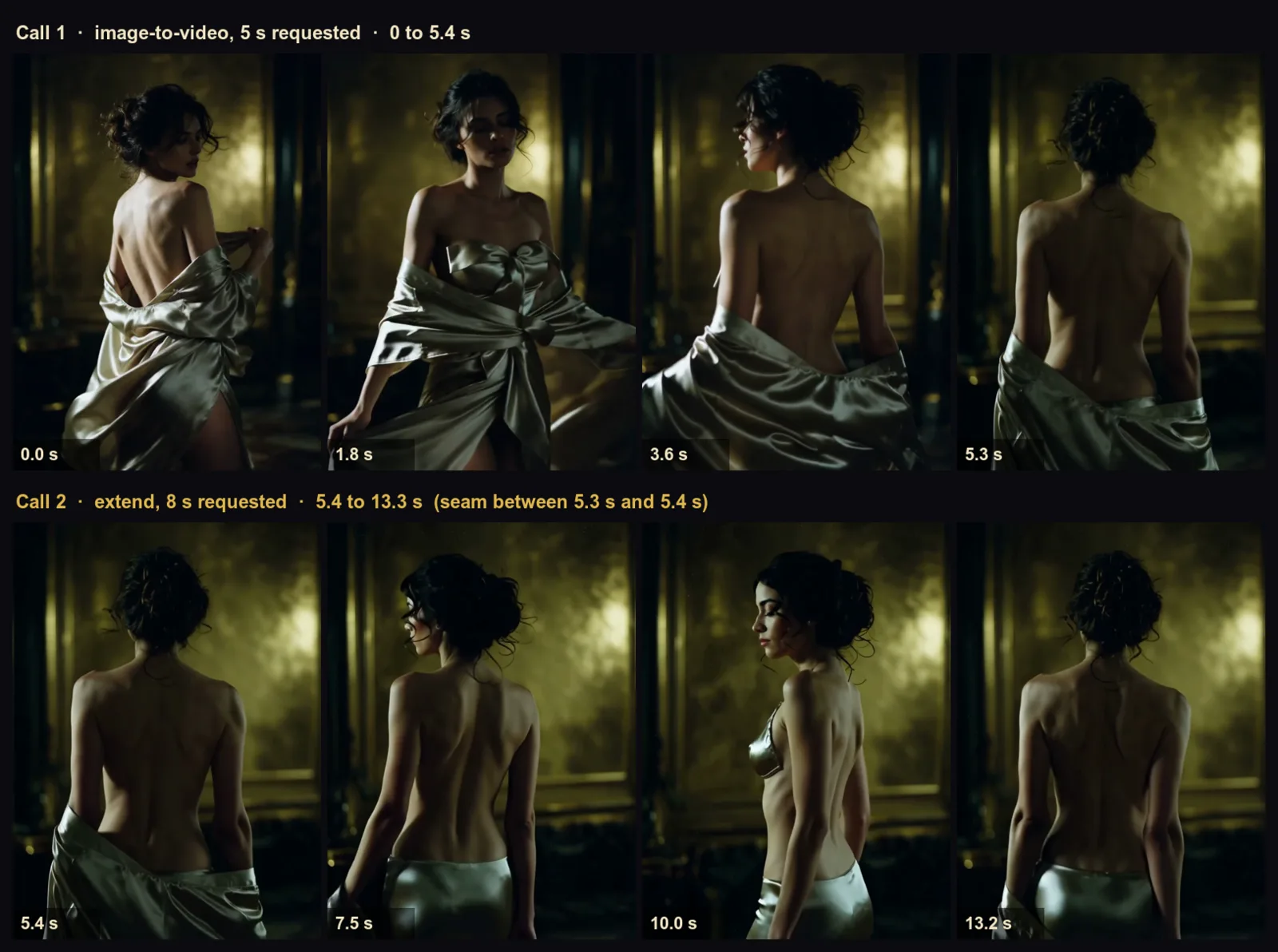
Wan 2.2 Spicy LoRA at 720p: a 5-second image-to-video clip (top), then an 8-second extension of it (bottom). The seam sits between 5.3 and 5.4 seconds. The robe loosens into a fitted satin skirt in the new seconds. The first call alone
At a glance
- Every link starts on the last frame of the one before. It works on every image-to-video model we host, and you redo one link at a time instead of the whole scene.
- For no visible seam, extend the clip itself. Wan 2.2 Spicy LoRA continues a finished clip by 5 or 8 seconds per call, as in the example above.
- The frame sets the level of the next link. Start from an L3 frame and the next link stays near L3; a prompt can push it about one step. For more, start from a frame that is already there.
- Three families do 30 seconds in one take: Seedance 2.5 Spicy, Seedance 2.5 and the Wan 3.0 family.
- About 30 seconds costs $0.57 to $6.48 at 480p: a silent LTX chain at the low end, one Seedance 2.5 Spicy take at the top.
Ways past the 10-second wall
| Way | What you do | Where it works | Watch out for |
|---|---|---|---|
| One long take | Ask for up to 30 seconds | Seedance 2.5 Spicy, Seedance 2.5, the Wan 3.0 family | A bad take costs the full 30 seconds |
| Last-Frame Chain | Start the next clip from the last frame | Every image-to-video model | Motion resets at each join |
| Extend | Hand the finished clip back and get the next seconds | Wan 2.2 Spicy LoRA | The returned file repeats your source first |
| Cut between shots | Make each clip a different angle or place and cut | Any model | Not one continuous take: the cut has to make sense |
Pick by what a failed attempt costs: a 30-second take that breaks at second 20 is paid for twice in full; a chain that breaks in link 3 costs you link 3. Long takes also drift: the longer a shot runs, the more anatomy and set dressing deform, so for genuinely long sequences several shorter takes cut together hold up better.
If the scene has more than one angle (a wide shot, then a close-up), you don't need a continuous take: make one clip per shot from the same character still and cut between them. Chain only where the camera and action must run on. A scene can mix the two.
How long one clip can be
Every model below is labelled Uncensored. Adult content levels run L1 Suggestive, L2 Mature themes, L3 Strong, L4 Intense and L5a higher-intensity scenes; L5b is non-adult cinematic gore. The last frame carries the people, wardrobe and scene into the next link; the model and prompt can still change them. Prices are the cheapest resolution.
| Model | Longest clip | Starts from | 5 s from | Set the ending frame | Furthest level that passed |
|---|---|---|---|---|---|
| Seedance 2.5 Spicy | 30 s | Image | $1.08 (480p) | Yes | L4, both L5 briefs |
| Seedance 2.5 | 30 s | Text, image, reference images | $0.62 (480p) | From an image | L4 in 8 of 9 clips, L5 |
| Wan 3.0 Spicy, also Prime Spicy | 30 s | Image | $0.285 (480p); Prime Spicy $0.45 | Yes | L1 to L4 and both L5 briefs. Leans adult unasked |
| Wan 3.0 | 30 s | Text, image, reference images | $0.225 (480p) | From an image | L4, both L5 briefs |
| Wan 3.0 Prime | 30 s | Text, image, reference images | $0.31 (480p) | From an image | Text/reference: L4, L5a; image: L3, softens L4 |
| LTX 2.5 | 20 s | Text, image | $0.45 (720p) | From an image | L4, L5 |
| LTX 2.3 Spicy | 20 s | Image | $0.095 (480p) | No | L3 Strong, went to L4 unasked |
| Vidu Q3 Spicy | 16 s | Image | $0.33 (540p) | No | L3, L5 |
| MiniMax H3 | 15 s | Text, image, reference images | $0.185 (768p) | From an image | L4, both L5 briefs |
| MiniMax H3 Spicy | 15 s | Image | $0.19 (480p) | Yes | L4, L5 |
| Seedance 2.0 Spicy | 15 s | Image | $0.57 (480p) | Yes | L3, L5, went to L4 unasked |
| Wan 2.7 Spicy | 15 s | Image | $0.62 (720p) | No | L3, L5, went to L4 unasked |
| Wan 2.6 Spicy | 5, 10 or 15 s | Image | $0.475 (720p) | No | L3, L5, went to L4 unasked |
| Wan 2.2 Spicy | 8 s | Image | $0.095 (480p) | Yes | L1 to L4; usually softens L5; went to L4 unasked |
| Wan 2.2 Spicy LoRA | 8 s, plus extend | Image, or a clip to continue | $0.10 (480p) | No | L3; the extension went on to L4 |
"Went to L4 unasked": the model went on to L4 by itself. Wan 3.0 Pro and Pro Prime also do 30 s but start at 1080p ($0.144 and $0.234 a second, so $4.32 and $7.02 for 30 s). Left out: H3 Max, Wan 2.2 and HappyHorse 1.1, which refuse or tone down L4 and L5. Full ranking: the best uncensored AI video models.
The Last-Frame Chain, step by step
We'll build a roughly 29-second hotel-suite scene from two 15-second MiniMax H3 links: $1.11 at 768p, with sound. H3 returns each 15-second request as 14.4 seconds, so two links make 28.8. The same steps work on any model in the table.
Run this way, the join did not show as a cut: pose, cup and light carried across. The woman, her hair, sweater and the cafe stayed the same for the full 28.8 seconds, though her face drifted slightly by the end.
Step 1: Pick the model and fix the look
- Widest range, cheapest links: MiniMax H3, 15 seconds per link, up to L5. A closing frame you supply is a nudge, not a lock.
- No frame grab, or your own LoRA files: Wan 2.2 Spicy LoRA with extend. H3 LoRA and LTX 2.3 Spicy LoRA take LoRAs too but have no extend; chain them by last frame.
- Fewest links: Wan 3.0, Wan 3.0 Spicy or Seedance 2.5 Spicy, 30 seconds each. Wan 3.0 Spicy leans adult on its own and may make a clothed frame more revealing; if the outfit has to stay, use plain Wan 3.0.
- Cheapest seconds: LTX 2.3 Spicy, 20 seconds per link, no sound.
If the face matters, make a still of your character with an uncensored image model and start link 1 from it: H3 has no seed, so two text runs give you two different women.
Write one beat per link before you generate ("link 1: she turns from the window and holds; link 2: she crosses to the bed and lies back"). It also shows where a cut would serve better than a chain.
Step 2: Make link 1 and end it on a hold
The last second of link 1 becomes the first frame of link 2, so write an ending that works as a still.
An adult woman with dark shoulder-length hair stands at the window of a dim hotel suite at dusk in an ivory silk robe. She gathers her hair over one shoulder and turns her back to the camera, then looks back over her shoulder and holds still. Slow push-in, then the camera stops. Warm lamp on the left, cool city light through the glass. Quiet room tone, distant traffic.
Set the length to 15 seconds. To fix her face, run the same prompt on image-to-video with your own still; the button above is text-to-video so you can try it without one. "Holds still" and "the camera stops" are the words that matter: a link that ends mid-gesture hands the next one a blurred, half-finished pose. End each link with the face turned toward the lens too: the model needs a clear view of the face at the start or end of a segment to keep it consistent (r/StableDiffusion thread). A link that ends on the back of her head leaves the next one nothing to copy.
Step 3: Grab the last frame
This seeks to the final second and keeps overwriting one image, so the file left behind is the final frame:
ffmpeg -sseof -1 -i segment_01.mp4 -update 1 -q:v 1 last_frame.pngLook at the frame before you use it: pose, wardrobe, a second person, the level are all where link 2 starts. Save PNG, not JPEG; lossy saves add up across links.
The standard Seedance 2.5 and Seedance 2.0 image-to-video tasks can hand you the frame instead: set return_last_frame to true and the final frame comes back as a separate image at no extra charge.
Upload the PNG on the model page, or host it as a direct file link. Download each result when it finishes (retention).
Step 4: Start link 2 from that frame
Open MiniMax H3 image-to-video, add the frame and describe only what happens next:
She turns away from the window, walks slowly to the bed and sits on the edge, then lies back across the white sheets, stretches both arms above her head and goes still. The camera follows at waist height, then holds. Quiet room tone, distant traffic.
Run link 2 on MiniMax H3 image-to-video →
Weak: "A beautiful woman with dark hair in a hotel room at dusk, cinematic, highly detailed." It repeats the frame and gives her nothing to do, so the model invents the motion.
Strong: the prompt above. It never says who she is (the frame carries that), strings actions with "then", and stops the camera.
Need link 2 to land somewhere specific? Most models in the table also take an ending frame. Use your original character still as link 2's ending and the last seconds are pulled toward the face you started with (a nudge on H3; Wan 3.0 Spicy ends on the supplied image).
Step 5: Repeat, and check every join before you pay for the next link
For a longer scene, pull the last frame of link 2 and go again. Check each link's final second first: Wan 3.0 Spicy often goes further than you asked and may make a clothed frame more revealing, and Wan 2.2 Spicy can bring a second person into a solo frame. The next link starts from whatever the model added, so re-roll only the link that went wrong.
Step 6: Stitch the links
Hard cut. A chained link opens on the frame the last one ended on; this drops it so the join doesn't hold for a frame:
ffmpeg -i segment_01.mp4 -i segment_02.mp4 -filter_complex \
  "[1:v]trim=start_frame=1,setpts=PTS-STARTPTS[b];[0:v][b]concat=n=2:v=1:a=0[v]" \
  -map "[v]" -c:v libx264 -pix_fmt yuv420p joined.mp4
That drops the sound. For links with sound, keep the shared frame and join picture and audio together so their durations stay aligned. If the brief hold is noticeable, use the crossfade below:
ffmpeg -i segment_01.mp4 -i segment_02.mp4 -filter_complex \
  "[0:v][0:a][1:v][1:a]concat=n=2:v=1:a=1[v][a]" \
  -map "[v]" -map "[a]" -c:v libx264 -pix_fmt yuv420p -c:a aac joined_av_cut.mp4
Crossfade. A half-second dissolve hides small jumps in colour or position. The offset is the length of the first clip minus the fade: 4.5 for two 5-second clips. Measure the actual file rather than the requested duration: the H3 links here run 14.375 seconds, so the offset is 13.875.
CLIP_SECONDS=$(ffprobe -v error -show_entries format=duration -of default=nw=1:nk=1 segment_01.mp4)
FADE_OFFSET=$(python3 -c 'import sys; print(float(sys.argv[1]) - 0.5)' "$CLIP_SECONDS")
ffmpeg -i segment_01.mp4 -i segment_02.mp4 -filter_complex \
  "[0:v][1:v]xfade=transition=fade:duration=0.5:offset=${FADE_OFFSET},format=yuv420p[v]" \
  -map "[v]" -c:v libx264 joined_xfade.mp4
For a third link, chain another fade. Its offset is the running length so far minus the fade (9.0 after two 5-second clips):
ffmpeg -i s1.mp4 -i s2.mp4 -i s3.mp4 -filter_complex \
  "[0:v][1:v]xfade=transition=fade:duration=0.5:offset=4.5[ab];[ab][2:v]xfade=transition=fade:duration=0.5:offset=9[v];[v]format=yuv420p[out]" \
  -map "[out]" -c:v libx264 joined3.mp4
With sound, fade it too, or the audio cuts while the picture dissolves. This example uses two 5-second clips; use the measured offset of 13.875 for the two H3 links:
ffmpeg -i s1.mp4 -i s2.mp4 -filter_complex \
  "[0:v][1:v]xfade=transition=fade:duration=0.5:offset=4.5,format=yuv420p[v];[0:a][1:a]acrossfade=d=0.5[a]" \
  -map "[v]" -map "[a]" -c:v libx264 -c:a aac joined_av.mp4
All links need the same resolution and frame rate.
Extend: the same idea without the frame grab
Wan 2.2 Spicy LoRA extend takes the finished clip as a file instead of a frame. The extension starts from the clip's final frame, so a source that ends on a settled pose joins most cleanly; that is why the opening clip below ends with "holds". In the 13.3-second pair at the top the join doesn't show.
- Make an opening clip of 5 or 8 seconds on Wan 2.2 Spicy LoRA image-to-video.
She turns slowly on the spot and the satin slips off one shoulder, the gold key light raking across her back. She stops with her back to the camera and holds. Camera locked, shallow depth of field, heavy film grain.
- Open extend, give it the clip as a direct file link, and write the next beat only.
She turns away from the light, lets the satin fall from her other shoulder and takes two slow steps toward the dark doorway, then stops with her back to the camera. Camera locked.
- Pick 5 or 8 new seconds at your source's resolution.
- Styled the first pass with LoRA files? Attach the same ones at the same strength; the extension doesn't inherit them, and the page warns the style shifts at the join if you don't.
- Repeat: a 5-second opening plus five 5-second extensions makes 30 seconds. Feed each call the latest trimmed piece (or the previous returned file) and trim as above; every returned file starts with its source.
The file comes back longer than you asked for, because it starts with your source. You pay only for the new seconds: an 8-second 720p extension is $0.608 whether the source runs 5 seconds or 13. To keep only the new part:
SRC=$(ffprobe -v error -show_entries format=duration -of default=nw=1:nk=1 segment_01.mp4)
ffmpeg -ss "$SRC" -i extended.mp4 -c:v libx264 -pix_fmt yuv420p -an segment_02.mp4
Extension pieces then join with a plain cut; there's no repeated frame to drop.
How far it goes: extend can go further than its source: an L3 clip continued to L4.
Keep the same person in every link
- Start from a still, not from text. The still carries face, body, wardrobe and set; a text re-roll invents a new person.
- One model, one resolution, one aspect ratio for the whole scene. Models render skin, grain and light differently, and a switch shows at the join. Don't draft at 480p and re-run only the good links at 720p: each opening frame came from the lower-resolution render.
- Describe what changes, never who she is. Re-describing her every link invites the model to reinterpret her.
- Expect slight drift even in a good chain. Across two H3 links the face stayed recognisably the same woman, but skin texture and jaw read a little differently by the end. Re-anchor from the still if a detail matters.
- Show the face at the join. Start or end a link on a clear view of it (see Step 2), and keep wall art and busy patterns out of the starting still; the model alters paintings on each pass.
- Re-anchor when the face starts to wander. A frame from link 4 has been through four generations. Start the next link from your original still, or make that still its ending frame. Colour and sharpness slip the same way after three or four links, so crossfade, then grade the finished video.
- Name the wardrobe if it matters. Face, hair, room and light held across the 13-second example's seam, but the robe turned into a skirt. Add one clause per link ("the loose satin robe stays as it is").
What a 30-second video costs
Links run one after another, and a slow model can take several minutes a clip, so a six-link chain is a long sitting.
The Wan 2.2 Spicy LoRA opening clip includes the current 15% LoRA price drop ($0.102 at 480p and $0.204 at 720p for 5 seconds; list $0.024 and $0.048 a second). Extensions are not discounted ($0.038 and $0.076 a second).
| Plan | Links | 480p | 720p | Redo one bad link | 480p if one link misses |
|---|---|---|---|---|---|
| One take, Seedance 2.5 Spicy | 1 × 30 s | $6.48 | $12.96 | $6.48 | $12.96 |
| One take, Wan 3.0 | 1 × 30 s | $1.35 | $2.70 | $1.35 | $2.70 |
| One take, Wan 3.0 Spicy | 1 × 30 s | $1.71 | $3.42 | $1.71 | $3.42 |
| Last-Frame Chain, MiniMax H3 | 2 × 15 s (28.8 s) | n/a (starts at 768p) | $1.11 (768p) | $0.555 (768p) | $1.67 (768p) |
| Last-Frame Chain, LTX 2.3 Spicy, silent | 20 s + 10 s | $0.57 | $1.14 | $0.38 | $0.95 |
| Extend chain, Wan 2.2 Spicy LoRA | 5 s + 5 × 5 s | $1.05 | $2.10 | $0.19 | $1.24 |
- Cheapest footage: the LTX 2.3 Spicy chain, silent, with no ending-frame field to steer the last link back to your still.
- Sound: H3 and Seedance 2.5 Spicy include it at no extra cost. Wan 3.0 and Wan 3.0 Spicy generate it by default and let you switch it off. The Wan 2.2 family is silent. Sound doesn't carry across links by itself; if you add one music bed in the edit, generate the links with sound off where the model allows.
- The 13.3-second example is $0.81: $0.204 for the opening 5 seconds at 720p and $0.608 for the 8-second extension.
When it goes wrong
| What you see | Fix |
|---|---|
| Motion stops dead at the join | End every link on a hold and open the next with a new action. A 0.5-second crossfade covers what's left. |
| A one-frame stutter at the cut | The new link repeats the frame you gave it. Use the silent hard-cut command to drop it, or crossfade links with sound. |
| Colour or brightness jumps at the join | A known chain problem (Wan 2.2 issue) that colour matching doesn't fully fix. Crossfade, then grade the finished video as one clip. |
| Her face is different by link 3 or 4 | Re-anchor from your original still, or set it as the next link's ending frame. |
| The next link is tamer than the last | Use an opening frame that already contains the scene you want, then describe its motion. A stronger prompt alone may leave a tame frame unchanged; if it still softens, choose a model that delivered your target level. |
| Someone new walks in, or the scene escalates | Check the last frame before you extract it; re-roll only that link. |
| An extension ignored the new location you asked for | The clip outranks the prompt: an extension asked for stairs and a crypt and stayed at its source's window. Change location with a cut. |
| The camera keeps creeping in | A slow push-in can tighten the framing from link to link. Say where it stops: "camera locked" or "then holds". The extension below says "Camera locked." and the framing never moves. |
| The extend call fails and refunds | Check the returned error and that video_url resolves to a downloadable file, not a player page. Use a direct file link or upload the clip. |
Try it in the Playground, then the API
Playground first. Open the model's task page (for example MiniMax H3 image-to-video), pick the mode (a sentence, your own opening frame or reference images), paste the prompt and run it; the exact price shows before anything is charged. Create an account if you don't have one.
Then the API, once a link works and you want to script the chain. One link, as H3 image-to-video (for another model, change model and input to that task's fields; an extension takes a video_url where a chained link takes an image_url):
curl -X POST https://api.spicyapi.ai/api/v1/jobs/createTask \
  -H "Authorization: Bearer $SPICY_API_KEY" \
  -H "Content-Type: application/json" \
  -H "Idempotency-Key: $(uuidgen)" \
  --data '{
    "model": "minimax/h3/image-to-video",
    "input": {
      "image_url": "https://your-storage.example.com/link-01-last-frame.png",
      "prompt": "She turns away from the window, walks slowly to the bed ...",
      "resolution": "768p",
      "duration_seconds": 15
    }
  }'
Fields, results and errors are in the API reference.
Let an Agent do it. An agent can run each link through the CLI, the MCP server or the Agent Skill; CLI and MCP show the price and ask you to confirm before creating a task. With SPICY_API_KEY set:
# CLI
npx @spicyapi/cli tasks create --model minimax/h3/image-to-video \
  --input-json '{"image_url": "https://your-storage.example.com/link-01-last-frame.png", "prompt": "She turns away from the window, walks slowly to the bed ...", "resolution": "768p", "duration_seconds": 15}' --wait

# MCP server: the command your assistant's MCP config runs
npx --yes --package=@spicyapi/mcp spicyapi-mcp

# Agent Skill
npx skills add spicyapi-ai/spicy-skill
FAQ
How do I make an AI video longer than 10 seconds?
Use a 30-second model (Seedance 2.5 Spicy, Seedance 2.5, Wan 3.0, Wan 3.0 Spicy), or chain clips from last frames and join with ffmpeg. For several angles, make one clip per shot and cut.
What's the longest uncensored AI video I can make in one go?
30 seconds, on Seedance 2.5 Spicy, Seedance 2.5 and the six Wan 3.0 builds (Wan 3.0, Prime, Pro, Pro Prime, Spicy and Prime Spicy). LTX tops out at 20, Vidu Q3 Spicy at 16, MiniMax H3 at 15. The long take is available at the levels the short clips pass.
Why does my video jump or freeze where the clips join?
A chained link starts from a frozen frame. End each link on a hold, open the next with a new action and add a half-second crossfade. Extend avoids the frozen frame because it continues the clip itself.
Will the next clip stay at the same level if I start it from the last frame?
Mostly. The frame sets the level: an L3 or L5 frame carries on at about that level, and an extension can go a step further than its source. A tamer frame stays tame whatever the prompt says, apart from a nudge of about one step, so extract a frame that is already where you want to be.
How do I extend a video I already have?
Send it to Wan 2.2 Spicy LoRA extend with one line about what happens next: 5 or 8 new seconds per call. On every other model, use the Last-Frame Chain.
How do I keep the same character across clips?
Start from a still, keep one model and resolution, describe only what changes, and restart from your original still when the face drifts.
Can I extend a Seedance or MiniMax video?
Not with an extend button. Use the longest take (30 seconds on Seedance 2.5, 15 on MiniMax H3), then chain from the last frame.
Your part
We add no extra content filter of our own. Everyone on screen must be an adult. Any real, identifiable person must have consented, including in reference stills and LoRA files built from their likeness. You need the rights to everything you upload, and you're responsible for the law where you publish.
Make your first link
Create an account, open MiniMax H3 in the Playground and paste the link 1 prompt from Step 2. It's $0.555 for 15 seconds at 768p. When the last second looks right, pull the frame and run link 2. Everything else is in the uncensored video catalogue.