With $20 of spendable API balance, the quoted image prices below allow up to 1,619 Z-Image Spicy candidates, 833 Qwen Image 2.1 candidates at 1k, or 555 Seedream 5.0 Pro candidates at an explicitly selected 1k tier. Those are generation ceilings. They are not promises of that many usable NSFW images.
For a recurring fictional adult character, I would use the budget differently: allow $13.92 for selecting a character, making reference-based variations, revising shortlisted images and creating final 2k versions, then keep $6.08 for additional attempts. That buys an actual production process instead of a folder of unrelated faces.
The figures are based on current task quotes, and the workflow is a proposed allocation rather than a generation test. No acceptance rate or image-quality winner was measured. The examples assume lawful fictional adult subjects, authorized references and public-safe preview images; the private creative direction still has to fit the exact model's content behavior.
How many candidate images can $20 buy?
Here is the simple division first. Each row spends the entire $20 on one task and leaves no allowance for edits, rejected creative attempts or other expenses. Counts are rounded down to whole billable images.
| Generation task | Explicit setting | Quoted USD per image | Maximum candidates for $20 |
|---|---|---|---|
| Z-Image Spicy | 1024 × 1536, prompt expansion off | $0.01235 | 1,619 |
| Z-Image Spicy Pro | 1536 × 2560 | $0.019 | 1,052 |
| Qwen Image 2.1 | 1k, 3:4 | $0.024 | 833 |
| Qwen Image 2.1 | 2k, 3:4 | $0.048 | 416 |
| Seedream 5.0 Lite | 1728 × 2304 | $0.0345 | 579 |
| Seedream 5.0 Pro | 1k, 3:4 | $0.036 | 555 |
| Seedream 5.0 Pro | 2k, 3:4 | $0.072 | 277 |
The corresponding task pages are Z-Image Spicy, Spicy Pro, Qwen Image 2.1, Seedream Lite and Seedream Pro. Requote your chosen settings before a large batch; the count follows the task price you actually select.
These rows are different tools at different output sizes. They do not prove that 1,052 Z-Image Pro images are better value than 833 Qwen images for your character, or that an output with more pixels keeps a face more reliably. They answer the narrower financial question: how many completed billable generation attempts fit this allowance?
The calculation assumes $20 is already available to spend. It excludes any payment conversion, tax, external reference licence, custom training, storage and your editing time. A generation-only maximum is useful for estimating exploration, but it is a poor promise to give a customer waiting for a finished image set.
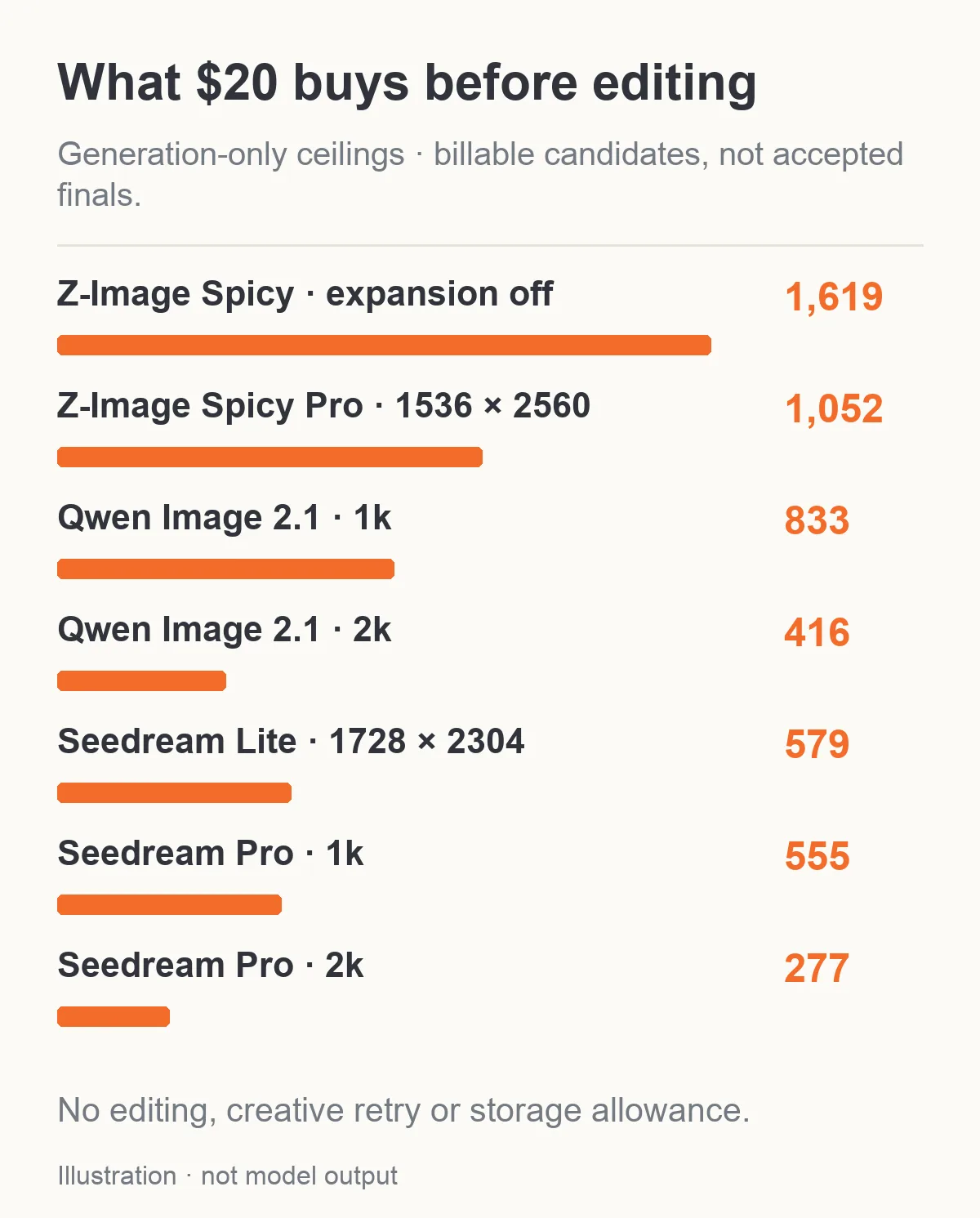
Billable candidate ceilings for $20, with no editing allowance. These counts are not accepted-image forecasts.
Pick a character before paying for a whole gallery
Consider an NSFW creator building a gallery for one fictional adult character in their thirties. The planned set has thirty final pictures across several outfits and settings. The same face needs to remain recognizable. A beautiful image of a different person does not solve that brief.
Start with a small number of new candidates to decide the face, hair, proportions and visual treatment. An inexpensive text-to-image task makes sense while those decisions are open. Once you approve a character, save that actual source image and move to a reference-based editor for later variations.
You can use a public-safe selection brief such as:
Portrait of a fictional adult character in their thirties, short dark hair, a distinctive angular jaw, a tailored burgundy jacket, warm window light, natural photographic texture, waist-up framing with space above the head.
The purpose is to establish an adult identity and a reusable source. Your later NSFW scene description is a separate creative requirement. An endpoint accepting an adult brief does not establish that every change you request will appear, or that the selected face will survive a complicated pose change.
Review the selection images at the crop your product will display. If the profile card is tight around the face, an appealing full-body composition may be less useful than a clear portrait. If your final gallery needs hands in frame, include a few such compositions early so you do not discover the problem only after making thirty variations.
Do not generate hundreds of images while hoping one face will keep reappearing. Repeating a description or seed is not a substitute for supplying the approved character image to an editing task. The decision to change methods can save more wasted calls than choosing a model that is a fraction of a cent cheaper.
Before buying the full set, decide what the thirty finals contain. For example, you might need six profile portraits with different expressions, twelve scene images for a private character gallery and twelve wardrobe variations. Those are suggested deliverables, not model limits. A batch of thirty near-identical portraits would not satisfy that brief even if every face looked good.
Give each group its own approval condition. A profile portrait needs a readable face and enough space for the interface crop. A scene image needs the intended character and setting together. A wardrobe variation needs the garment change to appear without making the person unrecognizable. That separation tells you which stage should receive another attempt and which stage is already finished. It also makes it easier to stop when you have the useful set, rather than continuing until the allowance is exhausted.
A $13.92 plan for a reference-based character series
The following allocation uses Qwen Image 2.1 generation and editing so that the stages have explicit, separately priced tasks. It targets a thirty-image set, but does not promise that thirty acceptable images will result.
| Stage | Call allowance | Task and setting | Allowance |
|---|---|---|---|
| Select the character | 40 | Text-to-image, 1k, $0.024 each | $0.96 |
| Explore variations from the approved source | 160 | One-source editing, 1k, $0.036 each | $5.76 |
| Revise shortlisted images | 120 | One-source editing, 1k, $0.036 each | $4.32 |
| Make selected delivery versions | 60 | One-source editing, 2k, $0.048 each | $2.88 |
| Planned task spend | Up to 380 billable outputs | All four stages | $13.92 |
| Unallocated balance | — | Additional attempts or a different direction | $6.08 |
The forty initial calls are an upper allowance, not a requirement. If you find the character after eight attempts, stop that stage and keep the difference. Likewise, the first variation pass should happen in small groups, not as a single 160-call commitment.
From the variations, you might select forty promising images and allow up to three revision attempts for each. From those, you might choose thirty finalists and allow two 2k attempts per finalist. The arithmetic explains the 120 and 60 call allowances; those selection counts are planning assumptions rather than measured yields.
The Qwen Image 2.1 editor accepts source images, so each revision can begin from the selected asset rather than a fresh text description. Use the best version as the source for a deliberate next change. If an edit drifts away from the character, return to the approved source instead of repeatedly editing the drifting result.
A 2k edit is another generation operation, not a guaranteed lossless enlargement. Compare it with the accepted 1k version, especially the face, hands and requested wardrobe detail. Do not automatically replace a good lower-resolution image with a larger one that changes the character.
If you already have a licensed, approved character reference, you can skip the $0.96 identity-selection allowance and begin with editing. That is a useful advantage of arriving with a real source asset, rather than trying to save everything about the person in a paragraph.
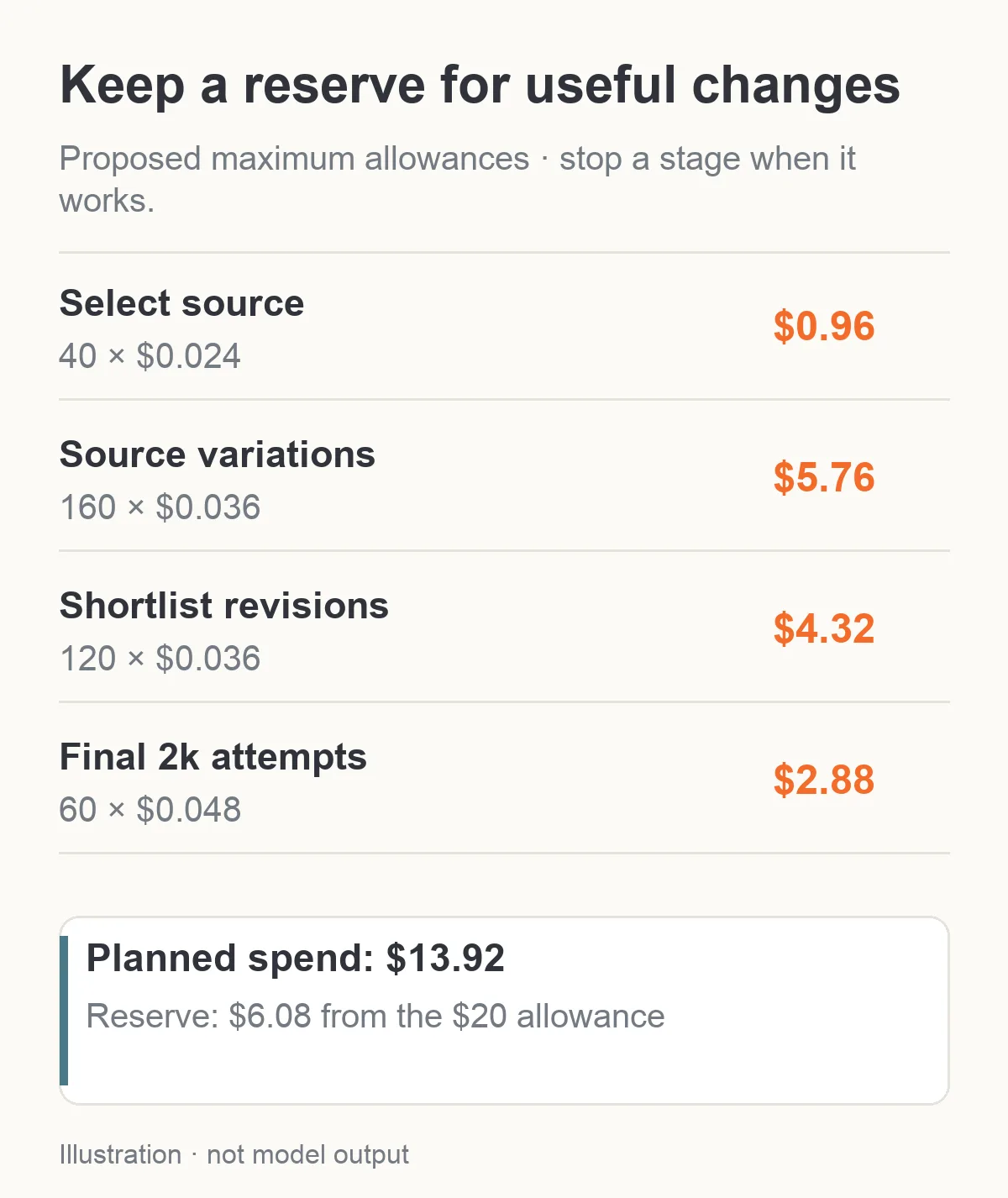
Proposed maximum allowances: stop each stage early when it gives you a usable result.
One reference and three references do not always cost the same
Reference-based work is where a simple “cost per image” headline can hide the bill you will actually pay. Your generation price does not necessarily cover editing, and the editing price may depend on the number of sources and resolution tier.
The exact quotes for Qwen Image 2.1 editing show an especially useful difference:
| Editing request | Quoted per output | Cost for 100 billable edits | Whole edits within $20 |
|---|---|---|---|
| 1k, one source | $0.036 | $3.60 | 555 |
| 1k, three sources | $0.060 | $6.00 | 333 |
| 2k, one source | $0.048 | $4.80 | 416 |
| 2k, three sources | $0.048 | $4.80 | 416 |
At these particular settings, a three-source 2k edit quotes lower than a three-source 1k edit. That is a property of the current task pricing, not a rule that larger images are always cheaper. Do not carry the 1k source surcharge into the 2k calculation or extrapolate these rows to every reference count.
For Seedream 5.0 Pro editing, the corresponding one-source/three-source quotes are $0.036/$0.042 at 1k and $0.072/$0.078 at 2k. The difference is another reason to quote the actual editing request instead of multiplying the lowest model-card price by your desired image count. See the separate Seedream Pro editing task.
Three references might be useful when they have three clear jobs: one supplies the fictional character, one supplies an authorized garment and one supplies a room. If you only need to change the jacket in the approved portrait, sending two extra similar portraits may add complexity without adding useful information.
The $6.08 reserve in the proposed plan could cover thirty additional Qwen 1k three-source edits for $1.80, leaving $4.28. Whether that is a good use of the reserve depends on the problem. Spend it when the extra source supplies something missing, not simply because the editor allows more images.
Watch the default settings that change the bill
Seedream 5.0 Pro is a good example of why the lowest advertised rate and the default request are different questions. Its generation task offers 1k at $0.036 and 2k at $0.072, but the declared default is 2k. A budget based on 555 images assumes you explicitly selected 1k. At the quoted default 2k rate, $20 covers only 277 whole images.
In contrast, the Qwen Image 2.1 generation task defaults to 1k. Its prompt expansion defaults on; turn it off if you want to assess the complete wording you wrote, without an extra expansion step. That is a comparison setting, not a guarantee of better NSFW results.
Z-Image Spicy has its own different control: prompt expansion changes the per-image quote. The 1,619-image ceiling uses expansion off. With it enabled at $0.0133, the same $20 covers 1,503 whole outputs. A small price difference multiplied across hundreds of calls changes the ceiling even when the model name stays the same.
Z-Image Spicy Pro, meanwhile, has a flat quoted $0.019 image rate within its declared pixel range. Rendering a smaller draft first does not reduce that task's unit rate. Set the dimensions your placement needs, subject to its supported bounds; paying for a second version just to reach the intended dimensions adds another call.
Seedream Lite uses explicit size strings on the reviewed task, not a generic resolution selector. The row above names 1728 × 2304 deliberately. Do not copy a 4k option from another provider's similarly named model and assume this endpoint will accept it.
If you want a character LoRA, separate inference from acquiring the adapter
A character adapter can be relevant when the same adult fictional identity is the core of your product. But “LoRA API” can mean a task that loads weights you already have. It does not necessarily include training a character model for you.
The Z-Image Turbo LoRA generation task accepts up to three compatible adapter weight files. The generation quote checked without an adapter supplied was $0.012 per image: two hundred such calls would cost $2.40. That quote is not evidence that an adapter loaded successfully, nor does it include training, a paid weight licence or source-image preparation.
If you already own a compatible adapter, quote your intended configuration and run a small loading and appearance check before committing the rest of the allowance. An incompatible adapter, an inaccessible file or the wrong base family cannot be fixed by purchasing more image attempts.
If you do not have an adapter, a $20 inference allowance does not tell you the full project cost. Obtain the rights and compatible weights separately, or start with a reference-editing workflow that uses a source you already have. Do not spend a character budget as though a cheap image endpoint also creates the character adapter.
How much will each image you actually keep cost?
After a real batch, calculate accepted-image cost from the bill you incurred and the finals you can use. Count a file only when it matches the agreed character, intended scene and delivery requirements. A downloaded file that depicts the wrong person is not an accepted character asset.
For the proposed $13.92 task allowance, hypothetical outcomes look like this:
| Assumed accepted finals | Cost per accepted final if $13.92 was spent |
|---|---|
| 12 | $1.16 |
| 24 | $0.58 |
| 30 | $0.464 |
| 40 | $0.348 |
These counts are not measured results or forecasts. They show why a $0.024 generation price does not mean a finished recurring-character image costs $0.024. Your accepted finals may require selection, several edits and more than one delivery-size attempt.
If you spend part of the reserve, include that too. The example thirty extra three-source edits increase spend to $15.72. Keeping thirty final images at that spend means $0.524 per final. If the extra edits do not improve the accepted count, the additional spending has made the series more expensive without adding assets.
This is also how to compare two models. Use a small project with the same delivery requirements and divide each actual bill by accepted finals. Do not decide from raw output count alone, and do not invent an acceptance rate for a model you have not run.
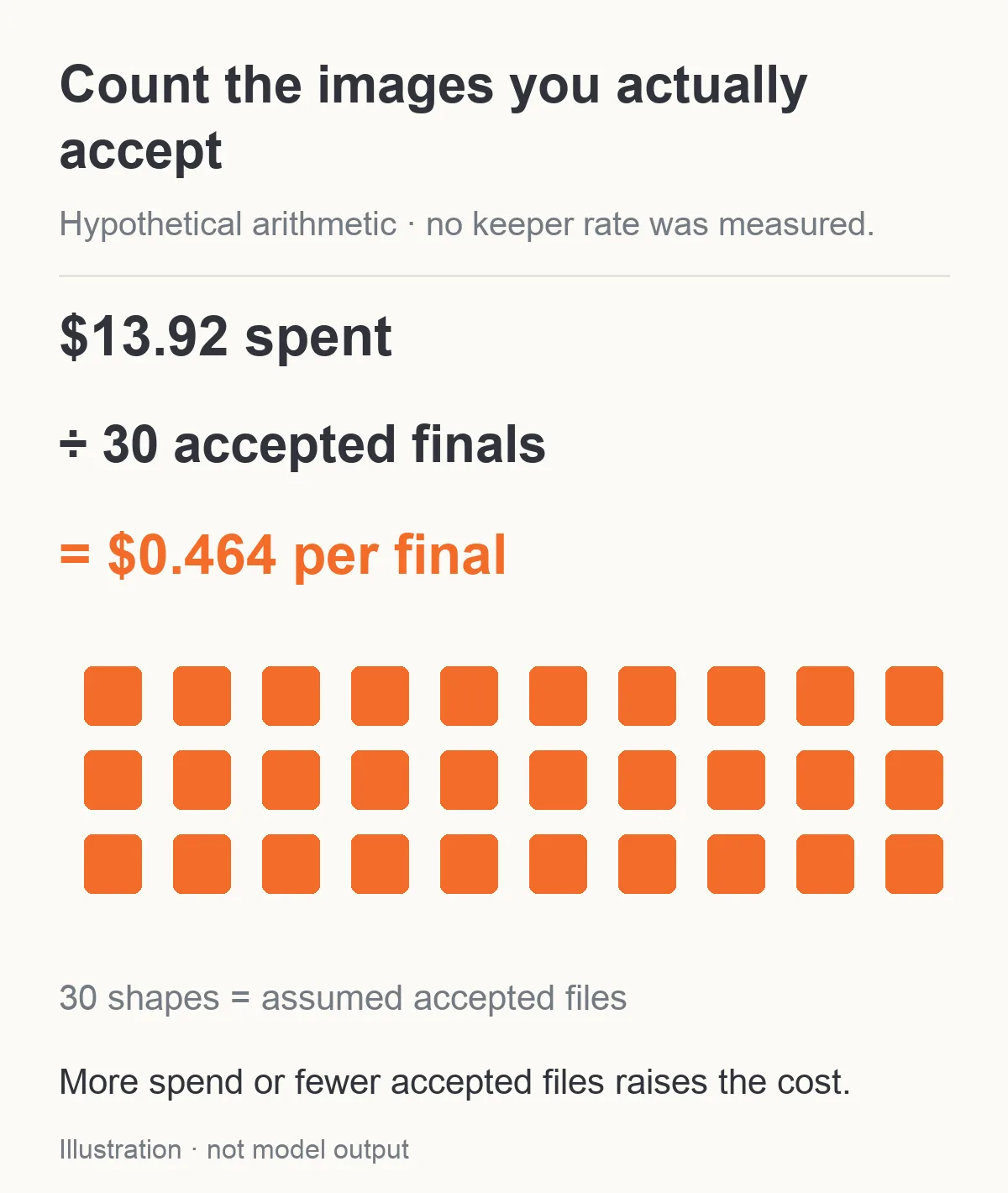
Hypothetical example: 30 accepted finals at $13.92 total spend cost $0.464 each. The count is an assumption, not a measured yield.
When to stop spending and change the approach
A reserve gives you room to respond to a specific problem. It should not become permission to repeat a failing instruction until the balance is empty.
If the face changes, return to the approved character source and request one change. If the setting improves but the character becomes unrecognizable, simplify the scene or separate wardrobe and background edits. If a required creative element repeatedly disappears, check the exact task's current description and try a small alternative that is eligible for the intended work. Do not assume a platform label guarantees the result, or disguise a request to bypass restrictions.
If the pose is unusable, inspect whether your source framing and requested pose are compatible before adding more references. If a detail is too small at the final crop, adjust framing before paying for repeated high-resolution attempts. If the image already fits the target display, stop generating larger versions simply because a higher tier exists.
The early spending checkpoint can be very small: ten Qwen 1k generation attempts cost $0.24, and six one-source 1k editing attempts cost $0.216. The combined allowance is $0.456, about $0.46. That is enough of a financial commitment to inspect the direction before approving the full plan; it is not a claim that sixteen calls prove model reliability.
Keep failed jobs separate from creative rejects
SpicyAPI's refund policy says failed tasks normally release the held amount, with exceptions for delivered usage and models that explicitly charge for failed or rejected requests. Completed images are charged even when the model misses your expectations. Paid balance does not expire, but top-ups are non-refundable.
For an NSFW workflow, a completed image that softens the intended scene is a creative reject. The same is true of a changed face, incorrect outfit or unusable composition. Budget for those completed attempts rather than assuming everything you discard will be refunded.
A pending job is another category. Check its final status and result before starting a duplicate. Paying twice because a page or connection is slow does not improve the creative odds. Your task history should let you distinguish unfinished work, technical failures and completed images you chose not to keep.
For a first $20 character project, begin with less than a dollar of representative generation and editing. Approve an adult fictional source, then release the remaining stage allowances only when the previous stage produces something useful. Keep the $6.08 reserve until you know which change it needs to buy. The useful outcome is a coherent set of characters and scenes you can use, not the largest possible folder of candidate images.