Introduction
GPT Image 2.5 Sunburst API focuses on polished campaign imagery and precise revisions where texture, lighting and reference details deserve extra rendering time. Its editing endpoint accepts up to 16 sources, PNG masks and transparent PNG or WebP delivery. Prepare the Sunburst mask at the first reference’s pixel dimensions in PNG: transparent pixels identify revisions and opaque pixels identify protected areas; omit it for instruction-led editing.
| Field | Value |
|---|---|
| Input | Image |
| Output | Image |
| Model | OpenAI gpt-image-2.5-sunburst (snapshot 2026-09-08) |
| Endpoints | Sunburst — Text to image; image editing with 1 to 16 sources and an optional mask |
| Quality tiers | Sunburst — low, medium, high (default), xhigh, max |
| Output size | Sunburst — 1k, 2k or 4k tier; 1:1 at 1024, 2048 or 2880 pixels square |
| Aspect ratios | Sunburst — 15 shapes from 1:3 to 3:1 |
| Background | Sunburst — auto, transparent or opaque (editing) |
| Output formats | Sunburst — PNG (default), JPEG, WebP; compression 0 to 100 for JPEG and WebP |
| Content policy | OpenAI's content policy; everything from the Mild level up is refused |
Key features & highlights
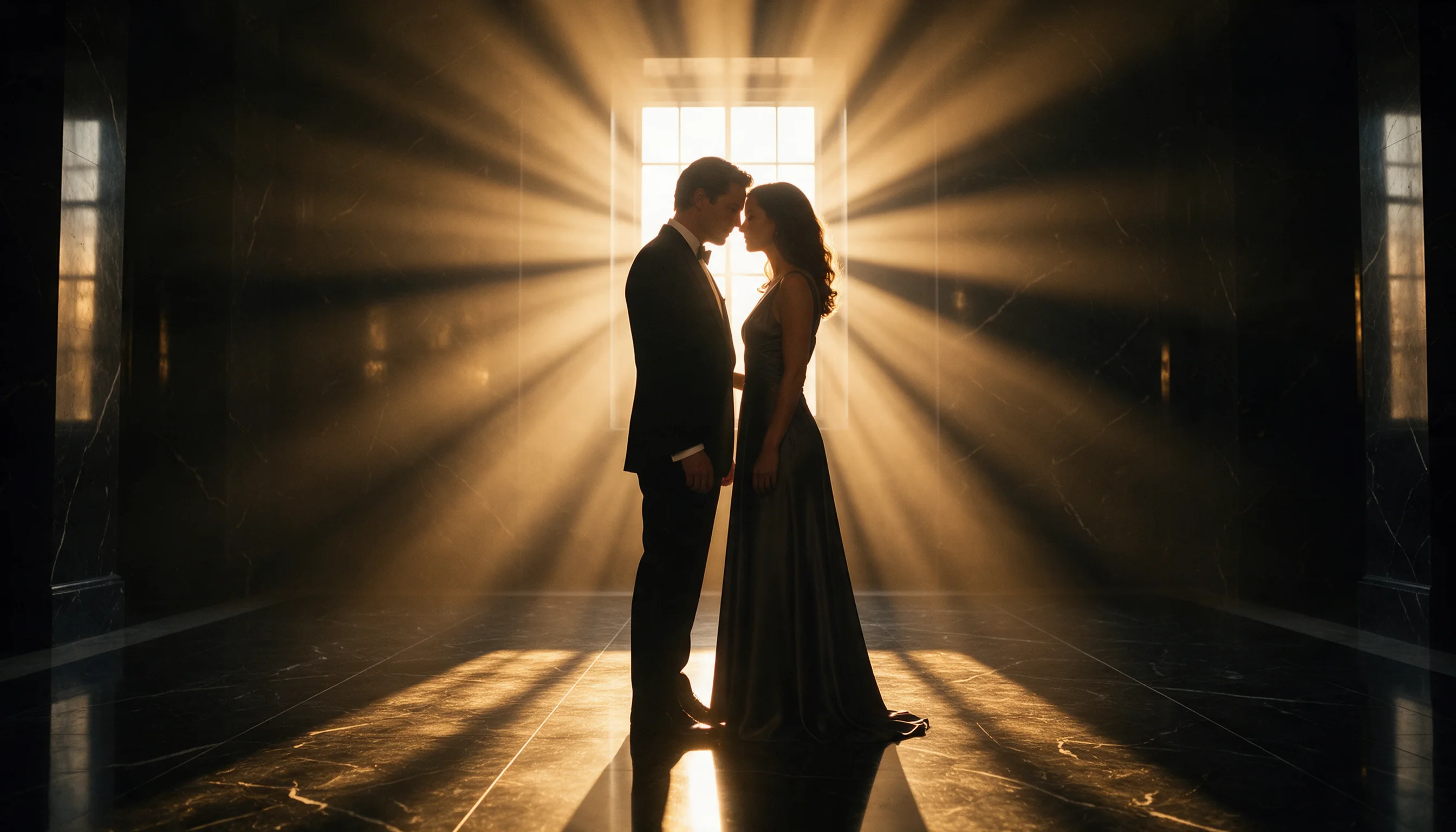
Fabric and light at the high tier
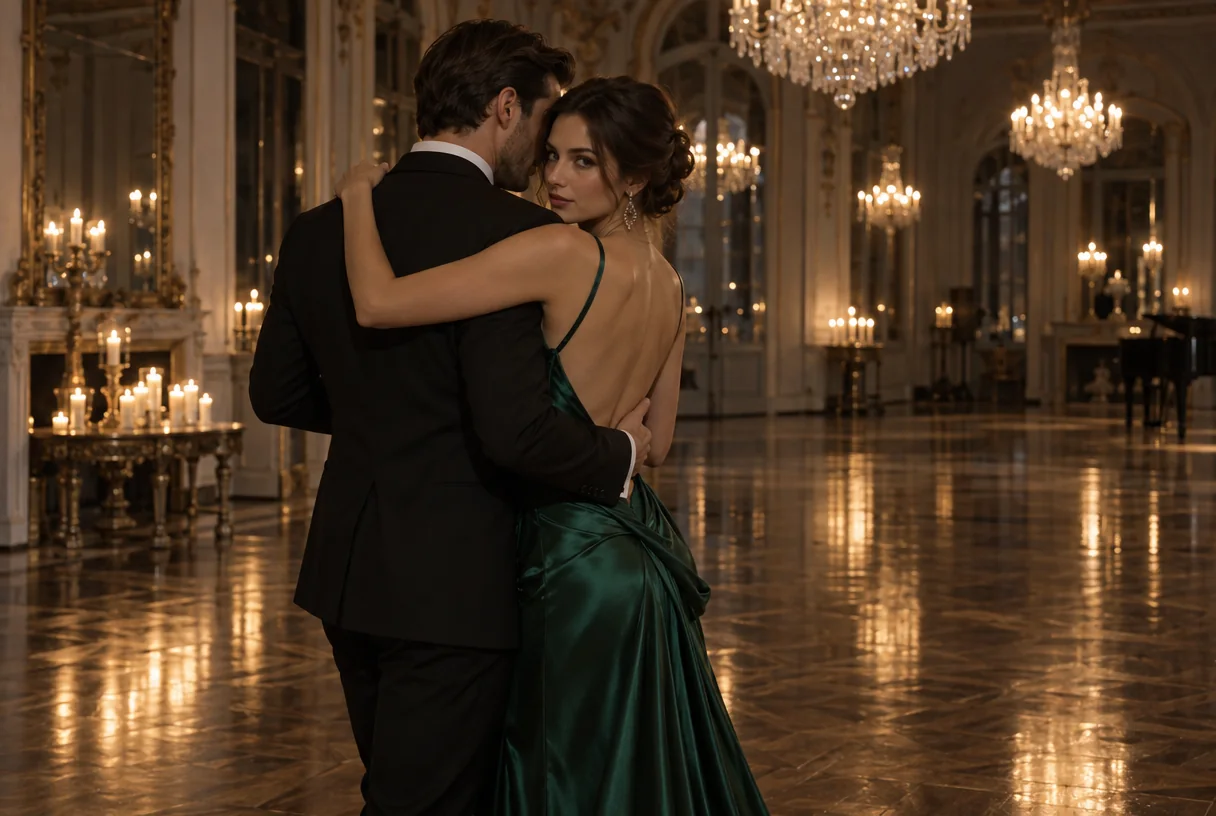
A couple in a tuxedo and an emerald satin gown in an empty candlelit ballroom. At high quality the satin folds, the chandeliers and the reflections in the parquet hold up at full size.
Repaint only the area you mark
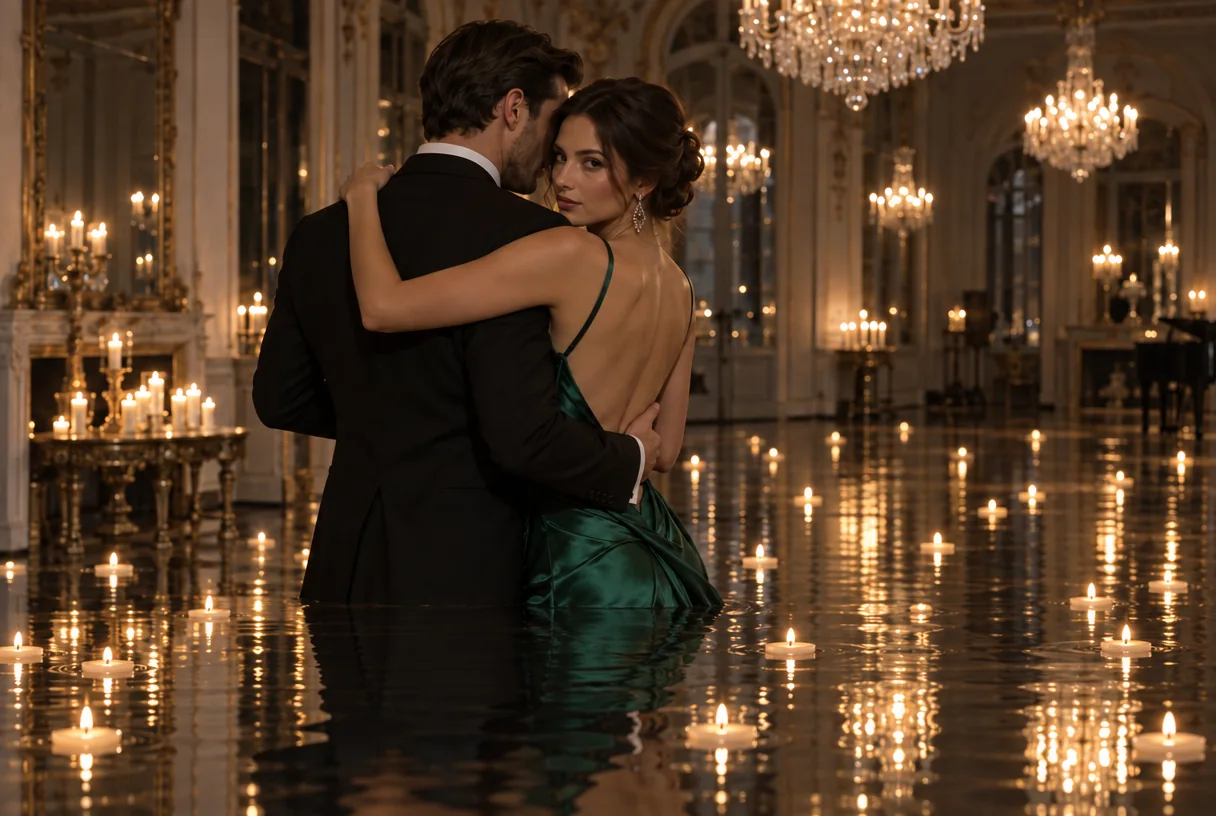
The same ballroom with a mask over the floor: the parquet became still water with floating candles, and the couple above the mask was left untouched.
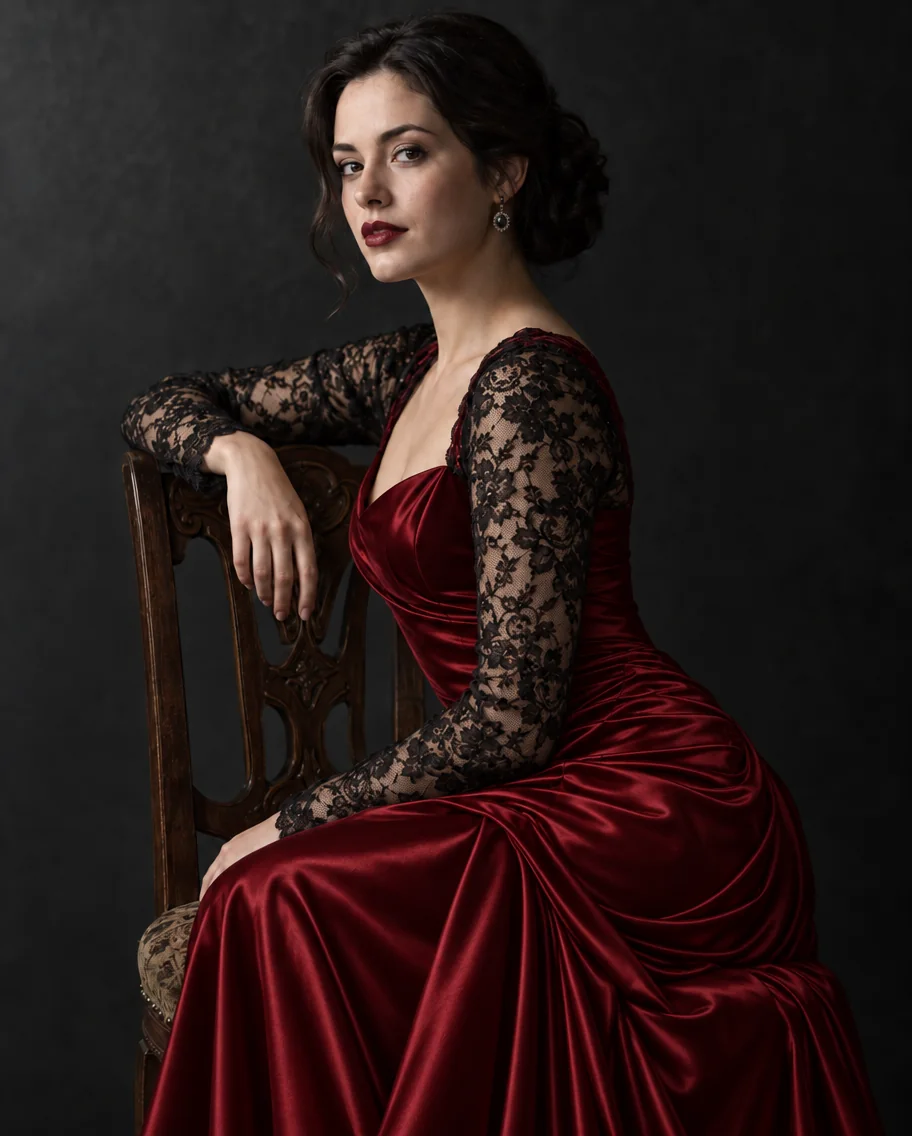
One garment changed, everything else kept
The velvet gown turned into crimson satin with the lace sleeves preserved, while her face, the chair and the single key light did not move.
Request parameters
| Parameter | Required | Description |
|---|---|---|
prompt | Yes | Up to 5,000 characters. Put every word that must appear in the image in double quotes and say where it goes; the rest is read as description. at least 1 characters · at most 5000 characters |
image_urls | Yes | Build a Sunburst edit from up to 16 images, at least 1, assigning each reference a role by position; standard-priced edits charge each source again for every output. at least 1 items · at most 16 items |
mask_url | No | Prepare the Sunburst mask at the first reference’s pixel dimensions in PNG: transparent pixels identify revisions and opaque pixels identify protected areas; omit it for instruc… |
aspect_ratio | No | Choose the finished Sunburst layout from 15 shapes between 1:3 and 3:1; 1:1 is default, source framing does not override your choice, and aspect ratio affects the quote. |
resolution | No | Sunburst offers 1k, 2k and 4k delivery tiers; their square widths are 1024, 2048 and 2880 pixels, so choose the larger, costlier tier for the final placement. |
quality | No | Sunburst’s detail controls run through low, medium, high, xhigh and max; high is the default, and the upper settings increase rendering time and cost. |
num_outputs | No | Choose how many Sunburst candidates to review, from 1 by default to 10, with a separate charge for every returned image. |
input_fidelity | No | Sunburst defaults to low input fidelity; choose high for closer reference detail without a separate fidelity surcharge. |
background | No | For Sunburst cut-outs, change auto to transparent and export PNG or WebP for real alpha; opaque is also available on the editing endpoint. |
output_format | No | Sunburst saves PNG unless you select JPEG or WebP; delivery format does not alter rendering cost. |
output_quality | No | Balance file size against finishing detail with Sunburst’s 0–100 JPEG/WebP quality control; a higher value preserves more detail, has no pricing effect and is ignored for PNG. |
official_fallback | No | GPT Image 2.5 Sunburst is billed per output by quality, resolution and shape; standard-priced edits add a fixed source-image charge to each output, and wide or tall shapes cost… Default: |
Pricing
GPT Image 2.5 Sunburst is billed per output by quality, resolution and shape; standard-priced edits add a fixed source-image charge to each output, and wide or tall shapes cost less than squares at the same tier. The lower-priced GPT Image 2.5 Sunburst offer covers one high 1k PNG, in 1:1, 3:2, 2:3, 4:3, 3:4, 16:9 or 9:16, and for edits only with no mask, input_fidelity low and background auto. With Official fallback enabled by default, a lower-priced request that is refused or cannot finish is retried at the standard price; the GPT Image 2.5 Sunburst quote shows the starting amount and maximum, other settings use standard pricing immediately, and disabling fallback rejects settings outside the offer without guaranteeing success for eligible ones. A refused GPT Image 2.5 Sunburst request is not charged; under standard pricing only, prompt tokens after the first 100 add a fee once per request, estimated at one token per Chinese, Japanese or Korean character and about one per four other characters.
| Specification | Price |
|---|---|
| $0.001816 / image |
| $0.001816 / image |
| $0.00244 / image |
| $0.00244 / image |
| $0.002752 / image |
| $0.002752 / image |
| $0.00304 / image |
| $0.00304 / image |
| $0.003568 / image |
| $0.003568 / image |
| $0.003808 / image |
| $0.003808 / image |
| $0.003856 / image |
| $0.003856 / image |
| $0.004192 / image |
| $0.004192 / image |
| $0.004744 / image |
| $0.004744 / image |
| $0.005104 / image |
| $0.00568 / image |
| $0.00568 / image |
| $0.00652 / image |
| $0.00652 / image |
| $0.007312 / image |
| $0.007312 / image |
| $0.008176 / image |
| $0.008176 / image |
| $0.008728 / image |
| $0.008728 / image |
| $0.010936 / image |
| $0.01396 / image |
| $0.01396 / image |
| $0.018592 / image |
| $0.018592 / image |
| $0.020998 / image (With Official fallback: up to $0.023992) |
| $0.020998 / image (With Official fallback: up to $0.023992) |
| $0.021472 / image |
| $0.021472 / image |
| $0.022 / image (With Official fallback: up to $0.028) |
| $0.022 / image (With Official fallback: up to $0.028) |
| $0.022864 / image (With Official fallback: up to $0.031456) |
| $0.022864 / image (With Official fallback: up to $0.031456) |
| $0.024136 / image |
| $0.024136 / image |
| $0.025636 / image (With Official fallback: up to $0.042544) |
| $0.0316 / image |
| $0.0316 / image |
| $0.034504 / image |
| $0.034504 / image |
| $0.037864 / image |
| $0.037864 / image |
| $0.043504 / image |
| $0.043504 / image |
| $0.049816 / image |
| $0.049816 / image |
| $0.054616 / image |
| $0.054616 / image |
| $0.055624 / image |
| $0.055624 / image |
| $0.059872 / image |
| $0.059872 / image |
| $0.07144 / image |
| $0.07144 / image |
| $0.075328 / image |
| $0.082936 / image |
| $0.082936 / image |
| $0.096472 / image |
| $0.096472 / image |
| $0.110728 / image |
| $0.110728 / image |
| $0.124624 / image |
| $0.124624 / image |
| $0.135064 / image |
| $0.135064 / image |
| $0.168976 / image |
| $0.002872 / image |
| $0.002872 / image |
| $0.004456 / image |
| $0.004456 / image |
| $0.005152 / image |
| $0.005152 / image |
| $0.005704 / image |
| $0.005704 / image |
| $0.006328 / image |
| $0.006328 / image |
| $0.006712 / image |
| $0.006712 / image |
| $0.007312 / image |
| $0.007312 / image |
| $0.008128 / image |
| $0.008128 / image |
| $0.009088 / image |
| $0.009088 / image |
| $0.009928 / image |
| $0.01108 / image |
| $0.01108 / image |
| $0.01276 / image |
| $0.01276 / image |
| $0.014176 / image |
| $0.014176 / image |
| $0.015904 / image |
| $0.015904 / image |
| $0.017296 / image |
| $0.017296 / image |
| $0.021808 / image |
| $0.024112 / image |
| $0.024112 / image |
| $0.03688 / image |
| $0.03688 / image |
| $0.041896 / image |
| $0.041896 / image |
| $0.043072 / image |
| $0.043072 / image |
| $0.048064 / image |
| $0.048064 / image |
| $0.055432 / image |
| $0.055432 / image |
| $0.062416 / image |
| $0.062416 / image |
| $0.062944 / image |
| $0.062944 / image |
| $0.067984 / image |
| $0.067984 / image |
| $0.07624 / image |
| $0.07624 / image |
| $0.086032 / image |
| $0.087496 / image |
| $0.087496 / image |
| $0.095248 / image |
| $0.095248 / image |
| $0.098968 / image |
| $0.098968 / image |
| $0.110656 / image |
| $0.110656 / image |
| $0.121312 / image |
| $0.121312 / image |
| $0.142816 / image |
| $0.142816 / image |
| $0.152632 / image |
| $0.171016 / image |
| $0.171016 / image |
| $0.19456 / image |
| $0.19456 / image |
| $0.220456 / image |
| $0.220456 / image |
| $0.248464 / image |
| $0.248464 / image |
| $0.274216 / image |
| $0.274216 / image |
| $0.342928 / image |
| $0.003736 / image |
| $0.003736 / image |
| $0.006016 / image |
| $0.006016 / image |
| $0.0076 / image |
| $0.0076 / image |
| $0.008368 / image |
| $0.008368 / image |
| $0.009304 / image |
| $0.009304 / image |
| $0.011176 / image |
| $0.011176 / image |
| $0.01192 / image |
| $0.01192 / image |
| $0.0124 / image |
| $0.0124 / image |
| $0.01324 / image |
| $0.01324 / image |
| $0.016216 / image |
| $0.0166 / image |
| $0.0166 / image |
| $0.02116 / image |
| $0.02116 / image |
| $0.023872 / image |
| $0.023872 / image |
| $0.026296 / image |
| $0.026296 / image |
| $0.028552 / image |
| $0.028552 / image |
| $0.032272 / image |
| $0.032272 / image |
| $0.035992 / image |
| $0.050776 / image |
| $0.050776 / image |
| $0.056176 / image |
| $0.056176 / image |
| $0.0652 / image |
| $0.0652 / image |
| $0.080464 / image |
| $0.080464 / image |
| $0.086752 / image |
| $0.086752 / image |
| $0.094288 / image |
| $0.094288 / image |
| $0.103984 / image |
| $0.103984 / image |
| $0.11296 / image |
| $0.11296 / image |
| $0.115576 / image |
| $0.115576 / image |
| $0.127864 / image |
| $0.127864 / image |
| $0.14272 / image |
| $0.14272 / image |
| $0.14272 / image |
| $0.168592 / image |
| $0.168592 / image |
| $0.184552 / image |
| $0.184552 / image |
| $0.197104 / image |
| $0.197104 / image |
| $0.201832 / image |
| $0.201832 / image |
| $0.253408 / image |
| $0.259552 / image |
| $0.259552 / image |
| $0.320608 / image |
| $0.320608 / image |
| $0.37588 / image |
| $0.37588 / image |
| $0.414736 / image |
| $0.414736 / image |
| $0.456544 / image |
| $0.456544 / image |
| $0.569656 / image |
Use cases
Hero and product imagery
Campaign key visuals and product shots viewed full screen, where the max tier's extra detail in fabric, glass and skin is worth its cost.
Precise retouching
Wardrobe colour changes, relighting and masked fixes on approved photographs, where everything outside the change has to stay identical.
Cut-outs for layouts
People and products on transparent backgrounds, ready to drop into a layout without a separate background-removal step.
Prompt guide & pro tips
Start at high, go to max for finals
High is the default and costs a quarter of max at the same size. Use xhigh or max for hero images where fabric, hair and small type are looked at closely.
Protect what must not change
In edits, state the change and then everything that stays: face, pose, light. Add input fidelity high when the source is a person who has to stay recognisable.
Ask for transparency by name
Set background to transparent and
output_formatto png or webp, and say in the prompt what should be cut out. The result carries a real alpha channel.
GPT Image 2.5 Sunburst
GPT Image 2.5 Sunburst API focuses on polished campaign imagery and precise revisions where texture, lighting and reference details deserve extra rendering time. Its editing endpoint accepts up to 16 sources, PNG masks and transparent PNG or WebP delivery.
| a written brief | GPT Image 2.5 Sunburst Text to image | | an image to change | GPT Image 2.5 Sunburst Edit |
Workflow
Start at high, go to max for finals
High is the default and costs a quarter of max at the same size. Use xhigh or max for hero images where fabric, hair and small type are looked at closely.
Protect what must not change
In edits, state the change and then everything that stays: face, pose, light. Add input fidelity high when the source is a person who has to stay recognisable.
Ask for transparency by name
Set background to transparent and output_format to png or webp, and say in the prompt what should be cut out. The result carries a real alpha channel.
Controls
Sunburst’s detail controls run through low, medium, high, xhigh and max; high is the default, and the upper settings increase rendering time and cost.
Sunburst offers 1k, 2k and 4k delivery tiers; their square widths are 1024, 2048 and 2880 pixels, so choose the larger, costlier tier for the final placement.
Build a Sunburst edit from up to 16 images, at least 1, assigning each reference a role by position; standard-priced edits charge each source again for every output.
Prepare the Sunburst mask at the first reference’s pixel dimensions in PNG: transparent pixels identify revisions and opaque pixels identify protected areas; omit it for instruction-led editing. Inspect the edges of a Sunburst material correction, because its mask is guidance rather than a guarantee of pixel-exact isolation.
For Sunburst cut-outs, change auto to transparent and export PNG or WebP for real alpha; opaque is also available on the editing endpoint.
Sunburst defaults to low input fidelity; choose high for closer reference detail without a separate fidelity surcharge.
Examples
Fabric and light at the high tier
A couple in a tuxedo and an emerald satin gown in an empty candlelit ballroom. At high quality the satin folds, the chandeliers and the reflections in the parquet hold up at full size.
Repaint only the area you mark
The same ballroom with a mask over the floor: the parquet became still water with floating candles, and the couple above the mask was left untouched.
One garment changed, everything else kept
The velvet gown turned into crimson satin with the lace sleeves preserved, while her face, the chair and the single key light did not move.
Sunburst’s precision settings do not remove OpenAI’s prompt and image checks: adult requests are refused, as were all tested levels from Mild upward in SpicyAPI’s existing runs. A refused Sunburst job is free; SpicyAPI does not add filtering and cannot disable OpenAI’s checks, and you can find unrestricted model families through the content-policy filter.
API quick start
# Generate the idempotency key once; reuse it when retrying after a lost response.
export SPICY_IDEMPOTENCY_KEY="${SPICY_IDEMPOTENCY_KEY:-$(uuidgen)}"
curl -X POST https://api.spicyapi.ai/api/v1/jobs/createTask \
  -H "Authorization: Bearer $SPICY_API_KEY" \
  -H "Content-Type: application/json" \
  -H "Idempotency-Key: $SPICY_IDEMPOTENCY_KEY" \
  -d '{
  "model": "openai/gpt-image-2.5-sunburst/edit",
  "input": {
    "aspect_ratio": "1:1",
    "background": "auto",
    "image_urls": [
      "https://example.com/reference.png"
    ],
    "input_fidelity": "low",
    "num_outputs": 1,
    "output_format": "png",
    "prompt": "A ceramic teapot on a linen cloth, soft window light, muted palette"
  }
}'

# Copy data.taskId from the response into TASK_ID, then poll the status.
TASK_ID="TASK_ID_FROM_RESPONSE"
curl "https://api.spicyapi.ai/api/v1/jobs/recordInfo?taskId=$TASK_ID" \
  -H "Authorization: Bearer $SPICY_API_KEY"
See the API reference for authentication, the complete schema, polling, and error handling.