
Introduction
Nano Banana Pro API uses Gemini 3 Pro Image to plan lettering, diagrams and multi-part layouts before rendering. Its editing tools suit a deliberate relight or a magazine masthead added to an existing photo, with 1K, 2K and 4K output. Build a Nano Banana Pro composite from 1–14 references, identifying which supplies the person, product or background. Economy editing supports 8 sources; using 9–14 requires Official fallback and official pricing with a fee per input image.
| Field | Value |
|---|---|
| Input | Image |
| Output | Image |
| Model | Google Gemini 3 Pro Image (Nano Banana Pro) |
| Endpoints | Nano Banana Pro — Text to image; image editing with 1 to 14 sources |
| Size tiers | For Nano Banana Pro, choose 1k (default), 2k at the same price, or the higher-priced 4k tier; 4096 × 4096 applies to square 4k output. |
| Aspect ratios | 1:1, 3:2, 2:3, 3:4, 4:3, 4:5, 5:4, 9:16, 16:9, 21:9 |
| Reasoning | Plans the image before rendering; billed per image, not per reasoning step |
| Output formats | Nano Banana Pro — PNG from text to image, JPEG from editing |
| Content policy | Google's content policy; requests from the Strong level up are refused, and the economy processing option refuses even Mild-level requests |
Key features & highlights
Lens and light, followed literally
A man in an unbuttoned black silk shirt on the edge of an unmade bed in morning light. The prompt names an 85mm lens at f/1.4 and window light from the right, and the render follows both.
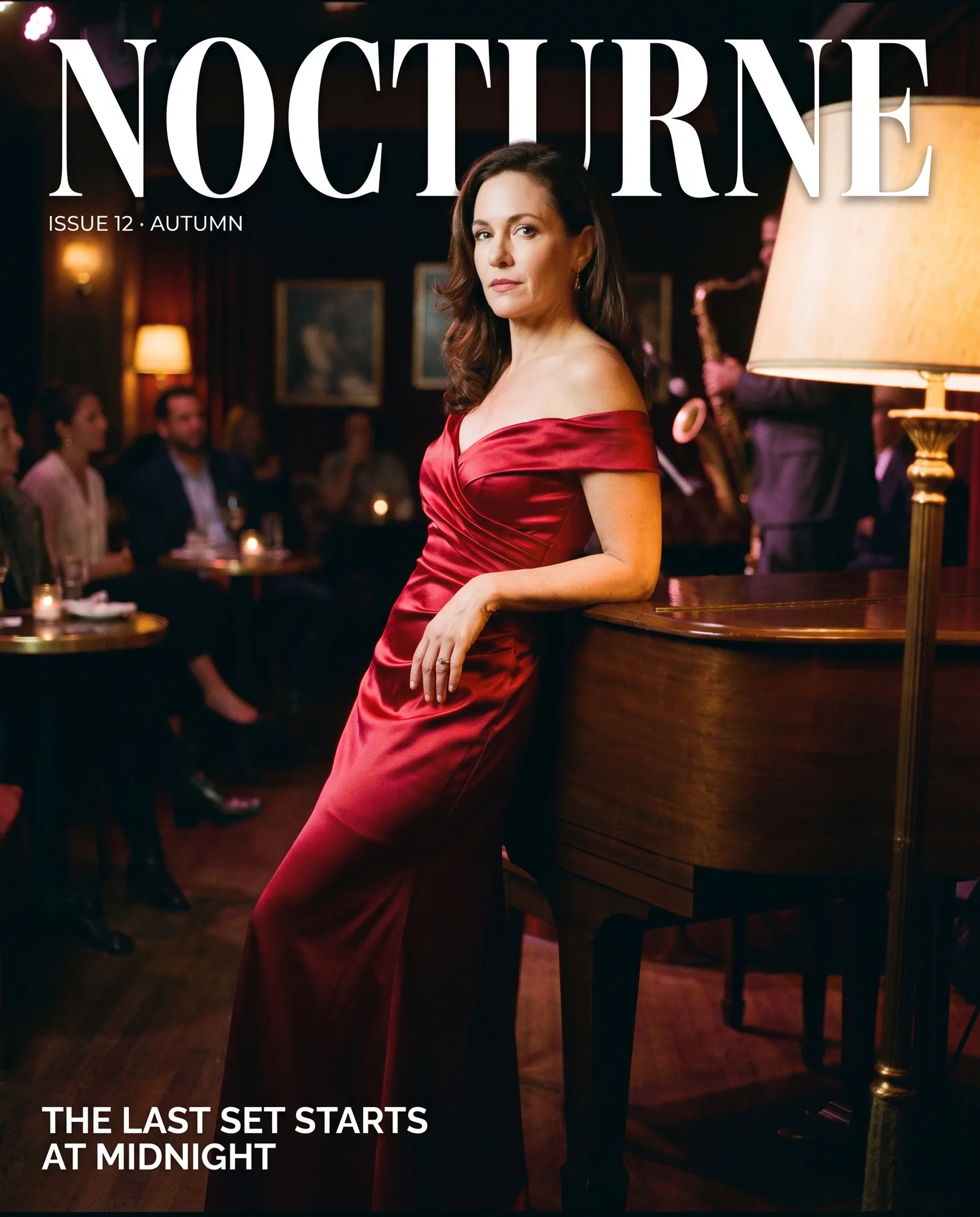
A magazine cover over a photograph
The jazz-lounge photograph turned into a cover with the masthead NOCTURNE, an issue line and a cover line, all spelled as quoted, while the woman and the piano stayed as they were.
One light source changed, the scene kept
The same lounge relit by a row of pillar candles on the piano, the stage lights switched off and her dress catching the warm light.
Request parameters
| Parameter | Required | Description |
|---|---|---|
prompt | Yes | Up to 5,000 characters. Describe subject, setting, light and lens in plain sentences; words in quotes are rendered as text in the image. at least 1 characters · at most 5000 characters |
image_urls | Yes | Build a Nano Banana Pro composite from 1–14 references, identifying which supplies the person, product or background. at least 1 items · at most 14 items |
aspect_ratio | No | With Nano Banana Pro, use one of ten aspect ratios from 21:9 to 9:16 to place labels and photographic elements within a planned layout; the ratio does not alter the image price. |
resolution | No | For Nano Banana Pro, choose 1k (default), 2k at the same price, or the higher-priced 4k tier; 4096 × 4096 applies to square 4k output. |
official_fallback | No | For Nano Banana Pro, Official fallback is enabled by default to retry work that economy processing cannot deliver. Default: |
Pricing
Nano Banana Pro bills the finished image rather than individual reasoning steps; 1K and 2K share a rate, while 4K costs more. Economy edits have no input-image fee. Official fallback can apply official pricing plus a charge per source; the quote shows that ceiling, which is reserved upfront, with the unused difference returned after economy success. Refused Pro requests are not charged. Build a Nano Banana Pro composite from 1–14 references, identifying which supplies the person, product or background. Economy editing supports 8 sources; using 9–14 requires Official fallback and official pricing with a fee per input image.
| Specification | Price |
|---|---|
| $0.0668 / image (With Official fallback: up to $0.1072) |
| $0.0668 / image (With Official fallback: up to $0.1072) |
| $0.118 / image (With Official fallback: up to $0.192) |
Use cases
Covers, posters and signage
Magazine covers, event posters and packaging where several lines of type share the frame with a photograph.
Lens-aware portraits
Portraits that follow a named lens, aperture and light direction, for editorial and brand photography mock-ups.
Relighting and compositing
Change the light in a finished photo or add text over it, keeping the people and the setting as they were.
Prompt guide & pro tips
Go straight to 2k
1k and 2k cost the same with this model, so there is little reason to draft at 1k unless you need smaller files.
Write the layout, not keywords
Say where each element sits and quote every piece of text. The model plans the frame before rendering, so precise layout instructions pay off.
Give each reference a role
In edits, say what each source contributes and what must stay unchanged, as you would brief a retoucher.
Nano Banana Pro API uses Gemini 3 Pro Image to plan lettering, diagrams and multi-part layouts before rendering. Its editing tools suit a deliberate relight or a magazine masthead added to an existing photo, with 1K, 2K and 4K output.
Build a Nano Banana Pro composite from 1–14 references, identifying which supplies the person, product or background. Economy editing supports 8 sources; using 9–14 requires Official fallback and official pricing with a fee per input image.
Give Nano Banana Pro the exact masthead or labels in quotes, then assign each a position in the layout. For a relight, specify the new illumination and separately identify the person, clothes and pose that should remain; inspect the finished photo for unintended changes.
For Nano Banana Pro, choose 1k (default), 2k at the same price, or the higher-priced 4k tier; 4096 × 4096 applies to square 4k output.
Nano Banana Pro bills the finished image rather than individual reasoning steps; 1K and 2K share a rate, while 4K costs more. Economy edits have no input-image fee. Official fallback can apply official pricing plus a charge per source; the quote shows that ceiling, which is reserved upfront, with the unused difference returned after economy success. Refused Pro requests are not charged.
| a written brief | Nano Banana Pro Text to image | | an image to change | Nano Banana Pro Edit |
API quick start
# Generate the idempotency key once; reuse it when retrying after a lost response.
export SPICY_IDEMPOTENCY_KEY="${SPICY_IDEMPOTENCY_KEY:-$(uuidgen)}"
curl -X POST https://api.spicyapi.ai/api/v1/jobs/createTask \
  -H "Authorization: Bearer $SPICY_API_KEY" \
  -H "Content-Type: application/json" \
  -H "Idempotency-Key: $SPICY_IDEMPOTENCY_KEY" \
  -d '{
  "model": "google/nano-banana-pro/edit",
  "input": {
    "aspect_ratio": "auto",
    "image_urls": [
      "https://example.com/reference.png"
    ],
    "prompt": "A ceramic teapot on a linen cloth, soft window light, muted palette",
    "resolution": "1k"
  }
}'

# Copy data.taskId from the response into TASK_ID, then poll the status.
TASK_ID="TASK_ID_FROM_RESPONSE"
curl "https://api.spicyapi.ai/api/v1/jobs/recordInfo?taskId=$TASK_ID" \
  -H "Authorization: Bearer $SPICY_API_KEY"
See the API reference for authentication, the complete schema, polling, and error handling.