Introduction
GPT Image 2.5 Flare API is the speed-oriented choice for previews, social graphics and repeated visual exploration. SpicyAPI’s existing high-quality 1k tests usually took 25–45 seconds; Flare also offers five quality settings and editing with up to 16 references. For a local Flare revision, upload a PNG mask matching the first image’s dimensions; transparent areas invite repainting, opaque areas indicate preservation, and without it the instruction defines the edit.
| Field | Value |
|---|---|
| Input | Image |
| Output | Image |
| Model | OpenAI gpt-image-2.5-flare (snapshot 2026-09-08) |
| Endpoints | Flare — Text to image; image editing with 1 to 16 sources and an optional mask |
| Quality tiers | Flare — low, medium, high (default), xhigh, max |
| Output size | Flare — 1k, 2k or 4k tier; 1:1 at 1024, 2048 or 2880 pixels square |
| Aspect ratios | Flare — 15 shapes from 1:3 to 3:1 |
| Background | Flare — auto, transparent or opaque (editing) |
| Output formats | Flare — PNG (default), JPEG, WebP; compression 0 to 100 for JPEG and WebP |
| Content policy | OpenAI's content policy; requests from the Mild level up are refused |
Key features & highlights
A finished frame in about half a minute
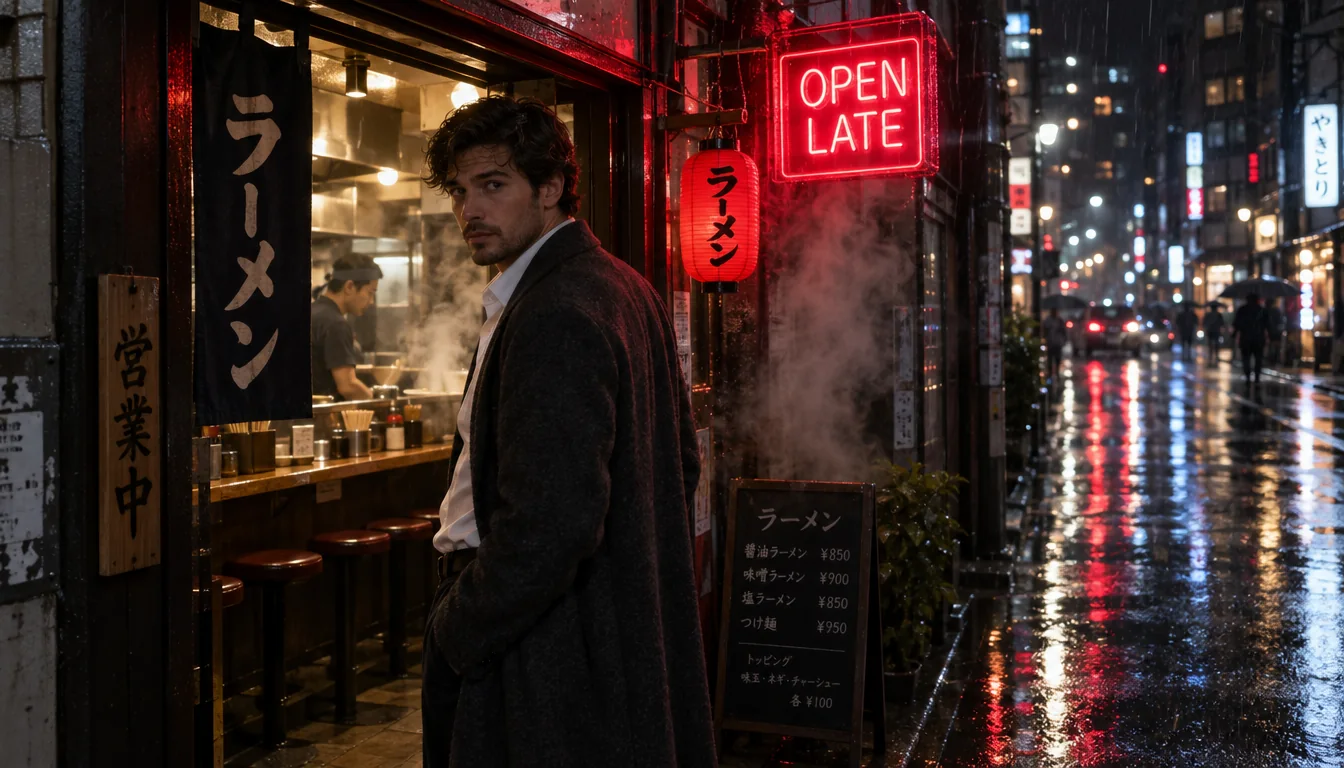
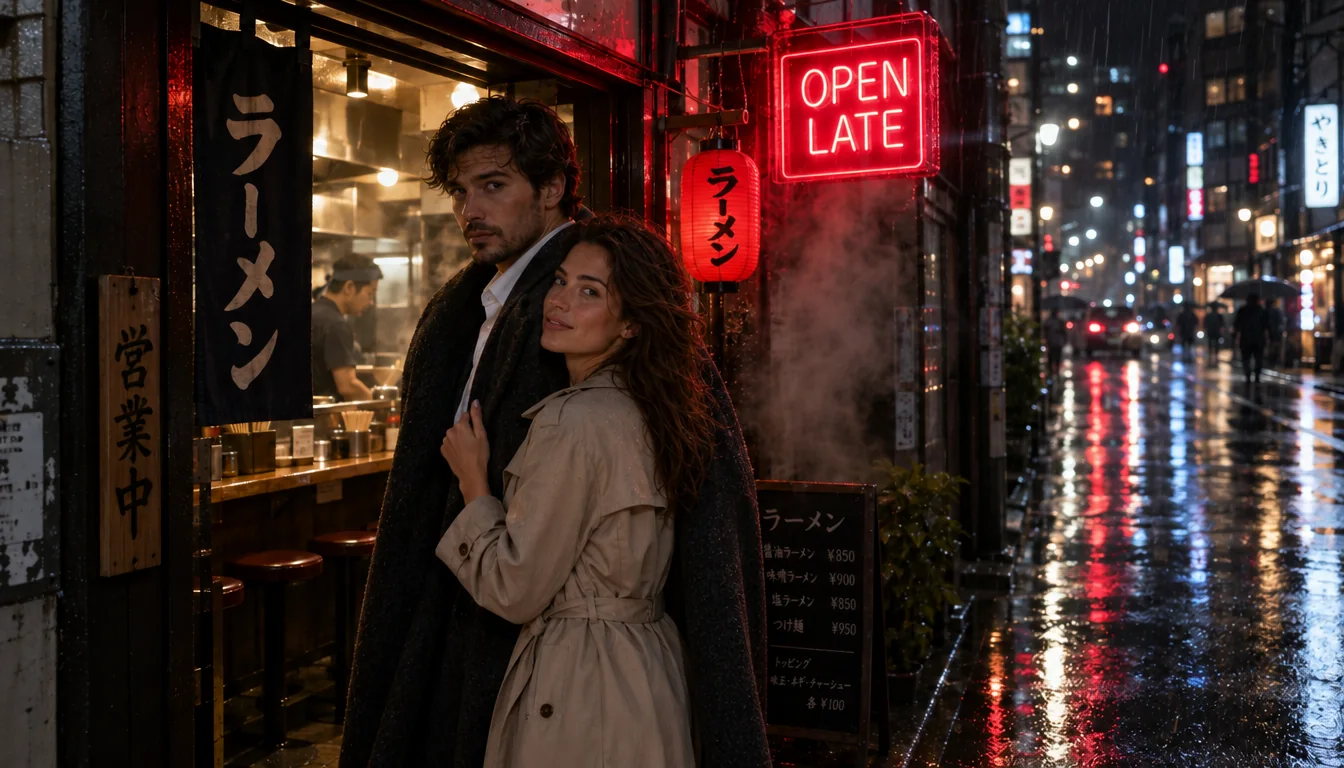
A man in a charcoal overcoat in a ramen-bar doorway on a rainy night, beside a legible red neon sign reading OPEN LATE. High quality at 16:9, returned in under 30 seconds.
Two sources, one scene
The man from the ramen bar and the woman from the terrace, placed together in the rainy doorway, each face kept from its own source.
Wardrobe and time of day in one pass
The white sundress became a red one-shoulder satin dress and the sunset turned to blue hour, while her face, her hair and the terrace stayed the same.
Request parameters
| Parameter | Required | Description |
|---|---|---|
prompt | Yes | Up to 5,000 characters. Put every word that must appear in the image in double quotes and say where it goes; the rest is read as description. at least 1 characters · at most 5000 characters |
image_urls | Yes | Supply 1 to 16 references for a Flare composite, describe their roles in upload order, and allow for an input charge per source on each output when standard pricing applies. at least 1 items · at most 16 items |
mask_url | No | For a local Flare revision, upload a PNG mask matching the first image’s dimensions; transparent areas invite repainting, opaque areas indicate preservation, and without it the… |
aspect_ratio | No | Frame the Flare preview for its placement: 15 ratios span 1:3 to 3:1, with 1:1 as default and a separate price for each shape. |
resolution | No | Flare previews start at 1k; 2k and 4k increase the image price, with square outputs measuring 1024, 2048 and 2880 pixels respectively. |
quality | No | For quick finished frames, Flare defaults to high; low and medium suit drafts, while xhigh and max spend more time and money on detail. |
num_outputs | No | Flare returns 1 image unless you request more, up to 10; budget for each variation separately. |
input_fidelity | No | Use high input fidelity when a Flare edit must retain a face or garment closely; low is default and the setting itself adds no fee. |
background | No | Flare edits offer auto by default, opaque or transparent; choose PNG or WebP for an alpha channel, since JPEG cannot carry transparency. |
output_format | No | Keep Flare output as png by default, or select jpeg or webp without changing the image price. |
output_quality | No | For smaller Flare downloads, adjust JPEG or WebP compression from 0 to 100; higher values retain more detail, PNG ignores this control and pricing stays unchanged. |
official_fallback | No | GPT Image 2.5 Flare is billed per output by quality, resolution and shape; standard-priced edits add a fixed source-image charge to each output, and wide or tall shapes cost les… Default: |
Pricing
GPT Image 2.5 Flare is billed per output by quality, resolution and shape; standard-priced edits add a fixed source-image charge to each output, and wide or tall shapes cost less than squares at the same tier. The lower-priced GPT Image 2.5 Flare offer covers one high 1k PNG, in 1:1, 3:2, 2:3, 4:3, 3:4, 16:9 or 9:16, and for edits only with no mask, input_fidelity low and background auto. With Official fallback enabled by default, a lower-priced request that is refused or cannot finish is retried at the standard price; the GPT Image 2.5 Flare quote shows the starting amount and maximum, other settings use standard pricing immediately, and disabling fallback rejects settings outside the offer without guaranteeing success for eligible ones. A refused GPT Image 2.5 Flare request is not charged; under standard pricing only, prompt tokens after the first 100 add a fee once per request, estimated at one token per Chinese, Japanese or Korean character and about one per four other characters.
| Specification | Price |
|---|---|
| $0.001816 / image |
| $0.001816 / image |
| $0.00244 / image |
| $0.00244 / image |
| $0.002752 / image |
| $0.002752 / image |
| $0.00304 / image |
| $0.00304 / image |
| $0.003568 / image |
| $0.003568 / image |
| $0.003808 / image |
| $0.003808 / image |
| $0.003856 / image |
| $0.003856 / image |
| $0.004192 / image |
| $0.004192 / image |
| $0.004744 / image |
| $0.004744 / image |
| $0.005104 / image |
| $0.00568 / image |
| $0.00568 / image |
| $0.00652 / image |
| $0.00652 / image |
| $0.007312 / image |
| $0.007312 / image |
| $0.008176 / image |
| $0.008176 / image |
| $0.008728 / image |
| $0.008728 / image |
| $0.010936 / image |
| $0.01396 / image |
| $0.01396 / image |
| $0.018592 / image |
| $0.018592 / image |
| $0.020998 / image (With Official fallback: up to $0.023992) |
| $0.020998 / image (With Official fallback: up to $0.023992) |
| $0.021472 / image |
| $0.021472 / image |
| $0.022 / image (With Official fallback: up to $0.028) |
| $0.022 / image (With Official fallback: up to $0.028) |
| $0.022864 / image (With Official fallback: up to $0.031456) |
| $0.022864 / image (With Official fallback: up to $0.031456) |
| $0.024136 / image |
| $0.024136 / image |
| $0.025636 / image (With Official fallback: up to $0.042544) |
| $0.0316 / image |
| $0.0316 / image |
| $0.034504 / image |
| $0.034504 / image |
| $0.037864 / image |
| $0.037864 / image |
| $0.043504 / image |
| $0.043504 / image |
| $0.049816 / image |
| $0.049816 / image |
| $0.054616 / image |
| $0.054616 / image |
| $0.055624 / image |
| $0.055624 / image |
| $0.059872 / image |
| $0.059872 / image |
| $0.07144 / image |
| $0.07144 / image |
| $0.075328 / image |
| $0.082936 / image |
| $0.082936 / image |
| $0.096472 / image |
| $0.096472 / image |
| $0.110728 / image |
| $0.110728 / image |
| $0.124624 / image |
| $0.124624 / image |
| $0.135064 / image |
| $0.135064 / image |
| $0.168976 / image |
| $0.002872 / image |
| $0.002872 / image |
| $0.004456 / image |
| $0.004456 / image |
| $0.005152 / image |
| $0.005152 / image |
| $0.005704 / image |
| $0.005704 / image |
| $0.006328 / image |
| $0.006328 / image |
| $0.006712 / image |
| $0.006712 / image |
| $0.007312 / image |
| $0.007312 / image |
| $0.008128 / image |
| $0.008128 / image |
| $0.009088 / image |
| $0.009088 / image |
| $0.009928 / image |
| $0.01108 / image |
| $0.01108 / image |
| $0.01276 / image |
| $0.01276 / image |
| $0.014176 / image |
| $0.014176 / image |
| $0.015904 / image |
| $0.015904 / image |
| $0.017296 / image |
| $0.017296 / image |
| $0.021808 / image |
| $0.024112 / image |
| $0.024112 / image |
| $0.03688 / image |
| $0.03688 / image |
| $0.041896 / image |
| $0.041896 / image |
| $0.043072 / image |
| $0.043072 / image |
| $0.048064 / image |
| $0.048064 / image |
| $0.055432 / image |
| $0.055432 / image |
| $0.062416 / image |
| $0.062416 / image |
| $0.062944 / image |
| $0.062944 / image |
| $0.067984 / image |
| $0.067984 / image |
| $0.07624 / image |
| $0.07624 / image |
| $0.086032 / image |
| $0.087496 / image |
| $0.087496 / image |
| $0.095248 / image |
| $0.095248 / image |
| $0.098968 / image |
| $0.098968 / image |
| $0.110656 / image |
| $0.110656 / image |
| $0.121312 / image |
| $0.121312 / image |
| $0.142816 / image |
| $0.142816 / image |
| $0.152632 / image |
| $0.171016 / image |
| $0.171016 / image |
| $0.19456 / image |
| $0.19456 / image |
| $0.220456 / image |
| $0.220456 / image |
| $0.248464 / image |
| $0.248464 / image |
| $0.274216 / image |
| $0.274216 / image |
| $0.342928 / image |
| $0.003736 / image |
| $0.003736 / image |
| $0.006016 / image |
| $0.006016 / image |
| $0.0076 / image |
| $0.0076 / image |
| $0.008368 / image |
| $0.008368 / image |
| $0.009304 / image |
| $0.009304 / image |
| $0.011176 / image |
| $0.011176 / image |
| $0.01192 / image |
| $0.01192 / image |
| $0.0124 / image |
| $0.0124 / image |
| $0.01324 / image |
| $0.01324 / image |
| $0.016216 / image |
| $0.0166 / image |
| $0.0166 / image |
| $0.02116 / image |
| $0.02116 / image |
| $0.023872 / image |
| $0.023872 / image |
| $0.026296 / image |
| $0.026296 / image |
| $0.028552 / image |
| $0.028552 / image |
| $0.032272 / image |
| $0.032272 / image |
| $0.035992 / image |
| $0.050776 / image |
| $0.050776 / image |
| $0.056176 / image |
| $0.056176 / image |
| $0.0652 / image |
| $0.0652 / image |
| $0.080464 / image |
| $0.080464 / image |
| $0.086752 / image |
| $0.086752 / image |
| $0.094288 / image |
| $0.094288 / image |
| $0.103984 / image |
| $0.103984 / image |
| $0.11296 / image |
| $0.11296 / image |
| $0.115576 / image |
| $0.115576 / image |
| $0.127864 / image |
| $0.127864 / image |
| $0.14272 / image |
| $0.14272 / image |
| $0.14272 / image |
| $0.168592 / image |
| $0.168592 / image |
| $0.184552 / image |
| $0.184552 / image |
| $0.197104 / image |
| $0.197104 / image |
| $0.201832 / image |
| $0.201832 / image |
| $0.253408 / image |
| $0.259552 / image |
| $0.259552 / image |
| $0.320608 / image |
| $0.320608 / image |
| $0.37588 / image |
| $0.37588 / image |
| $0.414736 / image |
| $0.414736 / image |
| $0.456544 / image |
| $0.456544 / image |
| $0.569656 / image |
Use cases
Social and feed content
Daily posts, story frames and ad variations where many good images per hour matter more than the last bit of detail.
Previews and interactive tools
Apps that show an image while the user waits, and design tools that generate options as someone types.
Quick composites
Two people from separate shots in one scene, or one person moved to a new place, with faces kept from their sources.
Prompt guide & pro tips
Use it for volume
Flare costs the same per token as Sunburst, so the reason to pick it is turnaround: batches, previews and interactive tools. In our runs most high-tier 1k images finished in 25 to 45 seconds.
Keep high as the default
High is where Flare produces finished-looking images; drop to low or medium only for rough previews, and use max for the handful of frames that go to print.
Combine sources by order
In edits, call the sources the first image, the second image and so on, and say what each one contributes to the new frame.
GPT Image 2.5 Flare
GPT Image 2.5 Flare API is the speed-oriented choice for previews, social graphics and repeated visual exploration. SpicyAPI’s existing high-quality 1k tests usually took 25–45 seconds; Flare also offers five quality settings and editing with up to 16 references.
| a written brief | GPT Image 2.5 Flare Text to image | | an image to change | GPT Image 2.5 Flare Edit |
Workflow
Use it for volume
Flare costs the same per token as Sunburst, so the reason to pick it is turnaround: batches, previews and interactive tools. In our runs most high-tier 1k images finished in 25 to 45 seconds.
Keep high as the default
High is where Flare produces finished-looking images; drop to low or medium only for rough previews, and use max for the handful of frames that go to print.
Combine sources by order
In edits, call the sources the first image, the second image and so on, and say what each one contributes to the new frame.
Controls
For quick finished frames, Flare defaults to high; low and medium suit drafts, while xhigh and max spend more time and money on detail.
Flare previews start at 1k; 2k and 4k increase the image price, with square outputs measuring 1024, 2048 and 2880 pixels respectively.
Supply 1 to 16 references for a Flare composite, describe their roles in upload order, and allow for an input charge per source on each output when standard pricing applies.
For a local Flare revision, upload a PNG mask matching the first image’s dimensions; transparent areas invite repainting, opaque areas indicate preservation, and without it the instruction defines the edit. Check mask edges before reusing a Flare result in a batch: the mask guides generation and does not guarantee exact pixel boundaries.
Flare edits offer auto by default, opaque or transparent; choose PNG or WebP for an alpha channel, since JPEG cannot carry transparency.
Use high input fidelity when a Flare edit must retain a face or garment closely; low is default and the setting itself adds no fee.
Examples
A finished frame in about half a minute
A man in a charcoal overcoat in a ramen-bar doorway on a rainy night, beside a legible red neon sign reading OPEN LATE. High quality at 16:9, returned in under 30 seconds.
Two sources, one scene
The man from the ramen bar and the woman from the terrace, placed together in the rainy doorway, each face kept from its own source.
Wardrobe and time of day in one pass
The white sundress became a red one-shoulder satin dress and the sunset turned to blue hour, while her face, her hair and the terrace stayed the same.
Flare is filtered: OpenAI checks prompts and generated images, and SpicyAPI’s existing tests refused every tested request from Mild upward, including one ordinary neon poster. Rejected Flare jobs cost nothing; SpicyAPI adds no filter and cannot remove OpenAI’s checks, so consult catalogue families marked unrestricted for a different policy.
API quick start
# Generate the idempotency key once; reuse it when retrying after a lost response.
export SPICY_IDEMPOTENCY_KEY="${SPICY_IDEMPOTENCY_KEY:-$(uuidgen)}"
curl -X POST https://api.spicyapi.ai/api/v1/jobs/createTask \
  -H "Authorization: Bearer $SPICY_API_KEY" \
  -H "Content-Type: application/json" \
  -H "Idempotency-Key: $SPICY_IDEMPOTENCY_KEY" \
  -d '{
  "model": "openai/gpt-image-2.5-flare/edit",
  "input": {
    "aspect_ratio": "1:1",
    "background": "auto",
    "image_urls": [
      "https://example.com/reference.png"
    ],
    "input_fidelity": "low",
    "num_outputs": 1,
    "output_format": "png",
    "prompt": "A ceramic teapot on a linen cloth, soft window light, muted palette"
  }
}'

# Copy data.taskId from the response into TASK_ID, then poll the status.
TASK_ID="TASK_ID_FROM_RESPONSE"
curl "https://api.spicyapi.ai/api/v1/jobs/recordInfo?taskId=$TASK_ID" \
  -H "Authorization: Bearer $SPICY_API_KEY"
See the API reference for authentication, the complete schema, polling, and error handling.