Introduction
InfiniteTalk lip-sync uses source footage and a replacement recording to generate a speaking performance with renewed mouth, head, and body movement. Optional scene direction and a white speaker mask guide the request, and the MP4 follows the audio duration.
| Field | Value |
|---|---|
| Input | Video, Audio |
| Output | Video |
| Model identity | MeiGen-AI InfiniteTalk; standard open-weight model, Apache-2.0 |
| Task name | meigen-ai/infinitetalk-v1/lip-sync |
| Media pair | Required |
| Input audio span | 3–600 seconds; determines output duration |
| Output tiers | 480p default; optional 720p at twice the rate |
| Optional direction |
|
| Duration accounting | Audio seconds rounded upward, minimum three seconds |
| Measured florist output | 1264×720, 25 fps, 6.10 seconds |
| Delivery format | Asynchronous MP4 result via polling or callback |
| Storage period | Outputs deleted after 14 days |
Key features & highlights
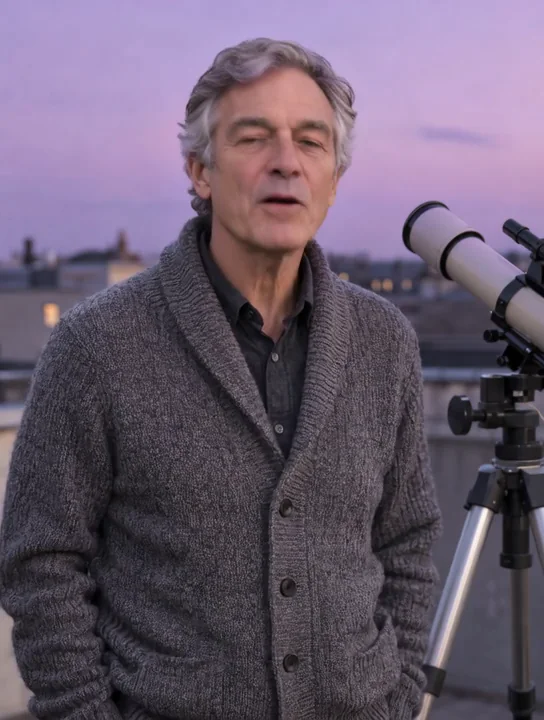
A short explanation of Saturn
In our tests, the astronomer spoke beside his rooftop telescope for about nine seconds. The delivery followed the recording with subtle natural movement.
A bar portrait delivers the line
Our 480p bar example animates a man with a loosened tie saying, 'Last call already? Then stay for one more.' The result includes natural head movement against the warm bar setting.
Identify the person, then vary one detail
Mark the intended speaker white in an optional mask when several people share the photo. A fixed seed helps compare one prompt or resolution adjustment at a time, without promising an identical result.
Request parameters
| Parameter | Required | Description |
|---|---|---|
video_url | Yes | Required footage for lip-sync with the intended person clearly visible. No default applies; video duration does not set the billed seconds, which follow audio and resolution. at least 1 characters |
audio_url | Yes | Required replacement recording for lip-sync, 3–600 seconds with no default. at least 1 characters |
prompt | No | Optional lip-sync direction for expression, action, and lighting, up to 2,000 characters. May be omitted; dialogue comes from audio. at least 1 characters · at most 2000 characters |
mask_url | No | Optional speaker-selection image for lip-sync when several people appear; mark the intended person white. Omit for an unmasked request. at least 1 characters |
resolution | No | Video lip-sync accepts 480p or 720p and defaults to 480p. Every billed second at 720p is twice the 480p rate; resolution does not change which input duration is counted. |
seed | No | Optional random seed for video lip-sync comparisons; no numeric range or default is specified here. Hold it fixed while changing one setting, without expecting identical output. |
Pricing
Count input audio seconds rounded upward to a whole second, with at least three seconds billed and audio limited to 3–600 seconds. The 720p rate is twice the 480p rate; source-video length, mask, prompt, and seed do not alter billing.
| Specification | Price |
|---|---|
| $0.036 / second |
| $0.072 / second |
Use cases
Give a still character a recorded reply
Use talking-avatar when your starting material is a portrait. Your recording supplies the voice and line, while the model adds speaking motion.
Change the mood of existing footage
Choose lip-sync for a new delivery from a source clip. In our flower-workshop test, a hesitant-to-delighted recording brought a raised head, brighter expression, and shoulder movement.
Build a presenter clip from narration
Pair a presenter photo or video with a prepared explanation. Audio from 3 to 600 seconds is accepted; review the full result when using a longer recording.
Direct one person in a shared scene
Mark the intended speaker white in a mask supplied through mask_url. This selects a person in the source media; the displayed florist test uses a single speaker without a mask.
Refine a delivery before a longer run
Try a short recording and a restrained motion prompt at 480p. Compare one changed instruction with a fixed seed, then decide whether to use 720p for the final clip at twice the rate.
Prompt guide & pro tips
Pair footage with the new recording
Set
video_urlto a clip with the speaker clearly visible andaudio_urlto a 3–600-second recording. Check rights to both media files and use adults without impersonation.Configure the delivery and rate
Add
mask_urlfor speaker selection or prompt for motion direction as needed. Use the default 480p tier or select 720p at twice the per-second rate; seed is optional for comparisons.Fetch and assess the speaking clip
Collect the asynchronous result by polling or callback. Watch the regenerated expressions and posture with the recording playing, then save the MP4 before deletion after 14 days.
Redubbing that changes the delivery
MeiGen-AI’s InfiniteTalk is a standard open-weight model under Apache-2.0. The meigen-ai/infinitetalk-v1/lip-sync endpoint accepts footage plus a new recording and produces an MP4. Mouth animation, head movement, facial expression, and posture can be regenerated together. Choose this workflow when a new line should influence the visible performance.
MeiGen-AI describes the method as sparse-frame video dubbing: the source supplies identity, background, and camera context while audio guides the generated movement. Review the complete performance rather than expecting the source motion to be reproduced frame for frame. The voice comes from your uploaded recording; the endpoint does not clone a voice.
Six request fields
| Field | Required | Accepted value and role |
|---|---|---|
video_url | Yes | Source footage with the intended person clearly visible. |
audio_url | Yes | A recording lasting 3–600 seconds; supplies the voice and output timing. |
mask_url | No | A speaker-selection image; mark the intended person white when several people appear. |
prompt | No | Up to 2,000 characters describing expression, action, or lighting. |
resolution | No | 480p by default, or 720p at twice the per-second rate. |
seed | No | A fixed random seed for comparing a single changed input; repeatability is not guaranteed. |
There is no separate duration field: prepare the recording to the length you want. A source clip longer than the recording is shortened in the result. The florist example also returned 6.10 seconds from 6.1 seconds of audio paired with 6.04 seconds of footage; this short extension does not establish behavior for every difference in input length.
Count audio seconds and choose a tier
Billing counts input audio seconds, rounding upward to the next whole second with a minimum of three seconds. The 720p rate is twice the 480p rate. Source-video duration, speaker masking, prompt wording, and seed selection do not change that rule. Consult the InfiniteTalk model price for the current rate.
For the florist request, the 6.1-second recording counted as seven seconds at the 720p tier. Start by checking the entire recording, including pauses and its ending, because that track determines both the speaking length and chargeable duration. A shorter source clip does not reduce the number of audio seconds billed.
Prepare the scene and recording
Make the speaker visible
Pick footage where you can clearly assess the intended person’s expression and movement. Confirm permission for the face, video, and voice separately: every person shown must be an adult, and the result must not impersonate another person. For a group scene, supply mask_url with white over the intended speaker. The mask selects the person; it is not a replacement for the audio track.
Keep instructions about the performance
Put the actual dialogue in the recording. A useful optional direction for a quiet workshop scene is: “The speaker looks up with a small surprised smile and a gentle shoulder movement; keep the warm workshop light steady.” Adapt the direction to the scene supplied in your footage. The text field can guide visible delivery but cannot replace audio_url.
Compare a single changed instruction while retaining the same media, seed, and resolution. A fixed seed helps make that comparison useful; it does not promise identical frames or a repeated gesture. Check what changed by watching both outputs with sound.
Observed video results
Our rainy-florist-surprise example began with a calm 6.04-second workshop clip at 864×496. The 6.1-second recording moves from hesitation to delight. With a motion prompt and resolution: 720p, the result measured 1264×720 at 25 fps and lasted 6.10 seconds. Her head lifted, her expression brightened, and her shoulders and upper body moved as her mouth followed the words.
In a separate 480p test, a 5.4-second source with a 4.55-second recording returned 4.55 seconds at 512×768 and 25 fps. The mouth and head posture followed the replacement line. These are measurements of short clips, not a guarantee of a particular frame size or sustained quality across a ten-minute recording.
Retrieve, review, and choose a workflow
Requests run asynchronously. Keep the task ID after submission, then poll for completion or use a callback to collect the MP4. Review speech timing, expression changes, head movement, and the scene through the end of the recording. Generated files are retained for 14 days and then deleted, so save accepted outputs before they expire.
Use the photo-led talking-avatar endpoint in InfiniteTalk when your source is a still image. For existing footage, compare Sync Lipsync 2 if preserving the source speaking style and choosing how mismatched durations are handled matter to the edit. Consider OmniHuman 1.5 for a portrait workflow with text direction for gestures, expression, and camera movement. Select according to the input material and controls you need, then assess a short result with your own authorized media.
API quick start
# Generate the idempotency key once; reuse it when retrying after a lost response.
export SPICY_IDEMPOTENCY_KEY="${SPICY_IDEMPOTENCY_KEY:-$(uuidgen)}"
curl -X POST https://api.spicyapi.ai/api/v1/jobs/createTask \
  -H "Authorization: Bearer $SPICY_API_KEY" \
  -H "Content-Type: application/json" \
  -H "Idempotency-Key: $SPICY_IDEMPOTENCY_KEY" \
  -d '{
  "model": "meigen-ai/infinitetalk-v1/lip-sync",
  "input": {
    "audio_url": "https://example.com/reference.mp3",
    "resolution": "480p",
    "video_url": "https://example.com/reference.mp4"
  }
}'

# Copy data.taskId from the response into TASK_ID, then poll the status.
TASK_ID="TASK_ID_FROM_RESPONSE"
curl "https://api.spicyapi.ai/api/v1/jobs/recordInfo?taskId=$TASK_ID" \
  -H "Authorization: Bearer $SPICY_API_KEY"
See the API reference for authentication, the complete schema, polling, and error handling.