Introduction
The InfiniteTalk talking-avatar endpoint animates a photographed speaker from audio, accepts scene and motion direction, and offers a seed for one-change comparisons.
| Field | Value |
|---|---|
| Input | Image, Audio |
| Output | Video |
| Publisher and weights | MeiGen-AI; open weights under Apache-2.0 |
| Input workflows | talking-avatar: photo + audio; lip-sync: video + audio |
| Recording range | 3–600 seconds |
| Output and timing | MP4; duration follows audio |
| Video performance | Mouth, expressions, head motion, and posture can be regenerated |
| Speaker mask | Optional |
| Video prompt | Optional scene and motion description, up to 2,000 characters |
| Resolution selection | 480p or 720p; video endpoint defaults to 480p |
| Chargeable duration | Input audio rounded up to whole seconds, minimum three seconds |
| Tier multiplier | Each 720p second is billed at twice the 480p rate |
| Seed purpose | Compare a single change; identical output is not guaranteed |
| Output storage | 14-day availability before deletion |
Key features & highlights
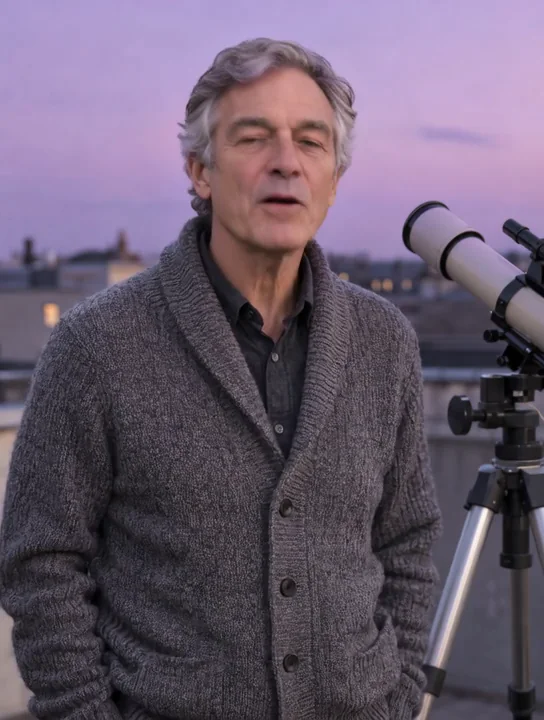
A short explanation of Saturn
In our tests, the astronomer spoke beside his rooftop telescope for about nine seconds. The delivery followed the recording with subtle natural movement.
A bar portrait delivers the line
Our 480p bar example animates a man with a loosened tie saying, 'Last call already? Then stay for one more.' The result includes natural head movement against the warm bar setting.
Identify the person, then vary one detail
Mark the intended speaker white in an optional mask when several people share the photo. A fixed seed helps compare one prompt or resolution adjustment at a time, without promising an identical result.
Request parameters
| Parameter | Required | Description |
|---|---|---|
image_url | Yes | Photo containing the intended speaker; if several people are present, pair it with a speaker mask. InfiniteTalk charges by audio seconds and resolution. at least 1 characters |
audio_url | Yes | Speech recording from 3 seconds to 10 minutes; its duration drives per-second billing with a 3-second minimum. at least 1 characters |
prompt | No | Optional scene and movement description for InfiniteTalk; the price depends on audio duration and the selected resolution, not prompt wording. at least 1 characters · at most 2000 characters |
mask_url | No | Optional mask for a group photo: mark the speaker in white. Speaker masking does not alter the audio-second and resolution billing rule. at least 1 characters |
resolution | No | 480p or 720p; choosing 720p makes each audio second cost twice the 480p rate. |
seed | No | Reuse a seed for the same random source in one-change comparisons, without guaranteeing identical frames; it does not change the duration-and-resolution rate. |
Pricing
InfiniteTalk is billed per second of input audio, with at least 3 seconds charged. Selecting 720p doubles the 480p per-second rate; failed requests have no charge.
| Specification | Price |
|---|---|
| $0.036 / second |
| $0.072 / second |
Use cases
Give a still character a recorded reply
Use talking-avatar when your starting material is a portrait. Your recording supplies the voice and line, while the model adds speaking motion.
Change the mood of existing footage
Choose lip-sync for a new delivery from a source clip. In our flower-workshop test, a hesitant-to-delighted recording brought a raised head, brighter expression, and shoulder movement.
Build a presenter clip from narration
Pair a presenter photo or video with a prepared explanation. Audio from 3 to 600 seconds is accepted; review the full result when using a longer recording.
Direct one person in a shared scene
Mark the intended speaker white in a mask supplied through mask_url. This selects a person in the source media; the displayed florist test uses a single speaker without a mask.
Refine a delivery before a longer run
Try a short recording and a restrained motion prompt at 480p. Compare one changed instruction with a fixed seed, then decide whether to use 720p for the final clip at twice the rate.
Prompt guide & pro tips
Identify the intended speaker
Send the source photo and a recording within the accepted duration; for a group photo, add a mask marking the speaker white.
Select the tier and comparison controls
Choose 480p or 720p and optionally add a scene prompt; reuse a seed when comparing one setting without expecting identical results.
A photo-led speaking performance
The InfiniteTalk talking-avatar endpoint combines image_url and audio_url to create a lip-synchronized video. The photo supplies the person and scene, while recorded speech drives the delivery. Natural head and body movement accompanies the mouth animation. Use it for narrated portraits, presenter clips or a short character exchange built around a recording.
This is the standard InfiniteTalk model, released by MeiGen-AI as open source under Apache-2.0. The controls on this page cover a photo, speech, optional scene direction, speaker selection, resolution and a seed. Plan your request around those inputs rather than importing settings from a different implementation.
Parameters and their roles
| Parameter | Required | What to supply |
|---|---|---|
image_url | Yes | A photo containing the intended adult speaker; use an image you have the right to use. |
audio_url | Yes | A speech recording from 3 seconds to 10 minutes, using a voice you have the right to use. |
prompt | No | A brief description of the scene and desired speaking movement. |
mask_url | No | For a group photo, a mask marking the intended speaker in white. |
resolution | Choose a tier | 480p or 720p; the selection determines the per-second rate. |
seed | No | A fixed value to help compare one change at a time, without promising an identical result. |
Use adults only and do not impersonate anyone. Check rights for the photograph and voice separately before preparing the request. If several people appear, the white region in the mask identifies who should speak. A scene description is not a substitute for that selection control.
Pricing follows the recording
Completed requests are billed by input audio seconds, with a minimum charge covering three seconds. At 720p, each audio second costs twice the 480p rate. Failed requests have no charge. See the InfiniteTalk model page for the current price when planning a run.
Choose the recording length and output tier together. A short 480p trial can help you inspect the delivery before committing to a longer recording. Moving to 720p changes the rate; it does not establish that the mouth animation or movement will match an earlier render.
Write direction for the portrait
Let the recording carry the words
Prepare the dialogue in the audio file. Use the optional prompt for visible performance details: the setting, mood, expression and a small movement. For a source portrait of a man at a bar, a suitable direction is: "A man in his late thirties with a loosened tie speaks softly across the bar, giving a small half smile in warm amber light."
Match the instruction to what the source photo shows. Clothing, light and surroundings help make the direction concrete, but they should describe the portrait you intend to animate. This endpoint is a photo-and-audio speaking workflow; the examples do not establish a wardrobe or background replacement workflow.
Keep the movement easy to assess
Start with a speaking action and a modest cue such as a gentle nod or head tilt. Check that cue against the returned clip before adding another. An adult presenter explaining a subject and an adult character speaking quietly at a bar need different moods, even when both use restrained head movement.
For comparisons, hold the photo, recording, resolution and seed steady while changing a single phrase. A fixed seed helps compare one change at a time; it does not promise the same video or identical frames. Judge the delivery by watching and listening to each result.
What our samples demonstrated
- Rooftop astronomy: a portrait beside a telescope delivered about nine seconds of speech about Saturn. The observed result had synchronized lip movement and subtle, natural head motion.
- Late-night bar: a 480p portrait of a man with a loosened tie delivered "Last call already? Then stay for one more." Natural head movement accompanied the spoken line.
These are observations from the supplied examples, not a promise for every portrait or recording. The documented samples do not verify speaker-mask behavior, seed comparisons or the full ten-minute input range. Review the beginning, pauses and ending of your own recording against the generated movement.
Limits and choosing another model
Audio outside the 3-second to 10-minute range is outside this endpoint's stated input limits. A supported recording length does not mean our short examples validate sustained quality across that entire span. The group-photo mask selects an intended speaker; the samples do not demonstrate alternating multi-voice dialogue.
Download generated files within 14 days, after which they are deleted. Save the finished clip with a record of the source photo, audio and settings if later revisions matter.
Choose Talking Avatar for the speed-oriented version of the same open-source model; InfiniteTalk provides the standard version with a 720p option. Consider HeyGen Avatar IV when you need its background-image control, adjustable expressiveness or five resolution tiers at the same rate. Compare those specific controls with your project rather than assuming the models deliver the same performance.
API quick start
# Generate the idempotency key once; reuse it when retrying after a lost response.
export SPICY_IDEMPOTENCY_KEY="${SPICY_IDEMPOTENCY_KEY:-$(uuidgen)}"
curl -X POST https://api.spicyapi.ai/api/v1/jobs/createTask \
  -H "Authorization: Bearer $SPICY_API_KEY" \
  -H "Content-Type: application/json" \
  -H "Idempotency-Key: $SPICY_IDEMPOTENCY_KEY" \
  -d '{
  "model": "meigen-ai/infinitetalk-v1/talking-avatar",
  "input": {
    "audio_url": "https://example.com/reference.mp3",
    "image_url": "https://example.com/reference.png",
    "resolution": "480p"
  }
}'

# Copy data.taskId from the response into TASK_ID, then poll the status.
TASK_ID="TASK_ID_FROM_RESPONSE"
curl "https://api.spicyapi.ai/api/v1/jobs/recordInfo?taskId=$TASK_ID" \
  -H "Authorization: Bearer $SPICY_API_KEY"
See the API reference for authentication, the complete schema, polling, and error handling.