Introduction
Kling 2.6 Image to video takes an opening frame and a prompt describing what happens next, and returns a fixed 1080p clip of 5 or 10 seconds. There is no aspect_ratio field either - the output takes the shape of your source image. generate_audio is optional: turn it on for dialogue or ambient sound rendered with the motion.
Choose a Kling 2.6 mode by starting material
| What you have at the start | Mode |
|---|---|
| a written scene | Kling 2.6 Text to video |
| an approved opening image | Kling 2.6 Image to video |
| a driving clip and a character photo | Kling 2.6 Motion Control |
Key features & highlights
The opening frame anchors the whole clip
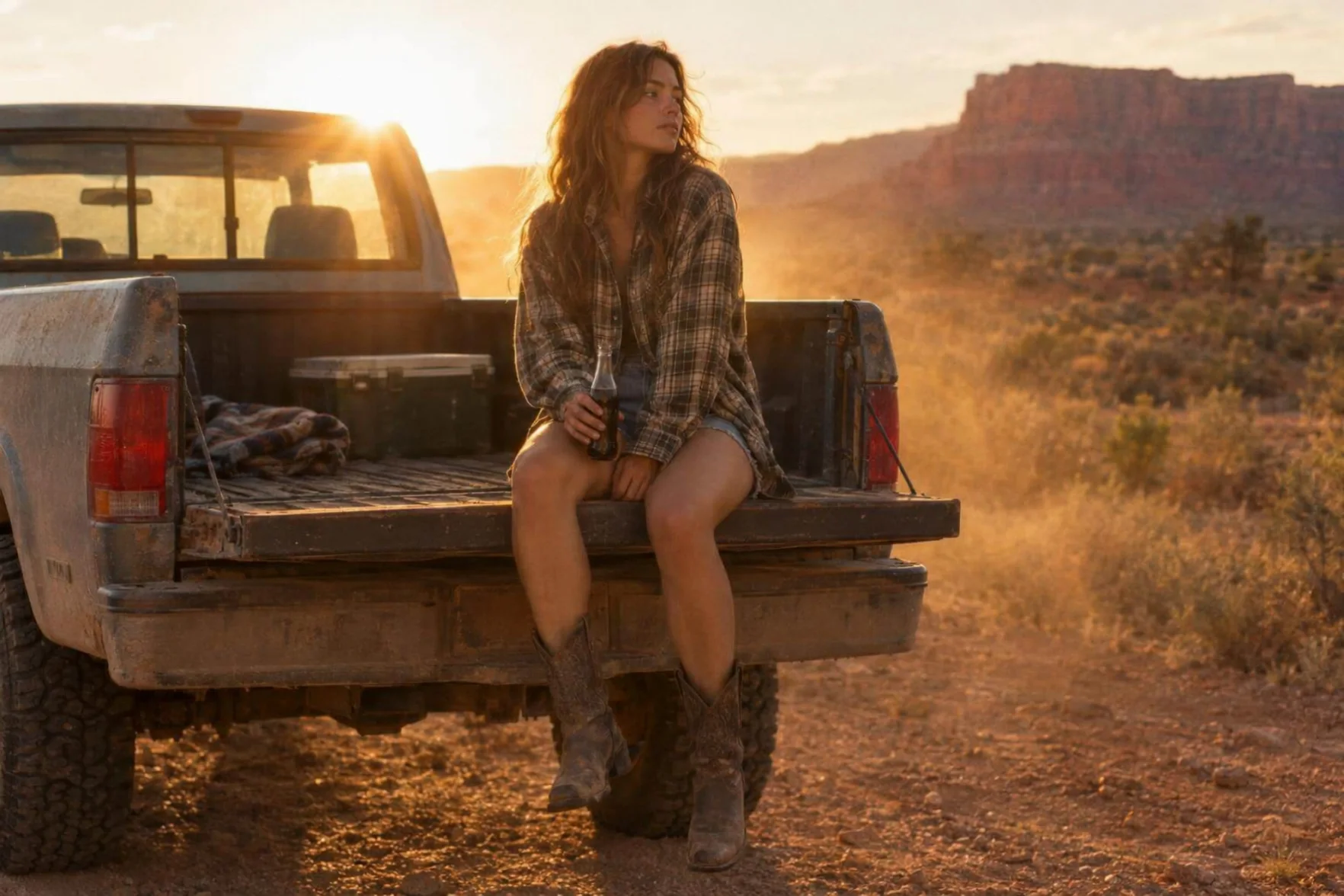
In our test, a woman's plaid shirt, the pickup truck and the desert setting from the opening frame carried through the full clip; the prompt only supplied the gesture, the turn toward the sun and the spoken line.
Sound, when you ask for it, tracks the action
With generate_audio on, our test returned desert wind, crickets and a passing truck synced to the moment she speaks - though the mix ran quieter than the picture, worth a re-run if you need the audio more present.
Request parameters
| Parameter | Required | Description |
|---|---|---|
prompt | Yes | Describe only what happens after the frame: the action, the camera move and, if you're turning sound on, the dialogue or ambient sound. at least 1 characters · at most 2500 characters |
image_url | Yes | Opening frame. The person, outfit and setting in this image hold through the clip. |
negative_prompt | No | What must not appear: a second person, captions, a prop the model keeps bringing back. Write a plain list rather than negated sentences. at most 2500 characters |
generate_audio | No | Off by default. Turn it on for a generated soundtrack rendered with the picture; it costs more per second. Default: |
duration_seconds | No | 5 or 10 seconds - no other value is accepted. Drives the price. |
guidance_scale | No | How strictly the clip follows the prompt, from 0 to 1 in steps of 0.01; default 0.5. |
Pricing
Billed per second of output; turning sound on costs more per second.
| Specification | Price |
|---|---|
| $0.069 / second |
| $0.138 / second |
Use cases
Turning an approved still into a scored beat
Animate a character, product or location you've already locked in a photo, and add a short spoken line or ambient sound instead of describing a whole scene from nothing. In our tailgate test, a single plaid-shirt still became a sunset clip with a spoken line, desert wind and a passing truck, all without redescribing the outfit or the setting the photo already fixed.
Fixed-format social clips
1080p, 5 or 10 seconds, is a predictable, ready-to-post shape when you don't need to tune resolution or duration per clip. That fixed shape is also what makes this endpoint a fast way to turn a batch of approved product or character stills into a run of same-format clips for a feed.
Recasting the same still with different lines
Because the opening frame anchors the look, you can run one approved image through several prompts - a different spoken line, a different gesture - and keep the person, outfit and setting identical across every version.
Prompt guide & pro tips
Describe the next beat, not the whole scene
Since the frame already sets the look, the prompt only needs the motion, the camera and - if generate_audio is on - the dialogue or ambient sound you want. Re-describing the outfit or the setting the photo already shows wastes words the model could spend on the action instead.
JPEG or PNG only
This endpoint's image field does not accept other formats. Convert your source image to JPEG or PNG before you upload it - a WEBP or HEIC source fails before the job even starts.
If the sound mix runs quiet, say so in the prompt
Our desert test came back with the wind, crickets and truck all synced to the moment she speaks, but mixed quieter than the picture. If the ambient sound needs to read as loud as the dialogue, say that explicitly in the prompt rather than assuming an even mix by default.
API quick start
# Generate the idempotency key once; reuse it when retrying after a lost response.
export SPICY_IDEMPOTENCY_KEY="${SPICY_IDEMPOTENCY_KEY:-$(uuidgen)}"
curl -X POST https://api.spicyapi.ai/api/v1/jobs/createTask \
  -H "Authorization: Bearer $SPICY_API_KEY" \
  -H "Content-Type: application/json" \
  -H "Idempotency-Key: $SPICY_IDEMPOTENCY_KEY" \
  -d '{
  "model": "kling/2.6/image-to-video",
  "input": {
    "duration_seconds": 5,
    "generate_audio": false,
    "image_url": "https://example.com/reference.png",
    "prompt": "A slow aerial shot drifting over a misty pine forest at sunrise"
  }
}'

# Copy data.taskId from the response into TASK_ID, then poll the status.
TASK_ID="TASK_ID_FROM_RESPONSE"
curl "https://api.spicyapi.ai/api/v1/jobs/recordInfo?taskId=$TASK_ID" \
  -H "Authorization: Bearer $SPICY_API_KEY"
See the API reference for authentication, the complete schema, polling, and error handling.