Kling O3 (Kling 3.0 Omni) video editing takes a video you already have and changes only what your prompt names. Source clips run 3 to 10 seconds at 720p or 1080p, with up to 4 optional reference photos for a new character or object.

From $0.125/s

Workbench

Input

Video editing
235/2500

Reordering updates prompt references. Removing media also removes its references; review your prompt.

Say what to change - the subject, outfit, setting, style or weather. Anything you do not mention stays as it is in the edited clip. at least 1 characters ยท at most 2500 characters
1/1

Drop a video here, or browse ยท 1 file ยท Max 90 MB ยท MP4 ยท WEBM

  • 1
1 / 1 files
Source clip to edit, 3 to 10 seconds, at least about 720 pixels on its shortest side. The edited result runs exactly as long as this clip.
Subjects0/1
One named subject to bring into the edited clip: give it a name, a one-line description and 2 to 4 photos of the same person or object (voice samples of 5 to 30 seconds are optional), then write @name in the prompt where the subject should appear. One subject per request; it cannot be combined with reference_image_urls in the same request. It does not change the price. at most 1 items
1/4

Drop files or media links, paste, or browse ยท Up to 4 files ยท Max 10 MB ยท JPG ยท PNG ยท WEBP ยท GIF

  • <<<image_1>>>
1 / 4 files
Optional, up to 4 reference photos for a new character, outfit, object or style to bring into the edit. JPEG or PNG. Refer to them in the prompt as <<<image_1>>>, <<<image_2>>> and so on. at least 1 items ยท at most 4 items
affects price
720p or 1080p. The higher tier costs more per second.
Keep original audio
Keeps the source clip's own sound in the edited result. On by default. It does not change the price.
Safety checkerOff

SpicyAPI does not run a safety checker on this model. Your prompt and media go to the model as written, and the model itself decides what comes back.

Checking your account before enabling submission and pricing.

Output

Ready for a new run
Example result

Missing the model you need?

Tell us what to add and where you would use it. Requests go to the people who decide what gets onboarded next.

VIDEO WITH SOUND, BUILT FOUR WAYS

Kling O3 API at a glance

One model, four ways in: write it, animate a frame, cast it from photos, or edit a clip you already have.

Modes in one model
4-IN-1
Text, image, reference photos or an existing video all go through the same endpoint set.
Reference photos
7
Give a person, an object and a place their own photo and it casts all three into one shot.
Top resolution
4K
Draft cheap at 720p, render the keeper in 4K.
Longest clip
15S
3 to 15 seconds for new clips; edits take a source clip of 3 to 10 seconds.
Native sound, optional
AUDIO
Dialogue, effects and ambience generated with the picture when you turn it on.
Auto multi-shot
MULTI
Ask for several shots in one prompt and it cuts between them on its own.

Results

What you can make with Kling O3

  • From text

    A three-shot scene from one paragraph

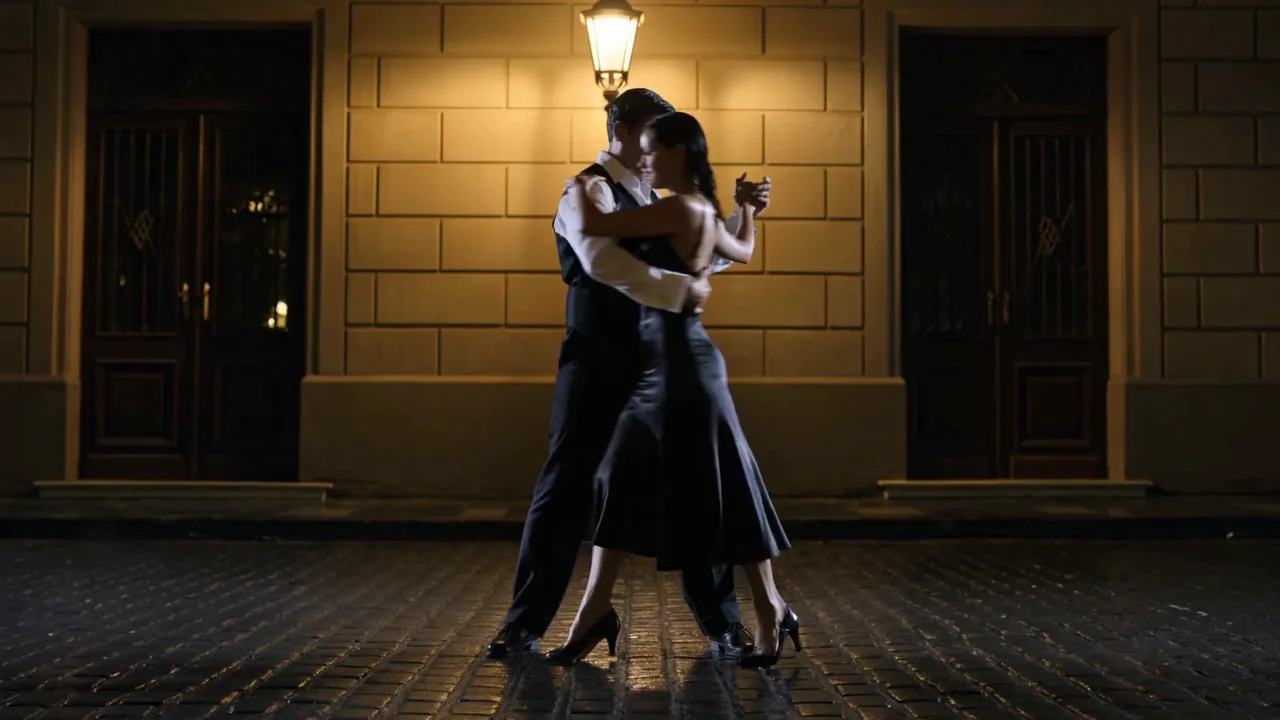
    Write the shots in order and turn shot_type to multi: Kling O3 cuts between them on its own, keeping the setting and the people consistent from one shot to the next. This rain-soaked tango was one prompt describing a wide shot, a close-up and a low angle - nothing else.

    Text-to-video, multi-shot, 1080p with sound: one prompt describing a wide shot, a close-up and a low angle came back as three cut shots.

  • From an image

    Your opening frame, carried forward

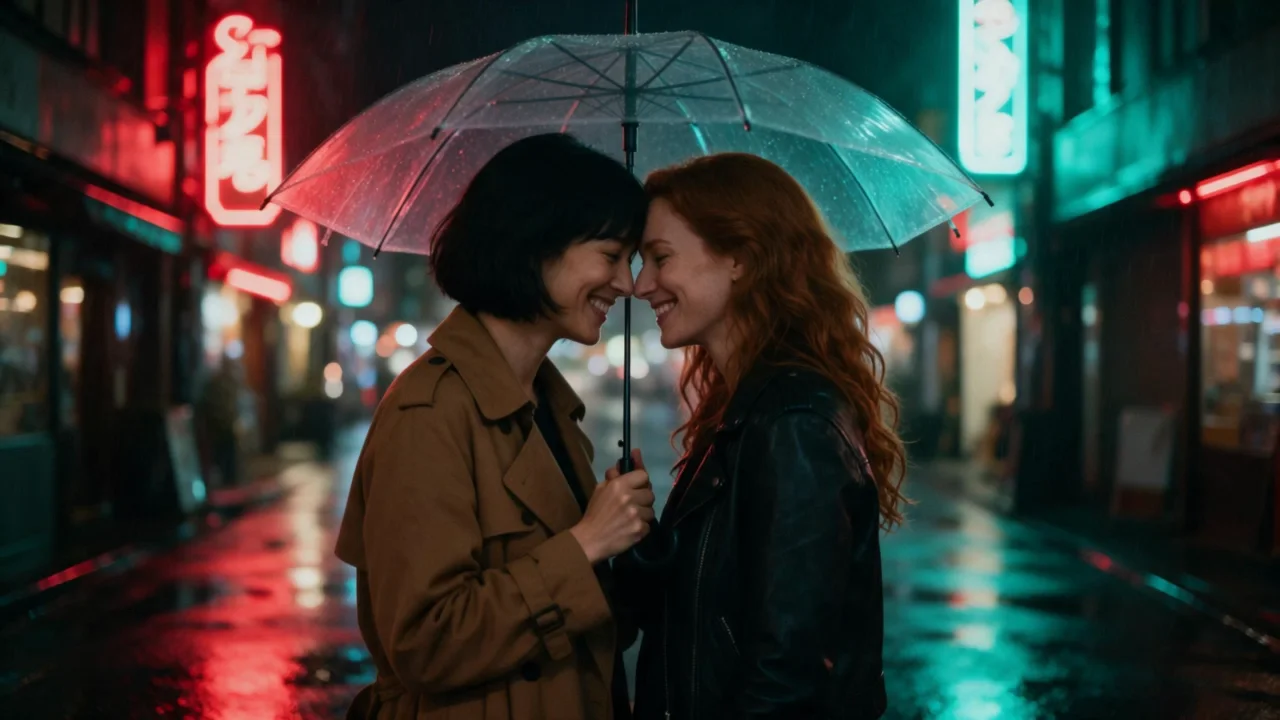
    Upload the frame you have already approved and describe only what happens next. Here the opening frame was two women sharing an umbrella; the prompt only added the heavier rain, the laugh and the walk into the neon street.

    Image-to-video, 720p with sound: the opening frame set the scene, the prompt only added the heavier rain and the walk into the street.

  • From reference photos

    Cast a person, an object and a place from three photos

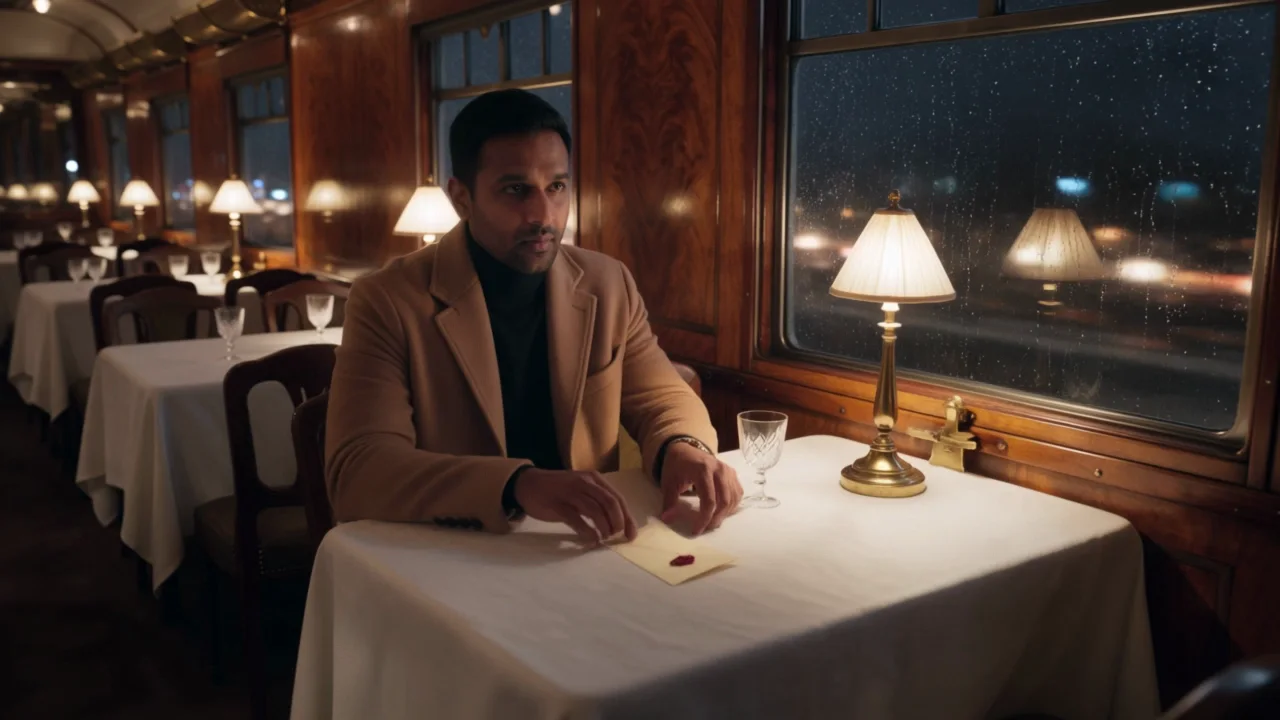
    Hand it up to seven images and give each one a job in the prompt: <<<image_1>>> is the man, <<<image_2>>> is the room, <<<image_3>>> is the letter he opens. All three carried through into a shot none of the source photos showed.

    Reference-to-video, 720p with sound: the man, the dining car and the letter each came from a separate reference photo.

  • Edit a video you have

    Change the season, keep everything else

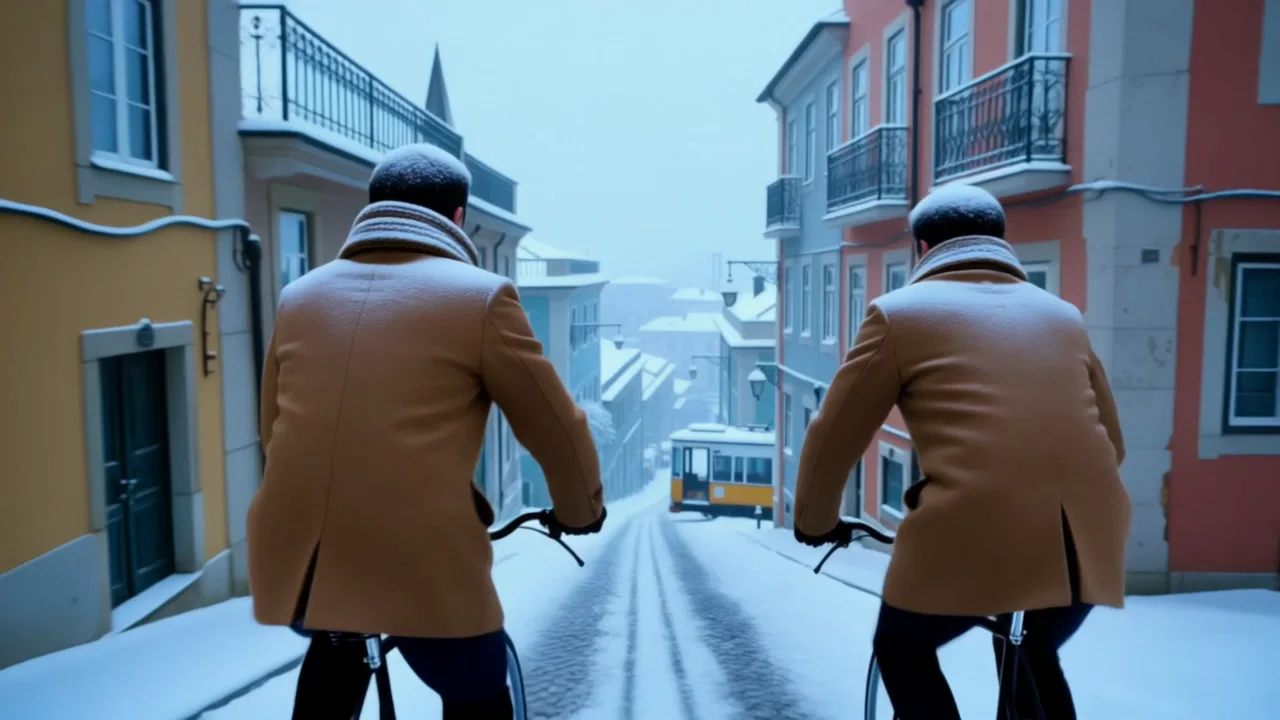
    Video-edit takes a finished clip and a prompt that names only what should change. Here the source was two men cycling downhill in Lisbon, laughing over their shoulders; the edit added snow to the street, rooftops and tram, and put both riders in wool coats, while the camera move, the ride and the laugh carried over untouched.

    Video-edit, 720p: the source clip was the same street and the same ride in morning sun - the edit added the snow and the coats and kept the rest.

  • With sound

    Dialogue arrives in the same file as the picture

    Turn on generate_audio and spoken lines, room tone and ambience are generated alongside the video. The two lines of dialogue in this clip came back exactly as written, timed to the picture.

    Text-to-video, 720p with sound: both lines of dialogue came back exactly as written.

Content test

Is Kling O3 uncensored? What we tested

We ran each level on our live setup and checked every clip frame by frame. A pass means the content was actually on screen, not just that the request went through.

Content levels tested on Kling O3, by mode
LevelVideo editingImage to videoReference to videoText to video
MildThe lightest prompts in the test
Not tested yet
Not tested yet
Not tested yet
Not tested yet
ModerateWhere filtered models start to refuse
RefusedTested Sep 28, 2026
StrongThe middle of the scale
RefusedTested Sep 28, 2026
Not tested yet
Not tested yet
Not tested yet
Very strongWhere most models start to hold back
Not tested yet
Not tested yet
Not tested yet
Not tested yet
MaximumThe top of the scale
Not tested yet
Not tested yet
Not tested yet
Not tested yet

Renders: on screen as written. Softened: generated, but milder than what was written. Refused: rejected. Not tested yet: we have not run that level on that mode.

How each mode behaves

Text to video
shot_type: single is not a hard guarantee of one continuous take - Kling O3 occasionally cuts anyway. Add "one continuous shot, no cuts" to the prompt when a single unbroken take matters.
Image to video
The opening frame is followed closely and an optional last_image_url pins the ending, but the middle of a long clip can wander. Keep the two frames close in light and framing for the cleanest result.
Reference to video
Each reference photo is only as useful as the job you give it in the prompt. Three or four references with one clear job each hold up better than seven overlapping shots of the same subject.
Video editing
Video-edit keeps the source clip's own sound by default (keep_original_audio); switch it off for a silent result. It does not generate new sound, and the switch does not change the price. The result runs exactly as long as your source clip, from 3 to 10 seconds, and the source needs to be at least about 720 pixels on its shortest side. When an edit adds a new wardrobe item to more than one person, it can give them the same style and color instead of distinct ones unless the prompt says otherwise.
All modes
Kling applies its own content review on every request, and it is strict: Mild-level requests sometimes render and sometimes do not, and anything from Moderate up is refused outright, including when it shows up in an uploaded photo or source video. Rejected requests are not charged. If your project needs that range, our Spicy families - Seedance 2.5 Spicy, Wan 2.2 Spicy or MiniMax H3 Spicy - are built for it; Kling's strength is cinematic look, motion, native sound and reference control.

Use cases

What to build with the Kling O3 API

  • A multi-shot scene without filming multiple takes

    Write a wide shot, a close-up and a low angle in one prompt and let shot_type: multi cut between them. It is the fastest way to get coverage of a scene out of a single request.

  • A repeatable character from a handful of photos

    Reference-to-video takes a face, an outfit and a location as separate photos, so a character can appear in a new setting you never filmed instead of only the one frame you have of them.

  • Change the season, wardrobe or backdrop of a clip you already have

    Video-edit takes an existing video and a prompt describing only what should change. Everything you do not mention - the framing, the motion, any dialogue - carries over from the source clip.

  • Animate an approved frame with dialogue built in

    Start from an image you have already signed off on and describe the action, the camera move and, with generate_audio on, the line a character says. The frame stays put; only what you wrote moves.

Prompts

Kling O3 prompt examples you can copy

Paste one into the playground as it is, then change one thing at a time.

  • Text to video

    Write three shots, let multi-shot cut between them

    Result from this prompt

    A night tango on a rain-slick cobblestone street in Buenos Aires. A man in his late thirties in a dark waistcoat and a white shirt open at the collar, and a woman in her early thirties in a backless black satin dress, dance close under a single amber streetlamp. Shot 1, wide: the couple turns through the falling rain and her dress flares. Shot 2, close-up: their faces almost touching, rain running down his cheek, she smiles. Shot 3, low angle on their feet: a sharp turn, her heel flicking water off the stones. Sound: a bandoneon tango drifting from an open window, steady rain, heels clicking on wet stone, her quiet laugh.

    Why it works. Numbering the shots and describing each camera angle in order - wide, close-up, low angle - is what tells the model where one shot should end and the next begin, instead of leaving it to guess.

    Try this prompt
  • Text to video

    Name the exact camera position to keep two faces in frame

    Result from this prompt

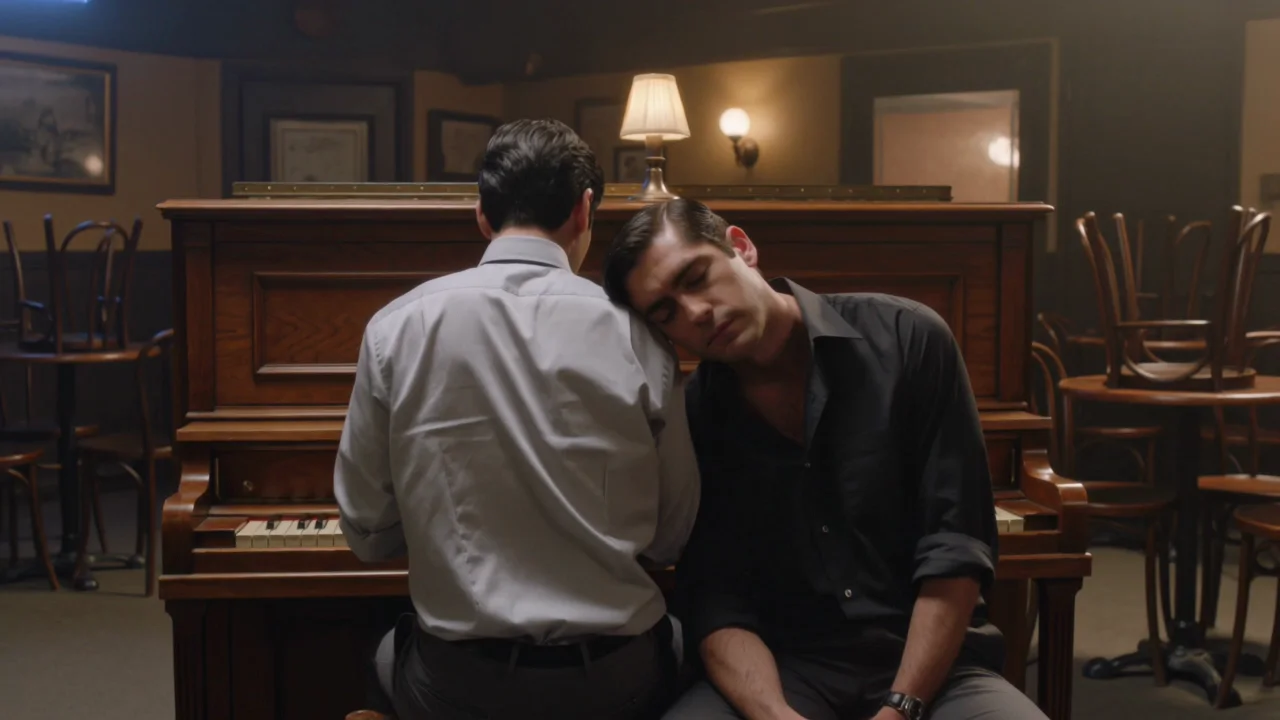
    A small jazz bar after closing, chairs upturned on the tables, one warm lamp over an old upright piano. Seen from the end of the keyboard so both faces are clear: two men in their thirties, a couple, sit close together on the piano bench. One, in a loosened tie with his sleeves rolled up, plays a slow chord; the other, in an open-collar black shirt, rests his head on the pianist's shoulder with his eyes half closed. The pianist stops, turns to him and says softly, "One more song?" The other smiles without lifting his head: "Only if it's ours." One continuous slow push-in, 35mm, warm tungsten light. Sound: soft piano chords, their low voices, the hum of the empty room.

    Instead of โ€œTwo men on a piano bench, one playing, the other leaning on his shoulder.โ€

    Why it works. "Seen from the end of the keyboard" is a real camera instruction; without it the model can pick an angle where the second person is mostly hidden behind the first.

    Try this prompt
  • Image to video

    Describe only what happens after the frame

    Result from this prompt

    The rain gets heavier. The woman in the camel trench coat tilts the umbrella back and laughs; the other woman pulls her closer by the collar and they walk off together down the neon street, the camera following at their shoulders. Sound: heavy rain drumming on the clear umbrella, distant traffic, footsteps splashing, and one of them says, "Come on, we're going to miss the last train."

    Why it works. The opening frame already set the two women, the umbrella and the neon street, so the prompt only has to say what happens next - the heavier rain, the laugh, the walk away.

    This mode starts from your own image: add it in the playground before you run.

    Try this prompt
  • Reference to video

    Give each reference photo one job

    Result from this prompt

    Image 1 is the man, Image 2 is the dining carriage, Image 3 is the sealed letter. The man from Image 1, still in his camel overcoat, sits alone at a table in the train carriage from Image 2 at night. He breaks the red wax seal of the letter from Image 3, unfolds it and reads, and a slow smile spreads across his face while city lights streak past the rainy window. Slow push-in. Sound: the rhythmic clatter of the train, rain on the glass, paper unfolding, a soft exhale.

    Why it works. Naming what each numbered image is responsible for - the man, the carriage, the letter - is why all three carried through together instead of the model blending them into something new.

    Try this prompt
  • Video editing

    Change one thing, leave the rest as it is

    Result from this prompt

    Turn the season to deep winter: fresh snow on the cobblestones, the balconies, the rooftops and the yellow tram, snowflakes drifting through the air and cold blue morning light. Dress both riders in wool coats and knitted scarves. Keep the street, the bicycles, the riders' movement and the camera move exactly as they are.

    Why it works. Video-edit only changes what you name - here, the season and the wardrobe - and holds the framing, motion and pacing of the source clip as they are.

    Try this prompt

Compare

Kling O3 vs similar models: which one to pick

ModelModesFromContentPick it when
Kling O3This pageImage to video ยท Reference to video ยท Text to video ยท Video editing$0.067 / output secondFiltered โ€” This model refuses requests beyond its own limits outright. Measured, not assumed โ€” models we have not measured carry no label at all.You want reference photos, an edit of a video you already have, or the widest range of modes in one endpoint set.
Kling 3.0Character animation ยท Image to video ยท Text to video$0.067 / output secondFiltered โ€” This model refuses requests beyond its own limits outright. Measured, not assumed โ€” models we have not measured carry no label at all.You want a single flagship shot with a first and last frame, or Motion Control to transfer a performance onto your character.
Kling 3.0 TurboImage to video ยท Text to video$0.112 / output secondFiltered โ€” This model refuses requests beyond its own limits outright. Measured, not assumed โ€” models we have not measured carry no label at all.You always want sound and a faster turnaround on a text or image prompt, and do not need reference photos or video-edit.
Kling 2.6Character animation ยท Image to video ยท Text to video$0.069 / output secondFiltered โ€” This model refuses requests beyond its own limits outright. Measured, not assumed โ€” models we have not measured carry no label at all.You want Kling's original native-audio model at a lower rate for silent 1080p clips, or its cheaper take on Motion Control.

Pricing

Kling O3 API pricing

A 5-second clip starts at $0.336 at 720p and $1.68 at 4K.

The playground shows the exact price for your settings before you run. Failed or timed-out tasks are usually not charged. Some models charge for content refusals as stated on their model page; check those billing terms before submitting.

See every price tier

Get started

How to use the Kling O3 API in three steps

  1. Step 1

    Try it in the playground

    Pick a mode above - a paragraph, your own opening frame, up to seven reference photos, or a video to edit - paste one of the prompts from this page and run it. The exact price shows before anything is charged.

  2. Step 2

    Get an API key

    Sign up, top up by card or crypto, and create a key in the console. There is no subscription: you pay for the seconds of video you generate.

  3. Step 3

    Send the same request from your code

    Copy the request from the API tab - it is the same body the playground just ran. The finished clip comes back to your webhook, or you fetch it by task ID.

Parameter reference and code samples are in the API and Readme tabs at the top of this page.

Why SpicyAPI

Why run Kling O3 on SpicyAPI

  • No filter from us

    We add no content filter of our own. What the model renders is what you get back.

  • Tested, not guessed

    Content labels come from real generations we ran and checked, with the test date on the page.

  • Pay per result, in dollars

    No subscription and no credits. Failed or timed-out tasks are usually not charged. Some models charge for content refusals as stated on their model page; check those billing terms before submitting.

  • One key for every model

    One API key and balance cover image, video, audio and chat models, so you can explore more models from the same account.

FAQ

Kling O3 API FAQ

About Kling O3

Kling O3 (Kling 3.0 Omni) is Kling's do-everything video model on SpicyAPI, in four modes: text-to-video, image-to-video, reference-to-video and video-edit. Clips run 3 to 15 seconds (a video you edit can be up to 10), up to 4K, with optional native sound and automatic multi-shot cuts. Kling runs its own content review and we do not add a filter on top of it; Mild-level material sometimes clears and anything stronger is refused, with no charge for a rejected request. We bill per second of output in US dollars, with no subscription and no package to buy up front. You are responsible for having the rights and consent for anything you upload and for how you use what you generate.

Related models and next tasks