Introduction
MiniMax H3 Video edit takes a clip you already have, sent as video_url, and a prompt that describes a change. It returns a new version of the same shot: 3 to 15 seconds at 480p, 540p or 768p, with a new soundtrack generated by default. Your footage keeps driving who is in the frame, the composition and the motion; the prompt rewrites the lighting, weather, style, environment or specific elements. Up to nine reference images and up to three reference audio clips can guide identity, style or sound.
Choose a MiniMax H3 mode by starting material
| What you have at the start | Mode |
|---|---|
| a written scene or script | MiniMax H3 Text to video |
| an approved opening image | MiniMax H3 Image to video |
| one to nine reference images | MiniMax H3 Reference to video |
| a clip that needs to carry on | MiniMax H3 Video extend |
| a clip that needs to look different | MiniMax H3 Video edit |
Key features & highlights
Your clip keeps driving the people and the motion
The source decides who is in the shot, how it is framed and how everyone moves. The prompt decides what the world around that looks like. That split is what separates an edit from generating a new shot: you do not describe the scene again, only the change. The source clip can be up to 15 seconds long; a longer clip is refused before anything is charged, so trim it first.
A sunny terrace turned into a storm
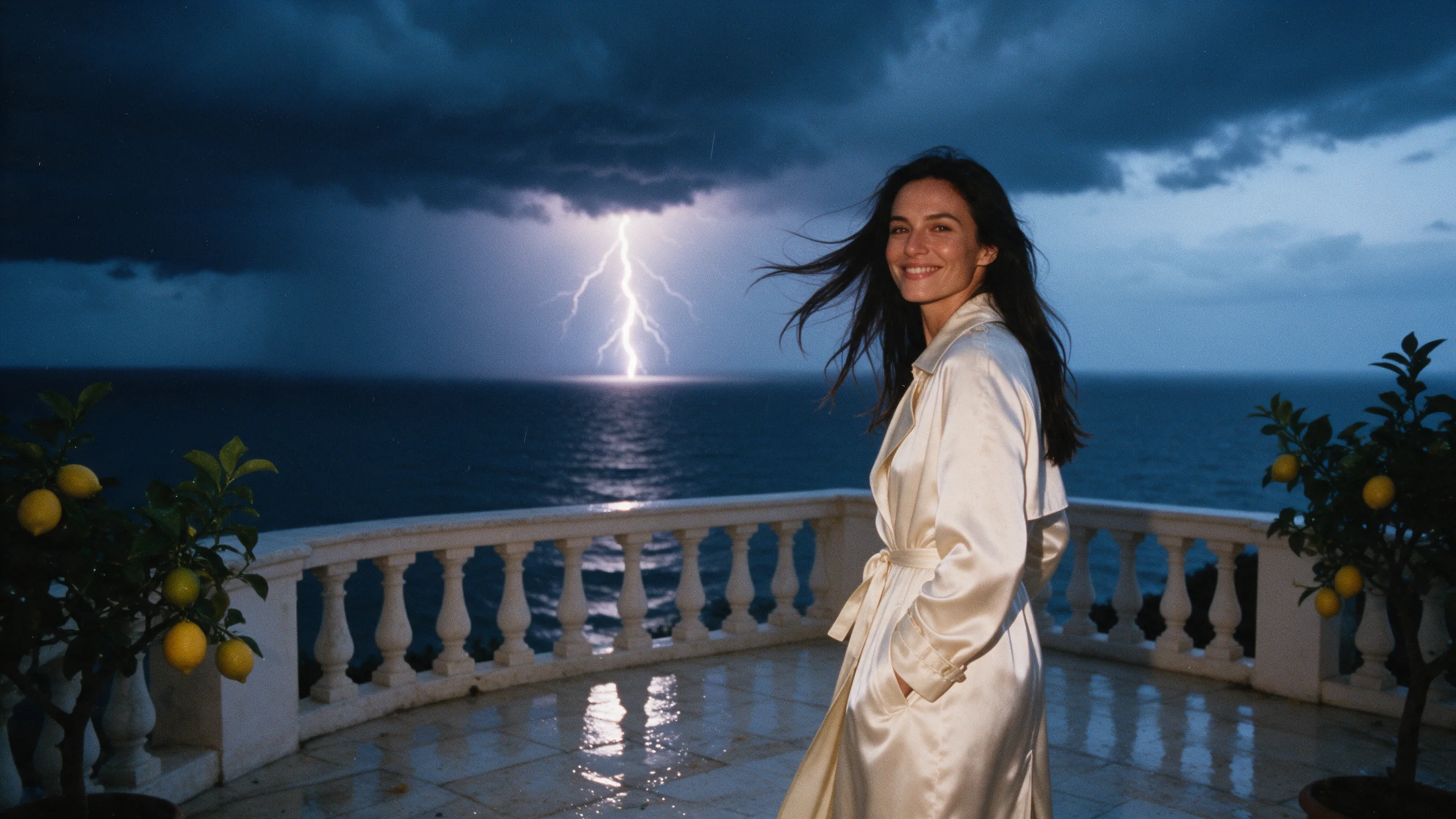
Our test run used a five-second 1280x720 clip from our OmniHuman 2.0 examples: a woman in a cream satin trench on a sunny seaside terrace. The prompt asked for a stormy dusk with dark clouds, rain, wet wind-blown hair and coat, and distant lightning, and ended with "Keep her face, pose and movement." At 768p with duration_seconds 5 and sound on, the result was a 1344x768 clip at 24 fps, about 5.2 seconds long, with new sound, after about three minutes of processing.
What changed: the sunny sky became a dark, cloudy dusk with a lightning flash over the sea, and the stone looked wet. What stayed: her face, her coat and her smile. Two things to expect honestly. The rain itself was light at 768p; a 480p trial of the same prompt showed stronger rain streaks. And she lifted a hand to her wind-blown hair, a gesture the source clip does not have. The prompt asked for wind-blown hair, so describing movement can bring small motion changes with it.
References are named by number
reference_image_urls takes up to nine images, called <Picture 1> to <Picture 9> in the prompt, and reference_audio_urls takes up to three audio clips, called <Audio 1> to <Audio 3>. Point an image at a look or an identity, and an audio clip at the sound you want. Each reference adds a small charge. We have not run this endpoint with references yet, so treat your first take with them as a test: start with one image or one clip and see what it changes.
Sound, length and shape
generate_audio is on by default, which gives the edit a new soundtrack. Switch it off to keep the source clip's own audio track. Sound never changes the price. duration_seconds runs from 3 to 15 and defaults to 5, so set it to the length of your source to edit the whole clip. Leave aspect_ratio out and the edit keeps the shape of the source; set it to 16:9, 9:16, 1:1, 4:3, 3:4, 21:9 or 9:21 to reframe.
Three resolutions
768p is the default and H3's own canvas. 540p and 480p cost less per second and finish sooner. We ran 768p and a 480p trial; we have not tried 540p. You pay for the seconds of the edit plus the seconds of the source, both at the rate of the resolution you pick, so a shorter source costs less.
Request parameters
| Parameter | Required | Description |
|---|---|---|
prompt | Yes | Write the edit as a change: what to alter, then what to keep. For example, turn the afternoon into a stormy dusk and keep her face and movement. at least 3 characters · at most 5000 characters |
video_url | Yes | The clip to edit, as an MP4. Up to 15 seconds long; a longer clip is refused before anything is charged, so trim it first. |
reference_image_urls | No | Up to nine images that guide identity or style. They are called <Picture 1> to <Picture 9> in the prompt, by their position in the list. at least 1 items · at most 9 items |
reference_audio_urls | No | Up to three audio clips that guide the sound. They are called <Audio 1> to <Audio 3> in the prompt, by their position in the list. at least 1 items · at most 3 items |
aspect_ratio | No | Optional. Leave it out and the edit keeps the shape of the source clip. |
resolution | No | 480p, 540p or 768p, default 768p, which is H3's own canvas. |
duration_seconds | No | Length of the edited clip: 3 to 15 seconds, default 5. Set it to your source clip's length to edit the whole clip. |
generate_audio | No | On by default, which gives the edit a new soundtrack. Turn it off to keep the source clip's own audio track. Default: |
seed | No | Optional integer. Send a fixed value while you change one thing at a time, so takes are easier to compare. |
Pricing
Billed per second of the edited clip plus per second of the source clip (source rounded up to whole seconds; the source clip can be up to 15 seconds long, and longer clips are refused before any charge), both at the per-second rate of the resolution you choose; each reference image or audio clip adds a small charge, and sound does not change the price. Failed requests are not charged.
| Specification | Price |
|---|---|
| $0.03 / second |
| $0.045 / second |
| $0.066 / second |
Use cases
Change the weather, light or time of day
Turn a bright afternoon into dusk, add rain, or swap harsh midday sun for soft morning light, as the terrace example does. Because the people and the motion come from your clip, you can try several moods on one take instead of shooting again.
Restyle or reset a finished clip
Ask for a different style, season or setting and keep the performance. Name what must stay, such as the face, the pose and the movement. So far we have tested weather and light; style and setting changes are what the endpoint is built for, but check a draft before you rely on it.
Change one element
Aim the prompt at a specific element, such as the colour of a coat or an object in the scene, and say that everything else stays. Run a draft first and look at the parts you did not ask to change.
Prompt guide & pro tips
Say what changes, then what stays
The terrace prompt is a good shape: "Turn the sunny afternoon into a stormy dusk: dark clouds over the sea, rain streaking across the frame, her hair and coat wet and wind-blown, distant lightning. Keep her face, pose and movement." The first sentence is the change; the second is the guard rail. Write it as a change to the clip you sent, not as a new scene.
Describe the environment, not the movement
In the test run the prompt mentioned wind-blown hair, and the result added a hand lifting to her hair. If the motion in your clip is what you care about, describe the weather and the light and leave the actions to the source.
Draft low, then deliver at 768p
480p costs less per second and finishes sooner, but the same prompt can look different: in our test the 480p trial showed stronger rain than 768p. Treat a draft as a rough check of the idea, not a preview of the final look. If an effect reads lighter than you wanted, make the prompt more specific about how strong it should be and run a second take.
Match the length to your source
Set duration_seconds to the length of your clip, up to 15 seconds, to edit all of it. The source clip can be up to 15 seconds long, and a longer clip is refused before anything is charged, so trim it to the part you need before you upload it. The source seconds are billed as well.
API quick start
# Generate the idempotency key once; reuse it when retrying after a lost response.
export SPICY_IDEMPOTENCY_KEY="${SPICY_IDEMPOTENCY_KEY:-$(uuidgen)}"
curl -X POST https://api.spicyapi.ai/api/v1/jobs/createTask \
  -H "Authorization: Bearer $SPICY_API_KEY" \
  -H "Content-Type: application/json" \
  -H "Idempotency-Key: $SPICY_IDEMPOTENCY_KEY" \
  -d '{
  "model": "minimax/h3-edit/video-edit",
  "input": {
    "duration_seconds": 5,
    "prompt": "A slow aerial shot drifting over a misty pine forest at sunrise",
    "resolution": "768p",
    "video_url": "https://example.com/reference.mp4"
  }
}'

# Copy data.taskId from the response into TASK_ID, then poll the status.
TASK_ID="TASK_ID_FROM_RESPONSE"
curl "https://api.spicyapi.ai/api/v1/jobs/recordInfo?taskId=$TASK_ID" \
  -H "Authorization: Bearer $SPICY_API_KEY"
See the API reference for authentication, the complete schema, polling, and error handling.










