You have a recording of a narrator and a script that runs past one paragraph. Chatterbox v1 on SpicyAPI can read that script in the timbre of the recording, one chunk at a time. Using the same reference file and three settings for every chunk helps keep the narrator consistent across a chapter.
For a first run, cut a clean 10 to 15 second clip of one speaker in the style you want and use the defaults exaggeration: 0.5, guidance_scale: 0.5 and temperature: 0.7. Based on our October 2026 tests, output stops at 40 seconds, so split long scripts into chunks of about 500 characters (about 27 seconds). Every request costs a flat $0.036 whatever its length, so a ten-minute narration is about 17 to 24 chunks, $0.61 to $0.86 before re-takes. The task is asynchronous, English-only and returns one WAV file.
If you only need one stable voice, not a particular recording, the preset-voice models give you that through a fixed voice_id (the comparison lists them with prices).
What the hosted task accepts
The Chatterbox v1 text to speech schema has five fields:
| Field | Valid values | Practical first choice |
|---|---|---|
text | 1–1,000 English characters | One short passage that ends on a full sentence |
reference_audio_url | Optional MP3 or WAV; 90 MB limit | A clean clip of one speaker you have the right to use |
exaggeration | 0–1 | 0.5 |
guidance_scale | 0.1–1 | 0.5 |
temperature | 0.05–2 | 0.7 |
The reference is optional. Leave it out to hear the built-in voice, a quick way to judge a script before you worry about a clone. With a reference, the reading takes on that clip's timbre; nothing is trained and no voice is saved, so you send the reference again with every request. The price does not change.
The output is one 24 kHz, 16-bit mono WAV with no word timings or subtitles. The task has no speed multiplier, seed, language selector or voice list. Expect bracketed tags such as [sigh] or <laugh> to be read aloud as words. Spell a sound out ("Mmm…", "ha…") and keep stage directions out of text.
Prepare a reference that fits the narration
The reference decides whose voice you hear and also how it paces and performs. Prepare it for the narration you want, not for the most dramatic sample you own.
- Length and format. The maintainers recommend at least 10 seconds, ideally WAV at 24 kHz or above, a single speaker, no background noise, and a delivery that matches what you want back: for audiobook-style output, use an audiobook-style clip.
- Start on clean speech. The start of the clip matters most, but a noisy or off-style section later in a long file still counts. Cut a clean 10 to 15 seconds that starts on speech.
- Match the pace. The reference carries its speed into the result, so pick the clip at the speed the narration should have.
- Use an English clip. A reference in another language can pull in its accent.
- Remove what you do not want copied. Music, a second voice, room echo, clipped peaks and long silences all make the example less clear. Aggressive noise removal that eats into the voice can be worse than a little steady background noise, so keep the untouched original and compare.
- Test unusual voices on one sentence first. Some accents drift: an Australian accent can come out American. Spend $0.036 on a single sentence before a whole chapter.
This command trims a 12 second section starting at 3.2 seconds from a raw recording and saves it as 24 kHz mono 16-bit WAV (needs ffmpeg). 24 kHz is the rate the model works at and the maintainers' floor; converting a 44.1 or 48 kHz recording down to it is fine, but there is no benefit in going lower:
ffmpeg -i narrator-raw.wav -ss 3.2 -t 12 -ac 1 -ar 24000 -c:a pcm_s16le reference.wavUse only a voice you have the right to use: a narrator who agreed in writing, not a clip from a video or social feed.
Try it in the Playground first
Open the Chatterbox text to speech page and use the Playground tab. A passage of about 240 characters shows pace and phrasing without much cost:
I saved the window seat for you. The rain has stopped, and the lamps along the quay are coming on one by one. Sit down, pour the tea while it is hot, and I will tell you how the story begins. It starts with a locked door and a borrowed key.
- Paste the passage into Text.
- Under Voice reference, choose your prepared clip with Choose a file (MP3 or WAV, up to 90 MB). To use a file that is already online, paste its link under Asset URL and select Add URL; it must be a direct link to the audio file, because a cloud-drive or social share page returns a web page and the task fails with
invalid_asset. Skip this step to hear the built-in voice. - Keep Expressiveness (
exaggeration), Temperature and Prompt adherence (guidance_scale) at their defaults: 0.5, 0.7 and 0.5. - Run it. The price, $0.036, shows beside the form.
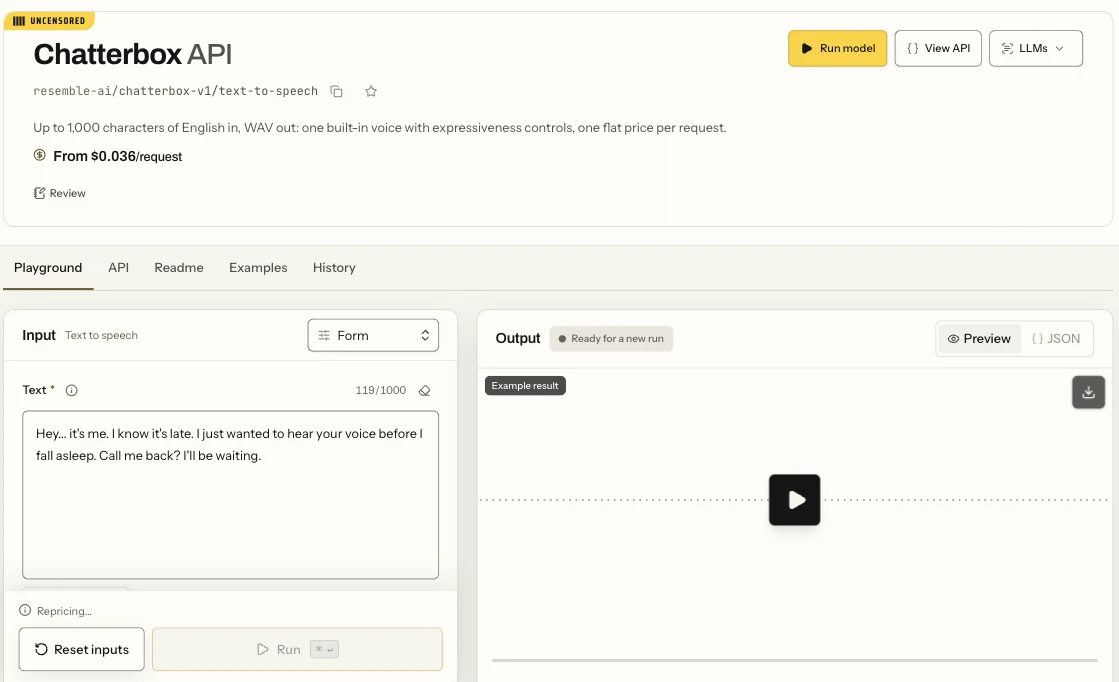
The Chatterbox text-to-speech Playground in Form view: the text input and the Run button.
Listen to the whole take with the script in hand: every word present, the first and last sentence intact, the same speaker throughout, no dead air or noise at the tail. Keep one reference file for the whole project; re-cutting it between chunks changes the voice.
Then call it from code
Once a take sounds right, send the same request from your own app. Set SPICY_API_KEY to your server-side key and point reference_audio_url at a direct HTTPS link to the clip, or at a spicy:// address printed by spicyapi files upload ./reference.wav (an upload stays usable for about a day):
curl -X POST https://api.spicyapi.ai/api/v1/jobs/createTask \
  -H "Authorization: Bearer $SPICY_API_KEY" \
  -H "Content-Type: application/json" \
  -H "Idempotency-Key: $(uuidgen)" \
  --data '{
    "model": "resemble-ai/chatterbox-v1/text-to-speech",
    "input": {
      "text": "I saved the window seat for you. The rain has stopped, and the lamps along the quay are coming on one by one. Sit down, pour the tea while it is hot, and I will tell you how the story begins. It starts with a locked door and a borrowed key.",
      "reference_audio_url": "https://example.com/reference.wav",
      "exaggeration": 0.5,
      "guidance_scale": 0.5,
      "temperature": 0.7
    }
  }'
Results, downloads and errors are in the task docs; uploads are in the Media guide.
Or let an Agent run the takes
An agent can make the same call through the CLI, the MCP server or the Agent Skill. CLI and MCP show the price and ask you to confirm before creating a task. With SPICY_API_KEY set, and input.json holding only the input object from the request above:
# CLI
spicyapi files upload ./reference.wav    # prints a spicy:// URI for reference_audio_url
spicyapi tasks create --model resemble-ai/chatterbox-v1/text-to-speech --input-file input.json --wait

# MCP server: the command your assistant's MCP config runs
# (it exposes spicyapi_upload_file and spicyapi_task_create)
npx --yes --package=@spicyapi/mcp spicyapi-mcp

# Agent Skill
npx skills add spicyapi-ai/spicy-skill
Change the control that matches what you hear
Change one setting per take and keep the text and reference fixed, so you know what caused the difference. Three takes (baseline, one expression change, one pacing change) cost $0.108.
| What you hear | Try first | Why |
|---|---|---|
| Flat, no emphasis | exaggeration (Expressiveness) 0.7 | Higher values add emphasis; pace barely changed in our test (13.0 s against 13.4 s for the same 240 characters), so judge it by ear |
| Rushed | guidance_scale (Prompt adherence) 0.3 | Lowering it slows the reading: the same 240 characters ran 15.0 s at 0.3 against 13.4 s at 0.5 |
| Rushed whatever the sliders | A calmer reference | The reference carries its pace |
| A word is wrong | Edit text: spell out an abbreviation, write numbers as the words you want, split a long sentence | The task has no pronunciation dictionary |
| A sound is read as a word | Remove the tag; write "Mmm…" or "ha…" | Tags are read aloud on this task |
| Does not sound like the narrator | Fix the reference: noise, a second voice, a different accent or performance | temperature varies takes; it is not an identity control |
| Takes differ more than you want | Lower temperature (try 0.5) | It controls variation between takes |
The two examples on the model page give a rough guide: default settings ran about 16 to 19 characters per second in our takes, and the calm-narration example, with exaggeration and guidance_scale both at 0.3, about 14. For a quiet bedtime-story pace, lower both. Do not copy values from the open-source script: the hosted default temperature is 0.7 where the open-source default is 0.8.
Split longer scripts into chunks of about 500 characters
A request accepts 1,000 characters, but the audio is capped at 40 seconds. At about 18 characters per second, 700 characters came back as 36 seconds, and 900 and 998 characters both came back as exactly 40 seconds, while that much text needs about 49 seconds, so the end is cut off and you still pay the full $0.036. Keep chunks to about 500 characters (a 492-character take ran 27 seconds) and check the last sentence of each take.
The flat price makes the trade-off easy to compute. A 2,430-character chapter costs:
- 3 requests of about 810 characters: $0.108, but each needs about 45 seconds and is cut at 40.
- 5 chunks of about 490 characters: $0.18.
- 9 chunks of about 270 characters, about 15 seconds each: $0.324.
Add allowance for re-takes: two re-takes on the five-chunk plan make seven requests, $0.252. A one-word repair also costs a full $0.036, so re-take a whole sentence or chunk instead of patching words one by one.
Cut at paragraph ends or between complete sentences, and keep several sentences together for context; chunks of about 300 to 500 characters sound natural. Use the same reference file, the same three numbers and the same text conventions for every chunk, and count characters including spaces and punctuation, not words.
Chunks arrived at similar loudness; lower a louder one before joining. This joins the takes with a short gap between them (match the 0.35 seconds to how the speaker pauses between paragraphs):
ffmpeg -y -f lavfi -i anullsrc=r=24000:cl=mono -t 0.35 -c:a pcm_s16le gap.wav
printf "file 'part-01.wav'\nfile 'gap.wav'\nfile 'part-02.wav'\nfile 'gap.wav'\nfile 'part-03.wav'\n" > list.txt
ffmpeg -y -f concat -safe 0 -i list.txt -c copy narration.wav
If one chunk is wrong, regenerate only that chunk with the same reference and settings; if it fails twice, change the text before a third take.
When Chatterbox is the wrong tool
- Another language, or two speakers. The hosted task is English-only and reads one voice per request. For two speakers, either make one request per speaker and join the files as shown above, or use one of the three Gemini text-to-speech models, whose dialogue field mixes up to two preset voices in one request (the comparison lists them). A dialogue takes preset voices, not your reference clip. For other languages, the comparison covers languages and pricing.
- A face that speaks the line. The WAV has no timing data. Feed it to a lip-sync or talking-avatar model such as Talking Avatar or Lip Sync.
- Captions. Run the finished audio through a speech-to-text step; do not derive timings from script length.
For adult-oriented fiction, SpicyAPI adds no content filter and adult scripts were read in full in the built-in voice. Do not read adult scripts in a real person's voice without that person's consent.
Common questions
Does Chatterbox support voice cloning? The hosted task imitates the timbre of an optional MP3 or WAV reference but does not train a voice.
Is it illegal to clone a voice? It depends on consent, where you and the speaker are, and what the audio is used for. Using someone's voice without permission, or presenting synthetic speech as a real person's statement, can create legal problems. Keep the permission on file and, where required, disclose that the audio is synthetic.
Can I save the voice and call it by name? No. The schema has no voice ID, so you send the reference file each time.
Where to start
Upload a clean 10 to 15 second reference in the Playground and run one 240-character take at the defaults for $0.036. If it sounds right, chunk the script at about 500 characters and re-take only the chunks that fail; if not, fix the reference or the one control in the table above first.